
1. Өнім аяқталдыview
The AZZA CSAZ-280B Spectra Black is an ATX Mid Tower gaming case designed to house various computer components. It features a tempered glass side panel and a steel right panel. This manual provides instructions for the proper installation and maintenance of your computer components within this case.

Сурет 1.1: Алдыңғы-сол жақ view of the AZZA CSAZ-280B Spectra Black case, showcasing the tempered glass side panel and the front panel design with integrated RGB lighting.
Негізгі ерекшеліктері:
- Left Panel: Tempered glass with rubber mounts for secure installation.
- Right Panel: Solid steel panel.
- Motherboard Compatibility: Supports ATX, Micro-ATX, and ITX motherboards.
- Drive Bays: Up to three 2.5" drive bays and up to two 3.5" drive bays.
- Maximum CPU Cooler Height: Up to 170 mm.
- Maximum Video Card Length: Up to 290 mm.
2. Орнату және құрамдастарды орнату
Follow these steps for proper installation of your computer components into the AZZA CSAZ-280B case. Ensure the system is powered off and unplugged before beginning any installation.
2.1 Алдыңғы енгізу/шығару панелінің қосылымдары
The top panel of the case features various input/output ports and controls for convenient access.

2.1 сурет: жоғарыдан төменге view of the case's front I/O panel, indicating the Power button, LED control button, Audio jacks (Mic and Headphone), two USB 2.0 ports, and one USB 3.0 port.
- Қуат түймесі: Press to power on or off the system.
- LED түймесі: Controls the RGB lighting effects of the case.
- Аудио ұялары: Separate ports for microphone and headphones.
- USB 2.0 порттары: Two ports for connecting USB 2.0 devices.
- USB 3.0 порты: One port for connecting USB 3.0 devices, offering faster data transfer speeds.
2.2 Дискіні орнату
The case supports both 3.5" HDDs and 2.5" SSDs. Refer to the images below for drive bay locations.

Сурет 2.2: Ішкі view showing the lower drive cage, capable of holding one 3.5" HDD or one 2.5" SSD, and an additional dedicated 3.5" HDD bay.

Сурет 2.3: Ішкі view showing two dedicated 2.5" SSD mounting brackets located behind the motherboard tray.
- For 3.5" HDDs: Install drives into the designated 3.5" drive cage located at the bottom front of the case. Secure with screws.
- For 2.5" SSDs: Install drives into the dedicated 2.5" mounting brackets behind the motherboard tray or in the lower drive cage. Secure with screws.
2.3 Графикалық картаны орнату
Корпус ұзындығы 290 мм-ге дейінгі графикалық карталарды қолдайды.

Сурет 2.4: Ішкі view illustrating the maximum supported length for a video card, which is 290mm.
- Remove the necessary PCI-E slot covers from the rear of the case.
- Carefully insert the graphics card into the PCI-E slot on your motherboard.
- Графикалық картаны корпусқа бұрандалармен бекітіңіз.
2.4 Fan Installation and Airflow
Proper fan placement ensures optimal cooling performance. The case supports various fan configurations:
- Алдыңғы: Supports 3 x 120mm fans or 2 x 140mm fans.
- Жоғарғы: Supports 2 x 120mm fans.
- Артқы: Supports 1 x 120mm fan.
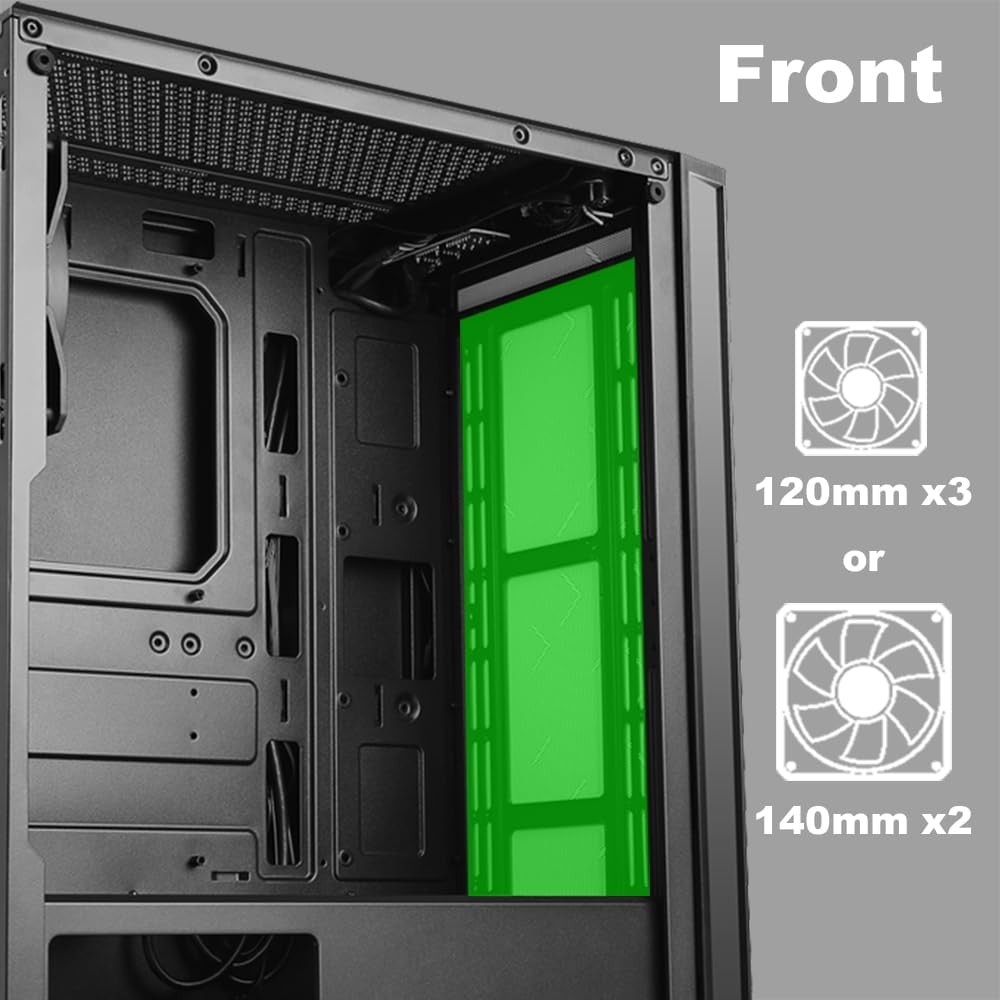
Сурет 2.5: Ішкі view of the front panel, highlighting the mounting locations for up to three 120mm fans or two 140mm fans.

Сурет 2.6: Ішкі view of the top panel, showing the mounting locations for up to two 120mm fans.

Сурет 2.7: Ішкі view of the rear panel, indicating the mounting location for one 120mm fan.
- Identify the desired fan mounting locations (front, top, rear).
- Secure fans to the case using appropriate fan screws.
- Желдеткіштің қуат кабельдерін аналық платаға немесе желдеткіш контроллеріне қосыңыз.
2.5 Қуат көзін орнату
The power supply unit (PSU) mounts at the bottom of the case.
- Slide the PSU into the designated compartment at the bottom rear of the case.
- Артқы жағындағы бұрандаларды пайдаланып PSU-ны корпусқа бекітіңіз.
- Route power cables through the cable management cutouts to reach your components.
3. Пайдалану нұсқаулары
3.1 Қуатты қосу/өшіру
To power on your system, press the power button located on the top I/O panel. To power off, either shut down through your operating system or press and hold the power button for several seconds.
3.2 Жарық диодты басқару
Use the dedicated LED button on the top I/O panel to cycle through various lighting modes and colors for the integrated RGB elements of the case.
4. Техникалық қызмет көрсету
Тұрақты техникалық қызмет көрсету компьютер компоненттерінің оңтайлы өнімділігі мен ұзақ қызмет ету мерзімін қамтамасыз етуге көмектеседі.
- Шаңды тазалау: Шаң сүзгілері мен ішкі компоненттерді сығылған ауамен мезгіл-мезгіл тазалап отырыңыз. Тазалау алдында жүйенің өшірілгеніне және розеткадан ажыратылғанына көз жеткізіңіз.
- Кабельдерді басқару: Ensure cables are neatly routed to prevent obstruction of airflow and to maintain a clean interior.
- Panel Care: Clean the tempered glass panel with a soft, lint-free cloth and a mild glass cleaner. Avoid abrasive materials.
5. Ақаулықтарды жою
Бұл бөлім сізде кездесетін жалпы мәселелерді қарастырады.
- Жүйе қосылмайды:
- Verify all power cables (24-pin ATX, 8-pin CPU, GPU power) are securely connected to the motherboard and components.
- Қуат көзі қосқышының «ON» күйінде екеніне көз жеткізіңіз.
- Алдыңғы панельдегі қуат түймесінің кабелінің аналық платаның алдыңғы панель колонтитулына дұрыс қосылғанын тексеріңіз.
- Fans Not Spinning / LEDs Not Lighting Up:
- Confirm fan power cables are properly connected to the motherboard or fan controller.
- Ensure LED cables are correctly connected to the motherboard's RGB header or the case's LED controller.
- Press the LED button on the top I/O panel to cycle through modes or turn on the lighting.
- USB порттары жұмыс істемейді:
- Check that the USB 2.0 and USB 3.0 headers from the front panel are correctly plugged into the corresponding ports on your motherboard.
- Audio Jacks Not Working:
- Ensure the HD Audio cable from the front panel is securely connected to the HD Audio header on your motherboard.
6. Техникалық сипаттамалар
Detailed technical specifications for the AZZA CSAZ-280B Spectra Black case.
| Ерекшелік | Техникалық сипаттама |
|---|---|
| Модель атауы | CSAZ-280B SPECTRA BLACK |
| Іс түрі | Орта мұнара |
| Аналық платаның үйлесімділігі | ATX, Micro-ATX, ITX |
| Материал | Пластик, шыңдалған әйнек |
| Түс | Қара |
| Өлшемдері (L x W x H) | 19.69 x 17.32 x 9.84 дюйм |
| Элемент салмағы | 11 фунт |
| 2.5 дюймдік жетек ұялары | 3 дейін |
| 3.5 дюймдік жетек ұялары | 2 дейін |
| CPU салқындатқышының максималды биіктігі | 170 мм |
| Бейне картаның максималды ұзындығы | 290 мм |
| Алдыңғы енгізу-шығару порттары | 2 x USB 2.0, 1 x USB 3.0, Audio, Mic, Power, LED Control |
| Алдыңғы желдеткішті қолдау | 3 x 120 мм немесе 2 x 140 мм |
| Top Fan Support | 2 x 120 мм |
| Rear Fan Support | 1 x 120 мм |
| Қуат көзін орнату | Төменгі тірек |
7. Кепілдік және қолдау
7.1 Қайтару саясаты
Бұл өнім сатушының шарттарына сәйкес 30 күндік қайтару саясатына бағынады, ол үшін ақшаны қайтару немесе ауыстыру құқығы бар.
7.2 Техникалық қолдау
For technical assistance or inquiries regarding your AZZA product, please visit the official AZZA website or contact their customer support channels. You can find more information and contact details by visiting the AZZA Store on Amazon.