
Өнім аяқталдыview
The typecase Touch Keyboard Case is designed to enhance the functionality and protection of your iPad Air. It features a full-size keyboard with a multi-gesture trackpad, offering a laptop-like experience. The case boasts a 360° rotatable hinge, allowing for multiple viewing angles and usage modes. An adjustable 11-color RGB LED backlight provides comfortable typing in various lighting conditions. Integrated smart features like auto sleep/wake help conserve battery life, and a dedicated holder keeps your Apple Pencil secure.
Негізгі ерекшеліктері:
- Үйлесімділік: Specifically designed for iPad Air 11-inch (M3 2025 / M2 2024), iPad Air 5th Gen (2022, 10.9"), and iPad Air 4th Gen (2020, 10.9").
- Integrated Trackpad: Supports multi-gesture controls for precise navigation.
- Артқы жарықтандырылған пернетақта: 11 adjustable RGB backlight colors with laser-etched keys and a full row of iPadOS shortcuts.
- Versatile Use Modes: 360° rotatable hinge for 7 different viewing modes (Laptop, Stand, Tent, Tablet, Corner, Share, Protect).
- Смарт қорғаныс: Premium hardshell design protects all sides of your iPad, with auto sleep/wake function.
- Қарындаш ұстағыш: Conveniently stores your Apple Pencil.
Пакет мазмұны
Пакетте барлық заттардың бар екенін тексеріңіз:
- 1 x typecase Touch Keyboard Case for iPad Air 5th/4th Gen (10.9 inch)
- 1 x USB-C зарядтау кабелі
- 1 x Пайдаланушы нұсқаулығы
Орнату нұсқаулығы
1. Charging the Keyboard Case
Before initial use, fully charge the keyboard case. Connect the provided USB-C charging cable to the charging port on the keyboard and to a USB power adapter (not included).
Charging indicator: The LED indicator will show charging status. Refer to the keyboard's specific LED behavior for full charge indication.
2. iPad құрылғыңызды қорапқа салу
Carefully align your iPad with the protective shell of the keyboard case. Gently press the iPad into place, ensuring all corners are securely seated. The case is designed to protect all sides of your iPad.
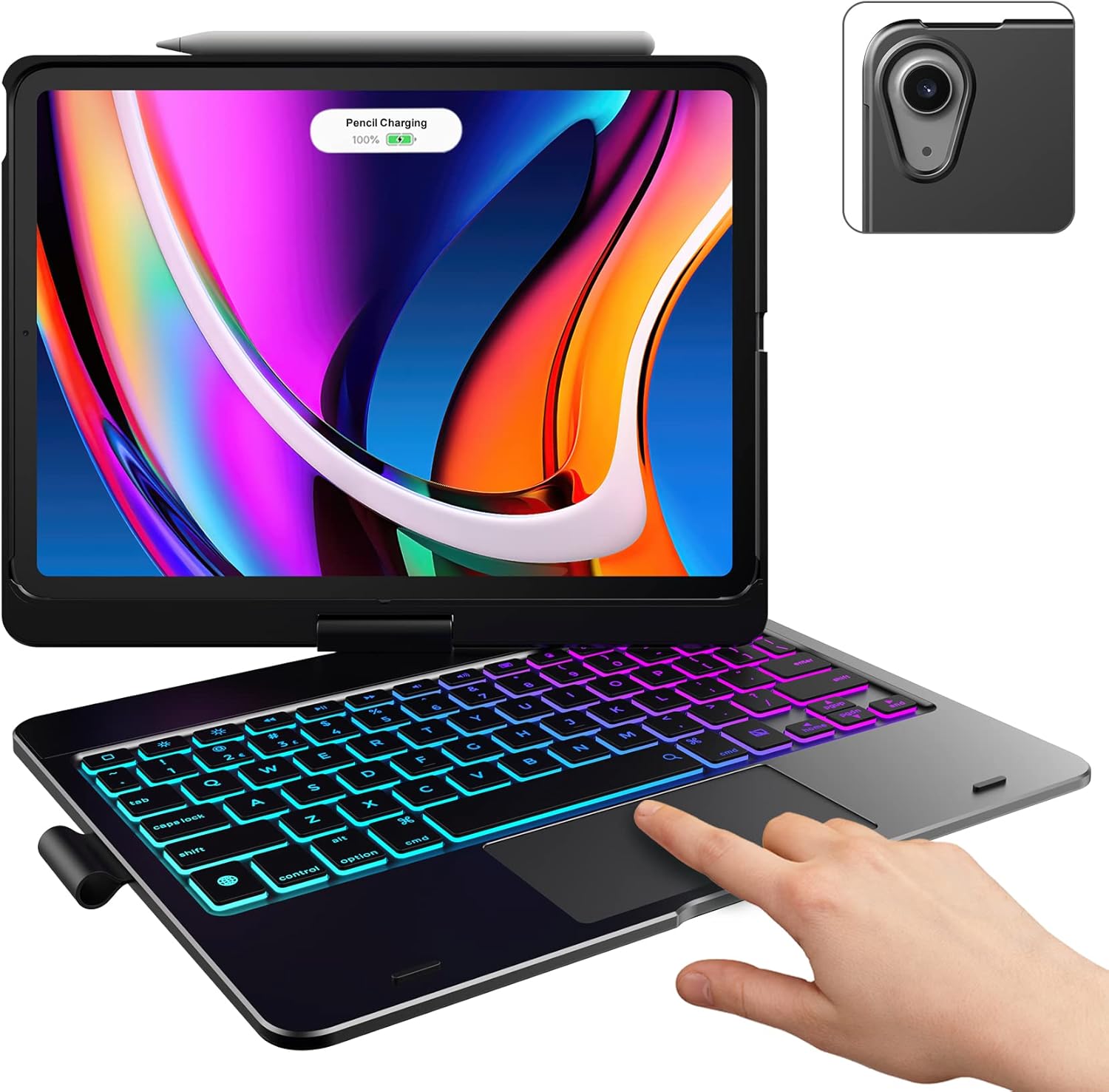
Image: The typecase keyboard case with an iPad securely inserted, ready for use. Note the integrated trackpad and backlit keys.

Image: Visual representation of the 7 versatile modes supported by the 360° rotatable hinge, including Laptop, Stand, and Tablet modes.
3. Pairing with Your iPad (Bluetooth)
- Қуат қосқышын ON күйіне сырғыту арқылы пернетақтаны қосыңыз.
- түймесін басыңыз Қосылу button (or a similar Bluetooth pairing button, usually indicated by a Bluetooth icon) on the keyboard. The Bluetooth indicator light will start blinking.
- iPad құрылғыңызда келесіге өтіңіз Параметрлер > Блютез.
- Bluetooth қосылғанына көз жеткізіңіз On.
- Locate "typecase Keyboard" or a similar name in the "Other Devices" list and tap on it to pair.
- Once paired, the Bluetooth indicator light on the keyboard will stop blinking and remain solid, or turn off.
Note: The keyboard will automatically enter sleep mode after a period of inactivity to conserve battery. Press any key to wake it up.
Пайдалану нұсқаулары
Пернетақта функциялары
The keyboard features a standard layout with 78 comfortably spaced keys and a dedicated row of iPadOS shortcut keys.

Сурет: егжей-тегжейлі view of the backlit keyboard, highlighting the iPadOS shortcut keys and the vibrant 11-color RGB backlight.
iPadOS пернелер тіркесімдері:
| Негізгі белгіше | Функция |
|---|---|
| Үй | Негізгі экранға оралады. |
| Жарықтық төмен | Экран жарықтығын төмендетеді. |
| Жарықтық жоғары | Экран жарықтығын арттырады. |
| Keyboard Hide/Show | Экрандық пернетақтаны ауыстырады. |
| іздеу | Activates iPad search. |
| Алдыңғы трек | Алдыңғы медиа трегіне өтеді. |
| Ойнату/Үзіліс | Мультимедианы ойнатады немесе кідіртеді. |
| Келесі трек | Келесі медиа трекке өтеді. |
| Дыбысты өшіру | Дыбысты өшіреді немесе қосады. |
| Дыбыс деңгейін төмендету | Аудио дыбыс деңгейін төмендетеді. |
| Дыбыс деңгейін жоғарылату | Аудио дыбыс деңгейін арттырады. |
| Экранды құлыптау | Locks the iPad screen. |
Trackpad пайдалану
The integrated multi-gesture trackpad allows for precise control and navigation of your iPad. Ensure the trackpad is enabled in your iPad's settings if you experience issues.
Common Trackpad Gestures:
- Бір саусақпен түрту: Басыңыз/Таңдаңыз.
- Екі саусақпен айналдыру: Жоғары немесе төмен айналдырыңыз.
- Масштабтау үшін шымшу: Мазмұнды үлкейту немесе кішірейту.
- Three Finger Swipe Up: Негізгі экранға өтіңіз.
- Three Finger Swipe Left/Right: Ашық бағдарламалар арасында ауысу.
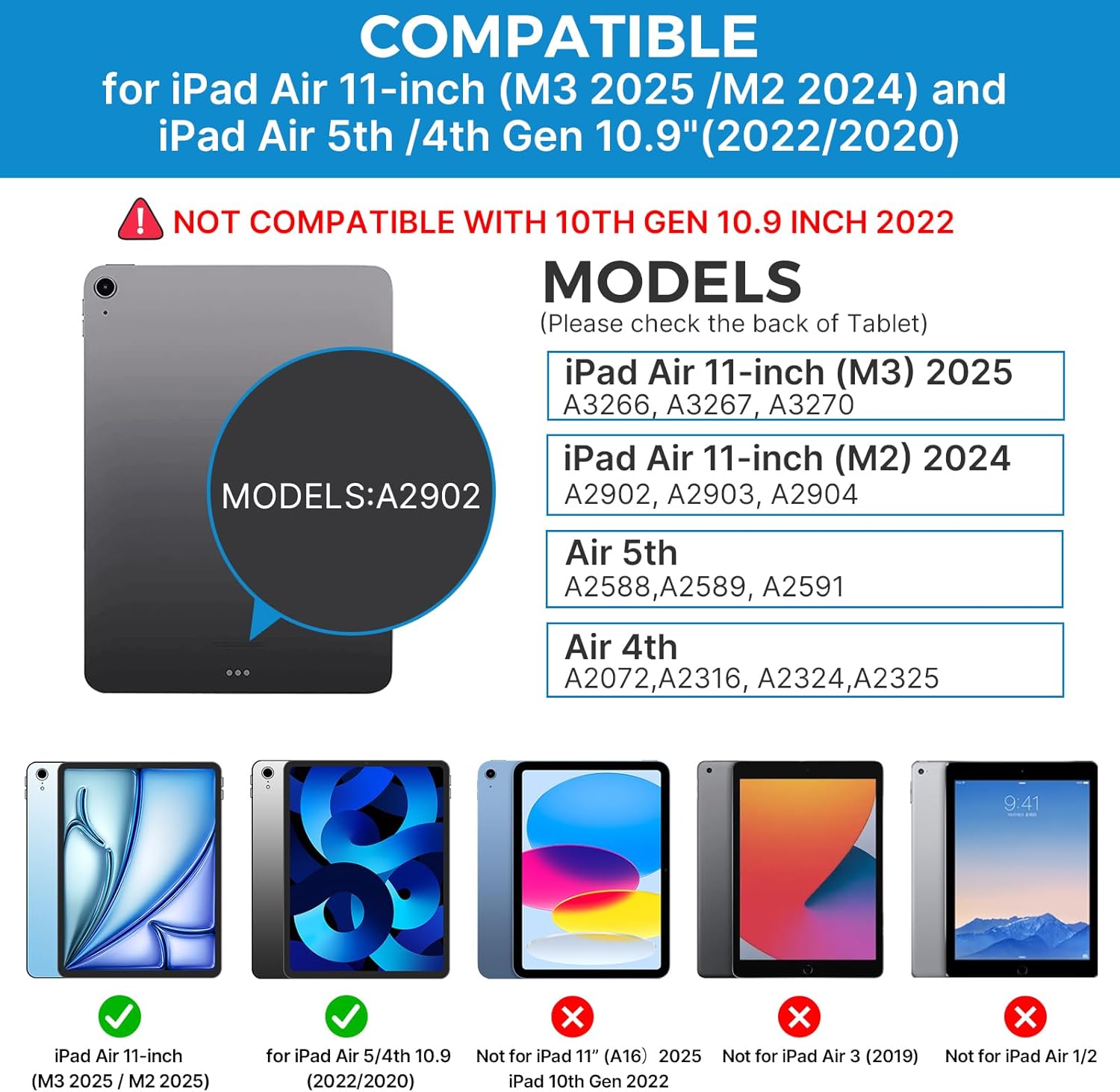
Image: A hand demonstrating the use of the multi-touch trackpad for precise cursor control on the iPad screen.
Артқы жарықты реттеу
The keyboard features 11 adjustable RGB backlight colors and 3 levels of brightness. Use the dedicated backlight keys on the keyboard to cycle through colors and adjust brightness levels.
Video: This video demonstrates the 360-degree rotation feature of the typecase Touch Keyboard Case, showcasing its versatility in different viewрежимдері.
Video: This video provides a step-by-step guide on how to properly install and remove your iPad from the typecase Touch Keyboard Case, ensuring a secure fit and preventing damage.
Техникалық қызмет көрсету және күту
- Тазалау: Жұмсақ пайдаланыңыз, damp cloth to clean the exterior of the case and keyboard. Avoid harsh chemicals or abrasive materials.
- Сақтау орны: When not in use for extended periods, store the keyboard case in a cool, dry place. Ensure the iPad is removed if storing for very long durations.
- Батареяның қызмет ету мерзімі: To maximize battery life, turn off the keyboard when not in use. The auto sleep/wake function helps conserve power.
- Сұйықтықтан аулақ болыңыз: Do not expose the keyboard case to excessive moisture or liquids.
- Мұқият ұстаңыз: While durable, avoid dropping the case or applying excessive force to the hinge or keyboard.
Ақаулықтарды жою
If you encounter any issues with your typecase Touch Keyboard Case, please refer to the following common solutions:
Keyboard Not Connecting/Typing:
- Ensure the keyboard is turned ON and fully charged.
- Check your iPad's Bluetooth settings to confirm the keyboard is paired and connected. If not, try re-pairing.
- iPad пен пернетақтаны қайта іске қосыңыз.
- Басқа Bluetooth құрылғыларының қосылымға кедергі келтірмейтініне көз жеткізіңіз.
Сенсорлық тақта жауап бермейді:
- Verify the keyboard is connected via Bluetooth.
- Check iPad settings: Параметрлер > Қол жетімділік > түртіңіз > AssistiveTouch. Ensure "Mouse Keys" is off if it's causing interference.
- Кез келген қоқысты кетіру үшін сенсорлық тақтаның бетін тазалаңыз.
Артқы жарық жұмыс істемейді:
- Пернетақта жеткілікті зарядталғанына көз жеткізіңіз.
- Press the backlight adjustment keys to cycle through brightness levels and colors.
iPad Not Entering Sleep/Wake Mode:
- Ensure the iPad is correctly seated in the case.
- Check iPad settings: Параметрлер > Дисплей және жарықтық > Құлыптау/құлпын ашу. Ensure this feature is enabled.
If problems persist, please contact typecase customer support for further assistance.
Техникалық сипаттамалар
| Ерекшелік | Мәлімет |
|---|---|
| Үлгі | B09WVRD5JD |
| Үйлесімділік | iPad Air 11-inch (M3 2025 / M2 2024), iPad Air 5th Gen (2022, 10.9"), iPad Air 4th Gen (2020, 10.9") |
| Қосылу мүмкіндігі | Блютез |
| Пернетақта орналасуы | 78-key standard with iPadOS shortcuts |
| Артқы жарық | 11 түсті RGB, 3 жарықтық деңгейі |
| Бақылау тақтасы | Multi-functional, multi-gesture |
| Hinge Rotation | 360° (20,000-cycle stress tested) |
| Қуат көзі | Батареямен жұмыс істейді (1 литий-полимерлі батарея кіреді) |
| Элемент салмағы | 1.52 фунт |
| Өнім өлшемдері (LxWxH) | 11.02 x 8.66 x 0.79 дюйм |
| Материал | Premium hardshell design |
Кепілдік және қолдау
typecase offers a comprehensive warranty and support for your product:
- 1 жылдық ауыстыру қызметі: Enjoy worry-free after-sales support with a 1-year replacement service for manufacturing defects.
- 30 күндік қайтару: If you are not satisfied with your purchase, you may be eligible for a refund within 30 days of purchase.
- Тұтынушыларды қолдау: For any questions, technical assistance, or warranty claims, please contact typecase customer service. Refer to the contact information provided in the product packaging or on the official typecase webсайт.

Сурет: аяқталдыview of typecase's customer support and warranty policy, including 1-year replacement and 30-day refund.