
LFF DAB Plus Digital FM Radio
LFF DAB Plus Digital FM Radio User Manual
Model: DAB Plus Digital FM Radio
Бренд: LFF
1. Кіріспе
This manual provides detailed instructions for the LFF DAB Plus Digital FM Radio. It covers setup, operation, maintenance, and troubleshooting to ensure optimal performance and user experience. Please read this manual thoroughly before using the device.

Алдыңғы view of the LFF DAB Plus Digital FM Radio, showing the speaker grille, color display, and extended antenna.
2. Пакет мазмұны
Пакетте келесі элементтердің бар-жоғын тексеріңіз:
- 1 x LFF DAB Plus Digital FM Radio
- 1 x айнымалы ток қуат адаптері
- 1 x Жылдам бастау нұсқаулығы
3. Өнім аяқталдыview
Familiarize yourself with the radio's components and controls.
3.1 Негізгі мүмкіндіктер

This diagram illustrates the radio's key functions: DAB+ radio, 60 station presets, FM radio, sleep timer, headphone jack, Bluetooth connectivity, full-color screen, and dual alarm capability.
3.2 Басқару элементтері және порттар

Жоғарғы және бүйірлік view of the radio, showing control buttons and knobs on the top panel, and the 3.5mm headphone jack located on the side.
Refer to the diagram above for the location of the following:
- Қуат түймесі: Радионы қосады/өшіреді.
- Режим түймесі: Switches between DAB+, FM, and Bluetooth modes.
- Tune/Select Knob: Rotates to tune stations or navigate menus, press to select.
- Дыбыс қаттылығы: Аудио дыбыс деңгейін реттейді.
- Алдын ала орнатылған түймелер: For saving and recalling favorite stations.
- Alarm/Sleep Timer Button: Accesses alarm and sleep timer settings.
- Түсті дисплей: Станция туралы ақпаратты, уақытты және мәзір опцияларын көрсетеді.
- Құлаққап ұясы (3.5 мм): Жеке тыңдау үшін.
- DC IN порты: Айнымалы ток қуат адаптерін қосуға арналған.
- Телескопиялық антенна: Радио қабылдауды жақсарту үшін.
4. Орнату
4.1 Қуатты қосу
The radio can be powered by the included AC adapter or by batteries.
- Айнымалы ток қуаты: Connect the AC power adapter to the DC IN port on the back of the radio and plug it into a wall outlet.
- Батарея қуаты: Open the battery compartment on the back of the radio and insert 4 x 1.5V AA (LR6) batteries, ensuring correct polarity.
Артқа view of the radio, detailing the battery compartment for 4x AA batteries, the AC adapter input (5V/1000mA), and the 360° rotatable antenna. Product dimensions are also indicated.
4.2 Антеннаны реттеу
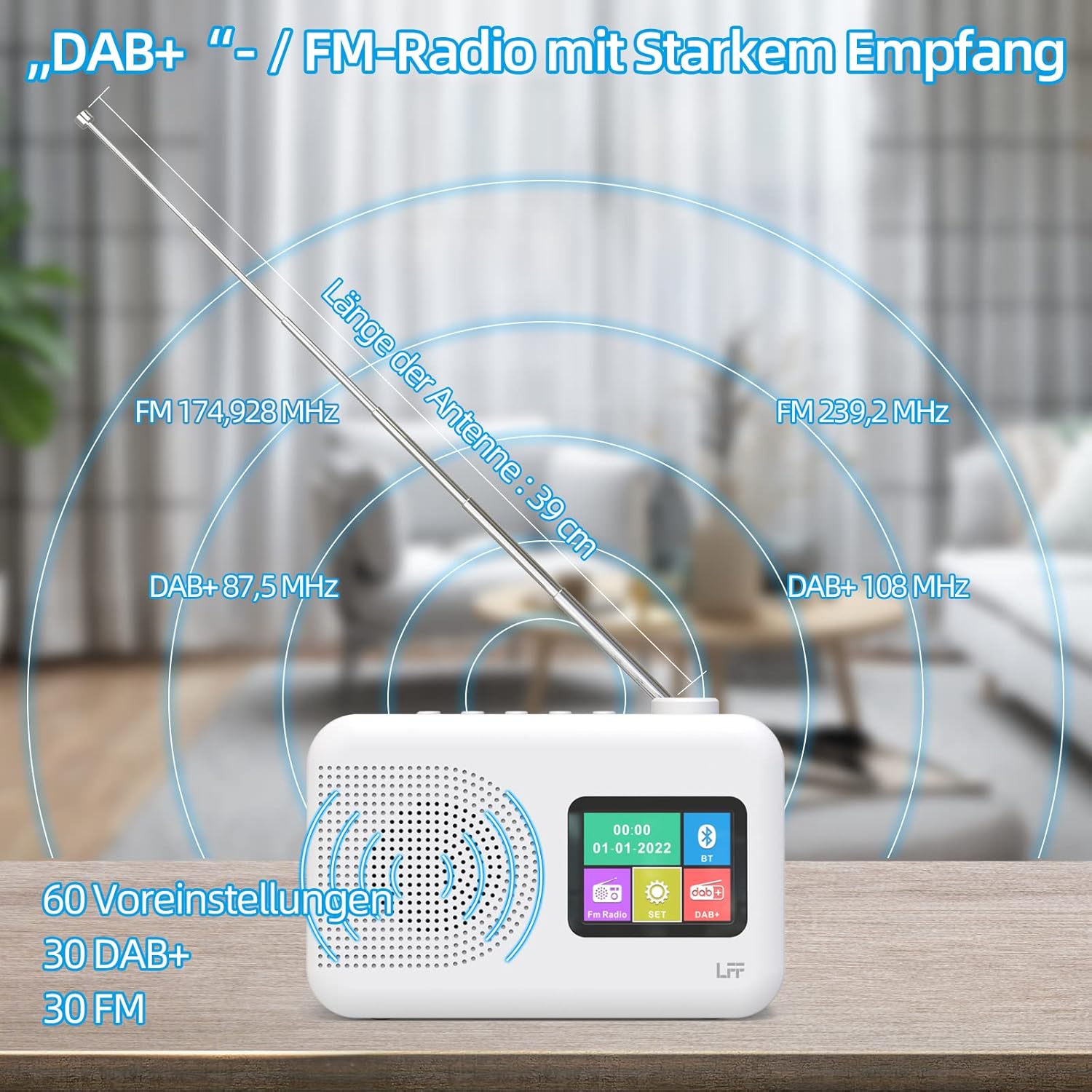
Extend the telescopic antenna fully (approximately 39 cm) and adjust its angle for optimal reception, especially for DAB+ and FM stations.

This diagram illustrates the radio's strong DAB+ and FM reception capabilities with the fully extended 39cm antenna, showing frequency ranges and the capacity for 60 total presets (30 DAB+, 30 FM).
4.3 Бастапқы сканерлеу (DAB+)
- Радионы қосыңыз.
- Ensure the mode is set to DAB+. If not, press the Режим ауысу үшін түймесін басыңыз.
- The radio will automatically perform a full scan for available DAB+ stations. This may take a few minutes.
- Once the scan is complete, the radio will display a list of found stations.
5. Пайдалану нұсқаулары
5.1 DAB+ радио режимі
- түймесін басыңыз Режим DAB+ режимін таңдау үшін түймесін басыңыз.
- айналдырыңыз Реттеу/Таңдау Қолжетімді станцияларды шолу үшін түймесін басыңыз.
- түймесін басыңыз Реттеу/Таңдау Станцияны таңдау үшін түймені басыңыз.
- Алдын ала орнатуларды сақтау: To save a station, press and hold a Алдын ала орнатылған button until the display confirms. To recall, briefly press the corresponding Алдын ала орнатылған button. Up to 30 DAB+ stations can be saved.
5.2 FM радио режимі
- түймесін басыңыз Режим түймесін басып, FM режимін таңдаңыз.
- айналдырыңыз Реттеу/Таңдау жиілікті қолмен реттеу үшін тұтқаны басыңыз.
- түймесін басып тұрыңыз Реттеу/Таңдау knob for a few seconds to auto-scan for the next available station.
- Алдын ала орнатуларды сақтау: Similar to DAB+ mode, press and hold a Алдын ала орнатылған button to save, and briefly press to recall. Up to 30 FM stations can be saved.
5.3 Bluetooth режимі

This diagram illustrates the three primary playback options for the radio: through its internal speaker, via Bluetooth connection to an external device, or using headphones connected to the headphone jack.
- түймесін басыңыз Режим button to select Bluetooth mode. The display will show "Bluetooth Pairing" or similar.
- On your external device (e.g., smartphone), enable Bluetooth and search for available devices.
- Select "LFF Radio" (or similar name) from the list to pair.
- Once paired, you can play audio from your device through the radio's speaker.
- Ескерту: This radio acts as a Bluetooth receiver. It does not support connecting to Bluetooth headphones or other Bluetooth speakers.
5.4 Ұйқы таймері
Ұйқы таймері радионы белгіленген уақыттан кейін автоматты түрде өшіруге мүмкіндік береді.

This image depicts the sleep timer function, offering selectable durations of 15, 30, 45, 60, 90, and 120 minutes before the radio automatically powers off.
- түймесін басыңыз Alarm/Sleep Timer button repeatedly to cycle through sleep timer options (15 min, 30 min, 45 min, 60 min, 90 min, 120 min, OFF).
- Select your desired duration. The radio will turn off automatically after this time.
5.5 Оятқыш
The radio features a dual alarm function.
- түймесін басып тұрыңыз Alarm/Sleep Timer button to enter alarm settings.
- пайдаланыңыз Реттеу/Таңдау knob to set the alarm time, alarm source (DAB+, FM, or buzzer), and volume.
- түймесін басыңыз Реттеу/Таңдау knob to confirm each setting.
- Repeat the process for the second alarm if needed.
5.6 Құлаққапты пайдалану
Plug 3.5mm headphones into the headphone jack on the side of the radio for private listening. The internal speaker will automatically mute.
6. Техникалық қызмет көрсету
6.1 Тазалау
- Wipe the radio's surface with a soft, dry cloth.
- Абразивті тазартқыштарды, балауызды немесе еріткіштерді пайдаланбаңыз, себебі олар әрлеуді зақымдауы мүмкін.
6.2 Батареяны ауыстыру
When using battery power, replace all four AA batteries when the low battery indicator appears on the display or when performance degrades.
- Ensure the radio is turned off and disconnected from AC power.
- Артқы жағындағы батарея бөлімінің қақпағын ашыңыз.
- Ескі батареяларды алып тастаңыз және оларды дұрыс тастаңыз.
- Insert new 4 x 1.5V AA (LR6) batteries, observing correct polarity (+/-).
- Батарея бөлігінің қақпағын мықтап жабыңыз.
6.3 Screen Protection Film
The radio's display comes with a transparent protective film. For optimal clarity, gently peel off this film before first use.
7. Ақаулықтарды жою
Мәселелерге тап болсаңыз, келесі жалпы мәселелер мен шешімдерді қараңыз:
| Мәселе | Ықтимал себебі | Шешім |
|---|---|---|
| Қуат жоқ | AC adapter not connected, batteries depleted or incorrectly inserted. | Айнымалы ток адаптерінің қосылымын тексеріңіз. Батареяларды ауыстырыңыз немесе дұрыс полярлықты тексеріңіз. |
| Нашар радио қабылдау | Антенна ұзартылмаған, сигнал аймағы әлсіз, кедергі бар. | Fully extend and adjust the telescopic antenna. Move the radio to a different location. Avoid sources of interference. |
| Bluetooth қосылмайды | Radio not in Bluetooth mode, device too far, already paired with another device. | Ensure radio is in Bluetooth mode. Keep devices within range. Disconnect from other devices. |
| Дыбыс жоқ | Дыбыс деңгейі тым төмен, құлаққаптар қосылған, дыбыс өшірулі. | Increase volume. Disconnect headphones. Check if mute is active. |
8. Техникалық сипаттамалар
- Бренд: LFF кеңейтімі
- Үлгі: DAB Plus Digital FM Radio
- Түсі: Ақ
- Қосылу технологиясы: Блютез
- Өлшемдері (L x W x H): 16.1 см x 5.9 см x 10.9 см
- Tuning Technology: DAB
- Қуат көзі: AC Adapter (5V/1000mA) or 4 x 1.5V AA (LR6) Batteries
- Қолдау көрсетілетін радио диапазондары: DAB+, FM
- DAB+ жиілік диапазоны: 174.928 - 239.2 МГц
- FM жиілігі диапазоны: 87.5 - 108 МГц
- Алдын ала орнатылған: 30 DAB+, 30 FM
- Антеннаның ұзындығы: 39 cm (extendable)
- Арнайы мүмкіндіктер: DAB Plus Radio, Sleep Timer, Dual Alarm, Headphone Jack, Color Display
- Қосылатын компоненттер: DAB Digital Radio, AC Power Adapter, Quick Start Guide
9. Кепілдік және қолдау
For any quality-related issues or technical support, please contact the seller directly. We are committed to resolving any problems you may encounter with your LFF DAB Plus Digital FM Radio.
Ask a question about this manual
Ask about setup, troubleshooting, compatibility, parts, safety, or missing instructions. Manuals+ will review the question and use this page’s manual context to help answer it.