
Кіріспе
This manual provides detailed instructions for the installation, operation, and maintenance of your Everycom EC-901 80mm Thermal POS Receipt Printer. Please read this manual thoroughly before using the printer to ensure proper functionality and to prevent damage.
Қауіпсіздік туралы ақпарат
- Ensure the printer is connected to a power source with the correct voltage.
- Принтерді суға немесе жоғары ылғалдылыққа ұшыратпаңыз.
- Принтерді тікелей күн сәулесі түсетін жерге немесе жылу көздеріне жақын қоймаңыз.
- Use only specified thermal paper for optimal performance and to prevent damage to the print head.
- Принтерді өз бетіңізше бөлшектеуге немесе жөндеуге әрекеттенбеңіз. Білікті қызмет көрсету қызметкерлеріне хабарласыңыз.
Пакет мазмұны
Барлық элементтер пакетте бар екенін тексеріңіз:
- Everycom EC-901 Thermal POS Receipt Printer
- Roll paper × 1 Roll (for initial testing)
- CD-ROM (containing Drivers, Utility Software, Manuals)
- Қағаз нұсқаулығы
- Paper Bearing
- USB кабелі
- Қуат адаптерінің кабелі
Өнім аяқталдыview
The Everycom EC-901 is a compact 80mm (3-inch) thermal POS receipt printer designed for efficient and reliable printing. It features a USB and LAN interface for versatile connectivity.

1-сурет: Алдыңғы view of the Everycom EC-901 Thermal POS Receipt Printer.
Негізгі ерекшеліктері:
- Жылдам басып шығару жылдамдығы: Up to 160mm per second for quick receipt output.
- Қағазды оңай жүктеу: Drop-in paper loading mechanism for quick and easy media changes.
- Шағын дизайн: Low space requirement with an integrated power supply.
- Variable Paper Width: Supports 80mm paper width.
- Қосылу мүмкіндігі: USB and LAN interface options.
- Жоғары ажыратымдылық: 203 x 203 DPI for clear print quality.
- Төмен шу деңгейлері: Operates quietly, suitable for various work environments.

Figure 2: Top-open design for easy paper roll installation.
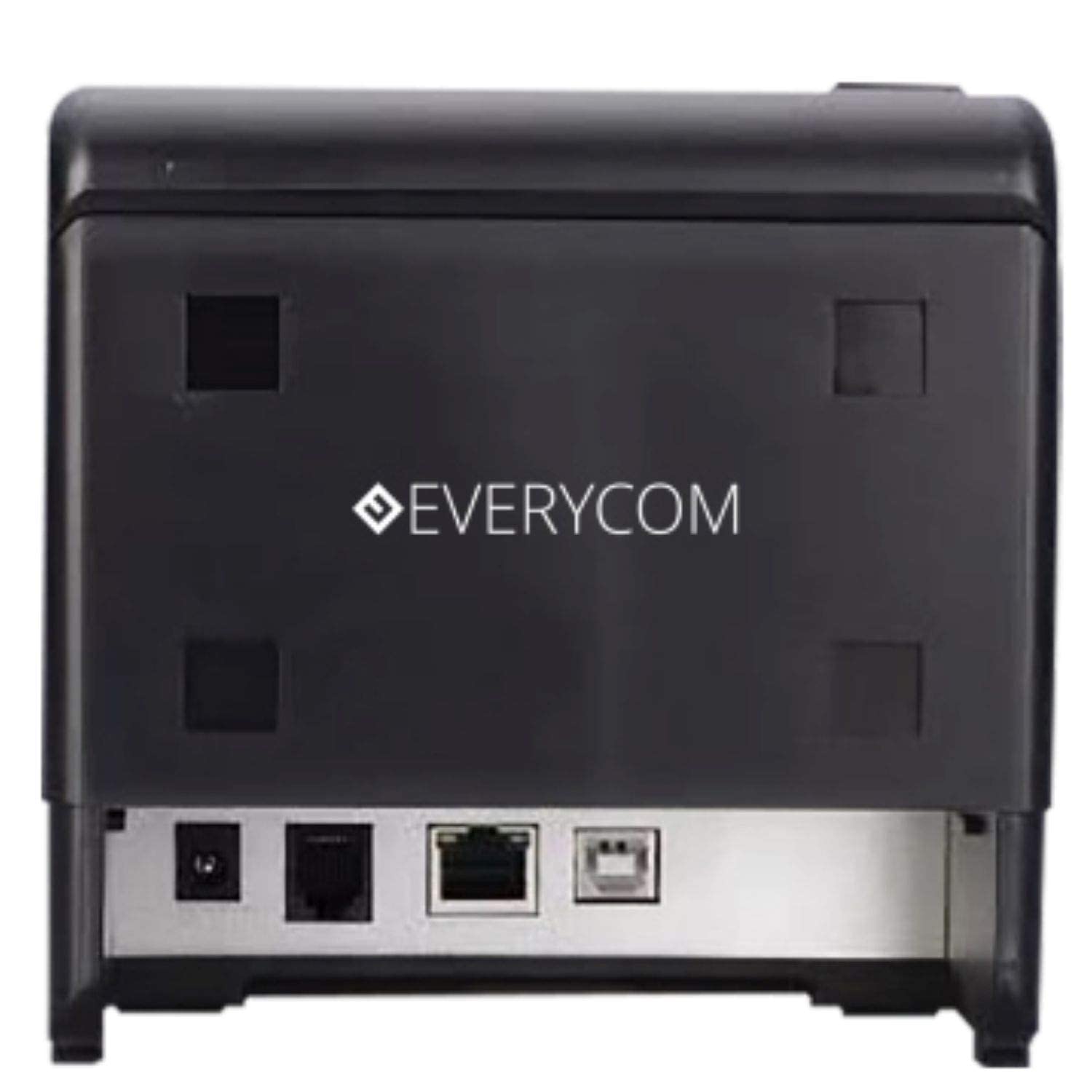
3-сурет: Артқы view showing USB and LAN connectivity ports.

Figure 4: The EC-901 printer is designed for low noise operation.

Figure 5: The EC-901 printer features an easy-to-use design for paper installation.
Орнату
1. Принтерді қосу
- Connect the power adapter cable to the printer's power port and then plug it into a suitable electrical outlet.
- For USB connection: Connect one end of the USB cable to the printer's USB port and the other end to your computer.
- For LAN connection: Connect an Ethernet cable to the printer's LAN port and the other end to your network router or switch.
- Turn on the printer using the power switch located on the front or side of the device.
2. Қағаз орамын орнату
- Open the printer cover by pressing the release button or lifting the cover.
- Insert the thermal paper roll into the compartment with the paper feeding from the bottom and exiting towards the front.
- Кескіштің жанынан аздаған қағазды тартыңыз.
- Принтер қақпағын орнына шерткен дыбыс шыққанша мықтап жабыңыз.
3. Драйверді орнату
Insert the provided CD-ROM into your computer's CD/DVD drive. Follow the on-screen instructions to install the printer drivers and utility software. Drivers are typically compatible with Windows operating systems, including Windows 10.
Пайдалану нұсқаулары
Индикатор шамдары:
- ҚУАТ: Indicates the printer is powered on.
- ҚАТЕ: Lights up or flashes to indicate an error (e.g., print head overheating, cover open).
- ҚАҒАЗ: Indicates low paper or no paper.
Негізгі басып шығару:
Once the printer is connected and drivers are installed, you can print receipts from your POS software or any application that supports printing. Ensure the Everycom EC-901 is selected as the default printer or the desired printer in your application's print settings.
Техникалық қызмет көрсету
Принтерді тазалау:
- Turn off the printer and disconnect the power cable before cleaning.
- Жұмсақ, түксіз матаны пайдаланыңыз dampened with isopropyl alcohol to gently clean the thermal print head. Allow it to dry completely before use.
- Wipe the exterior of the printer with a soft, dry cloth. Do not use abrasive cleaners.
Қағазды ауыстыру:
When the PAPER indicator lights up or printing becomes faint, replace the paper roll following the steps outlined in the "Installing the Paper Roll" section.
Ақаулықтарды жою
| Мәселе | Ықтимал себебі | Шешім |
|---|---|---|
| Принтер қосылмайды. | Қуат кабелі ажыратылған немесе розеткаға қатысты мәселе. | Қуат кабелінің қосылымдарын тексеріңіз. Қуат розеткасының жұмыс істеп тұрғанына көз жеткізіңіз. |
| No printing or blank output. | No paper, paper loaded incorrectly, or print head issue. | Check paper roll and ensure it's loaded correctly. Clean the print head if necessary. Verify printer drivers are installed. |
| PAPER indicator is on. | Paper roll is empty or low. | Қағаз орамын ауыстырыңыз. |
| ERROR indicator is on. | Printer cover open, print head overheating, or other internal error. | Ensure the printer cover is closed properly. Turn off the printer, wait a few minutes for it to cool down, then restart. If the issue persists, contact support. |
| Принтерді компьютер танымайды. | Driver not installed or USB/LAN cable issue. | Reinstall printer drivers. Check USB/LAN cable connections. Try a different port or cable. |
Техникалық сипаттамалар
| Ерекшелік | Мәлімет |
|---|---|
| Модель атауы | EC-901 |
| Баспа технологиясы | Жылулық |
| Баспа құралдары | Paper (plain thermal) |
| Ең үлкен медиа өлшемі | 3 дюйм (80 мм) |
| Максималды басып шығару жылдамдығы | 160 мм/секунд |
| Ажыратымдылық | 203 203 x XNUMX DPI |
| Қосылу технологиясы | USB, LAN Interface |
| Принтердің шығысы | Монохромды |
| Операциялық жүйе | Windows 10 (and compatible with other Windows versions) |
| Өнім өлшемдері (LxWxH) | 19.8 x 14.8 x 14.8 см |
| Элемент салмағы | 1.8 кг |
| Арнайы мүмкіндік | Without Auto cutter |
Кепілдік және қолдау
For technical assistance, warranty claims, or any product-related inquiries, please contact Everycom customer support.
- Тегін нөмір: 1800 121 4480
- Жұмыс уақыты: Monday - Saturday, 10:00 AM - 6:30 PM (Except on Public Holidays)