
WGP T6 Plus
WGP Teleheer T6 Plus Motorcycle Bluetooth Headset User Manual
Model: T6 Plus | Brand: WGP
Кіріспе
This manual provides detailed instructions for the installation, operation, and maintenance of your WGP Teleheer T6 Plus Motorcycle Bluetooth Headset. Please read this manual thoroughly before using the device to ensure proper function and safety. The T6 Plus is designed for motorcycle riders, offering full-duplex Bluetooth real-time intercom communication, hands-free calling, music playback, and voice assistant integration.
Негізгі мүмкіндіктер
- Full Duplex Bluetooth Real-time Intercom: Stable signal transmission up to 1500 meters (93 MPH) with ceramic antenna.
- Hands-free & Multi-function Keys: Bluetooth 5.1 connectivity, supports call handling (answer/refuse/redial), music playback. Automatic switch to phone mode for incoming calls. Large button design for easy operation with gloves.
- IP65 Waterproof & Dustproof Design: Withstands various weather conditions, operational down to -15°F.
- HD Speakers & Ultra High Quality Sound: High-definition sound quality, especially for bass, with effective wind noise reduction.
- All-in-One Type-C Port: Integrated audio, data transfer, and charging.
- Батареяның ұзақ қызмет ету мерзімі: 850 mAh battery providing 30 hours of continuous use and 500 hours standby.
Пакет мазмұны
Пакетте барлық элементтердің бар екенін тексеріңіз:
- WGP Teleheer T6 Plus Bluetooth Headset Unit (2 units for 2-pack)
- Дулыға спикерлері
- Microphone (boom mic for open-face helmets, soft mic for full-face helmets)
- Mounting Clip (clamp and adhesive options)
- USB Type-C зарядтау кабелі
- Пайдаланушы нұсқаулығы

Image: A detailed diagram illustrating the components of the WGP Teleheer T6 Plus headset, including the main unit with its Type-C port, indicator light, and control buttons (OFF/ON, Volume+, Volume-, Telephone, Connect). It also shows the securing clip, microphone, and trumpet (speakers), providing a clear visual guide to the parts included and their connections.
Орнату және орнату
1. Құрылғыны зарядтау
Before first use, fully charge the T6 Plus headset. Connect the provided USB Type-C cable to the headset's Type-C port and the other end to a USB power adapter (not included). The indicator light will show charging status and turn off when fully charged.
- Зарядтау уақыты: шамамен 2-3 сағат.
- Indicator light: Red during charging, off when fully charged.
2. Installing the Headset in Your Helmet
The T6 Plus can be installed using either the clamp mount or the adhesive mount.
- Орнату орнын таңдаңыз: Select a flat area on the left side of your helmet where the headset unit can be easily accessed.
- Динамиктерді орнату: Attach the speakers inside the helmet's ear pockets using the adhesive pads. Ensure they are positioned directly over your ears for optimal sound quality.
- Микрофонды орнату:
- For full-face helmets: Use the soft wire microphone and position it inside the chin bar, close to your mouth.
- For open-face or modular helmets: Use the boom microphone and position it in front of your mouth.
- Негізгі блокты орнату:
- Clamp Тау: cl сырғытыңызamp between the helmet shell and the inner padding. Secure it tightly.
- Жабысқақ орнату: Clean the chosen surface on the helmet. Peel off the protective film from the adhesive mount and firmly press it onto the helmet for at least 30 seconds. Allow 24 hours for the adhesive to cure before use.
- Кабельдерді қосу: Plug the speaker/microphone cable into the Type-C port on the main headset unit.

Image: A WGP Teleheer T6 Plus headset unit mounted on the side of a motorcycle helmet. This image demonstrates the typical installation position of the headset on a helmet, showing its compact design and how it integrates with the helmet's exterior. The control buttons are visible, indicating ease of access for the rider.
Пайдалану нұсқаулары
1. Қуатты қосу/өшіру
- Қуат қосулы: түймесін басып тұрыңыз Қуат түймесі for 3 seconds until the indicator light flashes.
- Қуат көзін өшіру: түймесін басып тұрыңыз Қуат түймесі индикатор шамы сөнгенше 3 секунд бойы басыңыз.
2. Bluetooth Pairing with Mobile Phone
- Ensure the T6 Plus is powered off.
- түймесін басып тұрыңыз Қуат түймесі for approximately 5-7 seconds until the indicator light flashes red and blue alternately, indicating pairing mode.
- On your mobile phone, enable Bluetooth and search for "Teleheer T6 Plus".
- Select "Teleheer T6 Plus" from the list of available devices to connect. Once connected, the indicator light will flash blue slowly.
3. Intercom Pairing (Two Units)
To establish intercom communication between two T6 Plus units:
- Ensure both T6 Plus units are powered off.
- On Unit 1, press and hold the Қуат түймесі for 5-7 seconds until the indicator light flashes red and blue alternately.
- On Unit 2, press and hold the Қуат түймесі for 5-7 seconds until the indicator light flashes red and blue alternately.
- түймесін қысқаша басыңыз Қуат түймесі on either Unit 1 or Unit 2 (one short press). The units will search for each other.
- Once connected, the indicator lights on both units will flash blue slowly, and you will hear a confirmation tone.
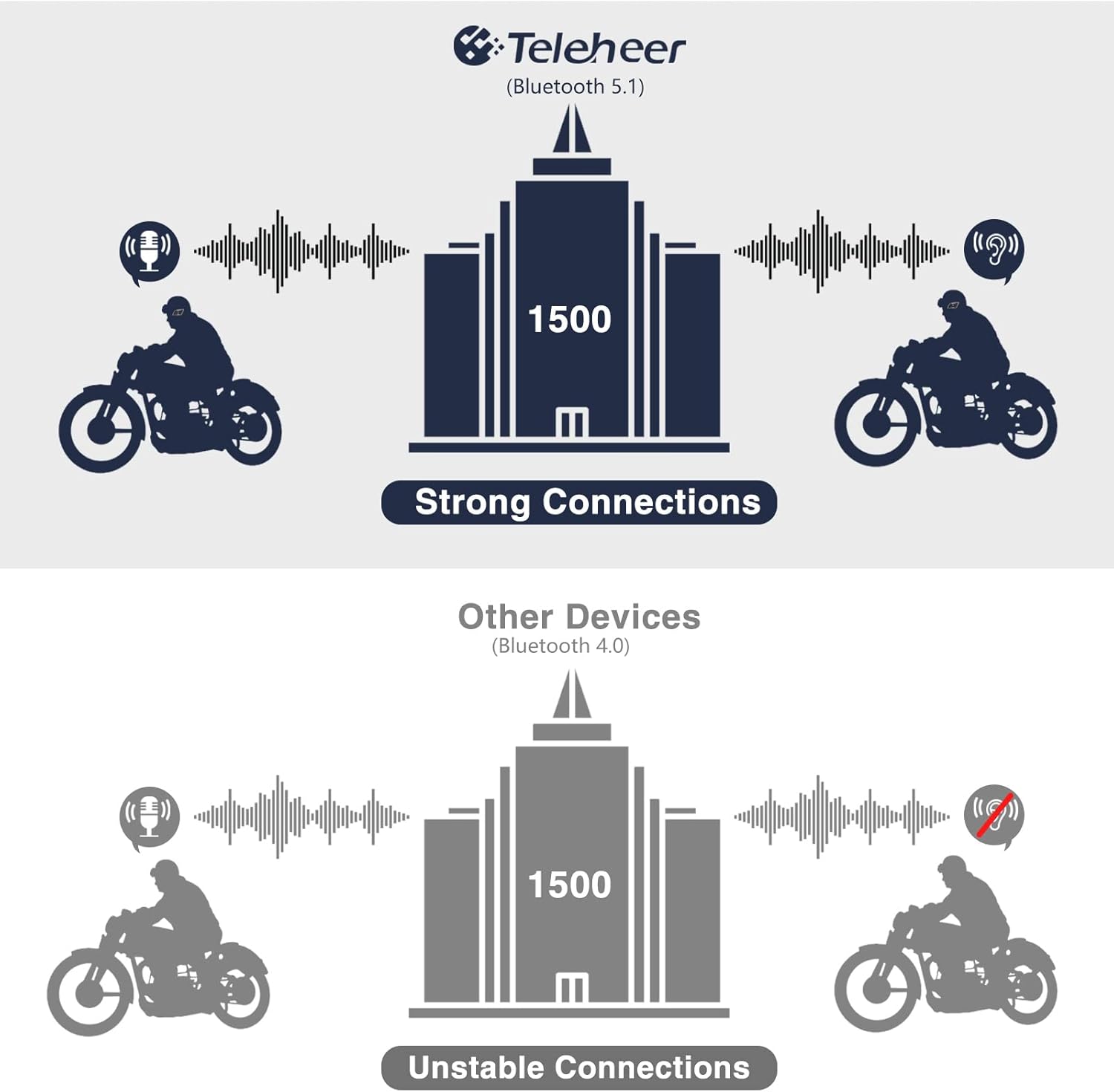
Image: A graphic illustrating the effective intercom range of the Teleheer T6 Plus (Bluetooth 5.1) compared to older Bluetooth 4.0 devices. The T6 Plus shows stable connections over 1500m, while older devices show unstable connections over shorter distances. This highlights the improved signal stability and range due to Bluetooth 5.1 and the ceramic antenna.
4. Phone Call Functions
- Қоңырауға жауап беру: түймесін қысқаша басыңыз Телефон түймесі.
- Қоңырауды аяқтау: түймесін қысқаша басыңыз Телефон түймесі.
- Қоңыраудан бас тарту: түймесін басып тұрыңыз Телефон түймесі 2 секундқа.
- Соңғы нөмірді қайта теру: түймесін екі рет басыңыз Телефон түймесі.
5. Музыканы ойнату
- Ойнату/кідірту: түймесін қысқаша басыңыз Телефон түймесі.
- Келесі трек: түймесін қысқаша басыңыз Дыбысты жоғарылату түймесі.
- Алдыңғы трек: түймесін қысқаша басыңыз Көлемді азайту батырмасы.
- Дыбыс деңгейін реттеу: түймесін басып тұрыңыз Дыбыс деңгейін жоғарылату/төмендету түймелері дыбыс деңгейін арттыру немесе азайту үшін.
6. Дауыстық көмекші (Siri/Google Assistant)
- Дауыстық көмекшіні іске қосыңыз: түймесін екі рет басыңыз Қуат түймесі.

Image: A graphic depicting the voice assistant feature of the Teleheer T6 Plus, showing a helmeted rider interacting with their phone via voice commands like "Hey Siri" or "Ok Google". This illustrates the hands-free convenience for navigation, calls, and other smartphone functions while riding.
Техникалық қызмет көрсету және күту
- Тазалау: Wipe the headset unit with a soft, damp шүберек. Қатты химиялық заттарды немесе абразивті тазартқыштарды қолданбаңыз.
- Суға төзімділік: The device is IP65 waterproof. While it can withstand water jets, avoid submerging it in water for extended periods. Ensure the Type-C port cover is securely closed when not charging.
- Сақтау орны: Құрылғыны пайдаланбаған кезде салқын, құрғақ жерде сақтаңыз. Шамадан тыс температурадан аулақ болыңыз.
- Батареяға күтім жасау: Батареяның қызмет ету мерзімін ұзарту үшін батареяны жиі толығымен зарядсыздандырмаңыз. Ұзақ уақыт пайдаланылмаса да, құрылғыны үнемі зарядтаңыз.

Image: A WGP Teleheer T6 Plus headset unit partially submerged in water with splashes, demonstrating its IP65 waterproof rating. The image emphasizes the device's ability to withstand water exposure, making it suitable for various weather conditions during riding.
Ақаулықтарды жою
| Мәселе | Ықтимал себебі | Шешім |
|---|---|---|
| Құрылғы қосылмайды. | Батарея төмен. | Құрылғыны толығымен зарядтаңыз. |
| Телефонмен жұптастыру мүмкін емес. | Device not in pairing mode; Bluetooth off on phone; too many paired devices. | Ensure device is in pairing mode (red/blue flashing). Turn on phone's Bluetooth. Delete old Bluetooth connections on phone. |
| Intercom connection unstable or short range. | Obstructions; out of range; interference. | Ensure clear line of sight. Stay within 1500m range. Avoid strong electromagnetic interference. |
| Динамиктерден дыбыс жоқ. | Speakers not connected properly; volume too low. | Check speaker connection to Type-C port. Increase volume. |
| Microphone not picking up voice. | Microphone not connected properly; microphone position. | Check microphone connection. Ensure microphone is close to your mouth. |
| Wind noise during calls/intercom. | High speed; improper microphone placement. | Ensure microphone is positioned correctly to minimize wind exposure. The device has DSP noise suppression, but extreme conditions may affect performance. |
Техникалық сипаттамалар
| Ерекшелік | Мәлімет |
|---|---|
| Модель атауы | Teleheer T6 Plus |
| Bluetooth нұсқасы | Bluetooth 5.1 |
| Домофон диапазоны | Up to 1500 meters (93 MPH) |
| Батарея сыйымдылығы | 850 мАч |
| Үздіксіз пайдалану уақыты | 30 сағат |
| Күту уақыты | 500 сағат |
| Зарядтау порты | C түрі |
| Суға төзімділік | IP65 (Jet-proof) |
| Жұмыс температурасы | Down to -15°F |
| Антенна материалы | Керамика |
| Бақылау әдісі | Сенсорлық / Физикалық түймелер |
| Элемент салмағы | 14.4 унция (шамамен 408 грамм) |
| Өлшемдері (пакет) | 8.54 x 3.9 x 2.95 дюйм |
Кепілдік және қолдау
For warranty information and technical support, please refer to the official WGP webсайтына өтіңіз немесе тұтынушыларға тікелей хабарласыңыз. Сатып алу түбіртегін кепілдік талаптары үшін сатып алудың дәлелі ретінде сақтаңыз.
Қосымша көмек алу үшін мына сайтқа кіре аласыз Amazon-дағы өнім беті or contact the seller directly through the Amazon platform.
Ask a question about this manual
Ask about setup, troubleshooting, compatibility, parts, safety, or missing instructions. Manuals+ will review the question and use this page’s manual context to help answer it.