
ELEFOCUS RC-815S, TX-8030, RC-816S, RC-903S, RC-904S, TX-8160, TX-8050, TX-8140
ELEFOCUS Replacement Remote Control User Manual
For Onkyo RC-815S, TX-8030, RC-816S, RC-903S, RC-904S, TX-8160, TX-8050, TX-8140 Network Audio/Video AV Stereo Receivers
Кіріспе
This manual provides essential information for the proper use and maintenance of your ELEFOCUS replacement remote control. This remote is designed as a direct replacement for various Onkyo Network Audio/Video AV Stereo Receivers, including models RC-815S, TX-8030, RC-816S, RC-903S, RC-904S, TX-8160, TX-8050, and TX-8140.
Please note that this is a replacement item and while it functions out of the box with compatible models, some advanced or specific functions of your original remote may not be fully supported. No complex programming is required; simply insert batteries to begin use.
Орнату
1. Батареяны орнату
Қашықтан басқару пульті екі (2) AAA батареясын қажет етеді (жинаққа кірмейді). Оларды орнату үшін келесі қадамдарды орындаңыз:
- Қашықтан басқару құралының артқы жағындағы батарея бөлімін табыңыз.
- Press down on the tab and slide the battery cover downwards to open it.
- Оң (+) және теріс (-) терминалдардың бөлімнің ішіндегі белгілермен дұрыс туралануын қамтамасыз етіп, екі AAA батареясын салыңыз.
- Батарея қақпағын қауіпсіз шерткенше орнына сырғытыңыз.
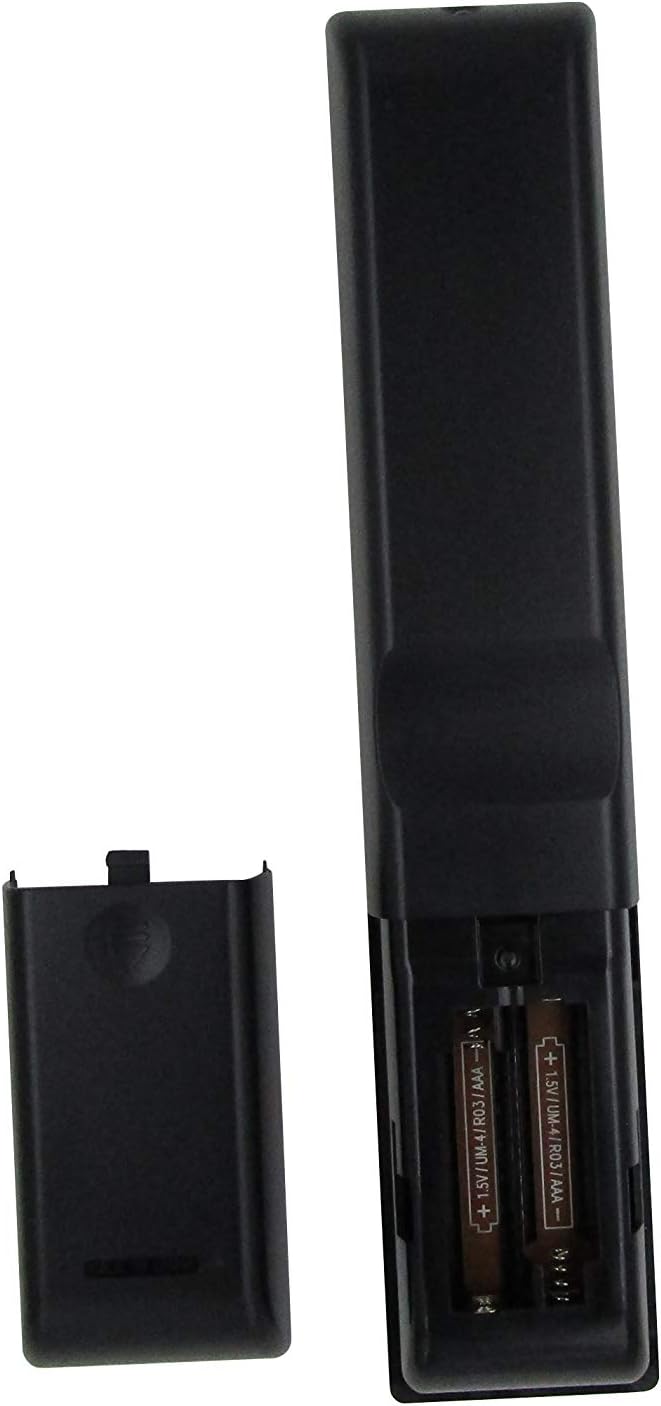
1-сурет: Battery compartment with AAA batteries. Ensure correct polarity when inserting batteries.
Once batteries are installed, the remote is ready for use. No additional programming or setup is typically required for compatible Onkyo receiver models.
Пайдалану нұсқаулары
This replacement remote control provides essential functions for your Onkyo receiver. Point the remote directly at the receiver's infrared (IR) sensor for optimal performance.

2-сурет: Біттіview of the remote control layout.
Негізгі функциялар:
- Қуат түймесі (⏻): Ресиверді қосады немесе өшіреді.
- Input Selector Buttons (BD/DVD, CBL/SAT, PC, Game, TV/Tape, CD, Phono, Tuner, NET, Bluetooth): Қажетті аудио/бейне кіріс көзін таңдайды.
- Дыбыс деңгейін жоғарылату/төмендеу (▲ / ▼): Негізгі дыбыс деңгейін реттейді.
- Дыбысты өшіру: Аудио шығысының дыбысын өшіреді немесе қосады.
- Шарлау тақтасы (жоғары, төмен, солға, оңға, енгізу): Used to navigate menus and confirm selections on your receiver's display.
- Мәзір: Accesses the receiver's main menu.
- Орнату: Enters the setup menu for configuration.
- Қайтару: Алдыңғы мәзірге немесе экранға оралады.
- Аудио: Cycles through audio modes or settings.
- Playback Controls (Rewind, Play/Pause, Fast Forward, Stop, Previous Track, Play, Next Track): Controls media playback for connected devices.
- Қайталау: Toggles repeat playback mode.
- Кездейсоқ: Toggles random/shuffle playback mode.
- A/B спикері: Selects speaker output groups.
- Сандық пернетақта (0-9): For direct input of numbers, such as radio frequencies or track numbers.
- Қақпақтар: Functionality may vary by receiver model.
- > 10: For entering numbers greater than 9 on some systems.
- D.TUN: Direct tuning for radio.
- Көрсеткіш: Changes display information on the receiver.
- Диммер: Adjusts the brightness of the receiver's display.
- Ұйқы: Sets a sleep timer for the receiver.
- CLR: Clears current input or selection.
Маңызды ескерту:
As a replacement remote, some advanced or specific functions present on your original Onkyo remote may not be replicated or fully functional. This remote is designed to cover the primary and most commonly used features.
Техникалық қызмет көрсету
1. Батареяны ауыстыру
Қашықтан басқару пультінің жауабы баяу болғанда немесе жұмысын тоқтатқанда батареяларды ауыстырыңыз. Әрқашан екі батареяны бір уақытта жаңа AAA батареяларымен ауыстырыңыз. Ескі және жаңа батареяларды немесе батареялардың әртүрлі түрлерін араластырмаңыз.
2. Тазалау
Қашықтан басқару құралын тазалау үшін жұмсақ, құрғақ шүберекті пайдаланыңыз. Қатты кір үшін, аздап dampen the cloth with water or a mild, non-abrasive cleaner. Do not use harsh chemicals, solvents, or abrasive cleaning pads, as these can damage the remote's surface or internal components.
3. Сақтау
When not in use for extended periods, it is recommended to remove the batteries to prevent leakage, which can damage the remote. Store the remote in a cool, dry place away from direct sunlight and extreme temperatures.
Ақаулықтарды жою
| Мәселе | Ықтимал себебі | Шешім |
|---|---|---|
| Remote is not working at all. |
|
|
| Кейбір функциялар жұмыс істемейді. |
|
|
| Қашықтан басқару үзіліспен жұмыс істейді. |
|
|
If your specific Onkyo receiver model is not listed in the product title (RC-815S, TX-8030, RC-816S, RC-903S, RC-904S, TX-8160, TX-8050, TX-8140), this remote may not be compatible. Please verify compatibility before purchase.
Техникалық сипаттамалар
- Бренд: ELEFOCUS
- Үйлесімді құрылғылар: Onkyo Network Audio/Video AV Stereo Receivers (Models: RC-815S, TX-8030, RC-816S, RC-903S, RC-904S, TX-8160, TX-8050, TX-8140)
- Қосылу технологиясы: Инфрақызыл (ИК)
- Қуат көзі: 2 x AAA батареялары (жинаққа кірмейді)
- Ерекше ерекшелігі: Эргономикалық дизайн
- Қолдау көрсетілетін құрылғылардың максималды саны: 1 (specific Onkyo receiver)
Кепілдік туралы ақпарат
Specific warranty details for this ELEFOCUS replacement remote control are not provided in the product information. Please refer to the seller's return policy or contact the seller directly for information regarding warranty coverage and terms.
Тұтынушыларды қолдау
For further assistance or inquiries regarding your ELEFOCUS replacement remote control, please contact the seller directly through the platform where the purchase was made. As this is a third-party replacement product, direct manufacturer support may not be available.
For general information about your Onkyo receiver, please refer to the original user manual provided with your receiver or visit the official Onkyo support webсайт.
Қосымша өнім Views

3-сурет: Бұрыштық view қашықтан басқару пультінің.

4-сурет: Close-up of the upper section of the remote, showing input and media controls.
Өнімнің ресми бейнелері
Бұл тауарға сатушыдан ешқандай ресми өнім бейнелері берілмеген.
Ask a question about this manual
Ask about setup, troubleshooting, compatibility, parts, safety, or missing instructions. Manuals+ will review the question and use this page’s manual context to help answer it.