
Cabletech URZ0336B
Cabletech URZ0336B DVB-T2 H.265 HEVC Digital Tuner
Пайдаланушы нұсқаулығы
1. Кіріспе
This manual provides comprehensive instructions for the installation, operation, and maintenance of your Cabletech URZ0336B DVB-T2 H.265 HEVC Digital Tuner. Please read this manual thoroughly before using the device to ensure proper functionality and to prevent damage.
2. Қауіпсіздік туралы ақпарат
Always observe the following safety precautions to avoid electric shock, fire, or damage to the device:
- Құрылғыны жаңбырға немесе ылғалға ұшыратпаңыз.
- c ашпаңызasing. Барлық қызмет көрсетуді білікті мамандарға тапсырыңыз.
- Ensure proper ventilation around the device. Do not block ventilation openings.
- Құрылғымен бірге берілген қуат адаптерін ғана пайдаланыңыз.
- Құрылғыны жылу көздерінен және тікелей күн сәулесінен алыс ұстаңыз.
- Disconnect the power plug from the wall outlet if the device will not be used for a long period.
3. Пакет мазмұны
Пакетте келесі элементтердің бар-жоғын тексеріңіз:
- Cabletech URZ0336B DVB-T2 H.265 HEVC Digital Tuner
- Қашықтан басқару құралы
- AAA батареялары (2x)
- Қуат адаптері
- Пайдаланушы нұсқаулығы (бұл құжат)
4. Өнім аяқталдыview
Familiarize yourself with the main components and connections of your Cabletech URZ0336B tuner.
4.1. Device and Remote Control
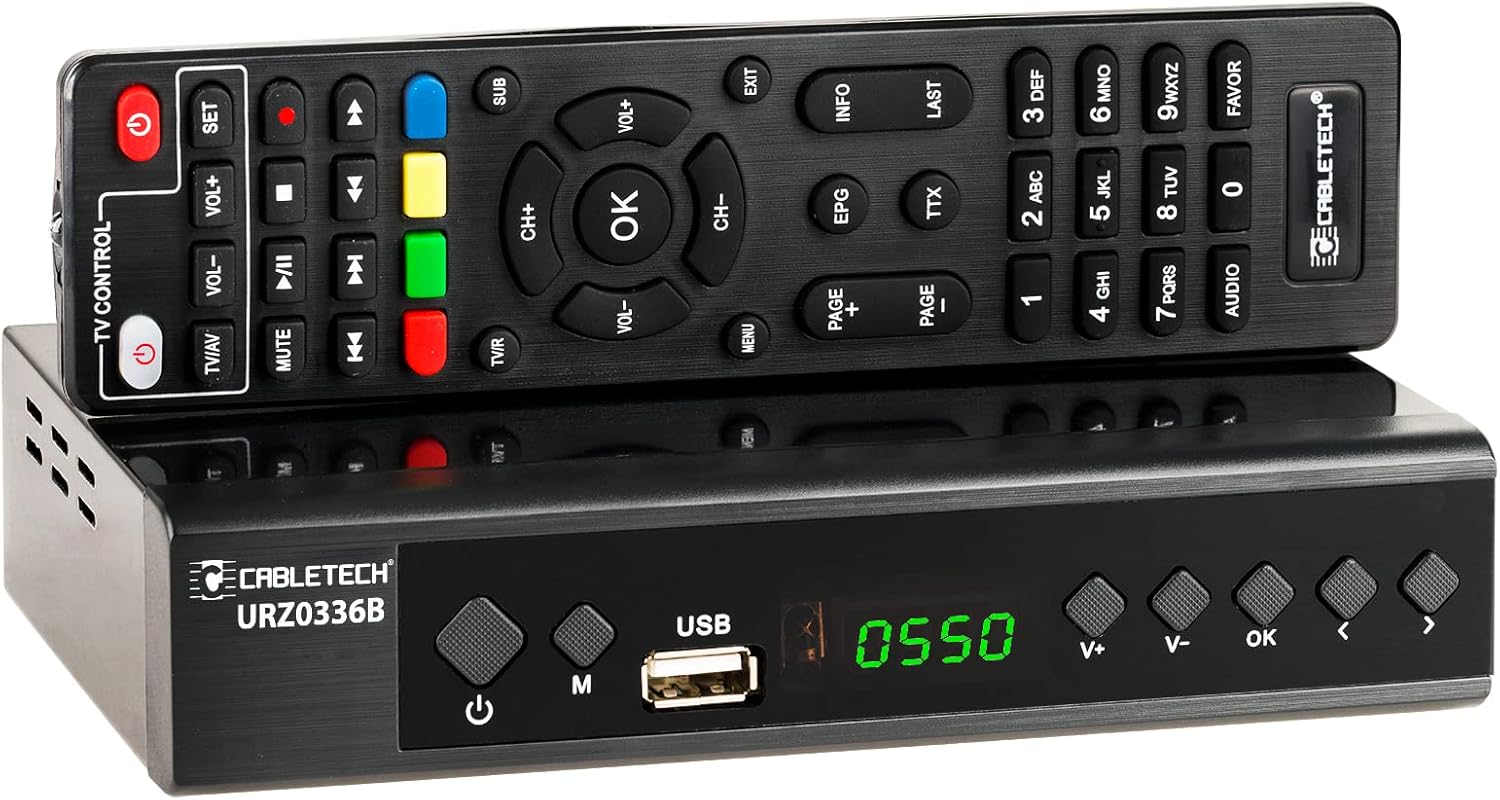
Image: The Cabletech URZ0336B DVB-T2 H.265 HEVC Digital Tuner shown with its accompanying remote control. The tuner is a compact black box, and the remote is also black with various control buttons.
4.2. Алдыңғы панель
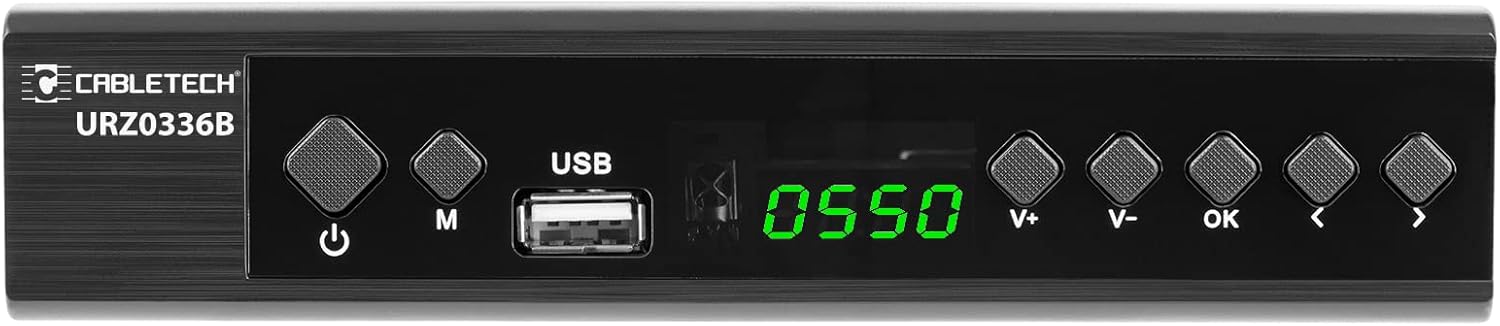
Image: Close-up of the Cabletech URZ0336B front panel, featuring a power button, menu button (M), USB 2.0 port, LED display showing "0550", and navigation/volume buttons (V+, V-, OK, <, >).
- Қуат түймесі: Turns the device on/off or to standby.
- M (Мәзір) түймесі: Негізгі мәзірге кіреді.
- USB 2.0 порты: For software updates, PVR recording, and media playback.
- Жарықдиодты дисплей: Shows channel number or time.
- V+/V- Buttons: Дыбыс деңгейін реттейді.
- Жарайды түймесі: Таңдауларды растайды.
- </> Buttons: Navigates through menus or changes channels.
4.3. Артқы панель қосылымдары

Image: The rear panel of the Cabletech URZ0336B, showing various input and output ports: ANT IN (IEC socket), COAXIAL, USB, HD OUT (HDMI), SCART, and the power input (110-240V~ 50/60Hz).
- Құмырсқа IN: Connects to your DVB-T/T2 antenna.
- КОАКСИАЛДЫ: Сандық аудио шығысы.
- USB: Additional USB 2.0 port for external devices.
- HD OUT (HDMI): Connects to your TV for high-definition video and audio.
- SCART: Connects to older TVs or VCRs.
- Қуат кірісі: Қуат адаптеріне қосылады.
4.4. Қашықтан басқару пультінің орналасуы

Сурет: егжей-тегжейлі view of the Cabletech URZ0336B remote control, showing buttons for power, TV/AV, volume, channel, mute, playback controls, EPG, TTX, INFO, numeric keypad, and special function buttons.
The remote control provides full functionality for operating your tuner. Insert 2x AAA batteries into the battery compartment before first use.
5. Орнату
5.1. Connecting the Tuner
- Антеннаны қосу: Connect your DVB-T/T2 antenna cable to the Құмырсқа IN port on the rear panel of the tuner.
- Теледидарға қосылу:
- For HD TVs: Connect an HDMI cable from the HD OUT (HDMI) port on the tuner to an HDMI input on your TV.
- For older TVs: Connect a SCART cable from the SCART port on the tuner to the SCART input on your TV.
- Қуатты қосу: Connect the power adapter to the tuner's power input and then plug it into a wall outlet.
- Батареяларды салыңыз: Open the battery compartment on the remote control and insert 2x AAA batteries, observing polarity.
5.2. First-Time Installation and Channel Scan
- Turn on your TV and select the correct HDMI or SCART input source that the tuner is connected to.
- Power on the Cabletech URZ0336B tuner using the power button on the front panel or remote control.
- The first-time installation wizard should appear on your TV screen. Follow the on-screen prompts.
- Select your preferred language and country.
- Initiate an Автоматты іздеу for channels. The tuner will scan for all available DVB-T/T2 channels in your area. This process may take several minutes.
- Once the scan is complete, the tuner will save the found channels and display the first channel.
Note: If you experience poor signal quality, adjust your antenna position or consider using a signal ampқұтқарушы.
6. Пайдалану нұсқаулары
6.1. Негізгі функциялар
- Қуатты қосу/өшіру: түймесін басыңыз ҚУАТ қашықтан басқару пультіндегі түймені басыңыз.
- Арнаны өзгерту: пайдаланыңыз CH + / CH- buttons or the numeric keypad to enter a channel number.
- Дыбыс деңгейін басқару: пайдаланыңыз VOL + / VOL- түймелері.
- Дыбысты өшіру: түймесін басыңыз ДЫБЫС дыбысты уақытша өшіру үшін түймесін басыңыз.
- Мәзір: түймесін басыңыз МӘЗІР button to access the main menu for settings and features.
- OK: Confirms selections in menus or displays the channel list.
- ШЫҒУ: Ағымдағы мәзірден немесе экраннан шығады.
6.2. Электрондық бағдарлама нұсқаулығы (EPG)
The 7-day EPG provides a schedule of current and upcoming programs.
- түймесін басыңыз EPG қашықтан басқару пультіндегі түймені басыңыз.
- Navigate through channels and program times using the arrow buttons.
- түймесін басыңыз OK дейін view details about a selected program.
6.3. PVR (Program Recording) and Timeshift
Connect a USB storage device (e.g., USB flash drive or external hard drive) to one of the USB 2.0 ports to use PVR and Timeshift functions.
- PVR Recording:
- түймесін басыңыз REC button (red circle) on the remote to start immediate recording of the current program. Press ТОҚТАТУ (square) to end recording.
- Schedule recordings via the EPG: Select a program in the EPG and press OK, then choose the record option.
- Уақыт ауысымы:
- While watching a program, press the ТОҚТАТУ button. The tuner will begin recording the live broadcast to the USB device.
- Сонда аласыз ОЙНАУ, ТЕЗ АЛҒА, немесе КЕРІ ОРНАТУ within the buffered content.
- түймесін басыңыз ТОҚТАТУ to exit Timeshift and return to live TV.
6.4. Медиа ойнату
The tuner supports playback of various media fileқосылған USB сақтау құрылғысынан s.
- Connect your USB device to a USB port on the tuner.
- Go to the main menu and select "Media" or "USB".
- Қажеттіге өтіңіз file type (MP3, WMA, JPEG, BMP, AVI) and select the file ойнау.
6.5. Supported Applications
The tuner supports various online applications when connected to the internet via an external MT7601 Wi-Fi adapter (not included).
- Ауа райы: View local weather forecasts.
- IPTV: Access Internet Protocol Television streams.
- YouTube: Watch videos from YouTube.
- RSS: Read RSS news feeds.
Note: An external MT7601 Wi-Fi adapter is required for internet connectivity and access to these applications.
6.6. Parental Control
Set up parental control to restrict access to certain channels or programs based on age ratings.
- Access the "Parental Control" section in the main menu.
- Enter your PIN (default is usually 0000 or 1234, check your device for specifics).
- Configure age restrictions or lock specific channels.
6.7. Таймер функциясы
The timer function allows you to schedule the tuner to turn on/off at specific times or to switch to a particular channel.
- Navigate to the "Timer" section in the main menu.
- Set the event type (e.g., Power On, Power Off, Record), time, and duration.
7. Техникалық қызмет көрсету
7.1. Тазалау
To clean the device, disconnect it from the power supply and wipe the exterior with a soft, dry cloth. Do not use liquid or aerosol cleaners.
7.2. Бағдарламалық жасақтаманы жаңарту
Software updates can improve performance and add new features. Updates are performed via the USB port.
- Ең соңғы микробағдарламаны жүктеп алыңыз file from the official Cabletech support webсайт (бар болса).
- Микробағдарламаны көшіріңіз file to the root directory of a USB flash drive.
- Connect the USB flash drive to the tuner's USB port.
- Go to the "System" or "Tools" menu, then select "Software Update" or "Upgrade by USB".
- Follow the on-screen instructions to complete the update. Do not power off the device during the update process.
8. Ақаулықтарды жою
If you encounter issues with your tuner, refer to the following common problems and solutions:
| Мәселе | Ықтимал себебі | Шешім |
|---|---|---|
| Сурет немесе дыбыс жоқ | Incorrect TV input selected; Loose cable connections; Tuner not powered on. | Select correct TV input (HDMI/SCART); Check all cable connections; Ensure tuner is powered on. |
| «Сигнал жоқ» хабары | Antenna not connected; Poor antenna signal; No channels scanned. | Connect antenna properly; Adjust antenna position; Perform an automatic channel scan. |
| Қашықтан басқару пульті жұмыс істемейді | Batteries are dead or inserted incorrectly; Obstruction between remote and tuner. | Replace batteries; Check battery polarity; Remove any obstructions; Point remote directly at the tuner. |
| Cannot record to USB | USB device not connected or formatted incorrectly; Insufficient storage space. | Ensure USB device is connected; Format USB device to FAT32 or NTFS; Free up space on USB device. |
| No internet access for apps | No MT7601 Wi-Fi adapter connected; Network configuration issues. | Connect a compatible MT7601 Wi-Fi adapter; Check network settings in the tuner's menu. |
9. Техникалық сипаттамалар
| Ерекшелік | Мәлімет |
|---|---|
| Үлгі нөмірі | URZ0336B |
| CPU | GX6702S5 |
| Ішкі жад | 32 МБ |
| Жедел Жадтау Құрылғысы | 512 МБ DDR2 |
| ANT қосқышы | IEC ұясы |
| Жиілік диапазоны | VHF: 170–230 MHz, UHF: 470–862 MHz |
| Демодуляция | QPSK, 16QAM, 64QAM, 256QAM |
| Өткізу қабілеті | 7 МГц, 8 МГц |
| Декодтау | MPEG-1, MPEG-2, MPEG-4, H.264, H.265, AAC, HE-AAC, AC-3, DD+ |
| Кіріс/шығыстар | 2x USB 2.0, HDMI, SCART, COAXIAL |
| Аспект қатынасы | Auto, 16:9 WS, 16:9 PB, 16:9 PS; 4:3 LB, 4:3 PS, 4:3 Full |
| Қолдау көрсетілетін форматтар | MP3, WMA, JPEG, BMP, AVI |
| Экран ажыратымдылығы | 480i, 480p, 576i, 576p, 720p, 1080i, 1080p |
| Бейне ажыратымдылығы | 1920 x 1080 пиксель |
| Аудионы декодтау | MPEG-1 LayerI/II, Dolby-Downmix 2-Channel (License), AAC LC, HE-AAC v1/V2, PCM-Downmix, IEC958 SPDIF |
| File Жүйе | FAT32, NTFS |
| Үйлесімділік | Fully compatible with DVB-T2/DVB-T |
| Қашықтан басқару құралы | Requires 2x AAA batteries |
| Қуатты тұтыну | Max. 6 W (Operating), Max. 50/60 Hz (Standby) |
| Өлшемдері (Е x Ж) | 168 мм x 36 мм |
| Wi-Fi қолдауы | Requires external MT7601 chip adapter |
| Tuner Bit Depth | 10 бит |
10. Кепілдік және қолдау
This product comes with a standard manufacturer's warranty. For specific warranty terms and conditions, please refer to the documentation included with your purchase or contact Cabletech customer support.
For technical assistance, troubleshooting beyond this manual, or warranty claims, please contact your retailer or the official Cabletech support channels.
Ask a question about this manual
Ask about setup, troubleshooting, compatibility, parts, safety, or missing instructions. Manuals+ will review the question and use this page’s manual context to help answer it.