
Кіріспе
Thank you for choosing the Audizio SB85 Soundbar with Subwoofer. This manual provides essential information for the safe and correct operation of your new audio system. Please read it thoroughly before use and retain it for future reference. The SB85 is designed to enhance your television's audio, providing a rich, immersive sound experience for movies, games, and music, complete with a dedicated subwoofer for powerful bass.
Қауіпсіздік нұсқаулары
- Құрылғыны іске қоспас бұрын барлық нұсқауларды мұқият оқып шығыңыз.
- Keep the unit away from water, moisture, and heat sources.
- Желдету саңылауларын жаппаңыз.
- Өндіруші көрсеткен қосымшаларды/керек-жарақтарды ғана пайдаланыңыз.
- Найзағай кезінде немесе ұзақ уақыт пайдаланбаған кезде құрылғыны электр желісінен ажыратыңыз.
- Барлық қызмет көрсетуді білікті қызмет көрсету қызметкерлеріне тапсырыңыз.
- Do not expose the battery (if applicable) to excessive heat such as sunshine, fire, or the like.
Пакет мазмұны
Барлық заттардың қорапта бар екеніне көз жеткізіңіз:
- Audizio SB85 Soundbar
- Сымды сабвуфер
- Қашықтан басқару құралы
- Optical Cable (Toslink)
- AUX кабелі
- Қуат адаптері
- Пайдаланушы нұсқаулығы
Өнім аяқталдыview
The Audizio SB85 system consists of a soundbar and a separate wired subwoofer, designed to deliver a powerful and clear audio experience.
Soundbar мүмкіндіктері
- Integrated 150W speaker system with 4 speakers (2x 2cm range, 2x 2cm tweeter).
- Front LED display for status indication.
- Control buttons on the side panel.
- Multiple input options: HDMI (ARC), USB, Line In (AUX), Coaxial, Optical.
- Сымсыз дыбыс ағыны үшін Bluetooth 5.0.

Image: Close-up of the Audizio SB85 Soundbar's control panel and its remote control, highlighting Bluetooth 5.0 and ease of use.

Сурет: Ішкі view of the Audizio SB85 Soundbar's full-range speaker, emphasizing its 150W speaker system for an immersive audio experience.
Сабвуфер мүмкіндіктері
- 5.25-inch wired subwoofer for enhanced bass response.

Image: Close-up of the Audizio SB85 wired subwoofer, designed to amplify bass frequencies.
Орнату
1. Орналастыру
Place the soundbar centrally below your television. The subwoofer can be placed on the floor near the soundbar, ideally in a corner for optimal bass reflection, but ensure it is not obstructed.

Image: Audizio SB85 Soundbar and Subwoofer setup in a living room, demonstrating room-filling sound and clean design.

Image: Audizio SB85 Soundbar placed below a television, illustrating its universal compatibility with any TV.
2. Қуатқа қосылу
Connect the power adapter to the DC IN port on the soundbar and then plug it into a wall outlet (230 Vac/50 Hz).
3. Сабвуферді қосу
Connect the wired subwoofer to the dedicated subwoofer output port on the soundbar.
4. Дыбыс көздеріне қосылу
The SB85 offers several connection options:
- HDMI (ARC): For the best audio quality and control, connect an HDMI cable from the HDMI (ARC) port on the soundbar to the HDMI ARC port on your TV. This allows the TV to send audio to the soundbar and often enables TV remote control of the soundbar's volume.
- Оптикалық (Toslink): Connect the included optical cable from the OPTICAL port on the soundbar to the Optical Digital Audio Out port on your TV or other audio source.
- Line In (AUX): Use the included AUX cable to connect the LINE IN port on the soundbar to the headphone jack or audio output of your device (e.g., smartphone, MP3 player).
- Коаксиалды: Connect a coaxial cable (not included) from the COAXIAL port on the soundbar to the Coaxial Digital Audio Out port on your TV or other audio source.
- USB: Insert a USB flash drive into the USB port for MP3 playback.
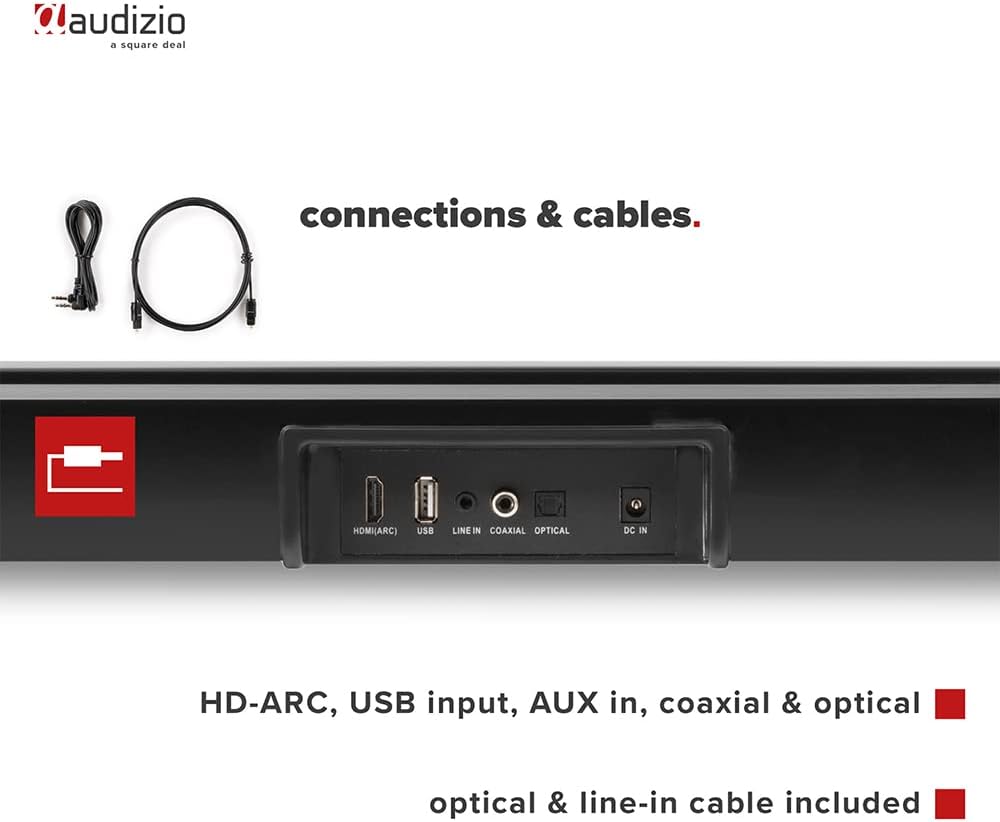
Сурет: артқы view of the Audizio SB85 Soundbar showing various connection ports: HDMI (ARC), USB, Line In, Coaxial, and Optical. Includes optical and line-in cables.
Пайдалану нұсқаулары
1. Қуатты қосу/өшіру
Құрылғыны қосу немесе өшіру үшін дыбыс тақтасындағы немесе қашықтан басқару құралындағы Қуат түймесін басыңыз.
2. Кіріс көзін таңдау
Press the 'MODE' button on the soundbar or the remote control repeatedly to cycle through the available input sources: HDMI (ARC), Optical, Coaxial, AUX, USB, and Bluetooth. The selected input will be shown on the front LED display.
3. Дыбыс деңгейін басқару
Use the 'VOL+' and 'VOL-' buttons on the soundbar or the remote control to adjust the volume. The 'MUTE' button on the remote control will temporarily silence the audio.
4. Bluetooth жұптастыру
- Switch the soundbar to Bluetooth mode using the 'MODE' button. The LED display will show 'BT'.
- Смартфонда немесе планшетте Bluetooth қосыңыз және қолжетімді құрылғыларды іздеңіз.
- Select 'Audizio SB85' from the list of devices.
- Once paired, the soundbar will indicate a successful connection, and you can stream audio wirelessly.
5. USB арқылы ойнату
MP3 дыбысы бар USB флэш-дискісін салыңыз files into the USB port. The soundbar will automatically switch to USB mode and begin playing the music. Use the remote control to navigate tracks (play/pause, next/previous).
6. Қашықтан басқару функциялары
The remote control provides full functionality for the soundbar, including power, mode selection, volume, mute, and playback controls for USB and Bluetooth modes.
Техникалық қызмет көрсету
Тазалау
Wipe the soundbar and subwoofer surfaces with a soft, dry cloth. Do not use abrasive cleaners, waxes, or solvents as they may damage the finish. Ensure the device is unplugged before cleaning.
Сақтау
Егер құрылғыны ұзақ уақыт сақтасаңыз, оны розеткадан суырып, салқын, құрғақ жерде, тікелей күн сәулесінен және жоғары температурадан алыс жерде сақтаңыз.
Ақаулықтарды жою
| Мәселе | Ықтимал себебі | Шешім |
|---|---|---|
| Қуат жоқ | Қуат кабелі қосылмаған; Розетка ақаулы | Қуат кабелінің қосылымын тексеріңіз; басқа розетканы қолданып көріңіз. |
| Дыбыс жоқ | Incorrect input selected; Volume too low; Mute activated; Cable connection loose | Select correct input source; Increase volume; Deactivate mute; Check all audio cable connections. |
| Bluetooth қосылмайды | Soundbar not in Bluetooth mode; Device too far; Device already connected to another unit | Switch soundbar to BT mode; Move device closer; Disconnect from other devices and try again. |
| Қашықтан басқару пульті жұмыс істемейді | Батареялар таусылған; Пульт пен саундбар арасындағы кедергі | Батареяларды ауыстырыңыз; Кез келген кедергілерді алып тастаңыз. |
Техникалық сипаттамалар
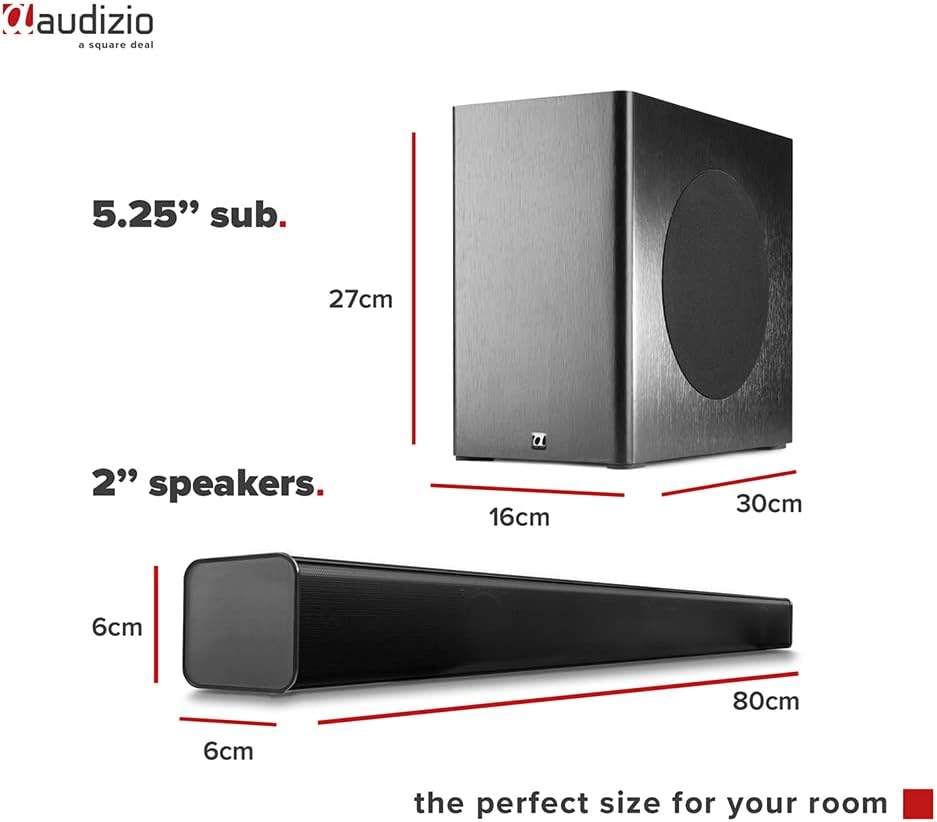
Image: Diagram showing the dimensions of the Audizio SB85 Soundbar and its subwoofer.
- Шығу қуаты: 150 Вт (макс.)
- Динамик конфигурациясы: 4 speakers (2x 2cm range, 2x 2cm tweeter)
- Сабвуфердің көлемі: 5.25 дюйм
- Жиілік диапазоны: 50 Гц - 20 000 Гц
- Максималды SPL: 125 дБ
- Қосылу мүмкіндігі: Bluetooth 5.0, HDMI (ARC), USB, Line In (AUX), Coaxial, Optical
- Аудио шығыс режимі: Стерео
- Үйлесімді құрылғылар: MP3 Player, Smartphone, TV
- Қуат көзі: 230 Vac/50 Hz (via electric cable)
- Soundbar өлшемдері (L x W x H): 80 x 6 x 6 см
- Сабвуфер өлшемдері (L x W x H): 16 x 30 x 27 см
- Жалпы салмағы: 3.9 кг
- Модель нөмірі: 100.292
Кепілдік және қолдау
Кепілдік туралы ақпарат немесе техникалық қолдау алу үшін сатып алу кезінде берілген құжаттаманы қараңыз немесе сатушыға хабарласыңыз. Кез келген кепілдік талаптары үшін сатып алуды растайтын құжатты сақтаңыз.