
1. Қауіпсіздік туралы ақпарат
Read all safety warnings and instructions carefully before using this appliance. Failure to follow the warnings and instructions may result in electric shock, fire, or serious injury.
- томды қамтамасыз етіңізtagбағалау жапсырмасында көрсетілген e электр қуатының көлеміне сәйкес келедіtage сіздің үйіңізде.
- Қыздырғышты жаппаңыз. Қызып кету орын алуы мүмкін.
- Keep flammable materials (e.g., curtains, furniture) at least 1 meter (3 feet) away from the heater.
- Do not use the heater in bathrooms, laundry areas, or similar indoor locations where it may come into contact with water. The appliance has an IP24 rating, meaning it is protected against splashing water, but it is not fully waterproof.
- Пайдаланбаған кезде немесе тазалау алдында қыздырғышты әрқашан желіден ажыратыңыз.
- Do not operate the heater with a damaged cord or plug, or after the appliance malfunctions or has been dropped or damaged in any manner.
- Бұл құрылғы физикалық, сенсорлық немесе ақыл-ой қабілеттері шектеулі немесе тәжірибесі мен білімі жоқ адамдардың (соның ішінде балалар) пайдалануына арналмаған, егер олардың қауіпсіздігіне жауапты адамның қадағалауынсыз немесе құрылғыны пайдалану туралы нұсқау болмаса.
- Балалардың құрылғымен ойнамауын қадағалау керек.
2. Өнім аяқталдыview
The Duux Edge 2000 Smart Convector Heater is designed to provide efficient heating for rooms up to 30 m². It features smart control via a smartphone app, a remote control, and can be operated manually. The heater offers both freestanding and wall-mounted installation options.

Image 2.1: Duux Edge 2000 Smart Convector Heater with its accompanying smartphone application interface.

Image 2.2: The Duux Edge 2000 Smart Convector Heater positioned freestanding in a contemporary living space.
3. Орнату және орнату
3.1. Пакет мазмұны
Барлық компоненттердің бар екенін тексеріңіз:
- Duux Edge 2000 Convector Heater
- Қашықтан басқару құралы
- Feet for freestanding use (if applicable)
- Wall mounting brackets and screws (if applicable)
- Нұсқаулық
3.2. Дербес орнату
- Қыздырғышты және барлық керек-жарақтарды абайлап ораудан шығарыңыз.
- Берілген аяқтарды бұрандаларды пайдаланып, жылытқыштың түбіне бекітіңіз. Олардың мықтап бекітілгеніне көз жеткізіңіз.
- Place the heater on a stable, level surface, ensuring adequate clearance from walls and furniture (minimum 1 meter).

Image 3.1: Mounting brackets and screws, which may be used for either wall mounting or attaching feet for freestanding use.
3.3. Қабырғаға орнату
- Select a suitable wall location, ensuring it is clear of obstructions and at least 1 meter from flammable materials.
- Using the provided wall mounting brackets, mark the drilling points on the wall.
- Тесіктерді бұрғылаңыз және қабырға тығындарын салыңыз (қажет болса).
- Secure the brackets to the wall with screws.
- Carefully hang the heater onto the installed wall brackets, ensuring it is stable and level.
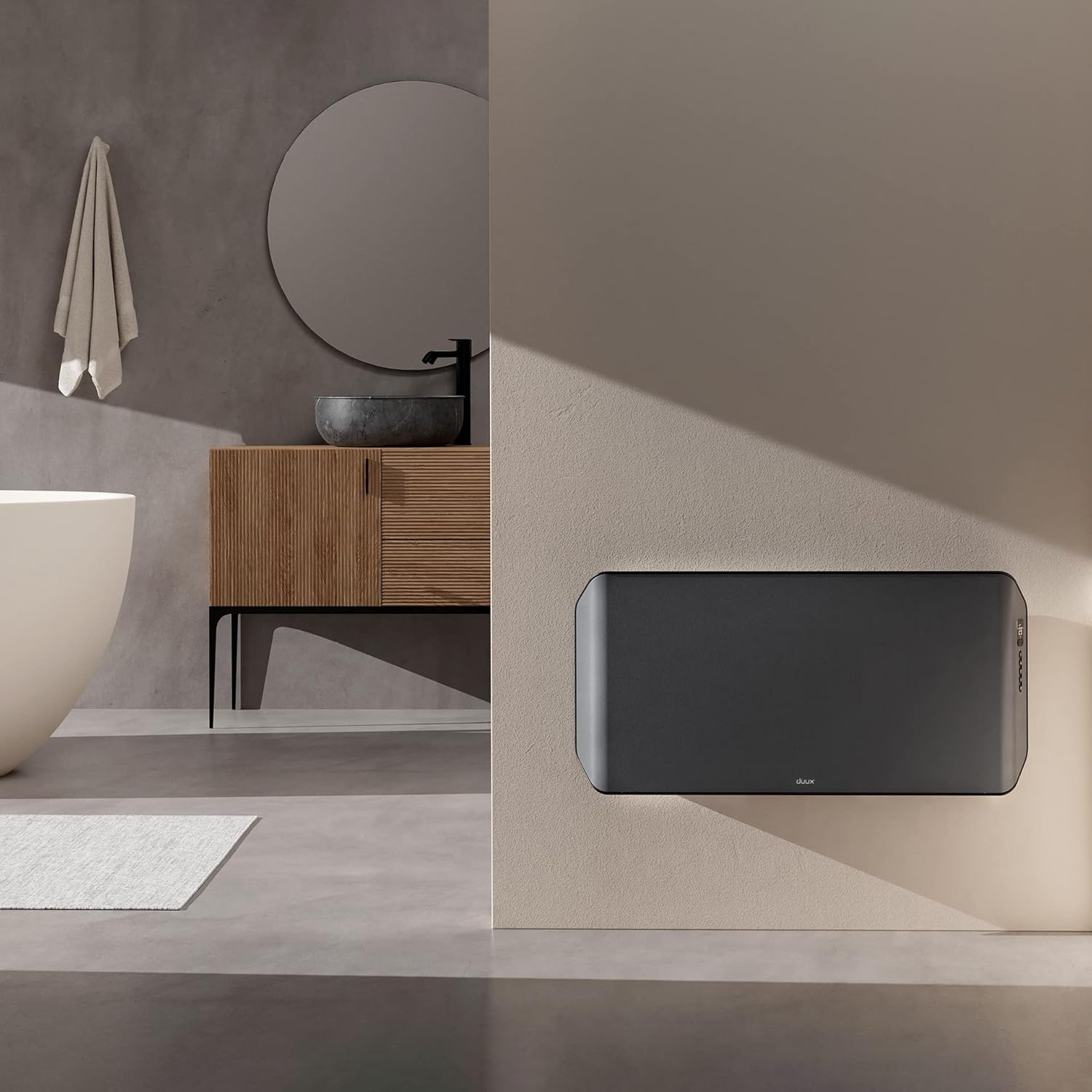
Image 3.2: The Duux Edge 2000 Smart Convector Heater installed on a wall in a bathroom setting.
3.4. Қуат қосылымы
Plug the power cord into a suitable electrical outlet. Ensure the outlet meets the power requirements of the heater (240V, 2000W).
4. Қыздырғышты пайдалану
4.1. Басқару тақтасы үстіндеview
The control panel is located on the side of the heater and features a digital display and several buttons for manual operation.

4.1-сурет: жақыннан view of the Duux Edge 2000 heater's integrated control panel.

Image 4.2: A hand demonstrating interaction with the heater's control panel buttons.
4.2. Қашықтан басқару функциялары
Қашықтан басқару құралы қашықтықтан параметрлерді ыңғайлы реттеуге мүмкіндік береді.
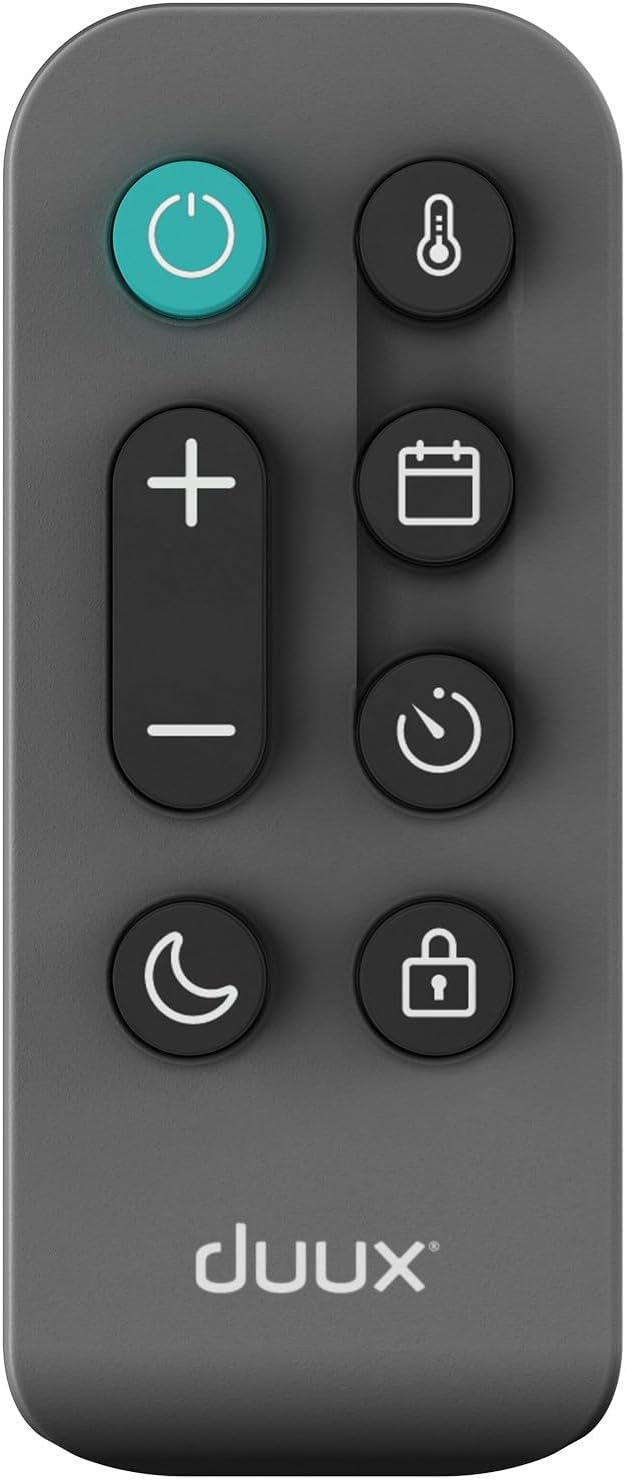
Image 4.3: The remote control for the Duux Edge 2000 Smart Convector Heater, showing various function buttons.
- Қуат түймесі: Жылытқышты қосады немесе өшіреді.
- Температура +/-: Қажетті бөлме температурасын реттейді.
- Режим түймесі: Cycles through available heating modes (e.g., Eco, Comfort).
- Таймер түймесі: Автоматты түрде өшіру үшін таймерді орнатады.
- Балалардан қорғау түймесі: Activates or deactivates the child lock function.
- Night Mode Button: Activates a low-light display mode for nighttime use.
4.3. Смарт қолданбаны басқару
The Duux Edge 2000 can be controlled via a smartphone app, offering advanced features and scheduling.

Image 4.4: A user interacting with the Duux smartphone application to manage heater settings.
- Download the Duux app from your smartphone's app store.
- Follow the in-app instructions to pair your heater with your device.
- Once paired, you can control temperature, modes, set schedules, and monitor the heater's status remotely.
- The app is compatible with Amazon Alexa and Google Assistant for voice control.
5. Техникалық қызмет көрсету
Тұрақты техникалық қызмет көрсету қыздырғыштың оңтайлы өнімділігі мен ұзақ қызмет ету мерзімін қамтамасыз етеді.
5.1. Тазалау
- Тазалау алдында қыздырғышты розеткадан ажыратып, оны толығымен суытыңыз.
- Сыртқы беттерді жұмсақ шүберекпен сүртіңіз, damp мата. Абразивті тазартқыштарды немесе еріткіштерді қолданбаңыз.
- Use a vacuum cleaner with a brush attachment to gently clean dust from the air intake and outlet grilles.
- Қыздырғышты суға батырмаңыз немесе судың ішкі бөлікке тамып кетуіне жол бермеңіз.

Image 5.1: Top-rear view of the heater, highlighting the air vents that require periodic cleaning.
5.2. Сақтау
Қыздырғышты ұзақ уақыт сақтасаңыз, оны мұқият тазалап, құрғақ, салқын жерде бастапқы қаптамасында сақтаңыз.
6. Ақаулықтарды жою
If you encounter issues with your Duux Edge 2000 heater, refer to the following common problems and solutions:
| Мәселе | Ықтимал себебі | Шешім |
|---|---|---|
| Жылытқыш қосылмайды. | Қуат көзі жоқ; Қуат түймесі басылмады; Қызып кетуден қорғау белсендірілді. | Check power cord connection and wall outlet; Press the power button; Unplug, wait 30 minutes, then plug back in. |
| Жылытқыш қосулы, бірақ жылу шығармайды. | Temperature setting too low; Eco mode active; Room temperature already reached. | Increase the target temperature; Switch to a higher heating mode; The heater will resume heating when the room temperature drops. |
| Smart app cannot connect to the heater. | Wi-Fi signal weak; Incorrect pairing procedure; Router issues. | Ensure heater is within Wi-Fi range; Re-attempt pairing process; Restart your Wi-Fi router. |
| Қашықтан басқару пульті жұмыс істемейді. | Батареялар таусылды; Қашықтан басқару құралы мен жылытқыш арасындағы кедергі. | Replace remote control batteries; Ensure a clear line of sight to the heater's receiver. |
Осы шешімдерді қолданып көргеннен кейін мәселе жойылмаса, тұтынушыларды қолдау қызметіне хабарласыңыз.
7. Техникалық сипаттамалар
| Ерекшелік | Техникалық сипаттама |
|---|---|
| Бренд | Duux |
| Үлгі нөмірі | DXCH14 |
| Түс | 2000w Gray |
| Қуат | 2000 Вт |
| Тtage | 240 вольт |
| Автоматты өшіру | Иә |
| Жылдамдықтардың саны | 2 |
| Арнайы мүмкіндіктер | Төмен энергия тұтыну |
| Өнімнің салмағы | 7.85 кг |
| Өлшемдері (L x W x H) | 88 см x 47 см x 12 см |
| Ішкі/сыртқы пайдалану | Ішкі |
| Монтаждау түрі | Қабырғаға орнатылатын немесе дербес |
| Ұсынылатын бөлме түрі | Жуынатын бөлме (IP24 рейтингі бар) |
| Жылытумен қамту | 30 м² дейін |
8. Кепілдік және қолдау
For warranty information and customer support, please refer to the documentation included with your product or visit the official Duux webсайт. Кепілдік шағымдары үшін сатып алуды растайтын құжатты сақтаңыз.