
1. Кіріспе
This manual provides detailed instructions for the installation, operation, and maintenance of your Podofo Double Din Car Stereo. This unit features a 7-inch touchscreen, Android 10.1 operating system, Wireless Apple CarPlay, Wired Android Auto, GPS navigation, Bluetooth, WiFi, USB connectivity, FM/RDS radio, and support for a backup camera. Please read this manual thoroughly before use to ensure proper functionality and safety.

Сурет: аяқталдыview of the Podofo Double Din Car Stereo in a vehicle dashboard, highlighting its main functionalities.
2. Орнату және орнату
2.1 Пакет мазмұны
Орнатпас бұрын, барлық компоненттердің бар-жоғын тексеріңіз:
- Podofo Double Din Car Stereo Unit
- Сақтық көшірме камерасы
- Қуат кабелі
- GPS антеннасы
- Камераның кіріс кабелі
- RCA Input and Output Cables
- 2 USB кабелі
- Screw/Metal Frame for installation
- Нұсқаулық (бұл құжат)

Сурет: Өнім бумасының мазмұны.
2.2 Өлшемдері
The installation size of the unit is 178mm x 103mm. The depth is 60mm. Ensure your vehicle's dashboard opening is compatible with these dimensions for a proper fit.
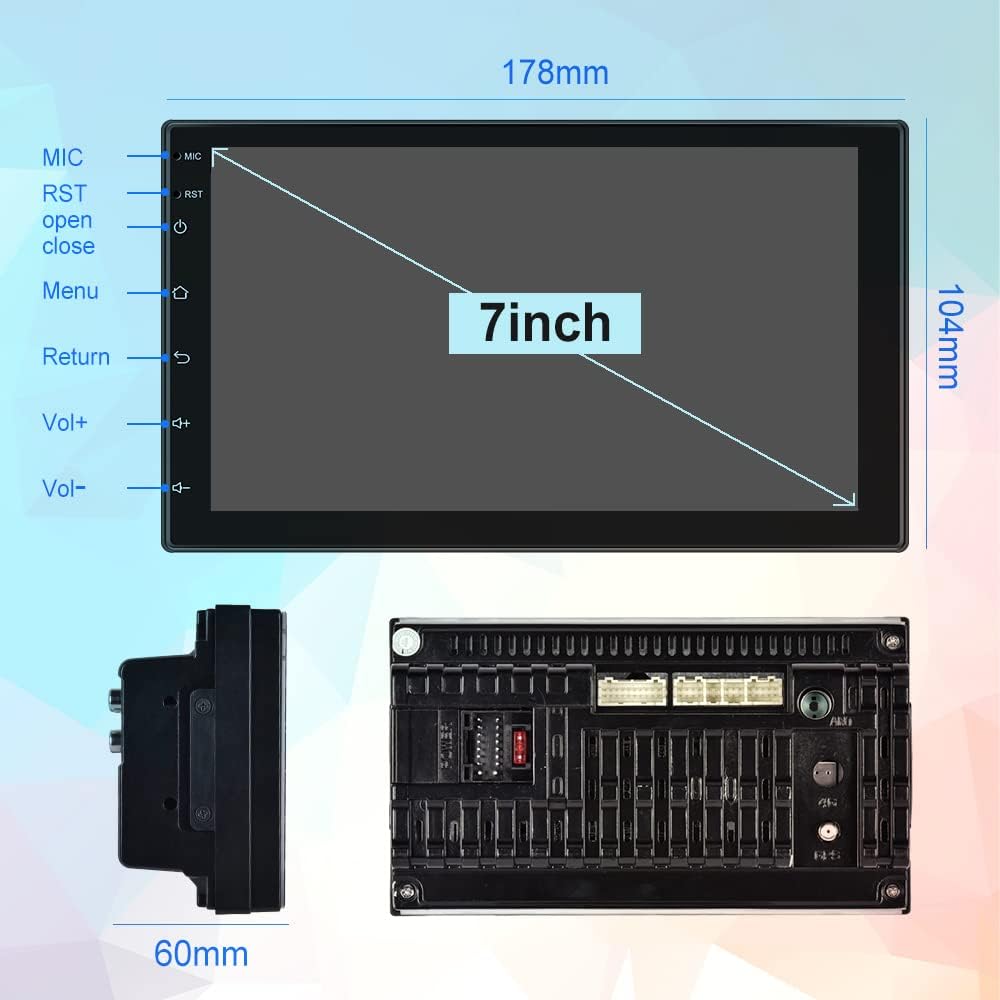
Image: Physical dimensions of the head unit.
2.3 Электр қосу схемасы
Сымдарды дұрыс жалғау үшін келесі диаграмманы қараңыз. Дұрыс емес сымдар құрылғыны немесе көлігіңіздің электр жүйесін зақымдауы мүмкін. Егер сенімді болмасаңыз, кәсіби орнатушыға хабарласыңыз.
- Yellow (B+): Constant Power Supply (+12V)
- Қызыл (ACC): Ignition Switch (+12V)
- Қара (GND): Жердегі сым
- Orange (ILL): Illumination Backlight
- Blue (ANT CONT): Автоматты антенна қуаты
- Brown (SW1) & Pink (SW2): Steering Wheel Control (connect to vehicle's steering wheel control wires)
- White/White-Black: Алдыңғы сол жақ динамик (+/-)
- Gray/Gray-Black: Алдыңғы оң жақ динамик (+/-)
- Green/Green-Black: Артқы сол жақ динамик (+/-)
- Purple/Purple-Black: Артқы оң жақ динамик (+/-)
- Кері енгізу: Connect to vehicle's reverse light signal for backup camera activation.
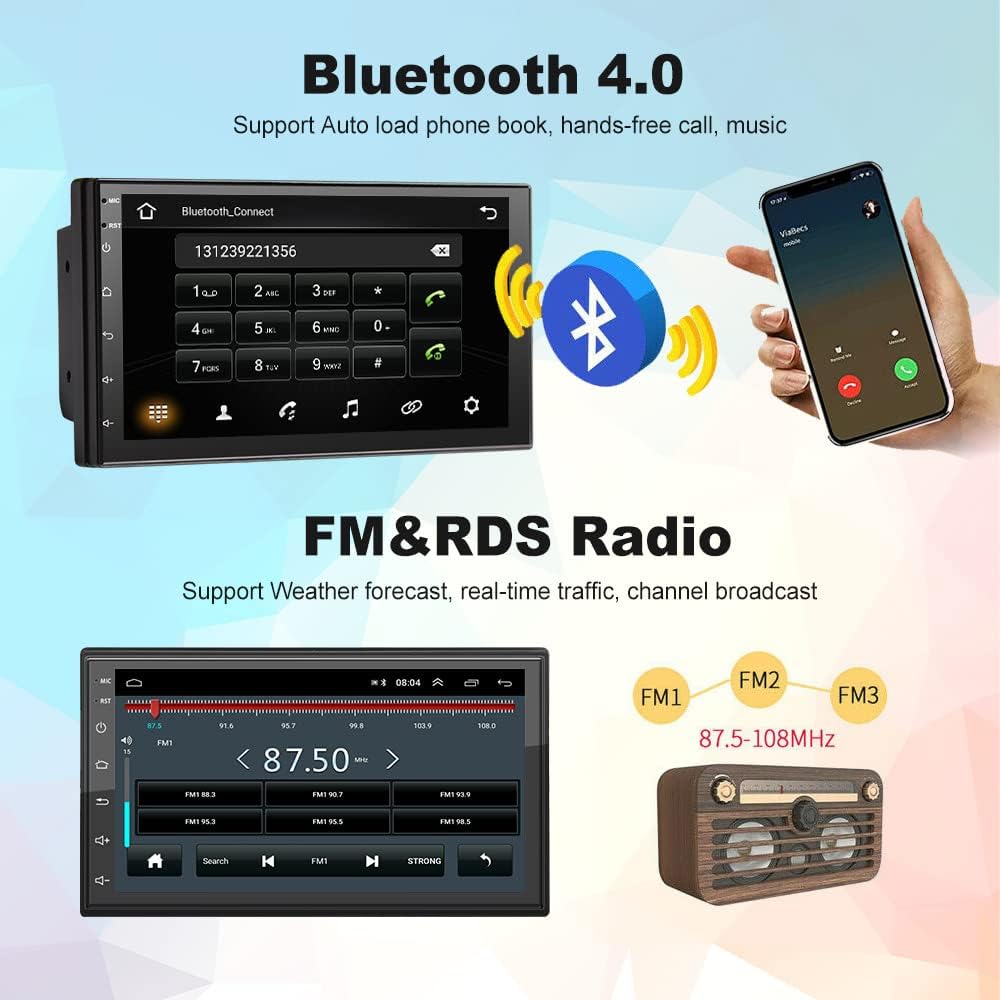
Image: Comprehensive wiring diagram for the car stereo.
2.4 Бастапқы қуат қосу
After completing all wiring, turn on your vehicle's ignition. The unit should power on automatically. Follow any on-screen prompts for initial setup.
3. Пайдалану нұсқаулары
3.1 Wireless Apple CarPlay / Wired Android Auto
This unit supports both wireless Apple CarPlay and wired Android Auto. Connect your smartphone to access navigation, music, calls, and more directly on the stereo's screen.
- Сымсыз CarPlay қосылымы:
- Ensure Bluetooth is enabled on your iPhone and the car stereo.
- Pair your iPhone with the car stereo via Bluetooth (device name: CarBT, PIN: 0000).
- Open the 'ZLINK' application on the car stereo.
- If the connection is not successful, manually connect your iPhone to the car stereo's WiFi hotspot. Go to Car Settings > Android Settings > Network & Internet > Hotspot & tethering > Wi-Fi hotspot. Turn on the hotspot and note the network name (e.g., AndroidAP_B442). Connect your iPhone to this WiFi network.
- Once connected via WiFi, the ZLINK app should prompt you to use CarPlay. Confirm the connection.
- After manually connecting to the WiFi of the vehicle, delete the history record in the ZLINK app and then click ZLINK again to connect.
- Сымды Android Auto қосылымы: Connect your Android phone to the stereo via a USB cable. Follow the on-screen prompts to enable Android Auto.
Video: Demonstrates the steps to connect an Android Double Din Car Stereo, including Bluetooth and ZLINK connections for smartphone integration.

Image: Wireless Apple CarPlay and Android Auto interfaces.
3.2 Bluetooth қосылымы
The unit features Bluetooth 4.2 for hands-free calling, music streaming, and automatic phonebook loading. To connect:
- Go to the Bluetooth application on the stereo.
- Enable Bluetooth on your smartphone and search for 'CarBT'.
- Pair the devices using the default PIN '0000' if prompted.
- Once connected, you can make/receive calls and play audio through the stereo.
Image: Bluetooth connection interface on the car stereo.
3.3 GPS Navigation & WiFi
The stereo includes built-in GPS navigation and WiFi connectivity.
- GPS навигациясы: Supports online and offline maps. You can download offline maps directly from the Play Store.
- Сымсыз дәлдiк: Connect to your phone's hotspot or a local WiFi network to browse websites and download apps like Chrome, Waze, IGO, Sygic, etc.
3.4 FM/RDS радиосы
Access FM radio stations and receive RDS (Radio Data System) information, which displays station names, program content, and other relevant data.
Image: FM radio interface with RDS display.
3.5 Руль дөңгелегін басқару (SWC)
The unit supports learning functions for your original car's steering wheel controls. This allows you to control the stereo's functions (e.g., volume, track skip) directly from your steering wheel for convenience and safety.
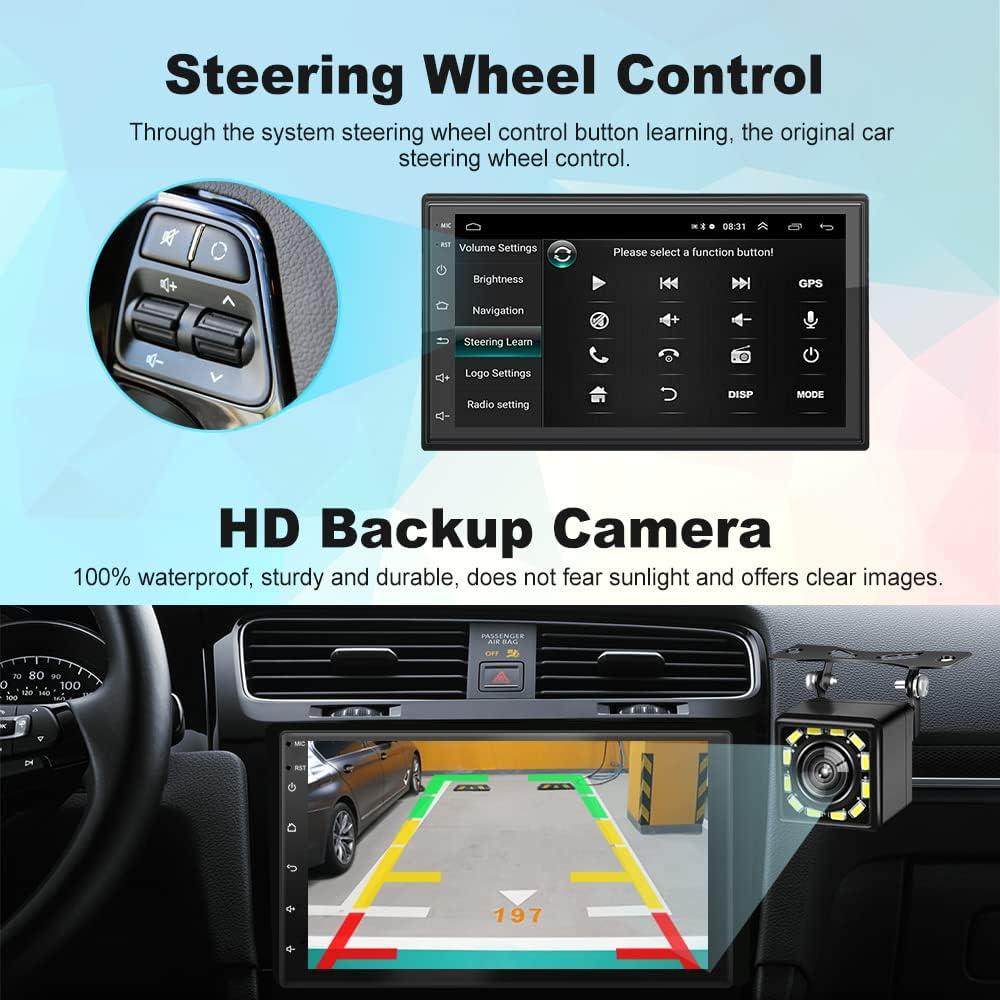
Image: Steering Wheel Control setup interface.
3.6 HD Backup Camera
The included 12-light HD backup camera is waterproof and provides high-definition night vision. When reversing, the stereo automatically switches to display the camera's feed, showing the area behind your vehicle.
Image: Backup camera view on the car stereo display.
3.7 Экранды бөлу функциясы
The split-screen feature allows you to run two applications simultaneously, such as navigation and music playback, without performance issues.

Image: Split Screen functionality displaying two applications simultaneously.
3.8 10-Band EQ Settings
Adjust the audio output to your preference with the integrated 10-band equalizer. This allows for fine-tuning of sound effects for each seat in the car.
Image: 10-band EQ settings interface.
4. Техникалық қызмет көрсету
Көлік стереосының ұзақ қызмет етуі және оңтайлы жұмыс істеуі үшін келесі техникалық қызмет көрсету нұсқауларын орындаңыз:
- Тазалау: Use a soft, dry cloth to clean the touchscreen and unit exterior. Avoid abrasive cleaners or solvents.
- Бағдарламалық құрал жаңартулары: Мерзімді түрде өндірушіні тексеріңіз website or the unit's settings for available software updates to improve performance and add new features.
- Температура: Құрылғыны шамадан тыс температураға, ұзақ уақыт бойы тікелей күн сәулесіне немесе шамадан тыс ылғалдылыққа ұшыратпаңыз.
5. Ақаулықтарды жою
If you encounter issues with your Podofo Car Stereo, refer to the following common problems and solutions:
- Қуат жоқ:
- Check the yellow (B+) and red (ACC) power wires for proper connection to a constant 12V and ignition 12V source, respectively.
- Ensure the black (GND) wire is securely connected to a vehicle ground.
- Verify that the fuse on the power cable is intact. Replace if blown.
- Дыбыс жоқ:
- Check all speaker wire connections (White, Gray, Green, Purple and their black-striped counterparts) to ensure they are correctly connected to your vehicle's speakers.
- Дыбыс деңгейі өшірілмегеніне немесе ең төменгі деңгейге қойылмағанына көз жеткізіңіз.
- Verify that the correct audio source is selected.
- Wireless CarPlay/Android Auto Connection Issues:
- Ensure Bluetooth is on and paired correctly.
- If using wireless CarPlay, ensure your iPhone is connected to the stereo's WiFi hotspot as described in section 3.1.
- Телефоныңызды да, көлік стерео жүйесін де қайта іске қосыңыз.
- Delete any existing Bluetooth/WiFi connections on both devices and attempt to reconnect.
- Руль дөңгелегін басқару элементтері жұмыс істемейді:
- Ensure the SW1 and SW2 wires are correctly connected to your vehicle's steering wheel control wires.
- Access the 'Steering Learn' function in the stereo's settings and follow the on-screen instructions to program the controls.
- Сақтық көшірме камерасы көрсетілмейді:
- Check the camera input cable connection to the stereo.
- Ensure the reverse input wire is correctly connected to your vehicle's reverse light signal.
- Verify the camera itself is powered and functioning.
If problems persist after attempting these solutions, please contact Podofo customer support.
6. Техникалық сипаттамалар
| Ерекшелік | Техникалық сипаттама |
|---|---|
| Бренд | Подофо |
| Үлгі | B09C2ZQLDW |
| Экран өлшемі | 7 дюйм |
| Операциялық жүйе | Android 10.1 |
| CPU | 8227L, 4-core 1.3GHz processor |
| Жад | 1 ГБ жедел жады + 16 ГБ ROM |
| Ажыратымдылық | 1024 x 600 |
| Қосылу технологиясы | USB, Bluetooth, WiFi |
| Bluetooth нұсқасы | 4.2 |
| Арнайы мүмкіндіктер | Wireless Apple CarPlay, Wired Android Auto, GPS Navigation, FM RDS, Backup Camera, Split Screen, Steering Wheel Control |
| Дыбысты шығару режимі | APE/FLAC/WAV/MP3/WMA және т.б. |
| Монтаждау түрі | Басқару тақтасына бекіту (қос динамигі) |
| Элемент салмағы | 941 грамм |
7. Кепілдік және қолдау
Your Podofo Double Din Car Stereo comes with a 2 жылдық кепілдік сатып алған күннен бастап. Бұл кепілдік қалыпты пайдалану кезіндегі өндірістік ақаулар мен ақауларды қамтиды.
For technical support, warranty claims, or any questions not covered in this manual, please contact Podofo customer service through the retailer where you purchased the product or visit the official Podofo webбайланыс ақпаратына арналған сайт.
Кепілдік мақсатында сатып алуды растайтын құжатты сақтаңыз.