
Кіріспе
This manual provides essential information for setting up, operating, maintaining, and troubleshooting your HP 2021 15.6-inch Full HD Laptop. This device is equipped with an Intel Celeron N4020 Processor, 8GB DDR4 RAM, and a 256GB Solid State Drive, designed for everyday computing tasks.
Қорапта не бар
Carefully unpack your new HP laptop and ensure all components are present.
- HP 15 ноутбугы
- 45 Вт ақылды айнымалы ток адаптері
- Documentation (Setup poster)

Image: Contents of the HP laptop box, showing the laptop, AC adapter, and setup poster.
Орнату
1. Бастапқы қуат қосу және зарядтау
Before first use, connect the AC power adapter to the laptop's power port and then to a wall outlet. Allow the battery to charge sufficiently before disconnecting the power adapter.
2. Windows 10 S Mode Setup
Follow the on-screen prompts to complete the initial Windows 10 S mode setup. This includes selecting your region, keyboard layout, connecting to a Wi-Fi network, and signing in with or creating a Microsoft account.
3. Activating Microsoft Office 365
Your laptop includes a 1-year subscription to Microsoft Office 365. To activate:
- Кез келген Office қосымшасын іске қосыңыз (мысалы, Word, Excel).
- Start activation by signing in with your Microsoft account. Create one if you do not have one.
- «Office қызметін белсендіру» түймесін басыңыз.
- Sign in to your account and follow the prompts.
- Complete steps 1, 2, and 3 as indicated.
- Click "Refresh" once Office is ready.
- Open a document and accept the license agreement.
4. Switching Out of Windows 10 S Mode (Optional)
Windows 10 S mode is designed for security and performance, limiting app installations to the Microsoft Store. If you need to install apps from outside the Microsoft Store, you can switch to regular Windows 10 Home or Pro. This process is irreversible.
- Windows 10 жүйесінде S режимінде жұмыс істейтін компьютерде ашыңыз Параметрлер > Жаңарту және қауіпсіздік > Белсендіру.
- «Windows 10 Home жүйесіне ауысу» немесе «Windows 10 Pro жүйесіне ауысу» бөлімінде таңдаңыз Дүкенге барыңыз. (Ensure you do not click a "Go to the Store" link in an "Upgrade your edition of Windows" section if present.)
- Microsoft дүкенінде пайда болатын "S режимінен шығу" (немесе осыған ұқсас) бетінде таңдаңыз Алу түймесі.
- After you see a confirmation message on the page, you will be able to install apps from outside of the Microsoft Store.
Сурет: жағы view of the HP laptop highlighting the SuperSpeed USB Type-C, SuperSpeed USB Type-A, HDMI 1.4b, RJ-45 Ethernet port, headphone/microphone combo, and media card reader.
Пайдалану нұсқаулары
Пернетақта және сенсорлық тақта
The laptop features a full-size keyboard with an integrated numeric keypad for enhanced productivity. The precision touchpad supports multi-touch gestures for intuitive navigation.
Перифериялық құрылғыларды қосу
- USB құрылғылары: Connect USB devices such as external drives, mice, or keyboards to the SuperSpeed USB Type-A or Type-C ports.
- Сыртқы дисплей: Use the HDMI 1.4b port to connect an external monitor or projector.
- Желі: Сымды желілік қосылым үшін Ethernet кабелін RJ-45 портына қосыңыз.
- Аудио: Plug headphones or an external microphone into the headphone/microphone combo jack.
Webкамера және микрофон
The integrated HP True Vision 720p HD camera and dual array digital microphones are ready for online meetings and video calls. Ensure appropriate privacy settings are configured in Windows.
Медиа карта оқу құралы
Insert compatible SD media cards into the multi-format SD media card reader to access photos and files.

Image: The HP laptop's display area, highlighting the HP True Vision 720p HD Camera, rich 6.5 mm micro-edge Full HD IPS display, Intel UHD Graphics, and tuned stereo speakers.
Техникалық қызмет көрсету
Батареяға күтім жасау
To prolong battery life, avoid fully discharging the battery frequently. For optimal performance, use the provided HP 45W Smart AC power adapter. The laptop supports HP Fast Charge, allowing it to charge up to 50% in approximately 45 minutes when powered off.
Ноутбукті тазалау
Аздап жұмсақ, түксіз матаны пайдаланыңыз dampдисплейді тазалау үшін сумен немесе экран тазалағышпен жабылған. Пернетақта мен шасси үшін жұмсақ, құрғақ матаны пайдаланыңыз. Қатты химиялық заттардан немесе абразивті материалдардан аулақ болыңыз.
Бағдарламалық құрал жаңартулары
Regularly check for and install Windows updates to ensure your system has the latest security patches and performance improvements. You can find these in Параметрлер > Жаңарту және қауіпсіздік > Windows жаңартуы.
Ақаулықтарды жою
Ноутбук қосылмайды
- Айнымалы ток адаптерінің ноутбукке де, жұмыс істейтін қуат розеткасына да сенімді жалғанғанын тексеріңіз.
- Басқа құрылғыны қосу арқылы розетканың жұмыс істеп тұрғанын тексеріңіз.
- Батарея толығымен таусылған болса, ноутбук қосылмас бұрын зарядтауға бірнеше минут кетуі мүмкін.
Battery Not Holding Charge / Only Works When Plugged In
- Check the battery health status in Windows settings.
- Ensure all drivers, especially power management drivers, are up to date.
- If the issue persists, the battery may require service or replacement. Contact HP Support for assistance.
Wi-Fi қосылымы жоқ
- Windows параметрлерінде Wi-Fi қосылғанын тексеріңіз.
- Маршрутизатор мен модемді қайта іске қосыңыз.
- Ensure Wi-Fi drivers are installed and up to date.
Мәселелерді көрсету
- If the screen is blank, try connecting an external monitor to determine if the issue is with the laptop's display or graphics card.
- Функционалдық пернелерді пайдаланып дисплей жарықтығын реттеңіз.
Күрделі мәселелер үшін HP қолдау бөлімін қараңыз webсайтына өтіңіз немесе тұтынушыларға қызмет көрсетуге хабарласыңыз.
Техникалық сипаттамалар
Below are the key technical specifications for your HP 2021 15.6" FHD Laptop:
| Ерекшелік | Техникалық сипаттама |
|---|---|
| Бренд | HP |
| Модель атауы | HP 2021 |
| Экран өлшемі | 15.6 дюйм |
| Дисплей ажыратымдылығы | FHD (1920 x 1080) IPS, Anti-Glare |
| Процессор | Intel Celeron N4020 (up to 2.8 GHz, 2 Cores, 4MB Cache) |
| ЖЖҚ жады | 8 ГБ DDR4 SDRAM |
| Сақтау | 256 ГБ SSD (қатты күйдегі диск) |
| Графика | Intel UHD графикасы |
| Операциялық жүйе | Windows 10 S |
| Порттар | 1x SuperSpeed USB Type-C, 2x SuperSpeed USB Type-A, 1x HDMI 1.4b, 1x RJ-45, 1x Headphone/Microphone Combo, 1x AC Smart Pin |
| Сымсыз қосылым | 802.11a/b/g/n/ac Wi-Fi, Bluetooth |
| Webкамера | Біріктірілген қос жиым сандық микрофондары бар HP True Vision 720p HD камерасы |
| Батарея | 3-Cell, 41 WHr, Integrated Lithium Ion |
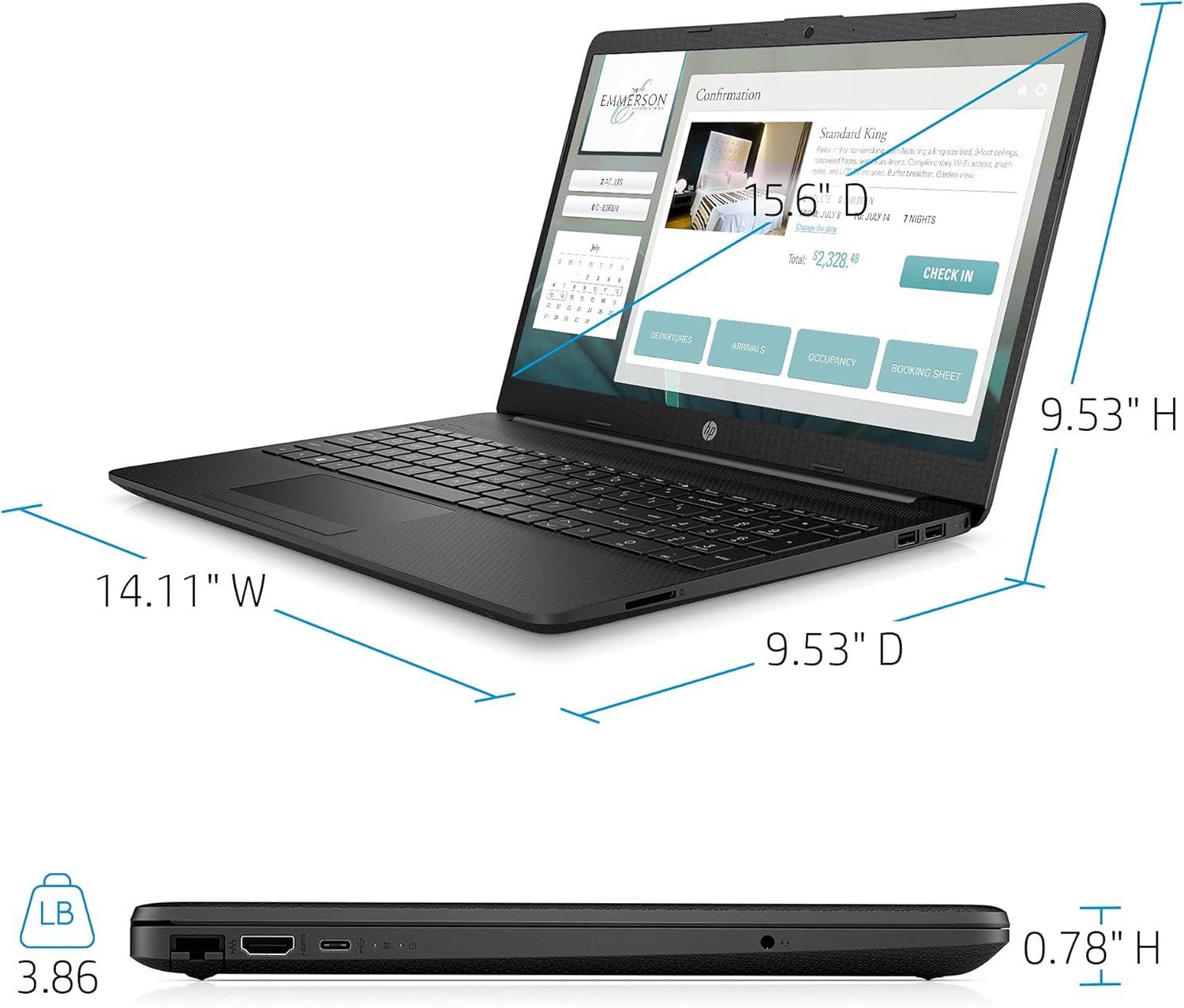
| Салмағы | 3.86 фунт |
| Түс | Қара |

Image: Physical dimensions of the HP laptop (14.11" W x 9.53" D x 0.78" H) and weight (3.86 lbs).
Кепілдік туралы ақпарат
Your HP 2021 15.6" FHD Laptop comes with a limited manufacturer's warranty. Please refer to the documentation included in the box for specific terms, conditions, and duration of your warranty. Keep your proof of purchase for warranty claims.
Қолдау
For further assistance, technical support, or service inquiries, please visit the official HP support website or contact HP customer service directly. You can find contact information and resources on the HP webсайт: