
1. Кіріспе
Thank you for choosing the SNDWAY SW-TG100 Laser Distance Meter. This device is designed for precise and rapid measurement of distances, areas, and volumes. It utilizes laser technology to provide accurate readings up to 100 meters, making it an essential tool for professionals and DIY enthusiasts in construction, interior design, and various other fields. Please read this manual carefully before using the device to ensure safe and optimal operation.
2. Қауіпсіздік туралы ақпарат
This device emits a Class 2 laser. Observe the following safety precautions:
- Do not stare into the laser beam directly. Direct exposure to the laser can cause eye damage.
- Лазер сәулесін адамдарға немесе жануарларға бағыттамаңыз.
- Құрылғыны бөлшектемеңіз немесе өзгертпеңіз. Unauthorized modifications can lead to hazardous laser radiation exposure.
- Құрылғыны балалардың қолы жетпейтін жерде сақтаңыз.
- Құрылғыны тек осы нұсқаулықта сипатталғандай мақсаты бойынша пайдаланыңыз.
- Avoid using the device in explosive environments or near flammable materials.
3. Өнім аяқталдыview
The SNDWAY SW-TG100 is a compact and ergonomic laser distance meter. Below is an image illustrating the device's general appearance.
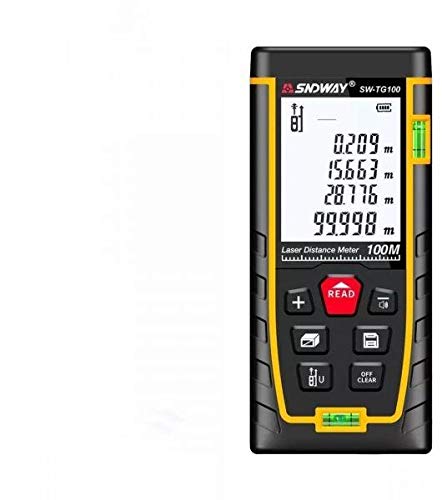
1-сурет: Алдыңғы view of the SNDWAY SW-TG100 Laser Distance Meter. The image shows the device's display screen, measurement buttons, and the laser emission/reception lens.
Әдетте негізгі компоненттерге мыналар жатады:
- СКД дисплей: Shows measurement results, unit, battery status, and function indicators.
- Өлшеу түймесі: Initiates single or continuous measurements.
- Функция түймелері: For selecting measurement modes (distance, area, volume, Pythagorean, etc.), unit conversion, and saving data.
- Clear/Off Button: Clears the last measurement or turns the device off.
- Лазерлік апертура: Where the laser beam is emitted and received.
- Батарея бөлімі: (If applicable) For inserting or accessing batteries.
4. Орнату
4.1 Қуатты қосу/өшіру
- Қосу үшін: түймесін басыңыз [MEAS] түймесін қысқа уақыт басыңыз. Дисплей жанады.
- Қуатты өшіру үшін: түймесін басып тұрыңыз [CLEAR/OFF] button for a few seconds until the display turns off. The device will also automatically power off after a period of inactivity to conserve battery.
4.2 Батареяны орнату (қажет болса)
While the product specifications indicate no batteries are required, this typically implies an internal rechargeable battery. If your model requires external batteries, open the battery compartment cover located on the back or bottom of the device. Insert the specified battery type (e.g., AAA batteries) according to the polarity indicators (+/-). Close the compartment cover securely.
4.3 Бірлікті орнату
To change the measurement unit (e.g., meters, feet, inches), press the [БІРЛІК] қажетті құрылғы көрсетілгенше түймесін қайта-қайта басыңыз.
5. Пайдалану нұсқаулары
5.1 Бір арақашықтықты өлшеу
- Құрылғыны қосыңыз.
- Лазерді мақсатты бетке бағыттаңыз.
- түймесін басыңыз [MEAS] бір рет басыңыз. Лазер іске қосылады.
- түймесін басыңыз [MEAS] button again. The measurement will be taken, and the result will appear on the display.
5.2 Ауданды өлшеу
- түймесін басыңыз [FUNCTION] button until the area measurement icon (usually a square or rectangle) appears on the display.
- Measure the first side (e.g., length) by pointing the laser and pressing [MEAS].
- Measure the second side (e.g., width) by pointing the laser and pressing [MEAS] қайтадан.
- Құрылғы аумақты автоматты түрде есептеп, көрсетеді.
5.3 Көлемді өлшеу
- түймесін басыңыз [FUNCTION] button until the volume measurement icon (usually a cube) appears on the display.
- Measure the length by pointing the laser and pressing [MEAS].
- Measure the width by pointing the laser and pressing [MEAS].
- Measure the height by pointing the laser and pressing [MEAS].
- Құрылғы дыбыс деңгейін автоматты түрде есептеп, көрсетеді.
5.4 Үздіксіз өлшеу (бақылау)
This mode allows for dynamic measurement, displaying the distance in real-time as you move the device.
- түймесін басып тұрыңыз [MEAS] button (or press it twice quickly, depending on the model) to enter continuous measurement mode.
- Move the device slowly towards or away from the target. The display will update with the current distance.
- түймесін басыңыз [MEAS] or [CLEAR/OFF] үздіксіз өлшеу режимінен шығу үшін.
6. Техникалық қызмет көрсету
- Тазалау: Жұмсақ пайдаланыңыз, damp құрылғыны тазалауға арналған шүберек casing. Do not use abrasive cleaners or solvents. Clean the laser lens carefully with a soft, lint-free cloth, similar to cleaning camera lenses.
- Сақтау орны: Store the device in a cool, dry place, away from direct sunlight and extreme temperatures. If storing for an extended period, remove any external batteries (if applicable).
- Әсерден аулақ болыңыз: Protect the device from drops and strong impacts, which can affect its accuracy and functionality.
7. Ақаулықтарды жою
| Мәселе | Ықтимал себебі | Шешім |
|---|---|---|
| Құрылғы қосылмайды. | Төмен немесе таусылған батарея. | Charge the device or replace batteries (if applicable). |
| Дәл емес өлшемдер. | Dirty laser lens; unstable measurement surface; strong light interference. | Clean the laser lens; ensure a stable measurement point; measure in less bright conditions if possible. |
| «Қате» хабары дисплейде көрсетіледі. | Measurement out of range; poor reflection from target. | Ensure target is within measurement range (0.05m-100m); use a reflective target plate if measuring against highly reflective or transparent surfaces. |
8. Техникалық сипаттамалар
| Ерекшелік | Мәлімет |
|---|---|
| Өндіруші | SNDWAY |
| Үлгі | SW-TG100 |
| Өлшем диапазоны | 100 метрге дейін |
| Өлшеу дәлдігі | Typically ±2mm (specific accuracy may vary based on conditions) |
| Өлшем бірліктері | m / ft / in |
| Лазерлік класс | Сынып 2 |
| Элемент салмағы | 260 г |
| Пакет өлшемдері | 16 x 8.8 x 5.2 см |
| Батареялар қажет | No (implies internal rechargeable battery) |
| Бірінші қол жетімді күн | 7 жылғы 2021 шілде |
9. Кепілдік және қолдау
SNDWAY products are manufactured to high-quality standards. For specific warranty information, please refer to the warranty card included with your product or contact the retailer from whom you purchased the device. For technical support, troubleshooting assistance beyond this manual, or service inquiries, please contact SNDWAY customer service through their official webсайты немесе сатып алумен бірге берілген байланыс ақпараты.
Кепілдік шағымдары үшін сатып алуды растайтын құжатты сақтаңыз.