
1. Кіріспе
The Avidsen HomeCam Battery is a 100% wireless outdoor surveillance camera designed for easy installation and robust home protection. Featuring 1080P Full HD resolution, a solar panel for continuous power, night vision, and two-way audio, this camera allows you to monitor your property remotely via a smartphone application without any subscription fees. This manual provides detailed instructions for setting up, operating, and maintaining your camera.
2. Қорапта не бар
Қаптамада барлық компоненттердің бар-жоғын тексеріңіз:
- 1 x Avidsen HomeCam Battery IP WiFi Camera
- 1 x Solar Panel (PV module)
- 2 x 18650 батареялар
- 1 x Camera Sealing Gasket
- Бекіту бұрандалары мен қабырға тығындары

Image: The Avidsen HomeCam Battery camera and its accompanying solar panel, unmounted, showing the main components included in the box.
3. Орнату нұсқаулығы
3.1. Батареяны орнату
- Камерадағы батарея бөлімін табыңыз.
- Insert the two 18650 batteries, ensuring correct polarity (+/-).
- Батарея бөлімін мықтап жабыңыз.
3.2. Камераны және күн панелін орнату
The camera and solar panel are designed for outdoor use and can be mounted separately or together. Choose a location that provides optimal sunlight exposure for the solar panel and a clear view камера үшін.
- Камераны орнату: The camera features an innovative magnetic mount for precise orientation. Secure the base of the mount to a wall using the provided screws and wall plugs. Attach the camera to the magnetic base and adjust its angle.
- Күн панелін орнату: Mount the solar panel in a location that receives direct sunlight for several hours a day. Connect the solar panel cable to the camera's charging port.
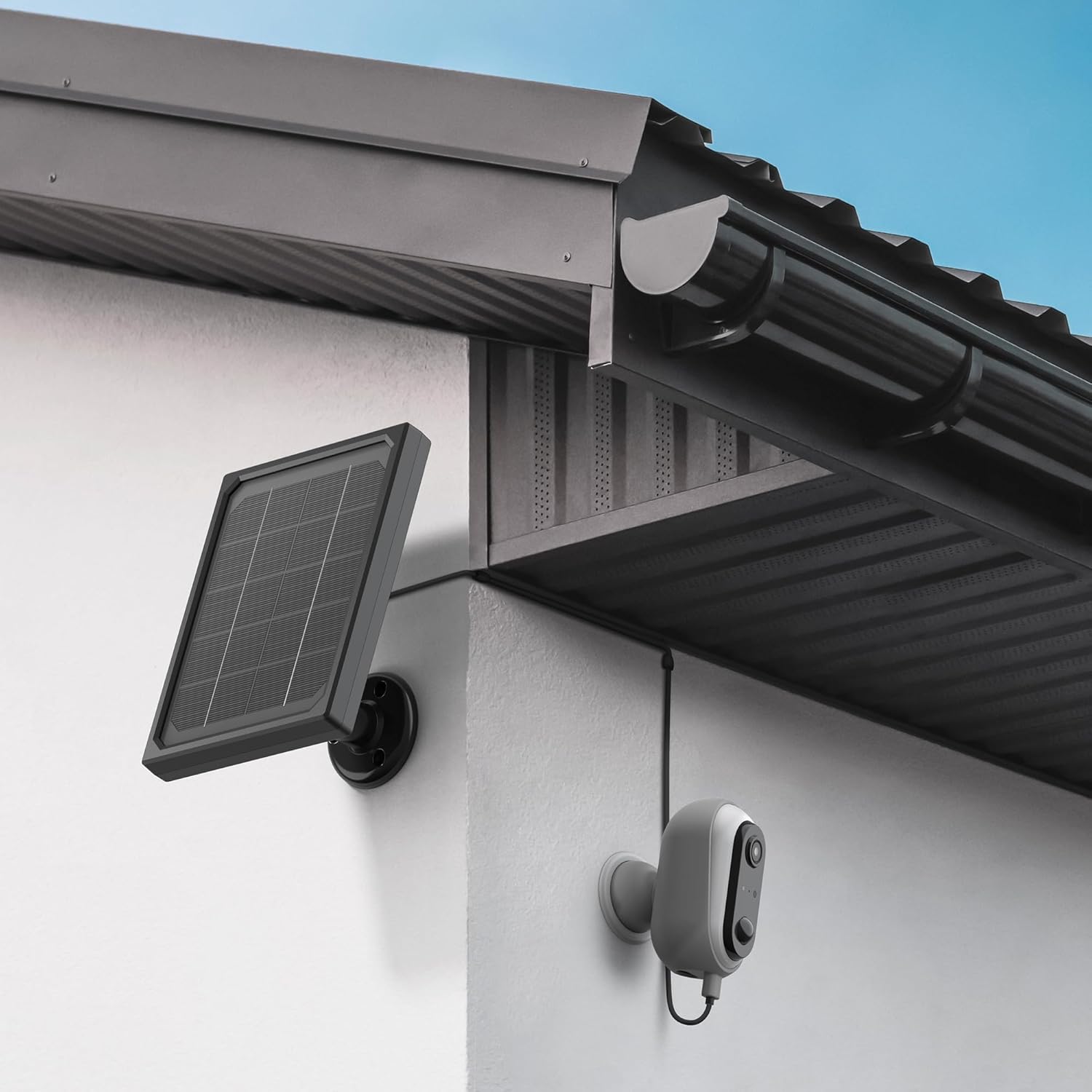
Image: The Avidsen HomeCam Battery camera and its solar panel are shown securely mounted on an exterior wall, positioned to capture sunlight and monitor the area.

Сурет: жақыннан түсірілген view of the Avidsen HomeCam Battery camera, highlighting its adjustable magnetic mount which allows for flexible positioning and angle adjustments.
3.3. App Download and Initial Pairing
- Download the "Avidsen Home" application from your smartphone's app store (available on Google Play and Apple App Store).
- Қолданбаны ашып, тіркелгі жасаңыз немесе бұрыннан бар болса, жүйеге кіріңіз.
- Follow the in-app instructions to add a new device. This typically involves scanning a QR code on the camera or manually selecting the device type.
- Жұптастыру процесінде смартфоныңыздың 2.4 ГГц Wi-Fi желісіне қосылғанына көз жеткізіңіз.
3.4. Wi-Fi қосылымы
During the app pairing process, you will be prompted to connect the camera to your home Wi-Fi network.
- Enter your Wi-Fi network name (SSID) and password when requested by the app.
- The camera supports 2.4GHz Wi-Fi networks only. Ensure your router is configured accordingly.
- Қосылғаннан кейін камераның индикатор шамы өзгереді және қолданба сәтті жұптастыруды растайды.
4. Камераны пайдалану
4.1. Тікелей эфир View және Басқару элементтері
Once connected, open the Avidsen Home app to access the live feed from your camera.
- Тікелей бейне: Tap on the camera in the app to view the real-time video stream.
- Екі жақты аудио: Use the microphone icon in the app to speak through the camera's speaker and the speaker icon to listen to audio from the camera's microphone.
- Жазу: Manually record video or capture screenshots directly from the live view интерфейс.
- Ойнату: Жазылған footage stored on the MicroSD card (not included) via the app's playback feature.

Image: A smartphone screen showing the Avidsen Home app, with options for live view, screenshot, two-way talk, recording, playback, and photo album.
4.2. Қозғалысты анықтау және хабарландырулар
The camera features motion detection to alert you to activity.
- Қосу/өшіру: In the app settings for your camera, you can enable or disable motion detection.
- Сезімталдық: Adjust the motion detection sensitivity to minimize false alarms.
- Хабарландырулар: When motion is detected, you will receive a notification on your smartphone.
- Жазу: Motion-triggered events are automatically recorded to the MicroSD card (if installed).
4.3. Түнгі көру
The integrated infrared LEDs provide clear visibility up to 8 meters in total darkness.
- Night vision activates automatically in low-light conditions.
- The camera provides a clear black and white image in night vision mode.
4.4. Local Storage (MicroSD Card)
The camera supports local storage via a MicroSD card (up to 128GB, not included).
- Insert the MicroSD card into the designated slot on the camera.
- Ensure the card is formatted correctly (FAT32 recommended).
- All recordings, including motion-triggered events, will be saved to this card.
4.5. Smart Home интеграциясы
The Avidsen HomeCam Battery is compatible with Amazon Alexa and Google Assistant.
- Link your Avidsen Home account with your Alexa or Google Assistant app.
- Дауыстық пәрмендерді пайдаланыңыз view камераңызды үйлесімді смарт дисплейлерге жібереді.
5. Техникалық қызмет көрсету
5.1. Тазалау
- Regularly clean the camera lens and the surface of the solar panel with a soft, damp оңтайлы өнімділікті қамтамасыз ету үшін шүберек.
- Беттерді зақымдауы мүмкін қатты химиялық заттарды немесе абразивті материалдарды пайдаланудан аулақ болыңыз.
5.2. Батареяны күту
- The solar panel is designed to keep the batteries charged. Ensure the panel is free from obstructions and receives adequate sunlight.
- If the camera's battery level drops significantly, consider repositioning the solar panel or manually charging the batteries if possible (refer to specific battery charging instructions if applicable).
5.3. Қосылымды тексеру
- Periodically check the physical connection between the solar panel and the camera to ensure it is secure and free from corrosion.
- Verify the camera's Wi-Fi connection status in the Avidsen Home app.
6. Ақаулықтарды жою
6.1. No Power / Camera Not Turning On
- Ensure the 18650 batteries are correctly inserted with the right polarity.
- Check if the batteries are charged. If not, ensure the solar panel is connected and receiving sunlight, or try charging the batteries externally if possible.
- Verify the power button (if any) is pressed.
6.2. Wi-Fi желісіне қосылу мүмкін емес
- Wi-Fi желісінің 2.4 ГГц екенін растаңыз. Камера 5 ГГц желілерді қолдамайды.
- Қолданбаға енгізілген Wi-Fi құпия сөзінің дұрыс екеніне көз жеткізіңіз.
- Сигнал күшін жақсарту үшін камераны Wi-Fi маршрутизаторына жақындатыңыз.
- Маршрутизатор мен камераны қайта іске қосыңыз.
- If issues persist, try resetting the camera to factory settings (refer to the reset procedure in the app or device manual) and re-pairing.
6.3. Төмен кескін сапасы
- Кез келген кірді немесе дақтарды кетіру үшін камера объективін тазалаңыз.
- Линзаның алдында ешқандай кедергілер жоқ екеніне көз жеткізіңіз.
- Wi-Fi сигналының күшін тексеріңіз; әлсіз сигнал бейне ағынының сапасына әсер етуі мүмкін.
6.4. Қозғалысты анықтау жұмыс істемейді немесе жалған дабылдар тым көп
- Verify motion detection is enabled in the Avidsen Home app.
- Adjust the motion detection sensitivity settings in the app. Lower sensitivity for fewer false alarms, higher for more sensitive detection.
- Камераның өрісін қамтамасыз етіңіз view is clear and not obstructed by moving objects like tree branches.
7. Техникалық сипаттамалар
| Модель атауы | HOME CAM BATTERY (127070) |
| Ажыратымдылық | 1080p толық HD |
| Қосылу мүмкіндігі | Сымсыз (Wi-Fi 2.4 ГГц) |
| Қуат көзі | Solar Panel (5V 3W), 2x 18650 Batteries |
| Түнгі көру диапазоны | 8 метрге дейін |
| өрісі View | 130° |
| IP рейтингі | IP65 (сыртқы пайдалану) |
| Сақтау | MicroSD картасы (128 ГБ дейін, кірмейді) |
| Арнайы мүмкіндіктер | Motion Detection, Two-Way Audio, Smart Home Compatibility (Alexa, Google Assistant) |
| Өлшемдері | 31.5 x 21 x 8.5 см |
| Салмағы | 1100 грамм |
8. Кепілдік және қолдау
8.1. Өндірушінің кепілдігі
This Avidsen product is covered by a 2 жылдық өндірушінің кепілдігі сатып алған күннен бастап. Кепілдік шағымдары үшін сатып алуды растайтын құжатты сақтаңыз. Кепілдік қалыпты пайдалану кезіндегі материалдар мен өңдеу ақауларын қамтиды.
8.2. Техникалық қамтамасыз ету
For technical assistance, troubleshooting, or further inquiries, please visit the official Avidsen website or contact their customer support. You can find contact information and FAQs on their webсайт: