
1. Кіріспе
This manual provides essential instructions for the safe and efficient use of your Generic charger, designed for Zebra TC51, TC52, TC56, TC57, TC52x, and TC57x Android Scanners. Please read this manual thoroughly before operating the device to ensure proper functionality and longevity.
2. Қауіпсіздік туралы ақпарат
- Use only the provided power supply with the charger.
- Зарядтағышты суға немесе шамадан тыс ылғалға ұшыратпаңыз.
- Зарядтағышты құлатып алудан немесе қатты әсер етуден аулақ болыңыз.
- Балалардың қолы жетпейтін жерде сақтаңыз.
- Зарядтағышты бөлшектеуге немесе өзгертуге әрекеттенбеңіз.
3. Пакет мазмұны
Пакетте барлық элементтердің бар екенін тексеріңіз:
- Generic Charging Cradle
- Қуат көзі (айнымалы ток адаптері)

Image: The Generic charging cradle and power supply, shown with a compatible Zebra scanner for illustration.
4. Өнім аяқталдыview
The Generic charger is designed to provide reliable power to your Zebra TC51, TC52, TC56, TC57, TC52x, and TC57x Android Scanners. It features a removable insert to accommodate devices with or without a protective boot/case.

Сурет: егжей-тегжейлі view of the Generic charger cradle, highlighting its design.
5. Орнату нұсқаулары
5.1 Зарядтағышты қосу
- Connect the DC power connector from the power supply to the machine's interface on the charging cradle.
- Қуат көзін стандартты электр розеткасына қосыңыз.
5.2 Adjusting for Protective Case (Removable Insert)
The charging cradle features a removable insert (shim) to allow charging of your Zebra scanner with or without a protective boot/case.
- For devices without a protective case: Ensure the insert is in place within the charging cradle.
- For devices with a protective case: Gently remove the insert from the charging cradle. This provides additional space for the device with its case.
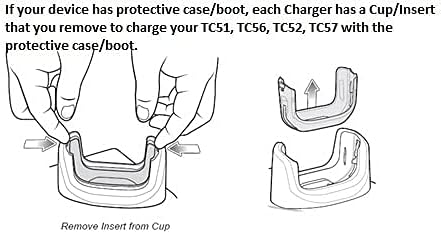
Image: Diagram illustrating the process of removing the insert from the charging cup to accommodate a device with a protective case.

Сурет: жақыннан түсірілген view of the removable insert, highlighting its design and how it fits into the charging cradle.
5.3 Көрнекі орнату нұсқаулығы
Video: A short demonstration of the charger and its fast-charging capabilities for your workday.
Video: An operational demonstration of the scanner charger cable for Zebra TC51, showing connection and charging status.
Video: A demonstration of the charger cradle for Zebra TC5X series, including how to insert and remove the device for charging.
Video: A visual guide on using the USB charger cable for Zebra TC51, TC510K, TC52, TC56, TC57 models.
6. Пайдалану нұсқаулары
6.1 Құрылғыны зарядтау
- Зарядтағыштың қуат көзіне дұрыс қосылғанына көз жеткізіңіз.
- Carefully place your Zebra scanner into the charging cradle, ensuring the charging contacts align.
- A charging indicator light (usually red or orange) on the scanner or cradle will illuminate to confirm charging has begun.
- The indicator light will change (e.g., to green) or turn off when charging is complete.
7. Техникалық қызмет көрсету
- Clean the charging contacts on both the cradle and your device regularly with a dry, soft cloth to ensure optimal connection.
- Зарядтағышты пайдаланбаған кезде салқын, құрғақ жерде сақтаңыз.
- Avoid wrapping the cable too tightly to prevent damage.
8. Ақаулықтарды жою
8.1 Құрылғы зарядталмай жатыр
- Қуат қосылымын тексеріңіз: Ensure the power supply is securely plugged into both the wall outlet and the charging cradle.
- Verify Device Placement: Make sure the Zebra scanner is correctly seated in the cradle and the charging contacts are aligned.
- Байланыстарды тексеру: Clean the charging contacts on both the device and the cradle for any debris or corrosion.
- Removable Insert: If using a protective case, ensure the removable insert has been taken out of the cradle. If not using a case, ensure the insert is properly seated.
- Басқа розеткаға кіріп көріңіз: Test the charger with a different electrical outlet to rule out power source issues.
9. Техникалық сипаттамалар
| Ерекшелік | Техникалық сипаттама |
|---|---|
| Бренд | Жалпы |
| Үйлесімді құрылғылар | Zebra TC51, TC52, TC56, TC57, TC52x, TC57x Android Scanners |
| Қосқыш түрі | 2 түйреуіш |
| Қуат көзі | Сымды электр |
| Ватtage | 15 Вт |
| Шығу көлеміtage | 5 вольт |
| Шығыс тогы | 3 Amps |
| Арнайы мүмкіндік | Removable Insert for Protective Case |
| Қосылу технологиясы | USB |
| Монтаждау түрі | Үстелге орнату |
| Түс | Қара |
10. Кепілдік туралы ақпарат
Өнімнің қаптамасына немесе сатушының нұсқаулығына қараңыз website for specific warranty details. Keep your proof of purchase for any warranty claims.
11. Тұтынушыларға қолдау көрсету
For further assistance, technical support, or inquiries, please contact the retailer or manufacturer directly. Contact information can typically be found on the product packaging or the seller's online store page.