
Кіріспе
This manual provides detailed instructions for the installation, operation, and maintenance of your DeLOCK USB Type-C to 2.5 Gigabit LAN Adapter (Model 66645). Please read this manual thoroughly before using the device to ensure proper functionality and to prevent damage.
Өнім аяқталдыview
The DeLOCK USB Type-C to 2.5 Gigabit LAN Adapter expands your PC or notebook with a network interface via a USB Type-C port. It is also compatible with Thunderbolt 3 interfaces. This adapter supports NBASE-T technology, allowing data transfer speeds of 1 Gbps and 2.5 Gbps over standard network cables, automatically negotiating the best possible transfer rate.

Image: DeLOCK 2.5 Gigabit LAN Adapter in its retail packaging.
The adapter features a SuperSpeed USB (USB 3.2 Gen 1) Type-C male connector for connecting to your host device and a 2.5 Gigabit LAN RJ45 female port for network cable connection. The compact design ensures portability and ease of use.
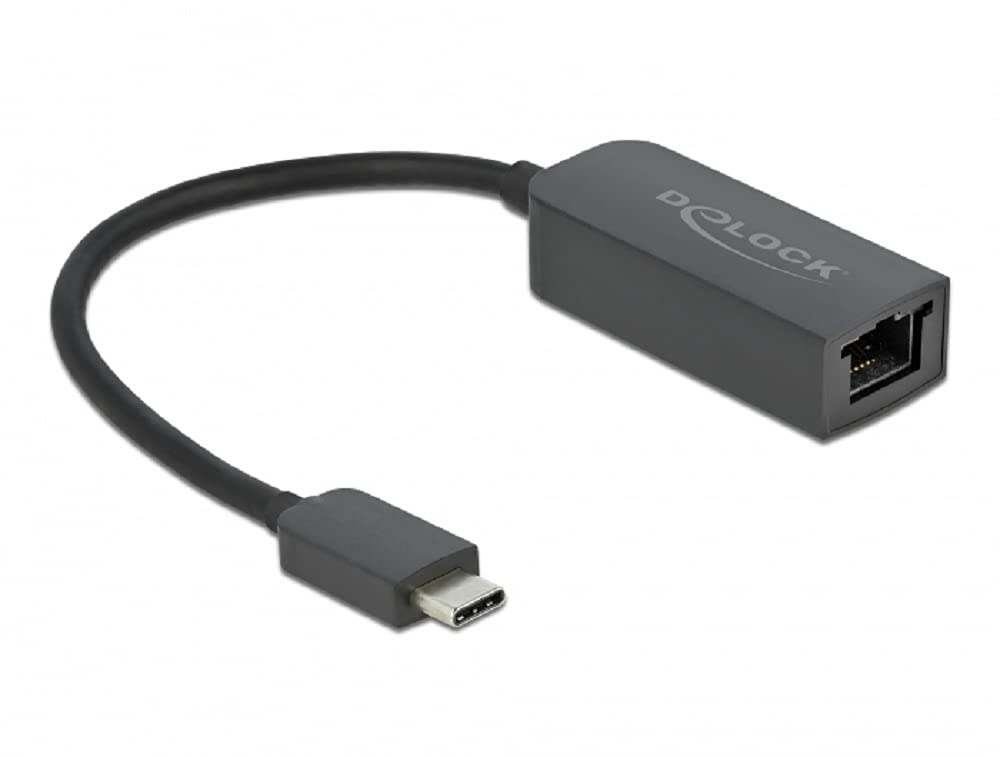
Image: Diagram illustrating the USB Type-C male connector, the 16 cm cable, and the 2.5 Gigabit LAN RJ45 female jack of the DeLOCK adapter.
Орнату нұсқаулары
- Хост құрылғысына қосылу: Plug the USB Type-C male connector of the DeLOCK adapter into an available USB Type-C port on your PC or notebook. Ensure the port supports USB 3.2 Gen 1 or Thunderbolt 3 for optimal performance.
- Желіге қосылу: Connect a standard RJ45 Ethernet network cable from your router, modem, or network switch to the 2.5 Gigabit LAN RJ45 female port on the DeLOCK adapter.
- Драйверді орнату: In most modern operating systems (Windows 10/11, macOS, Linux), the adapter is plug-and-play and drivers will install automatically. If prompted, allow the system to install necessary drivers. If automatic installation fails, visit the official Delock website for driver downloads specific to model 66645.
- Қосылымды тексеру: Once connected, check your operating system's network settings to confirm that the new network adapter is recognized and has established a connection.
Адаптерді пайдалану
After successful setup, the DeLOCK adapter functions as a standard wired network interface. Your operating system will automatically detect and utilize it for internet and local network access. The NBASE-T technology will automatically negotiate the highest possible speed (up to 2.5 Gbps) supported by your network infrastructure and cable quality.
- Ensure your network cable is securely connected to both the adapter and your network device.
- For optimal performance, use Cat5e or higher-rated Ethernet cables.
- Monitor your system's network activity indicators to confirm data transmission.
Техникалық қызмет көрсету
The DeLOCK USB Type-C to 2.5 Gigabit LAN Adapter requires minimal maintenance.
- Тазалау: Use a soft, dry cloth to clean the exterior of the adapter. Avoid using liquid cleaners or solvents.
- Сақтау орны: Пайдаланбаған кезде адаптерді салқын, құрғақ жерде, тікелей күн сәулесінен және төтенше температурадан алыс жерде сақтаңыз.
- Өңдеу: Avoid bending or twisting the cable excessively, and do not apply undue force when connecting or disconnecting the adapter.
Ақаулықтарды жою
- Желі қосылымы жоқ:
- Ensure the adapter is firmly plugged into the USB Type-C port.
- Verify the Ethernet cable is securely connected to both the adapter and the network device.
- Restart your computer and network equipment (router/modem).
- Check your operating system's network settings to ensure the adapter is enabled.
- Try a different USB Type-C port on your device.
- Басқа Ethernet кабелімен тексеріңіз.
- Баяу қосылу жылдамдығы:
- Ensure your network infrastructure (router, switch, cables) supports 2.5 Gigabit Ethernet.
- Use Cat5e or Cat6 Ethernet cables for optimal performance.
- Update the adapter's drivers from the official Delock webегер бар болса сайт.
- Check for other network activity or bandwidth-intensive applications running on your device.
- Адаптер танылмаған:
- Ensure your USB Type-C port is functional.
- Try connecting the adapter to another computer to rule out a device-specific issue.
- Manually install drivers from the Delock website if automatic installation failed.
- Check your device manager (Windows) or system information (macOS/Linux) for any unrecognized devices or driver conflicts.
Техникалық сипаттамалар
| Модель нөмірі: | 66645 |
| Қосқыштар: | 1 x SuperSpeed USB (USB 3.2 Gen 1) USB Type-C male 1 x 2.5 Gigabit LAN RJ45 female |
| Чипсет: | Realtek RTL8156 |
| Деректерді тасымалдау жылдамдығы: | Ethernet up to 10 Mbps (half/full duplex) Fast Ethernet up to 100 Mbps (half/full duplex) Gigabit Ethernet up to 1000 Mbps (half/full duplex) NBASE-T up to 2.5 Gbps (half/full duplex) |
| USB сипаттамасы: | SuperSpeed USB - 5Gbps |
| Ерекше өзгешеліктері: | Auto MDI-X (стандартты немесе кроссовер желі кабелін автоматты түрде анықтау) қолдайды. NBASE-T technology for 1Gbps and 2.5Gbps speeds |
| Аппараттық интерфейс: | Ethernet, Thunderbolt, USB, USB C түрі |
| Үйлесімді құрылғылар: | Жұмыс үстелі, ноутбук |
| Түсі: | Қара |
| Өнім өлшемдері: | 5.51 x 4.72 x 1.18 дюйм |
| Элемент салмағы: | 1.76 унция (50 грамм) |
Кепілдік және қолдау
For warranty information and technical support, please refer to the documentation included with your purchase or visit the official Delock webсайт. Сіз әдетте қолдау ресурстарын, жиі қойылатын сұрақтарды және тұтынушыларға қызмет көрсету үшін байланыс ақпаратын таба аласыз.