
Movo iVlog1
Movo iVlog1 Vlogging Kit Instruction Manual
Model: iVlog1
Кіріспе
The Movo iVlog1 Vlogging Kit is a comprehensive solution designed to enhance smartphone video recording. This kit provides professional-quality audio, video, and lighting accessories to elevate your content creation. It is specifically compatible with iPhone Lightning devices, offering a seamless experience for aspiring and professional content creators.
Қорапта не бар
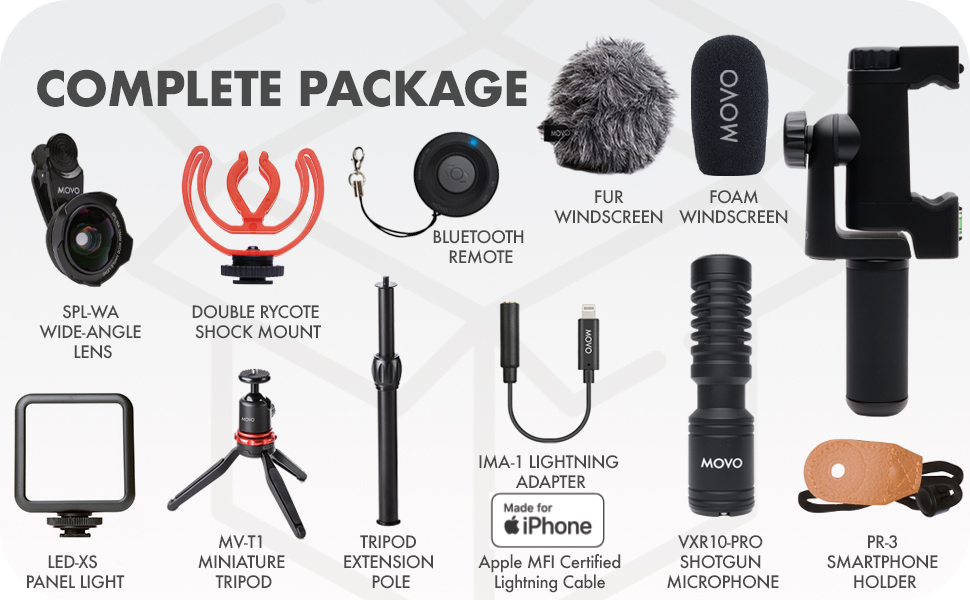
Your Movo iVlog1 Vlogging Kit includes the following components:
- VXR10-PRO Cardioid Microphone with Shock Mount and Windscreen
- MV-T1 Miniature Tripod
- PR-3 Phone Holder for Video Recording
- LED-XS Panel Light
- SPL-WA Wide-Angle Lens
- Wireless Shutter Remote
- Қолды ұстап алу
- Tripod Extension Pole
- Найзағай адаптері
- Тасымалдау қорабы

Орнату нұсқаулығы
1. Assemble the Phone Holder and Tripod
- Attach the PR-3 Phone Holder to the MV-T1 Miniature Tripod. The phone holder features a 1/4" screw thread at its base for secure attachment.
- If additional height is desired, screw the Tripod Extension Pole between the phone holder and the tripod.
- Adjust the tripod legs for stability on a flat surface, or fold them for handheld use.

2. Mount Accessories
- Slide the VXR10-PRO Microphone into one of the cold shoe mounts on the PR-3 Phone Holder. Ensure it is securely fastened.
- Slide the LED-XS Panel Light into another cold shoe mount on the PR-3 Phone Holder.
- Attach the SPL-WA Wide-Angle Lens to your smartphone's main camera using the provided lens clip.
3. Connect Microphone to Smartphone
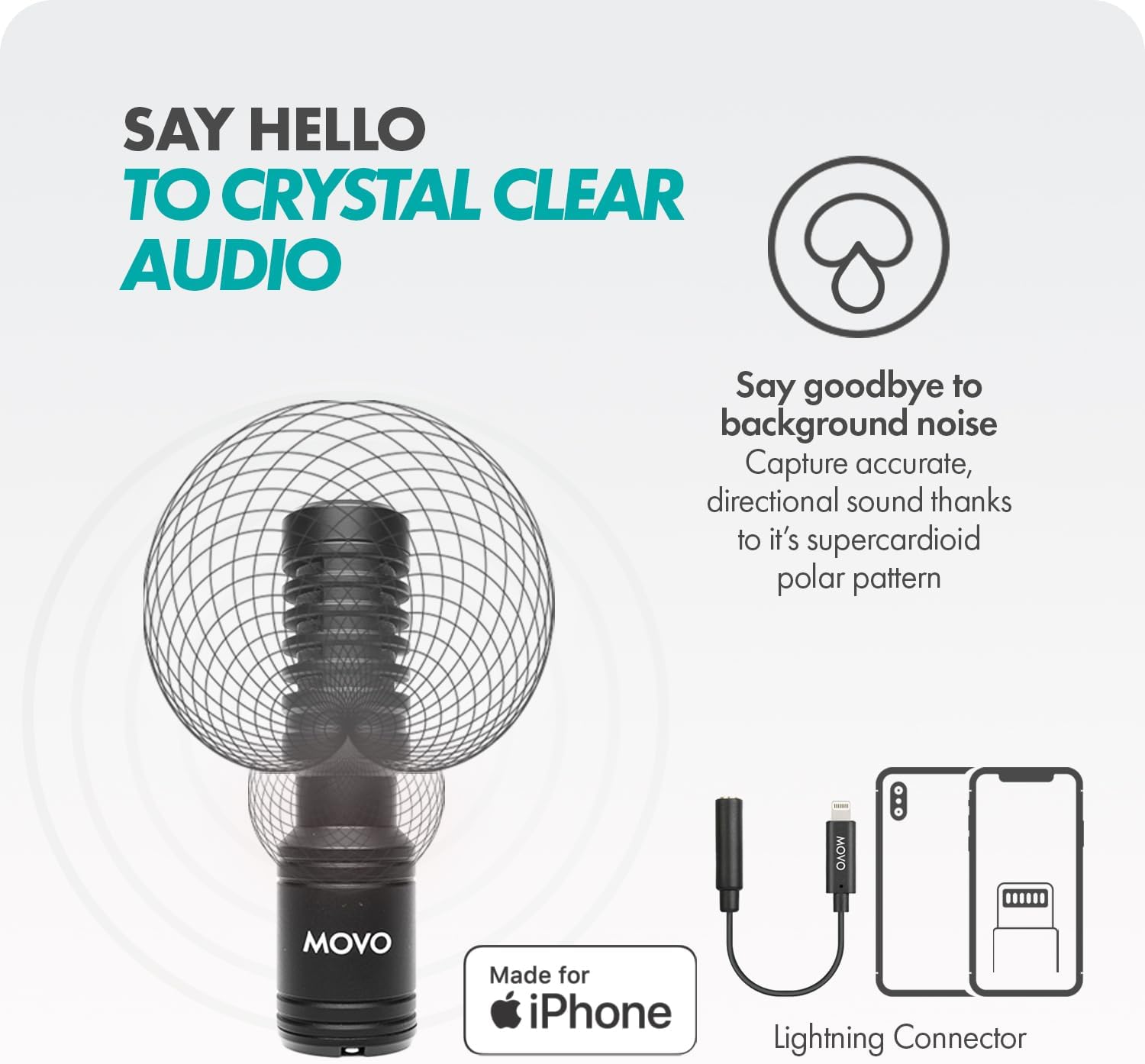
- Connect the VXR10-PRO microphone to your iPhone using the provided Lightning Adapter.
- Ensure the connection is firm to guarantee optimal audio capture.

Video: A quick guide demonstrating the easy setup process for the Movo iVlog1 kit, including phone mounting, microphone, and LED light connection.
Пайдалану нұсқаулары
Using the PR-3 Phone Holder
- The PR-3 Phone Holder accommodates smartphones up to 3.9 inches wide.
- Rotate your smartphone between vertical and horizontal orientations for diverse shots.
- Utilize the built-in bubble levelers to ensure your shots are perfectly aligned.
VXR10-PRO Microphone
- The supercardioid polar pattern of the VXR10-PRO microphone captures crisp, directional sound while minimizing background noise.
- Ensure the microphone is pointed towards your audio source for best results.
LED-XS Panel Light
- The LED-XS features 5 adjustable brightness settings. Use the controls on the light to select the appropriate brightness for your environment.
- The light provides both warm and cool light options to suit different lighting needs.
SPL-WA Wide-Angle Lens
- Clip the 18mm wide-angle lens over your smartphone's main camera to capture broader, more panoramic shots.
- Ensure the lens is centered over your phone's camera for optimal image quality.

Wireless Shutter Remote
- Pair the Bluetooth shutter remote with your smartphone for hands-free operation.
- Use the remote to start/stop video recording or take photos from up to 65 feet away.

Техникалық сипаттамалар
| Ерекшелік | Мәлімет |
|---|---|
| Микрофон пішін факторы | Мылтық |
| Қуат көзі | Батареядан қуат алады |
| Материал | Пластмасса |
| Сигналдардың шуылға қатынасы | 76 дБ |
| Аппараттық платформа | Камера, смартфон |
| Жиілік реакциясы | 18 кГц |
| Элемент салмағы | 3.48 фунт |
| Қосылу технологиясы | Найзағай |
| Полярлық үлгі | Бір бағытты |

Техникалық қызмет көрсету
- Keep all components clean using a soft, dry cloth. Avoid abrasive cleaners.
- Store the kit in its provided carrying case to protect it from dust and damage when not in use.
- Ensure all cables are free from kinks or damage to maintain optimal performance.
Ақаулықтарды жою
Микрофон мәселелері
- No Audio/Static: Ensure the microphone cable is fully inserted into both the microphone and the smartphone's Lightning adapter. Verify that your smartphone's recording app is configured to use an external microphone.
- Үйлесімділік: This kit is designed for iPhone Lightning compatible devices. For Android devices, a separate USB-C adapter may be required (not included in this specific kit).
Жарық диодты жарық мәселелері
- Жарық қосылмайды: Ensure the LED-XS Panel Light is charged. Check the power button and brightness settings.
- Insufficient Brightness: Adjust the 5 brightness settings on the LED-XS Panel Light to suit your environment.
Wireless Remote Issues
- Remote Not Connecting: Ensure Bluetooth is enabled on your smartphone and the remote is in pairing mode. Re-pair the remote if connection issues persist.
Кепілдік және қолдау
The Movo iVlog1 Vlogging Kit comes with a 2 жылдық кепілдік. To activate your warranty, scan the QR code provided in the product packaging or visit the official Movo webсайт.
For technical support or customer service, please visit the official Movo webсайтына кіріңіз немесе олардың қолдау көрсету тобына тікелей хабарласыңыз.
Бейне: біттіview of the Movo iVLOG Series, including a microphone test, demonstrating the audio quality of the VXR10-PRO microphone.
Ask a question about this manual
Ask about setup, troubleshooting, compatibility, parts, safety, or missing instructions. Manuals+ will review the question and use this page’s manual context to help answer it.