
ITECH IT6952A
ITECH IT6952A Бағдарламаланатын тұрақты ток көзінің пайдаланушы нұсқаулығы
Model: IT6952A | Brand: ITECH
1. Кіріспе
This user manual provides essential information for the safe and effective operation of your ITECH IT6952A Programmable DC Power Supply. Please read this manual thoroughly before using the device to ensure proper functionality and to prevent damage or injury. The IT6952A is a high-performance, programmable DC power supply designed for laboratory and industrial applications, offering precise control over voltage және ток шығысы.
2. Қауіпсіздік туралы ақпарат
Always observe the following safety precautions to prevent electric shock, injury, or damage to the instrument:
- Ensure the power supply is connected to a grounded AC outlet.
- Құрылғыны ылғал немесе d жерде пайдаланбаңызamp шарттар.
- c ашпаңызasing; ішінде пайдаланушы жөндеуге болатын бөлшектер жоқ. Барлық қызмет көрсетуді білікті мамандарға тапсырыңыз.
- Кіріс көлемінің екенін тексеріңізtage matches the power supply's rating before connecting to the mains.
- Avoid short-circuiting the output terminals, especially at high power settings.
- Қызып кетудің алдын алу үшін құрылғының айналасында дұрыс желдетуді қамтамасыз етіңіз.
3. Өнім аяқталдыview
The ITECH IT6952A features a clear VFD display and intuitive controls for easy operation.
3.1 Алдыңғы панельдің орналасуы

Figure 3.1: Front Panel of IT6952A
The front panel includes the VFD display for voltage and current readings, a rotary knob for precise adjustments, number keys (0-9) and ESC for direct input, function keys (V-SET, I-SET, Save, Recall, Meter, Trigger, Enter, On/Off) for various operations, navigation keys (UP/DOWN/LEFT/RIGHT) for cursor movement, and output terminals for connecting loads. The 'Shift' and 'Local' keys provide additional control options, and the main power switch is integrated.
3.2 Артқы панельдің орналасуы
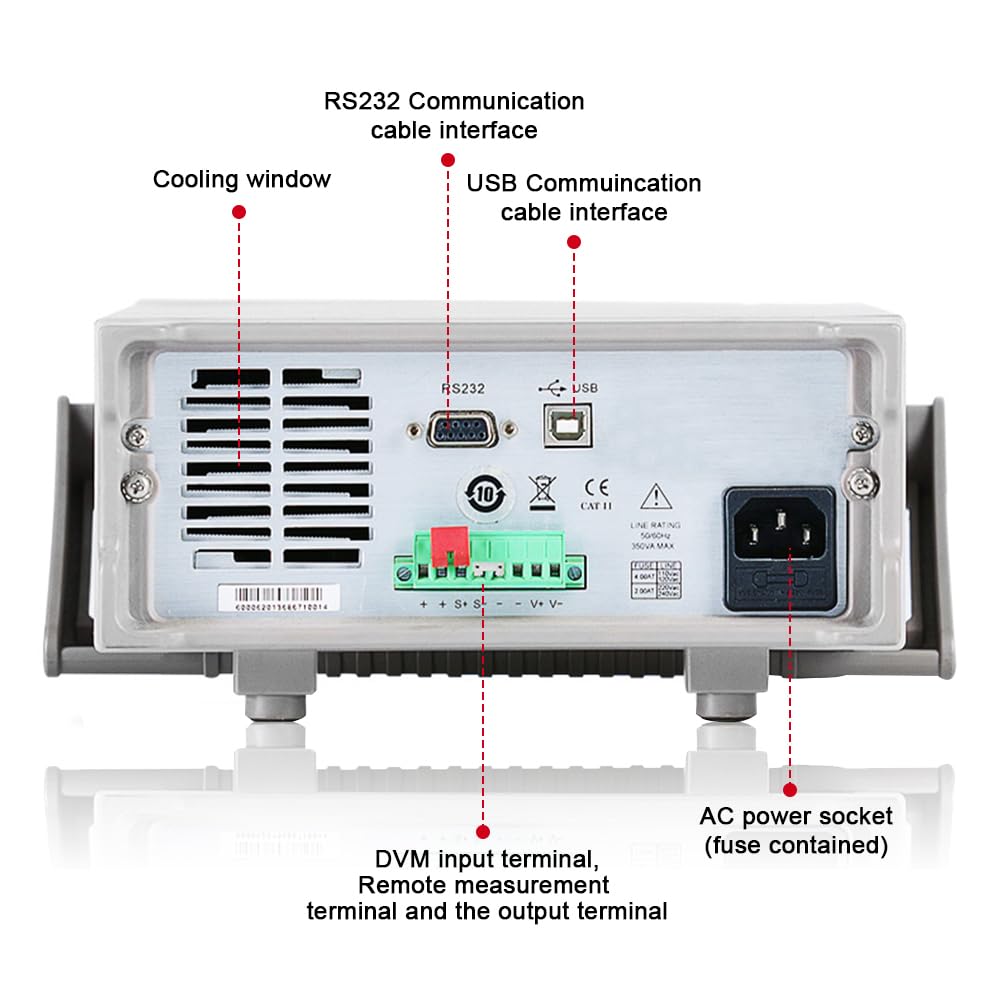
Figure 3.2: Rear Panel of IT6952A
The rear panel features the AC power socket (with integrated fuse), cooling windows for heat dissipation, an RS232 communication cable interface, a USB communication cable interface, and DVM input terminals along with remote measurement terminals and additional output terminals for specific applications.
4. Орнату
Бастапқы орнату үшін мына қадамдарды орындаңыз:
- Қаптаманы ашу: Қуат көзін қаптамасынан абайлап алыңыз. Тасымалдау кезінде зақымдану белгілерінің бар-жоғын тексеріңіз.
- Орналастыру: Place the unit on a stable, level surface with adequate ventilation around all sides. Do not block the cooling vents on the sides and rear.
- Қуат қосылымы: Connect the provided AC power cord to the AC power socket on the rear panel of the IT6952A. Plug the other end into a grounded electrical outlet.
- Қуат қосулы: Press the main power switch on the front panel to turn on the unit. The VFD display should illuminate.
- Шығыс қосылымы: Connect your load to the output terminals on the front panel using appropriate test leads. Ensure correct polarity (positive to positive, negative to negative).
5. Пайдалану нұсқаулары
This section covers basic operation of the IT6952A.
5.1 Параметр томtage және Current
- Томды орнатуtage: түймесін басыңыз V-SET button. The voltage display will become active. Use the rotary knob to adjust the voltage, or use the number keys for direct input followed by Енгізіңіз.
- Ағымды орнату: түймесін басыңыз I-SET button. The current display will become active. Use the rotary knob to adjust the current limit, or use the number keys for direct input followed by Енгізіңіз.
- Enable Output: Қажетті дыбыс деңгейін орнатқаннан кейінtage және ағымдағы, түймесін басыңыз Қосу/Өшіру button to enable the output. The output indicator will illuminate.
- Disable Output: To disable the output, press the Қосу/Өшіру түймесін қайтадан басыңыз.
5.2 Using Memory Functions (Save/Recall)
The IT6952A allows you to save and recall frequently used voltage және ағымдағы параметрлер.
- Параметрді сақтау: Қажетті көлемді орнатыңызtage and current. Press the Сақтау button. Use the navigation keys or number keys to select a memory location (e.g., 0-9) and press Енгізіңіз to store the settings.
- Recall Setting: түймесін басыңыз Еске түсіру button. Use the navigation keys or number keys to select the desired memory location and press Енгізіңіз to load the stored settings.
6. Техникалық қызмет көрсету
Proper maintenance ensures the longevity and reliability of your power supply.
- Тазалау: Disconnect the power supply from the mains before cleaning. Use a soft, dry cloth to wipe the exterior. For stubborn dirt, a slightly damp cloth with mild detergent can be used, ensuring no liquid enters the unit.
- Желдету: Regularly check that the cooling vents are free from dust and obstructions. Use compressed air to clear dust if necessary.
- Сақтау орны: When not in use for extended periods, store the power supply in a cool, dry, and dust-free environment.
7. Ақаулықтарды жою
If you encounter issues with your IT6952A, refer to the following common problems and solutions:
| Мәселе | Ықтимал себебі | Шешім |
|---|---|---|
| Қосылған кезде қуат жоқ | Power cord not connected; Blown fuse; No power from outlet | Check power cord connection; Replace fuse (refer to specifications for type); Test outlet with another device |
| Шығу көлемі жоқtage/ағым | Output disabled; Overload protection activated; Incorrect settings | түймесін басыңыз Қосу/Өшіру to enable output; Reduce load or increase current limit; Verify voltage/ағымдағы параметрлер |
| Дисплейде «Қате» көрсетіледі | Internal fault; Over-temperature | Turn off unit, wait 5 minutes, restart; Ensure proper ventilation, allow unit to cool down. If error persists, contact support. |
| Дәл емес көрсеткіштер | Poor connection; Calibration needed | Check all connections; Contact ITECH support for calibration information. |
8. Техникалық сипаттамалар
Key technical specifications for the ITECH IT6952A Programmable DC Power Supply:
| Техникалық сипаттама | Мән |
|---|---|
| Бренд | ITECH |
| Үлгі | IT6952A |
| Шығу көлеміtage | 60 вольт |
| Ampтазарту | 25 Amps |
| Шығу Wattage | 600 Вт |
| Форма факторы | Үстелдік |
| Қосқыш түрі | USB |
| Материал | Металл |
| Түс | Қызыл, қара |
9. Кепілдік және қолдау
ITECH products are designed for reliability and performance. For warranty information, technical support, or service inquiries, please refer to the warranty card included with your product or visit the official ITECH webсайт. Сатып алу түбіртегін кепілдік талаптары үшін сатып алудың дәлелі ретінде сақтаңыз.
For further assistance, you may contact ITECH customer service through their official channels. Always provide your product model (IT6952A) and serial number when seeking support.
Ask a question about this manual
Ask about setup, troubleshooting, compatibility, parts, safety, or missing instructions. Manuals+ will review the question and use this page’s manual context to help answer it.