
Кіріспе
This manual provides detailed instructions for the proper use and maintenance of your Borofone BC26 Wireless FM Transmitter. Please read this manual thoroughly before operating the device to ensure optimal performance and safety.
Өнім аяқталдыview
The Borofone BC26 is a versatile car accessory that combines an FM transmitter, Bluetooth connectivity, and a dual USB car charger. It allows you to stream audio from your smartphone or USB flash drive to your car's FM radio and charge your devices simultaneously.
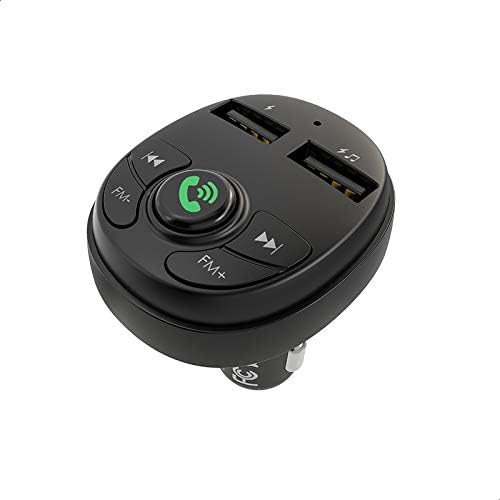
Сурет: жоғарыдан төменге view of the Borofone BC26 FM Transmitter, highlighting its control buttons for FM tuning, call management, track control, and the two USB charging ports.
Ерекше өзгешеліктері
- Wireless FM transmission for audio streaming.
- Bluetooth connectivity for hands-free calls and music playback.
- Dual USB ports for charging mobile devices (2.1A output).
- Supports USB flash drive for music playback.
- MP3, WMA, WAV және FLAC аудио форматтарымен үйлесімді.
- Digital LED display for FM frequency.
- Universal compatibility with 12V-24V car power outlets.
Пакет мазмұны
- Borofone BC26 Wireless FM Transmitter
- Пайдаланушы нұсқаулығы

Image: The retail packaging for the Borofone BC26, displaying the device and its main functionalities such as Bluetooth 5.0, 2.1A output, and USB flash drive support.
Орнату
- Таратқышты салыңыз: Plug the Borofone BC26 into your car's 12V or 24V cigarette lighter socket. The device will power on automatically, and the LED display will light up.
- FM жиілігін реттеу: Adjust your car's FM radio to an empty frequency (one with no broadcast). Then, press and hold the 'Call' button on the BC26 until the FM frequency on the LED display starts flashing. Use the 'FM-' and 'FM+' buttons to match the transmitter's frequency to your car's radio frequency. Once matched, press the 'Call' button again to confirm.
- Bluetooth жұптастыру: On your smartphone, enable Bluetooth and search for available devices. Select 'BC26' from the list to pair. A voice prompt will confirm successful connection.

Image: The Borofone BC26 FM Transmitter plugged into a car's power outlet, showing the digital display set to an FM frequency, ready for use.
Пайдалану нұсқаулары
Музыканы ойнату
- Bluetooth арқылы: Once paired, open your music player on your smartphone. Audio will be transmitted to your car's FM radio. Use the 'Previous Track' and 'Next Track' buttons on the BC26 to control playback.
- Via USB Flash Drive: MP3/WMA/WAV/FLAC аудиосы бар USB флэш-дискісін салыңыз files into the designated USB port (usually marked with a music note or data symbol). The device will automatically detect and play music. Use the 'Previous Track' and 'Next Track' buttons to navigate.
Handsfree қоңырау шалу
- Қоңырауға жауап беру/аяқтау: Press the 'Call' button once to answer an incoming call or end an ongoing call.
- Қоңырауды қабылдамау: Press and hold the 'Call' button to reject an incoming call.
- Қайта теру: Double-press the 'Call' button to redial the last number.
Зарядтау құрылғылары
Connect your mobile device to either of the USB charging ports using a compatible USB cable. The ports provide a total output of 2.1A for efficient charging.
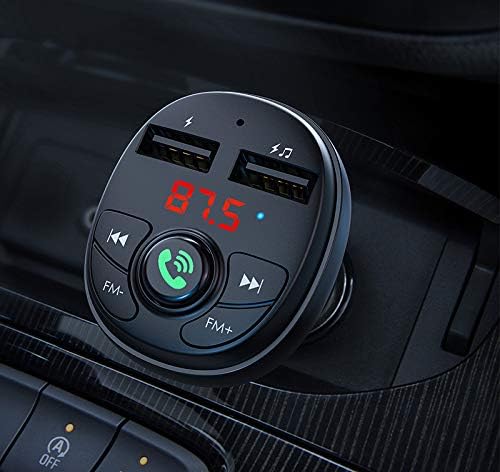
Сурет: егжей-тегжейлі view of the Borofone BC26 in a car's console, illustrating the illuminated digital display, clearly labeled control buttons, and the dual USB charging ports.
Техникалық қызмет көрсету
- Keep the device dry. Moisture can damage the internal circuits.
- Құрылғыны шектен тыс температураға ұшыратпаңыз.
- Құрылғыны жұмсақ, құрғақ шүберекпен тазалаңыз. Қатты химиялық заттарды немесе абразивті тазалағыштарды пайдаланбаңыз.
- Ensure the cigarette lighter socket is clean and free of debris for proper connection.
Ақаулықтарды жою
- Қуат жоқ: Ensure the device is fully inserted into the car's cigarette lighter socket. Check if the car's power outlet is functioning.
- Дыбыс сапасы нашар/статикалық: Adjust the FM frequency on both the transmitter and your car radio to an unused channel. Avoid frequencies occupied by strong radio stations. Ensure the volume on your phone and car radio is set appropriately.
- Bluetooth ажырату: Re-pair the device with your phone. Ensure your phone's Bluetooth is enabled and within range.
- USB Flash Drive Not Playing: Ensure the USB flash drive is formatted correctly (FAT32) and contains supported audio files (MP3/WMA/WAV/FLAC). Try a different USB flash drive.
Техникалық сипаттамалар
| Ерекшелік | Техникалық сипаттама |
|---|---|
| Бренд | Borofone |
| Үлгі | BC26 |
| Кіріс көлеміtage | DC 12-24V |
| USB шығысы | 2.1A (Макс) |
| Bluetooth нұсқасы | Supported (Specific version not provided, but typically 5.0 or higher for modern devices) |
| Қолдау көрсетілетін аудио пішімдері | MP3, WMA, WAV, FLAC |
| Қосылу технологиясы | USB, Bluetooth, FM |
| Өлшемдері | 14 x 8.8 x 3.2 cm (approximate shipment dimensions) |
| Салмағы | 52 г |
Қауіпсіздік туралы ақпарат
- Құрылғыны бөлшектемеңіз немесе өзгертпеңіз.
- Балалардың қолы жетпейтін жерде сақтаңыз.
- Avoid using the device in extremely dusty or humid environments.
- Do not expose to open flames or direct sunlight for extended periods.
- Ensure secure placement in the car's power outlet to prevent dislodging during driving.
Кепілдік және қолдау
Borofone products are designed for reliability and performance. For warranty information, technical support, or service inquiries, please refer to the documentation provided with your purchase or contact your local retailer. Keep your proof of purchase for warranty claims.