
1. Кіріспе
The Fujitsu UTY-XCBXZ2 Interface Kit is an essential component designed to enable the connection of a wired remote controller (such as the UTY-XWZX) to compatible Fujitsu mini-split air conditioning units. This interface kit facilitates advanced control and monitoring capabilities for your HVAC system, enhancing user convenience and energy management.
It is compatible with specific Fujitsu mini-split models, including ASU12RLF1, ASU7RLF1, and ASU9RLF1. The kit supports both residential and commercial applications, providing features like remote controller sensor integration, energy-saving operation modes, and control over horizontal/vertical airflow direction.
2. Өнім аяқталдыview
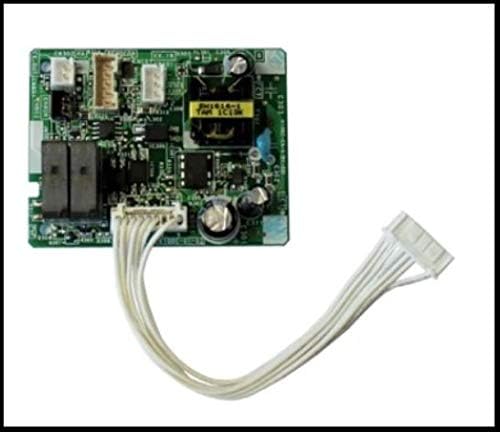
Figure 2.1: The Fujitsu UTY-XCBXZ2 Interface Kit, showing the green circuit board with various electronic components and a white multi-pin connector cable extending from it.
The UTY-XCBXZ2 is a compact circuit board with an integrated cable designed for seamless integration into your Fujitsu mini-split system. It acts as a bridge between the indoor unit's main board and the wired remote controller, translating commands and sensor data.
Key features enabled by this interface kit include:
- Remote Controller sensor functionality.
- Energy Saving operation modes.
- Control over Horizontal/Vertical air flow direction.
- Child lock capabilities for enhanced safety.
- ON/OFF/WEEKLY timer modes.
- Set back timer functionality.
3. Орнату және орнату
Installation of the UTY-XCBXZ2 Interface Kit requires careful attention to detail and should ideally be performed by a qualified HVAC technician. Ensure the main power to the mini-split unit is disconnected before beginning any installation procedures.
3.1. Орнатуға дейінгі бақылау тізімі
- Verify compatibility with your Fujitsu mini-split model (ASU12RLF1, ASU7RLF1, ASU9RLF1).
- Ensure you have the necessary tools (e.g., screwdrivers, wire cutters).
- Confirm the wired remote controller (e.g., UTY-XWZX) is available and compatible.
3.2. Орнату қадамдары
- Қуатты ажырату: Locate the circuit breaker for your Fujitsu mini-split system and turn off the power completely. Verify power is off using a voltagэлектронды тексеруші.
- Ішкі блокқа кіру: Open the indoor unit's casing to access the main control board. Refer to your mini-split unit's specific service manual for instructions on safely opening the casing.
- Қосылым портын табыңыз: Identify the designated port on the indoor unit's main control board for the wired remote interface kit. This port is typically labeled or indicated in the mini-split's wiring diagram.
- Connect Interface Kit: Carefully connect the multi-pin cable from the UTY-XCBXZ2 kit to the identified port on the main control board. Ensure the connector is fully seated and secure.
- Secure Interface Kit: Mount the UTY-XCBXZ2 circuit board securely within the indoor unit's casing. Use existing mounting points or secure it to prevent movement or damage. Ensure it does not obstruct any moving parts or airflow.
- Сымды қашықтан басқару құралын қосу: Connect the wired remote controller's cable to the appropriate port on the UTY-XCBXZ2 interface kit.
- Жабу блогы: Carefully close and secure the indoor unit's casing.
- Қуатты қалпына келтіру: Ажыратқышта қуатты қайта қосыңыз.
- Сынақ функционалдығы: Power on the mini-split unit and test the functionality of the wired remote controller to ensure proper communication and control.
Ескерту: Some users have reported that securing the interface kit can be challenging, potentially leading to a less rigid fit. Ensure all connections are firm and the board is as stable as possible to prevent dislodgement during operation or maintenance.
4. Операция
Once installed, the UTY-XCBXZ2 Interface Kit operates transparently, enabling the full functionality of your connected wired remote controller. All operational commands, settings adjustments, and status displays will be managed directly through the wired remote.
Refer to the instruction manual provided with your specific wired remote controller (e.g., UTY-XWZX) for detailed instructions on how to utilize features such as:
- Setting temperature and operating modes (Cool, Heat, Fan, Dry, Auto).
- Adjusting fan speed.
- Controlling horizontal and vertical airflow louvers.
- Programming ON/OFF/WEEKLY timers.
- Activating energy-saving modes.
- Engaging child lock.
- Utilizing the set-back timer.
The interface kit ensures reliable communication between the remote and the mini-split unit, allowing for precise control over your indoor climate.
5. Техникалық қызмет көрсету
The Fujitsu UTY-XCBXZ2 Interface Kit is designed for long-term, maintenance-free operation once properly installed. As an internal electronic component, it does not require routine cleaning or servicing.
However, it is advisable to:
- Ensure the indoor unit's air filters are regularly cleaned or replaced to maintain optimal airflow and prevent dust buildup near electronic components.
- Periodically check the physical connections of the interface kit and the wired remote controller during routine HVAC system maintenance to ensure they remain secure.
- Avoid exposing the mini-split unit or the interface kit to excessive moisture or extreme temperatures outside of its operational design parameters.
6. Ақаулықтарды жою
If you experience issues with your wired remote controller after installing the UTY-XCBXZ2 Interface Kit, consider the following troubleshooting steps:
6.1. No Response from Wired Remote
- Қуатты тексеру: Ensure the mini-split unit has power and is turned on.
- Қосылымдарды тексеру: Turn off power to the unit and re-check all connections, including the interface kit to the main board and the wired remote to the interface kit. Ensure all connectors are fully seated and secure.
- Remote Controller Functionality: If possible, test the wired remote controller with another compatible unit or have it checked by a technician to rule out a faulty remote.
6.2. Intermittent Control or Erratic Behavior
- Қауіпсіз орнату: Ensure the UTY-XCBXZ2 board is securely mounted within the indoor unit. Loose connections or movement can cause intermittent issues.
- Сымдардың тұтастығы: Inspect the wiring for any signs of damage, pinching, or corrosion.
- Қоршаған орта факторлары: Ensure the operating environment is within the specified temperature and humidity ranges for the mini-split system.
6.3. Error Codes on Remote
- Refer to the specific wired remote controller's manual and your Fujitsu mini-split unit's service manual for explanations of error codes and recommended solutions.
If problems persist after attempting these steps, contact a qualified HVAC technician or Fujitsu General customer support for further assistance.
7. Техникалық сипаттамалар
| Атрибут | Мәлімет |
|---|---|
| Үлгі нөмірі | UTY-XCBXZ2 |
| Бренд | Fujitsu генералы |
| ASIN | B08WHNLGSQ |
| Арнайы мүмкіндік | Қашықтан басқарылады |
| Түс | Жасыл (тұлба) |
| Қолдау көрсетілетін құрылғылардың максималды саны | 1 (Wired Remote Controller) |
| Үйлесімді құрылғылар | Fujitsu mini split models ASU12RLF1, ASU7RLF1, ASU9RLF1 |
| Бірінші қол жетімді күн | 12 ақпан, 2021 жыл |
8. Кепілдік және қолдау
For information regarding the warranty coverage for your Fujitsu UTY-XCBXZ2 Interface Kit, please refer to the documentation provided with your purchase or contact Fujitsu General directly. Warranty terms typically vary by region and purchase date.
For technical support, installation assistance, or to report issues, please contact Fujitsu General customer service or an authorized Fujitsu HVAC dealer. Contact information can usually be found on the manufacturer's official webсайтында немесе өнімнің қаптамасында.
Кепілдік шағымдары үшін сатып алуды растайтын құжатты сақтау ұсынылады.


