
1. Қауіпсіздік туралы ақпарат
Please read and understand this entire manual before attempting to assemble, operate, or install the product. Failure to do so could lead to electric shock, fire, or other injuries.
- Орнату немесе техникалық қызмет көрсету алдында әрқашан негізгі автоматты ажыратқыштағы қуатты ажыратыңыз.
- Барлық электр қосылымдары жергілікті ережелерге, жарлықтарға және Ұлттық электр кодексіне сәйкес болуы керек. Егер сіз электр сымдарымен таныс болмасаңыз, білікті электрикке хабарласыңыз.
- Орнату орны желдеткіштің салмағын көтере алатынына көз жеткізіңіз.
- Желдеткішті пышақтары немесе корпусы зақымдалған кезде пайдаланбаңыз.
- Жұмыс кезінде желдеткіш қалақшаларынан қолыңызды алыс ұстаңыз.
2. Өнім аяқталдыview
2.1 Негізгі мүмкіндіктер
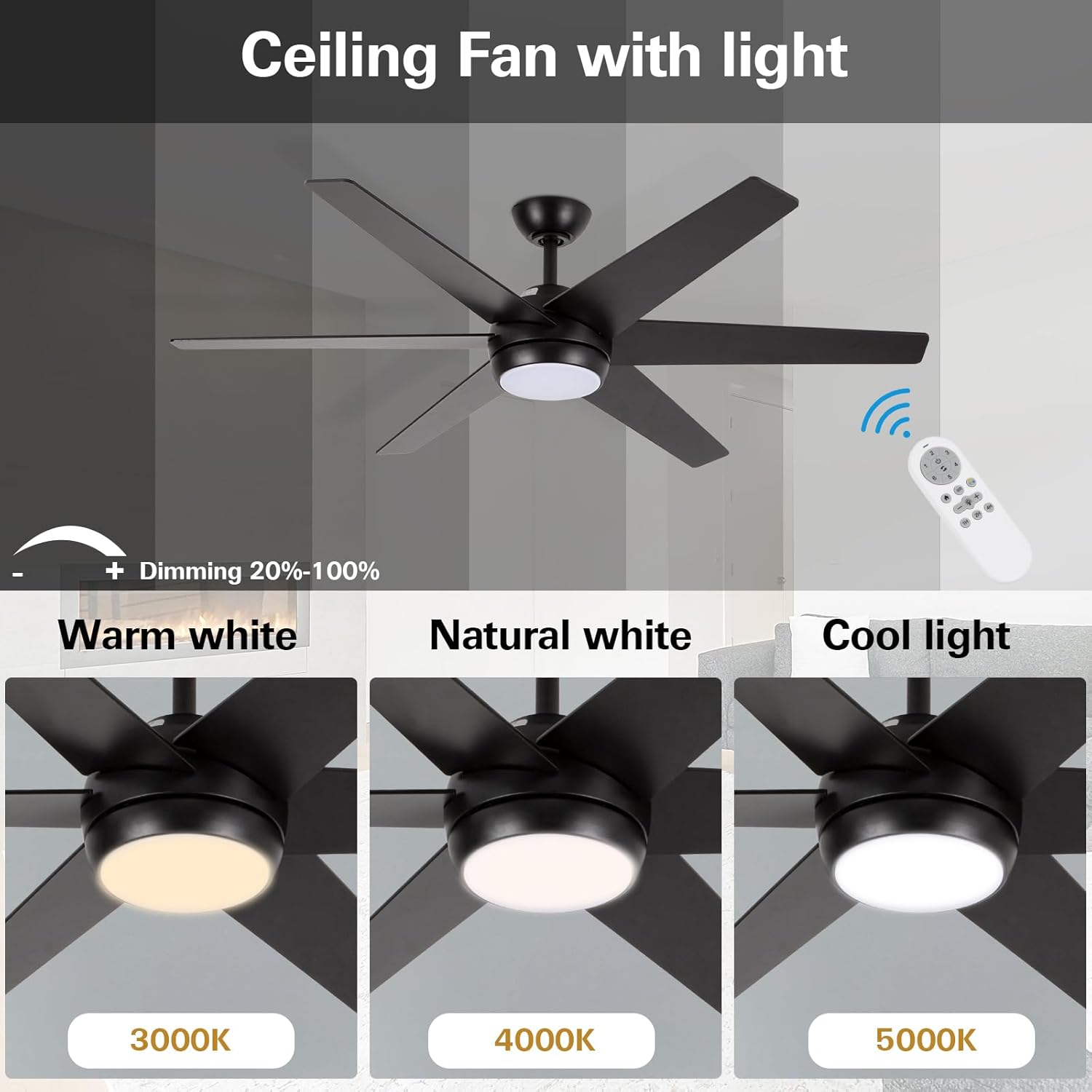
- Қазіргі заманғы минималистік дизайн: 52-inch ceiling fan with metal motor housing and six dual-color blades. Features an acrylic cover and flicker-free integrated LED light.
- Күңгірттелетін жарықдиодты шам: Replaceable 18W LED light source with three color temperature options (3000K Warm White, 4000K Natural White, 5000K Cool White) and adjustable brightness (20%–100%).
- Тыныш қайтымды қозғалтқыш: Allows for downward airflow in summer for cooling and upward airflow in winter for warm air distribution. Designed for quiet operation.
- Multifunction Remote Control: Offers six fan speeds, a natural wind option, 1/2/4-hour timer functions, and a security anti-theft function (light turns on for 5 minutes every two hours).
2.2 Техникалық сипаттамалар
| Атрибут | Техникалық сипаттама |
|---|---|
| Бренд | гиколит |
| Үлгі нөмірі | HYK-52BK-LED-RC |
| Өлшем | 52 дюйм |
| Түс | Қара |
| Материал | Wood (blades), Metal (shade) |
| Жарық көзі | Кіріктірілген жарықдиодты шам (18 Вт) |
| Түс температурасы | 3000K, 4000K, 5000K |
| Жарықтық | 870 люмен |
| Бақылау әдісі | Қашықтан басқару құралы |
| Желдеткіш жылдамдығы | 6 speeds + Natural Wind |
| Таймер функциясы | 1, 2, 4 сағат |
| Ішкі/сыртқы пайдалану | Тек ішкі |
| Өнім өлшемдері | 52"L x 5.9"W x 13.2"H |
2.3 Өнімнің көрнекілігі




3. Орнату
For detailed visual instructions, please refer to the official installation video below. Ensure power is disconnected at the circuit breaker before beginning installation.
Бейне: Official Installation Guide for hykolity 52 inch Ceiling Fan with LED Light and Remote Control. This video demonstrates the step-by-step process of assembling and mounting the fan, including wiring connections.
3.1 Step-by-Step Installation Guide
- Prepare the Downrod:
- Loosen the hanging ball screw and remove the horizontal bolt to detach the hanging ball.
- Remove the lower latch from the hanging pipe.
- Prepare the Motor Assembly:
- Partially loosen the preassembled set screws in the yoke at the top of the motor assembly.
- Assemble Downrod to Motor:
- Thread the main wiring harness through the hole at the bottom of the lifting pipe (downrod).
- Slip the downrod into the motor assembly yoke, aligning the holes for the safety pin and cotter pin.
- Tighten the set screws in the motor assembly yoke.
- Install Remote Control Receiver:
- Insert the remote control receiver (BCE) into the lifting pipe.
- Put the crossbolt back through the lifting ball to secure it, then replace the original latch and tighten the lifting screw.
- Mount the Hanging Bracket:
- Install the hanging bracket to the outlet box using the provided outlet box screws (or original screws).
- Connect the GROUND (GREEN) wires from the fan and remote control receiver to the BARE/GREEN supply wire from the ceiling.
- Connect the BLACK wire from the remote control receiver to the BLACK supply wire from the ceiling.
- Connect the WHITE wire (labeled AC IN N) from the remote control receiver to the WHITE supply wire from the ceiling.
- Connect the wire group from the remote control receiver to the wire group from the motor assembly.
- Желдеткішті іліп қойыңыз:
- Grab the fan firmly with two hands. Slide the downrod through the opening in the hanging bracket and let the hanging ball rest on the hanging bracket.
- Аспалы шар ұясын ілулі кронштейннің ілмегімен сәйкес келгенше бұраңыз.
- Gently slide the remote control receiver flat-side up into the mounting bracket.
- Re-insert the screw that was removed and then tighten both screws securely.
- Желдеткіш қалақшаларын орнату:
- Loosen the screws and remove the installation fan blade decorative panel.
- Slide a blade through one of the narrow, rectangular openings on the motor housing, aligning holes in the blade with holes in the blade arm.
- Insert 3 blade attachment screws with fingers first and then tighten screws securely with a Phillips screwdriver. Repeat this procedure for the remaining blades.
- Install LED Light Kit:
- Connect the wire group from the motor housing to the wire group from the LED light kit. Ensure Molex connections snap together securely.
- Барлық 3 бұранданы Phillips бұрағышымен қатайтыңыз.
- L тіркеңізampкөлеңке:
- l түймесін айналдырыңызampshade clockwise to ensure fixation.
4. Пайдалану нұсқаулары
The hykolity ceiling fan is operated using the included multifunction remote control.
4.1 Қашықтан басқару құралының функциялары
- Желдеткіш жылдамдығы (1-6): Adjusts the fan speed from low (1) to high (6).
- Желдеткішті қосу/өшіру: Желдеткішті қосады немесе өшіреді.
- Қайтымды қозғалтқыш: Changes the direction of the fan blades for summer (downward airflow) or winter (upward airflow) modes.
- Жарықты қосу/өшіру: Кірістірілген LED шамын қосады немесе өшіреді.
- Light Dimming (20%-100%): Жарық диодты шамның жарықтығын реттейді.
- Түс температурасы (3000K/4000K/5000K): Cycles through Warm White, Natural White, and Cool White light settings.
- Табиғи жел: Activates a mode that simulates natural breeze by varying fan speeds.
- Timer Function (1H/2H/4H): Желдеткішті 1, 2 немесе 4 сағаттан кейін автоматты түрде өшетін етіп орнатады.
- Security Anti-Theft Function: Activates a mode where the light turns on for 5 minutes every two hours.
4.2 Reversible Motor Operation
The reversible motor feature allows you to optimize air circulation for different seasons:
- Жазғы режим: Set the fan to rotate counter-clockwise to create a downward airflow, producing a cooling effect.
- Қысқы режим: Set the fan to rotate clockwise to circulate warm air upwards, helping to distribute heat evenly throughout the room.
5. Техникалық қызмет көрсету
Тұрақты техникалық қызмет көрсету төбелік желдеткіштің оңтайлы өнімділігі мен ұзақ қызмет ету мерзімін қамтамасыз етеді.
- Тазалау: Жұмсақ пайдаланыңыз, damp желдеткіш қалақтары мен мотор корпусын тазалауға арналған шүберек. Абразивті тазартқыштарды немесе еріткіштерді қолданбаңыз.
- Пышақтарды тексеру: Periodically check the fan blades for any signs of damage or warping. Ensure all blade attachment screws are secure.
- Электр қосылымдары: Annually inspect all electrical connections for tightness and wear.
- Жарық көзі: The integrated LED light source is replaceable. Contact customer service for replacement parts if needed.
6. Ақаулықтарды жою
If you experience issues with your hykolity ceiling fan, refer to the following common problems and solutions:
| Мәселе | Ықтимал себебі | Шешім |
|---|---|---|
| Желдеткіш іске қосылмайды | No power to the fan; loose wiring connections; remote control battery dead. | Check circuit breaker; ensure all wiring connections are secure; replace remote control battery. |
| Light does not turn on/off | Loose wiring connection to light kit; LED light source failure; remote control issue. | Check light kit wiring; contact customer service for LED replacement; ensure remote is functioning correctly. |
| Желдеткіш күңкілдеген дыбыс шығарады | Loose mounting screws; unbalanced blades; motor issue. | Tighten all mounting screws; ensure blades are balanced and securely attached; if noise persists, contact customer service. |
| Қашықтан басқару пульті жұмыс істемейді | Dead battery; remote not paired with receiver; interference. | Replace battery; refer to remote pairing instructions (if applicable, usually automatic); ensure no strong interference sources nearby. |
7. Кепілдік және тұтынушыларды қолдау
For warranty information or any further assistance, please contact hykolity customer service. Refer to the product packaging or the official hykolity webарнайы кепілдік мәліметтері мен байланыс ақпараты үшін сайт.
If you encounter any issues during use, feel free to contact us for assistance.