
Кіріспе
This manual provides essential instructions for the proper use and maintenance of your Vikefon Type C Charging and Data Cable. This 1-meter cable is designed for efficient charging and high-speed data transfer between your Type C enabled devices and compatible power sources or computers.

Image: The Vikefon Type C Charging and Data Cable, featuring a standard USB-A connector on one end and a reversible USB-C connector on the other.
Өнім ерекшеліктері
- USB Connector Quality: Ensures reliable charging and high-speed data transmission.
- Шығу қуаты: Supports up to 5V, 3 Amp жылдам зарядтау үшін.
- Әмбебап үйлесімділік: Fully compatible with all Type C mobile devices for fast charging and syncing.
- Reversible USB Type-C Connector: Allows for quick and easy connections in any orientation.
- Тұрақты дизайн: Features intricate nylon braiding for enhanced durability and longevity, outlasting standard cables.
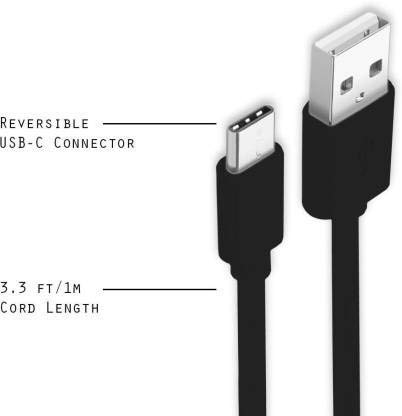
Image: A diagram illustrating the reversible nature of the USB-C connector and the cable's 1-meter (3.3 ft) cord length.
Орнату
- Қосқыштарды анықтау: The cable has a standard USB-A connector on one end and a smaller, oval-shaped USB Type-C connector on the other.
- Connect to Power Source/Computer: Insert the USB-A end of the cable into a compatible USB port on a wall adapter, power bank, car charger, or computer.
- Құрылғыға қосылу: Insert the USB Type-C end into the charging/data port of your smartphone, tablet, or other Type C enabled device. The USB Type-C connector is reversible, so it can be inserted in either orientation.
- Қосылымды тексеру: Ensure both ends are securely connected. Your device should indicate that it is charging or connected for data transfer.
Пайдалану нұсқаулары
Құрылғыны зарядтау
- Connect the USB-A end of the cable to a compatible USB power adapter (e.g., wall charger, car charger, power bank).
- Connect the USB Type-C end to your device's charging port.
- Ensure the power adapter is plugged into a live power outlet. Your device should begin charging.
Деректерді тасымалдау
- Кабельдің USB-A ұшын компьютеріңіздегі USB портына қосыңыз.
- Connect the USB Type-C end to your device.
- On your device, you may receive a prompt asking to allow data access or to select a USB connection mode (e.g., "File Transfer," "MTP"). Select the appropriate option to enable data transfer.
- Құрылғы тасымалдауға мүмкіндік беретін компьютерде алынбалы диск немесе медиа құрылғы ретінде пайда болуы керек files.
Техникалық қызмет көрсету
- Дұрыс өңдеу: Кабельді қосқанда немесе ажыратқанда әрқашан қосқыш басынан ұстаңыз. Ішкі сымдардың зақымдалуын болдырмау үшін кабельдің өзінен тікелей тартпаңыз.
- Иілуден аулақ болыңыз: Do not excessively bend or crimp the cable, especially near the connectors, as this can cause internal wire breakage.
- Сақтау орны: Store the cable in a clean, dry place away from extreme temperatures and direct sunlight. Avoid tangling the cable.
- Тазалау: If necessary, gently wipe the cable and connectors with a dry, soft cloth. Do not use liquids or abrasive cleaners.

Сурет: жақыннан түсірілген view highlighting the durable metal heads of the Vikefon Type C cable connectors, designed for anti-oxidation and corrosion resistance.
Ақаулықтарды жою
- Құрылғы зарядталмай жатыр:
- Кабельдің екі ұшы да мықтап жалғанғанына көз жеткізіңіз.
- Қуат адаптерінің дұрыс жұмыс істеп тұрғанын және ток розеткаға қосылғанын тексеріңіз.
- Басқа қуат адаптерін немесе USB портын пайдаланып көріңіз.
- Check your device's charging port for any debris or damage.
- Баяу зарядтау:
- Ensure you are using a power adapter that supports fast charging (e.g., 3A output).
- Құрылғыңыздағы қажет емес фондық қолданбаларды жабыңыз.
- Деректерді тасымалдау жоқ:
- Confirm the cable is properly connected to both your device and computer.
- On your device, check the notification panel for USB options and select "File Transfer" or "MTP."
- Компьютердегі басқа USB портына қосылуға тырысыңыз.
- Құрылғыны да, компьютерді де қайта іске қосыңыз.
Техникалық сипаттамалар
| Ерекшелік | Мәлімет |
|---|---|
| Бренд | Vikefon |
| Модель атауы | C түрі |
| Үлгі нөмірі | C түрі 0129 |
| Қосқыш түрі | USB Type C (Male-to-Male) |
| Кабель түрі | USB |
| Үйлесімді құрылғылар | Laptop, PC, Smartphone (e.g., Xiaomi Redmi 8A, Poco M2, Poco M2 Pro, Samsung, Motorola, Lenovo, Lava, Sony, HTC, LG, Karbonn, Maxx) |
| Арнайы мүмкіндіктер | Charging Wire, Durable, High Data Transfer Rate, High Quality, Long Length |
| Деректерді тасымалдау жылдамдығы | Up to 0.48 Gigabits Per Second (480 Mbps) |
| Қосылу технологиясы | USB |
| Техникалық сипаттама | ISO |
| Түс | Қара |
| Элемент пішіні | Дөңгелек |
| Outer Material Type | Rubber (with Nylon Braiding) |
| Кабель ұзындығы | 1 метр |
Кепілдік және қолдау
Specific warranty details for the Vikefon Type C Charging and Data Cable are not provided in this manual. For information regarding warranty coverage, returns, or technical support, please refer to the product packaging or contact the manufacturer directly through their official channels.