
1. Кіріспе
This manual provides comprehensive instructions for the installation, operation, and maintenance of the SINOTIMER TM919B 30A Programmable Electronic Timer Switch. This device is designed to automatically control the ON/OFF switching of various electrical appliances based on user-defined daily or weekly programs. Please read this manual carefully before installation and use to ensure proper function and safety.
2. Қауіпсіздік туралы ақпарат
WARNING: Risk of electric shock. Installation should only be performed by a qualified electrician or trained personnel.
- Always disconnect power at the circuit breaker before installing or servicing the timer switch.
- Барлық сым қосылымдарының қауіпсіз екеніне және жергілікті электр кодтарына сәйкес келетініне көз жеткізіңіз.
- 30А максималды жүктеме номиналды мәнінен асырмаңыз.
- Бұл құрылғы тек үй ішінде пайдалануға арналған. Ылғалға немесе жоғары температураға ұшыратпаңыз.
- Құрылғыны өз бетіңізше бөлшектеуге немесе жөндеуге әрекеттенбеңіз. Білікті қызмет көрсету қызметкерлеріне хабарласыңыз.
3. Өнім аяқталдыview
The SINOTIMER TM919B is a digital timer switch featuring a large LCD display, multiple programming options, and a manual override function. It is designed for DIN rail mounting.
3.1. Компоненттер және басқару элементтері
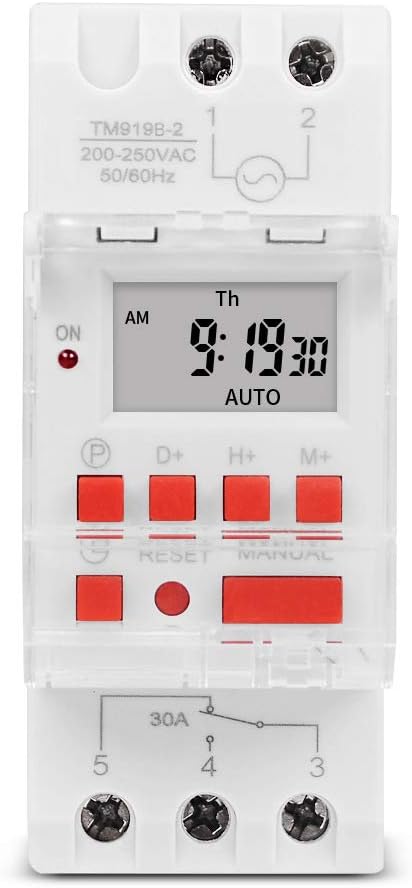
1-сурет: Алдыңғы view of the TM919B timer switch, showing the LCD display, control buttons, and terminal connections.

2-сурет: Бұрыштық view of the TM919B with the transparent protective cover open, revealing the programming buttons (P, D+, H+, M+, RESET, MANUAL).
- СКД дисплей: Ағымдағы уақытты, күнді және бағдарламаның күйін көрсетеді.
- P (Бағдарлама) түймесі: Enters/exits program setting mode.
- D+ (Day) Button: Adjusts day of the week in setting modes.
- H+ (Hour) Button: Adjusts hour in setting modes.
- M+ (Minute) Button: Adjusts minute in setting modes.
- RESET түймесі: Clears all settings and resets the timer to factory defaults.
- ҚОЛМЕН БАСҚАРУ Түймесі: Toggles between ON, AUTO, and OFF modes.
- Терминал қосылымдары: For power input and load output.
4. Техникалық сипаттамалар
| Ерекшелік | Техникалық сипаттама |
|---|---|
| Үлгі | TM919B |
| Тtage | 220 В (айнымалы ток 200-250 В) |
| Жиілік | 50/60 Гц |
| Максималды жүктеме | 30А (резистивті жүктеме) |
| Бағдарламалар | 16 ON/OFF programs per day/week |
| Минималды интервал | 1 минут |
| Батареяның сақтық көшірмесі | Built-in rechargeable battery (for memory retention) |
| Монтаждау | 35 мм DIN рельсі |
| Өлшемдері | 3-суретті қараңыз |

3-сурет: Detailed dimensions of the TM919B timer switch, showing height, width, and depth measurements.
5. Орнату және орнату
Follow these steps for safe and correct installation of your timer switch.
5.1. Монтаждау
- Негізгі автоматты ажыратқышта қуаттың ажыратылғанына көз жеткізіңіз.
- Mount the TM919B onto a standard 35mm DIN rail. The device features a clip mechanism on the back for secure attachment.
- Press the orange clip at the bottom of the unit to release it from the DIN rail if removal is necessary.

4-сурет: Бүйір view of the TM919B, highlighting the orange DIN rail mounting clip.

5-сурет: Артқа view of the TM919B, illustrating the DIN rail mounting mechanism.
5.2. Электр схемасы
Refer to the diagram below for correct wiring connections. Ensure all connections are tight and insulated.

6-сурет: Бүйір view of the TM919B showing the wiring diagram printed on the casing. Terminals 1 and 2 are for power input (L and N). Terminals 3, 4, and 5 are for load output (Common, Normally Open, Normally Closed).
- 1 және 2 терминалдар: Power Input (L - Live, N - Neutral). Connect your 220V AC supply here.
- Терминал 3: Common (COM) for the output relay.
- Терминал 4: Normally Open (NO) output. The load will be powered when the timer is ON.
- Терминал 5: Normally Closed (NC) output. The load will be powered when the timer is OFF.
For typical applications where the load is switched ON by the timer, connect the load between Terminal 3 (COM) and Terminal 4 (NO).
6. Пайдалану нұсқаулары
6.1. Бастапқы орнату және қалпына келтіру
- After connecting power, the display may be blank or show random characters. Press the RESET button with a pointed object (e.g., a pen tip) to clear all memory and reset the timer. The display will show "0:00" and "MO".
- Allow the internal battery to charge for at least 30 minutes before programming for optimal performance and memory retention during power outages.
6.2. Ағымдағы уақыт пен күнді орнату
- түймесін басып тұрыңыз D+ button to set the current day of the week (MO, TU, WE, TH, FR, SA, SU).
- түймесін басып тұрыңыз H+ button to set the current hour (0-23).
- түймесін басып тұрыңыз M+ button to set the current minute (0-59).
- Release the buttons when the correct time and day are displayed. The timer will automatically save the settings.
6.3. Programming ON/OFF Cycles
The TM919B supports up to 16 ON/OFF programs. Each program consists of an ON time and an OFF time.
- түймесін басыңыз P button once. The display will show "1 ON". This is for the first ON program.
- Қолдану D+ to select the day(s) for this program. Options include:
- MO TU WE TH FR SA SU (Every day)
- MO (Monday only)
- TU (Tuesday only)
- ...
- MO TU WE TH FR (Weekdays)
- SA SU (Weekends)
- MO TU WE (Mon-Wed)
- TH FR SA (Thu-Sat)
- MO WE FR (Mon, Wed, Fri)
- TU TH SA (Tue, Thu, Sat)
- MO TU WE TH FR SA (Mon-Sat)
- Қолдану H+ және M+ to set the desired ON hour and minute.
- түймесін басыңыз P button again. The display will show "1 OFF". This is for the first OFF program.
- Қолдану D+, H+, және M+ to set the desired OFF day, hour, and minute. Ensure the OFF time is after the ON time for the same program.
- Repeat steps 1-5 for additional ON/OFF programs (up to 16). If you don't need all 16 programs, simply press P to cycle through unused programs until you return to the current time display.
- To exit programming mode and save settings, press the clock button (usually labeled with a clock icon, or simply wait for 30 seconds without input).
6.4. Қолмен анықтау
түймесін басыңыз НҰСҚАУЛЫҚ Жұмыс режимдері арасында ауысу үшін түймені басыңыз:
- ҚОСУЛЫ: The timer output is continuously ON, ignoring all programs.
- АВТОМАТТЫ: Таймер бағдарламаланған ҚОСУ/ӨШІРУ циклдарына сәйкес жұмыс істейді. Бұл стандартты жұмыс режимі.
- ӨШІРУЛІ: The timer output is continuously OFF, ignoring all programs.
Таймердің орнатылғанына көз жеткізіңіз АВТО for programmed operation.
7. Техникалық қызмет көрсету
- The TM919B is designed for maintenance-free operation.
- Сыртын жұмсақ, құрғақ шүберекпен тазалаңыз. Абразивті тазалағыштарды немесе еріткіштерді пайдаланбаңыз.
- Ensure the internal battery is charged by keeping the unit powered for at least 24 hours initially, and periodically thereafter, to maintain time and program memory during power outages.
8. Ақаулықтарды жою
| Мәселе | Ықтимал себебі | Шешім |
|---|---|---|
| Дисплей бос. | No power supply; internal battery discharged. | Check power connections. Allow unit to charge for 30 minutes. |
| Timer not switching load. | Incorrect wiring; timer in MANUAL ON/OFF mode; incorrect program settings. | Verify wiring (refer to Figure 6). Ensure timer is in AUTO mode. Check program times and days. |
| Қуат өшірілгеннен кейін бағдарламалар жоғаладыtage. | Internal battery not fully charged or faulty. | Ensure unit is powered for at least 24 hours to fully charge the battery. If problem persists, contact support. |
| Түймешіктер жауап бермейді. | Unit frozen; temporary glitch. | түймесін басыңыз RESET түймесі. |
9. Кепілдік және қолдау
SINOTIMER products are manufactured to high-quality standards. For warranty information or technical support, please refer to the documentation provided with your purchase or visit the official SINOTIMER webсайт. Сатып алуды растау ретінде сатып алу түбіртегіңізді сақтаңыз.
For further assistance, you may contact SINOTIMER customer service through their official channels.