
Кіріспе
This manual provides detailed instructions for the setup, operation, and maintenance of your BUFFBEE Glow Alarm Clock HRS-BLACK. Please read this manual thoroughly before using the product to ensure proper function and longevity.
Өнім аяқталдыview
The BUFFBEE Glow Alarm Clock is a versatile device combining a digital alarm clock, FM radio, and a 7-color night light. It is designed to enhance your sleep and wake-up experience with customizable features.
Негізгі ерекшеліктері:
- 3-і 1 функциясы: Digital alarm clock, FM radio, and night light.
- 7 түсті түнгі жарық: Adjustable with 5 brightness levels.
- Қос дабыл: Set two independent alarms with choice of FM radio, built-in beep, or bird sounds.
- Adjustable Display Dimmer: 0-100% brightness control for the time display.
- Жарықтандыру түймелері: For easy operation in low light conditions.
- Ұйқы таймері: Quick nap setting from 10 to 120 minutes.
- Auto-Off Sleep Timer: Automatically turns off night light and FM radio after a set duration.
- USB зарядтау порты: For charging external electronic devices.
- Қуат опциялары: AC powered with AAA battery backup (batteries not included).
Пакет мазмұны:
- 1 x BUFFBEE Glow Alarm Clock
- 1 x қуат адаптері
- 1 x Пайдаланушы нұсқаулығы
Құрамдас идентификация:
Refer to the image below for an overview of the alarm clock's buttons and display.

Сурет: алдыңғы view of the BUFFBEE Glow Alarm Clock, showing the digital time display, alarm indicators, and control buttons on the top panel. The top edge features a light strip.
Орнату
1. Қуат қосылымы:
- Берілген қуат адаптерін оятқыш сағаттың артқы жағындағы тұрақты ток кіріс портына қосыңыз.
- Адаптерді стандартты розеткаға қосыңыз.
2. Battery Backup (Optional):
Қуат беру кезінде үзіліссіз жұмыс істеу үшін utages, install 3 AAA batteries (not included) into the battery compartment on the bottom of the unit. The clock will maintain time and alarm settings, and the alarm will still function, but the display and night light may be limited to conserve power.

Сурет: артқы view of the alarm clock showing the power input and battery compartment, alongside a power adapter and three AAA batteries (not included).
3. Initial Time Setting:
- When first powered on, the display will show a default time.
- түймесін басып тұрыңыз УАҚЫТ ОРНАТЫЛДЫ button (usually located on the top panel) until the hour digits flash.
- пайдаланыңыз +/- buttons (or similar navigation buttons) to adjust the hour.
- түймесін басыңыз УАҚЫТ ОРНАТЫЛДЫ again to confirm the hour and move to minute adjustment.
- пайдаланыңыз +/- минуттарды реттеу үшін түймелер.
- түймесін басыңыз УАҚЫТ ОРНАТЫЛДЫ уақытты орнату режимін растау және шығу үшін тағы бір рет басыңыз.
- 12 сағаттық және 24 сағаттық формат арасында ауысу үшін түймесін басыңыз 12/24 сағ button (if available, often combined with time set or a dedicated button).
Пайдалану нұсқаулары
1. Setting Alarms (Alarm 1 & Alarm 2):
Сағат екі тәуелсіз дабылды қолдайды.
- түймесін басыңыз 1-дабыл түймесі (немесе 2-дабыл) once to display the current alarm time.
- түймесін басып тұрыңыз 1-дабыл (немесе 2-дабыл) button until the hour digits flash.
- пайдаланыңыз +/- түймелері сағатты реттеуге арналған.
- түймесін басыңыз Дабыл Сағатты растау және минутты реттеуге өту үшін түймесін қайта басыңыз.
- пайдаланыңыз +/- минуттарды реттеу үшін түймелер.
- түймесін басыңыз Дабыл button again to select the alarm sound: FM radio, built-in beep, or bird sounds. Use +/- опциялар арқылы айналдыру.
- түймесін басыңыз Дабыл Дабылды растау және іске қосу үшін түймесін тағы бір рет басыңыз. Дисплейде дабыл белгішесі пайда болады.
- To turn off an active alarm, press the corresponding Дабыл button. The alarm icon will disappear.
2. Кідірту функциясы:
Дабыл естілгенде, үлкен түймесін басыңыз ҰЙЫҚТЫРУ / ЖАРЫҚ button on top to temporarily silence the alarm for 9 minutes. The alarm will sound again after the snooze period.
3. Night Light Operation:
The alarm clock features a 7-color night light with adjustable brightness.

Image: The alarm clock shown with its top light strip illuminated in various colors, demonstrating the 7-color night light feature.
- түймесін басыңыз ЖАРЫҚ button (often combined with SNOOZE or a dedicated button) to turn the night light on/off.
- When the night light is on, press the ЖАРЫҚ button repeatedly to cycle through the 7 available colors.
- To adjust the brightness, use the +/- buttons while the night light is active. There are 5 brightness levels.
4. FM радиосы:
The built-in FM radio allows you to listen to your favorite stations.
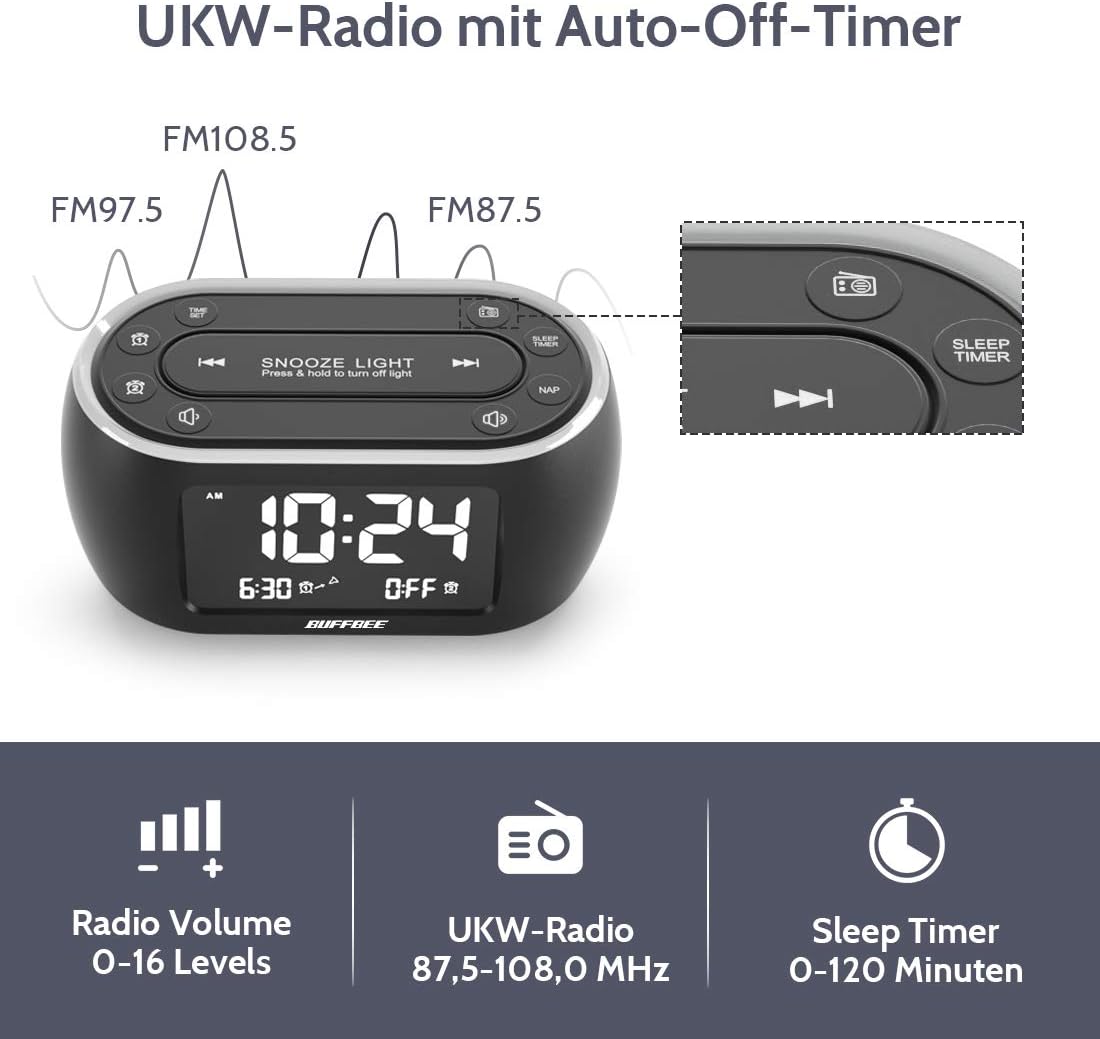
Image: The alarm clock display showing FM radio frequencies (FM108.5, FM97.5, FM87.5) and icons for radio volume and sleep timer.
- түймесін басыңыз РАДИО button to turn the FM radio on/off.
- түймесін басыңыз SCAN button (or similar) to automatically scan and save available FM stations.
- пайдаланыңыз Алдын ала/КЕЛЕСІ сақталған станциялар арасында шарлау немесе қолмен реттеу түймелері.
- Дыбыс деңгейін реттеңіз ДЫБЫС +/- buttons. The volume can be set from 0 to 16 levels.
5. Nap Timer:
The nap timer allows for quick, short sleep periods without affecting regular alarm settings.
- түймесін басыңыз NAP button. The display will show the default nap time (e.g., 10 minutes).
- түймесін басыңыз NAP button repeatedly to cycle through preset nap durations (e.g., 10, 20, 30, 60, 90, 120 minutes).
- The nap timer will start automatically after selection.
- To cancel the nap timer, press the NAP button until "OFF" is displayed.
6. Auto-Off Sleep Timer:
Set a timer for the night light and/or FM radio to automatically turn off after a specified duration.
- While the night light or FM radio is active, press the ҰЙҚЫ ТАЙМЕРІ түймесі.
- түймесін басыңыз ҰЙҚЫ ТАЙМЕРІ button repeatedly to cycle through available durations (e.g., 15, 30, 60, 90, 120 minutes, or OFF).
- The selected duration will be displayed, and the timer will begin. The night light and/or FM radio will turn off automatically when the timer expires.
7. Display Dimmer:
Adjust the brightness of the main time display from 0% to 100%.

Image: Six different views of the alarm clock display, illustrating the range of brightness from very dim to fully bright, and also showing the night light dimmer.
Арнайы пайдаланыңыз DIMMER теру немесе ДИММЕР +/- buttons (if available) to adjust the display brightness to your preference. This allows for comfortable viewкез келген жарықтандыру жағдайында.
8. USB зарядтау порты:
A USB port is located on the back of the unit for charging small electronic devices.

Image: The alarm clock with a smartphone plugged into its side USB port, indicating the charging function.
Connect your device's USB charging cable to the port. The clock must be powered by the AC adapter for the USB charging function to work.
Техникалық қызмет көрсету
To ensure the longevity and optimal performance of your BUFFBEE Glow Alarm Clock, follow these maintenance guidelines:
- Тазалау: Құрылғыны жұмсақ, құрғақ шүберекпен сүртіңіз. Абразивті тазартқыштарды, балауыздарды немесе еріткіштерді пайдаланбаңыз, себебі олар бетіне зақым келтіруі мүмкін.
- Қуат: Always disconnect the power adapter from the wall outlet before cleaning or if the unit will be unused for an extended period.
- Қоршаған орта: Keep the alarm clock away from direct sunlight, heat sources, and excessive moisture.
- Батареяны ауыстыру: If using battery backup, replace AAA batteries annually or when the battery indicator suggests low power. Ensure correct polarity when inserting new batteries.
Ақаулықтарды жою
If you encounter issues with your BUFFBEE Glow Alarm Clock, refer to the following common problems and solutions:
| Мәселе | Ықтимал себебі | Шешім |
|---|---|---|
| Clock display is blank or flickering. | No power or loose connection. Low battery backup. | Ensure the power adapter is securely plugged into the clock and the wall outlet. Check if AAA batteries are installed correctly and have sufficient charge. |
| Дабыл естілмейді. | Дабыл іске қосылмаған. Дабыл дыбысы тым төмен. | Verify that the alarm icon is displayed. Check the alarm volume setting. Ensure the correct alarm time is set. |
| FM радиосының қабылдауы нашар. | Weak signal. Antenna not extended. Interference. | Extend the FM antenna fully. Try repositioning the clock. Perform an auto-scan for stations again. |
| Night light is not working. | Жарық функциясы өшірілді. | Press the LIGHT button to turn it on. Check if the brightness is set to 0%. |
| USB арқылы зарядтау жұмыс істемейді. | Clock not connected to AC power. Device not compatible. | Ensure the clock is powered by the AC adapter. Check if your device is compatible with standard USB charging. |
Техникалық сипаттамалар
| Ерекшелік | Мәлімет |
|---|---|
| Бренд | BUFFBEE |
| Үлгі нөмірі | HRS-BLACK |
| Өлшемдері (L x W x H) | 12 x 3.81 x 6 см (4.72 x 1.5 x 2.36 дюйм) |
| Салмағы | 330 грамм (0.73 фунт) |
| Қуат кірісі | Айнымалы ток 100-240В, 50/60Гц |
| Батареяның сақтық көшірмесі | 3 x AAA батареялары (жинаққа кірмейді) |
| Дисплей түрі | Сандық |
| Дисплей жарықтығы | 0-100% реттеледі |
| Түнгі жарық түстері | 7 түс |
| Түнгі жарықтың жарықтығы | 5 деңгей реттеледі |
| FM радио жиілігі | 87.5-108.0 МГц |
| Дабыл дыбысы | 0-16 деңгейлері реттеледі |
| Арнайы мүмкіндіктер | Ambient light, Dual Alarm, Nap Timer, Sleep Timer, USB Charging Port |
Кепілдік және қолдау
BUFFBEE products are designed for reliability and performance. For specific warranty information, please refer to the documentation included with your purchase or contact BUFFBEE customer support.
If you require technical assistance or have questions regarding your BUFFBEE Glow Alarm Clock, please visit the official BUFFBEE webсайтына кіріңіз немесе олардың тұтынушыларға қызмет көрсету бөліміне хабарласыңыз. Байланыс мәліметтері әдетте өнімнің қаптамасында немесе өндірушінің нұсқаулығында көрсетілген. webсайт.


