
Кіріспе
This manual provides comprehensive instructions for the Lexmark MS431dw Monochrome Laser Printer. It covers setup, operation, maintenance, and troubleshooting to ensure optimal performance and longevity of your device. The Lexmark MS431dw is designed for efficient monochrome printing, offering speeds up to 40 pages per minute and automatic duplex printing.

Сурет: алдыңғы оң жақ view of the Lexmark MS431dw Monochrome Laser Printer.
Орнату
1. Принтерді орамнан шығару
Принтерді қаптамасынан абайлап алыңыз. Принтердің сыртынан және ішінен барлық қаптама материалдарының, таспалардың және қорғаныш пленкалардың алынып тасталғанына көз жеткізіңіз. Қажет болса, қаптаманы болашақта тасымалдау үшін сақтаңыз.
2. Тонер картриджін орнату
- Принтердің алдыңғы қақпағын ашыңыз.
- Жаңа тонер картриджін қаптамасынан шығарып, тонерді біркелкі тарату үшін ақырын шайқаңыз.
- Тонер картриджін белгіленген ұяға орнына шерткенше салыңыз.
- Алдыңғы қақпақты жабыңыз.
3. Қағаз жүктеу
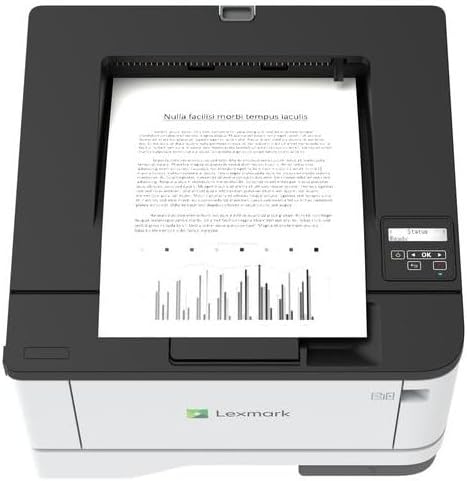
Сурет: жоғарғы view of the Lexmark MS431dw with paper loaded in the input tray.
Open the paper tray and adjust the paper guides to fit the size of your paper. Load the paper stack into the tray, ensuring it is flat and below the maximum fill line. Close the paper tray. The printer supports various media types, including card stock.
4. Қуатты қосу
Қуат сымын принтердің қуат кірісіне, содан кейін жерге қосылған электр розеткасына қосыңыз.
5. Connecting to a Network/Computer
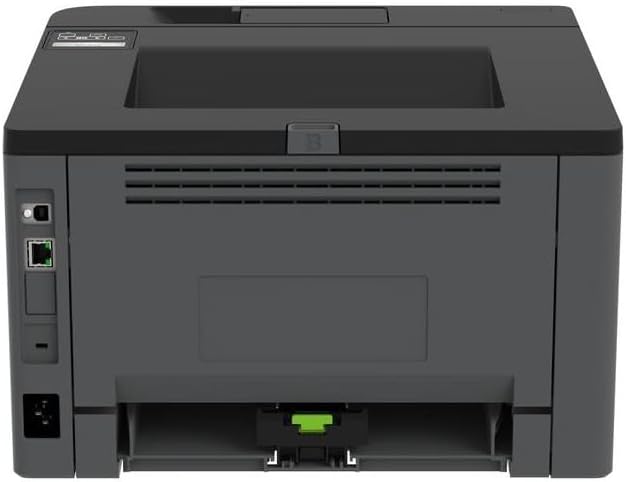
Сурет: артқы view of the Lexmark MS431dw, highlighting the Ethernet and power connection ports.
The Lexmark MS431dw supports Ethernet connectivity. Connect an Ethernet cable from your network router or switch to the Ethernet port on the back of the printer. For direct connection to a computer, use a USB cable (not included) if available, or configure network printing.
6. Драйверді орнату
Turn on the printer. Insert the driver CD (if provided) into your computer, or download the latest drivers from the official Lexmark support webсайт. Драйверді орнатуды аяқтау үшін экрандағы нұсқауларды орындаңыз.
Пайдалану нұсқаулары
1. Басқару тақтасы үстіндеview

Сурет: жоғарғы view of the Lexmark MS431dw, showing the printer's control panel with display and buttons.
The control panel features a display screen and navigation buttons (Up, Down, OK, Back) to access printer settings, status, and functions. Refer to the on-screen menus for specific options.
2. Негізгі басып шығару
- Принтердің қосылғанын және компьютерге немесе желіге қосылғанын тексеріңіз.
- Компьютерде басып шығарғыңыз келетін құжатты ашыңыз.
- таңдаңыз Басып шығару қолданба мәзірінен (мысалы, File > Басып шығару).
- Choose the Lexmark MS431dw from the list of available printers.
- Adjust print settings as desired (e.g., number of copies, paper size).
- басыңыз Басып шығару.
3. Automatic Duplex Printing
The MS431dw supports automatic two-sided (duplex) printing. To enable this feature:
- In the print dialog box on your computer, navigate to the printer properties or preferences.
- Look for an option related to "Two-sided printing" or "Duplex printing."
- Қажетті дуплекстеу опциясын таңдаңыз (мысалы, ұзын жиекті байланыстыру, қысқа жиекті байланыстыру).
- Таңдауыңызды растаңыз және басып шығаруды жалғастырыңыз.
Техникалық қызмет көрсету
1. Тонер картриджін ауыстыру
When the toner level is low, the printer's display will indicate a warning. To replace the cartridge:
- Принтердің қосулы екеніне көз жеткізіңіз.
- Алдыңғы қақпақты ашыңыз.
- Ескі тонер картриджін тартып шығарыңыз.
- Unpack a new Lexmark-compatible toner cartridge and gently shake it.
- Жаңа картриджді орнына бекітілгенше салыңыз.
- Алдыңғы қақпақты жабыңыз.
2. Принтерді тазалау
Тұрақты тазалау баспа сапасын сақтауға және принтердің қызмет ету мерзімін ұзартуға көмектеседі.
- Сыртқы: Сыртқы беттерді жұмсақ шүберекпен сүртіңіз, damp, түксіз мата. Абразивті тазартқыштарды немесе еріткіштерді қолданбаңыз.
- Интерьер: Periodically open the front cover and gently remove any dust or paper debris from accessible areas using a dry, lint-free cloth. Avoid touching the fuser unit.
Ақаулықтарды жою
This section addresses common issues you might encounter. For more detailed troubleshooting, refer to the Lexmark support webсайт.
1. Қағаз кептелістері
- If a paper jam occurs, the printer display will show an error message indicating the location of the jam.
- Carefully open the indicated covers or trays.
- Кептелген қағазды қағаз жолының бағытымен ақырын тартыңыз. Қағазды жыртып алмаңыз.
- Close all covers and trays. The printer should resume printing.
2. Басып шығару сапасының нашарлығы
- Түссізденген баспалар: The toner cartridge may be low. Replace it if necessary.
- Жолақтар немесе дақтар: Clean the printer's interior as described in the Maintenance section. Ensure the toner cartridge is properly seated.
- Бос беттер: Verify the toner cartridge is installed correctly and has toner. Check printer drivers and print settings.
3. Қосылу мәселелері
- Принтер табылмады: Ensure the Ethernet cable is securely connected to both the printer and the network. Verify network settings on the printer and computer.
- Офлайн күйі: Check the printer's power and network connection. Restart both the printer and your computer.
Техникалық сипаттамалар
| Ерекшелік | Мәлімет |
|---|---|
| Үлгі нөмірі | 29S0110 |
| Баспа технологиясы | Лазер |
| Принтердің шығысы | Монохромды |
| Максималды басып шығару жылдамдығы (монохромды) | Минутына 40 бетке дейін (минутына беттер) |
| Қосылу технологиясы | Ethernet |
| Арнайы мүмкіндік | Auto-Duplex (Automatic Two-sided Printing) |
| Максималды кіріс парағы сыйымдылығы | 900 парақ |
| Print Media Support | Card stock, Plain paper |
| Элемент салмағы | 9300 грамм (шамамен 20.5 фунт) |
| Ватtage | 570 ватт |
| UPC | 734646695558 |
Ескерту: Техникалық сипаттамалар ескертусіз өзгертілуі мүмкін.
Кепілдік және қолдау
Кепілдік туралы ақпарат
Your Lexmark MS431dw printer is covered by a standard manufacturer's warranty. For specific terms, conditions, and duration of your warranty, please refer to the documentation included with your product or visit the official Lexmark webсайт. Кепілдік шағымдары үшін сатып алуды растайтын құжатты сақтаңыз.
Тұтынушыларды қолдау
For technical assistance, driver downloads, or further support, please visit the official Lexmark support portal.
Visit the Lexmark Store for Support