
1. Кіріспе
1.1 Өнім біттіview
The Renkforce RF-HC-100 is a compact 16-megapixel trail camera designed for outdoor monitoring. It features a time-lapse function, night vision capabilities, and a durable, camouflage brown housing. This camera is suitable for wildlife observation, property surveillance, and other outdoor recording needs.
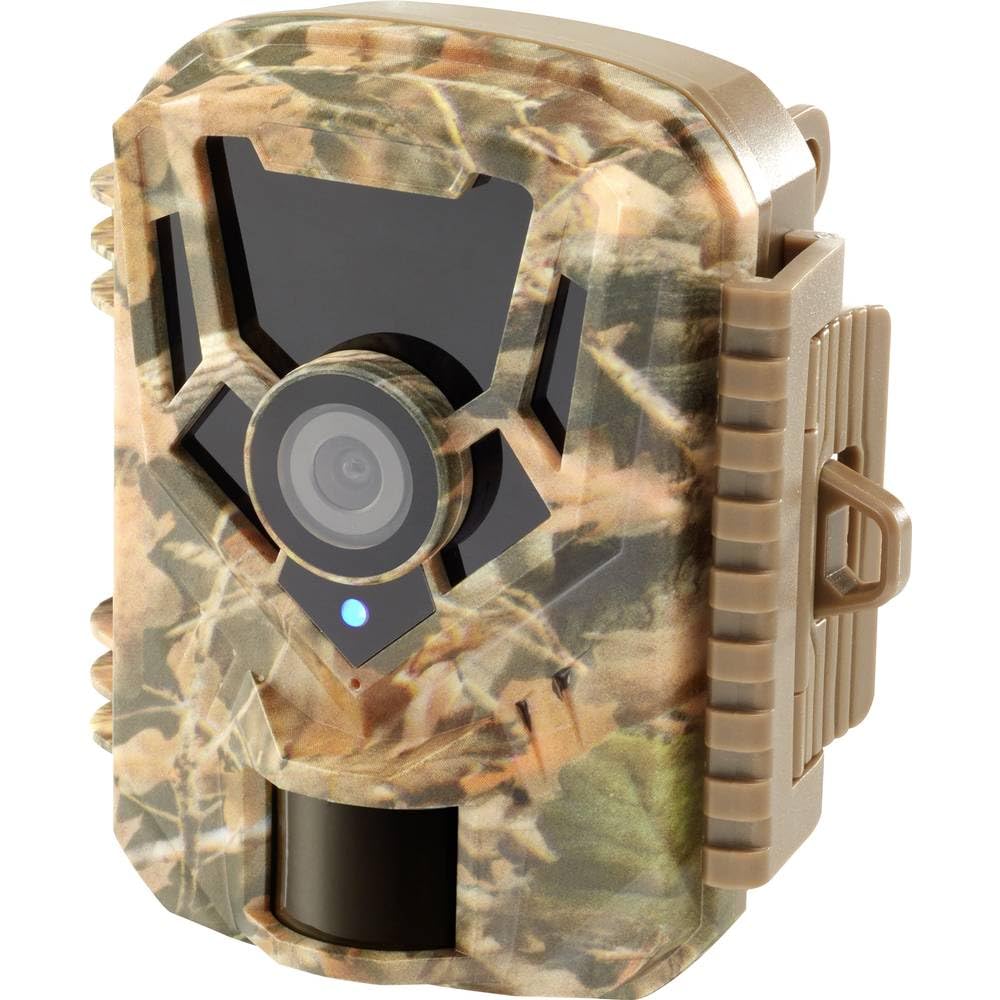
Сурет: алдыңғы жағы view of the Renkforce RF-HC-100 Trail Camera, showcasing its compact design and camouflage pattern.

Сурет: алдыңғы view of the Renkforce RF-HC-100 Trail Camera, highlighting the main lens and motion sensor.
1.2 Пакет мазмұны
- 1 x Renkforce RF-HC-100 Trail Camera Unit
- Note: Additional accessories such as mounting straps, USB cables, or user manuals may be included depending on the specific package.
2. Қауіпсіздік туралы ақпарат
- Құрылғыны іске қоспас бұрын барлық нұсқауларды мұқият оқып шығыңыз.
- Do not expose the camera to extreme temperatures, direct sunlight for prolonged periods, or corrosive liquids.
- Ensure the battery compartment is properly sealed to maintain the IP65 weather resistance.
- Dispose of batteries according to local regulations. Do not mix old and new batteries or different types of batteries.
- Құрылғыны балалардың қолы жетпейтін жерде сақтаңыз.
- Камераны бөлшектеуге немесе өзгертуге әрекеттенбеңіз, себебі бұл кепілдікті жояды және зақым келтіруі мүмкін.
3. Өнімнің ерекшеліктері
The Renkforce RF-HC-100 Trail Camera offers the following key features:
- Жоғары ажыратымдылықты бейнелеу: 16 Megapixel effective capture resolution for clear photos and 1080p video recording.
- Түнгі көру: Equipped with color night vision for monitoring in low-light conditions.
- Уақыт аралығы функциясы: Capture images at set intervals to observe long-term events.
- SD картасы ұясы: Supports external SD cards for ample storage of photos and videos.
- Ауа-райына төзімділік: IP65 international protection rating ensures durability in various outdoor environments.
- Шағын дизайн: Miniature form factor with a camouflage brown finish for discreet placement.
- Кең бұрыш View: 90-degree angle of view to cover a broad area.
- Қосылу мүмкіндігі: Features wired connectivity (USB, AV ports) and Wi-Fi protocol for data transfer and control via application.
- Орнату опциялары: Includes support for wall mounting.
4. Орнату
4.1 Батареяны орнату
- Бүйірлік қысқыштарды босату арқылы камера корпусын ашыңыз.
- Батарея бөлімін табыңыз.
- Insert the required number of AA batteries (not included) according to the polarity markings (+/-).
- Батарея бөлімін мықтап жабыңыз.
4.2 SD картасын орнату
- Камера корпусы ашық тұрғанда, SD картасы ұясын табыңыз.
- Insert a compatible SD card (up to 32GB, Class 10 recommended) into the slot with the metal contacts facing down until it clicks into place.
- To remove, push the SD card in again until it springs out.

Image: The Renkforce RF-HC-100 Trail Camera with its housing open, revealing the control panel, USB, AV, and DC ports, and the ON/SETUP/OFF switch.
4.3 Камераны орнату
The camera can be mounted using a strap or a wall mount bracket (if included or purchased separately).
- Бауды орнату: Thread a mounting strap through the slots on the back of the camera and secure it to a tree or pole.
- Қабырғаға орнату: Use the integrated mounting points or a compatible wall mount bracket to attach the camera to a flat surface. Ensure the camera is stable and pointed in the desired direction.
5. Пайдалану нұсқаулары
5.1 Қуатты қосу/өшіру және режимді таңдау
Locate the ON/SETUP/OFF switch inside the camera housing.
- ӨШІРУЛІ: Камераны өшіреді.
- ОРНАТУ: Enters setup mode, allowing you to configure settings via the internal display.
- ҚОСУЛЫ: Activates the camera for recording based on the configured settings.
5.2 Параметрлерді конфигурациялау
In SETUP mode, use the navigation buttons (if available) to access the menu and adjust parameters such as:
- Фото/бейне ажыратымдылығы
- PIR сенсорының сезімталдығы
- Анықтаудың кешігуі
- Уақыт аралығы
- Күні мен уақыты
- Recording Mode (Photo, Video, Photo+Video, Time-Lapse)
5.3 Деректерді іздеу
Жазылғанға қол жеткізу үшін files:
- USB арқылы: Connect the camera to a computer using a USB cable. The camera will appear as a removable disk.
- SD картасы арқылы: Remove the SD card from the camera and insert it into a computer's card reader.
6. Техникалық қызмет көрсету
- Тазалау: Use a soft, dry cloth to clean the camera lens and housing. For stubborn dirt, a slightly damp шүберекті пайдалануға болады, бірақ құрылғыға ылғал енбегеніне көз жеткізіңіз.
- Батареяны ауыстыру: Батарея заряды аз деген индикатор пайда болғанда немесе өнімділік төмендегенде батареяларды ауыстырыңыз.
- SD карталарын басқару: Regularly format the SD card (after backing up important data) to maintain optimal performance and prevent errors.
- Сақтау орны: Ұзақ уақыт пайдаланбаған кезде, батареяларды алып тастаңыз және камераны тікелей күн сәулесінен алыс, салқын, құрғақ жерде сақтаңыз.
7. Ақаулықтарды жою
| Мәселе | Ықтимал себебі | Шешім |
|---|---|---|
| Камера қосылмайды. | Low or dead batteries; incorrect battery installation; power switch in OFF position. | Replace batteries; ensure correct polarity; set switch to ON or SETUP. |
| Кескін/бейне сапасы нашар. | Dirty lens; low light conditions; incorrect resolution settings. | Clean the lens; ensure adequate lighting or use night vision; adjust resolution settings. |
| Камера жазып жатқан жоқ. | SD card full or faulty; incorrect mode selected; PIR sensor blocked. | Format or replace SD card; select appropriate recording mode; clear sensor path. |
| Компьютерге қосылу мүмкін емес. | Faulty USB cable; camera not in correct mode; driver issues. | Try a different USB cable; ensure camera is in connection mode (if applicable); try another computer or card reader. |
8. Техникалық сипаттамалар
| Модель атауы | RF-HC-100 (RF-4466574) |
| Effective Capture Resolution | 16 мегапиксель |
| Бейне ажыратымдылығы | 1080p |
| Өлшемдері (L x W x H) | 21 x 12 x 9 см (8.27 x 4.72 x 3.54 дюйм) |
| Салмағы | 186 грамм (0.41 фунт) |
| Қосылу технологиясы | Wired (USB, AV), Wi-Fi Protocol (for control/transfer) |
| Арнайы мүмкіндіктер | Local Recording, Night Vision (Color Night Vision) |
| Қолдану ортасы | Сыртта |
| Халықаралық қорғау рейтингі | IP65 |
| Қуат көзі | Manual Operation (Battery-powered, batteries not included) |
| Ватtage | 1.5 Вт |
| View Бұрыш | 90 градус |
| Түс | Camouflage Brown |
| Материал | Metal (internal) |
| Монтаж түрі | Қабырғаға орнату тірегі |
9. Кепілдік және қолдау
Renkforce provides support for its products. Spare parts availability is indicated for 1 year from the date of purchase. For technical assistance, troubleshooting beyond this manual, or warranty claims, please refer to the contact information provided with your product packaging or visit the official Renkforce webсайт.