
GOKOO B08FMBHSWD
GOKOO Smart Watch B08FMBHSWD User Manual
Кіріспе
This manual provides essential information for the proper setup, operation, and maintenance of your GOKOO Smart Watch B08FMBHSWD. Please read it thoroughly before using the device to ensure optimal performance and longevity.
The GOKOO Smart Watch is a versatile fitness tracker and smartwatch designed to monitor various health metrics and assist with daily activities. It features a full touch screen, heart rate and blood oxygen monitoring, sleep tracking, multiple sports modes, and notification capabilities.
Өнім аяқталдыview
The GOKOO Smart Watch B08FMBHSWD is equipped with advanced features to support your active lifestyle and health monitoring needs.
- All-day Activity Tracking: Records steps, calories, and mileage. Supports 10 sports modes including walking, running, yoga, and swimming.
- Денсаулықты кешенді бақылау: Continuously monitors heart rate and blood oxygen levels. Features automatic sleep tracking, breathing training, and sedentary reminders.
- Durable and Waterproof Design: IP68 waterproof rating suitable for daily use and swimming.
- Реттелетін дисплей: 1.3-inch round high-definition screen with personalized UI interfaces.
- Ақылды хабарландырулар: Synchronizes messages and allows management of incoming calls.
- Батареяның ұзақ қызмет ету мерзімі: Up to 10 days of usage on a single charge (200MA battery).
- Кең үйлесімділік: Works with Android 5.0+ and iOS 9.0+ devices.

Figure 1: GOKOO Smart Watch highlighting its design and core functionalities.
Орнату
1. Құрылғыны зарядтау
Before initial use, fully charge your GOKOO Smart Watch. Connect the magnetic charging cable to the charging contacts on the back of the watch and plug the USB end into a power adapter (not included) or a computer's USB port. The watch display will indicate charging status.
A full charge typically takes approximately 2 hours and provides up to 10 days of usage, depending on individual use patterns.

Figure 2: Illustration of the watch's IP68 waterproof capability and its extended battery life.
2. Қолданбаны орнату және жұптастыру
- Қолданбаны жүктеп алыңыз: Іздеу the official GOKOO companion app in your smartphone's app store (Apple App Store for iOS, Google Play Store for Android).
- Орнату және тіркеу: Қолданбаны орнатыңыз және тіркелгі жасау немесе кіру үшін экрандағы нұсқауларды орындаңыз.
- Bluetooth қосу: Смартфонда Bluetooth қосылғанына көз жеткізіңіз.
- Сағаттарды жұптаңыз: Open the GOKOO app, navigate to the device pairing section, and select your GOKOO Smart Watch from the list of available devices. Confirm the pairing request on both your phone and the watch if prompted.
- Рұқсаттарды беру: Allow necessary permissions (e.g., notifications, location, health data) for the app to function correctly.
The watch will synchronize its language with your phone upon successful connection.
Пайдалану нұсқаулары
1. Негізгі шарлау
- Сенсорлық экран: The watch features a full touch screen for interaction.
- Жоғары/төмен сырғытыңыз: Мәзірлер мен хабарландырулар арқылы жылжыңыз.
- Солға/оңға сырғытыңыз: Әртүрлі виджеттерге немесе жылдам функцияларға қол жеткізіңіз.
- Түртіңіз: Элементті таңдаңыз немесе әрекетті растаңыз.
- Бүйірлік түйме: Typically used to return to the home screen or activate/deactivate the display.

Figure 3: The watch interface displaying multiple functions and touch screen interaction methods.
2. Әрекетті қадағалау
The watch automatically tracks your daily steps, calories burned, and distance traveled. For specific activities, you can select from 10 sports modes:
- Жаяу жүру
- Жүгіру
- Йога
- Жүзу
- Велосипед
- Өрмелеу
- Баскетбол
- Футбол
- Бадминтон
- Өткізіп жіберу
To start a workout, navigate to the 'Sports' menu on your watch, select the desired activity, and tap to begin. The watch will record your exercise data, which can be reviewсеріктес қолданбасында ed.

Figure 4: The watch interface showing available sports monitoring modes.

Figure 5: The watch tracking an outdoor run, displaying distance, calories, and a trajectory map.
3. Денсаулықты бақылау
- Жүрек соғу жиілігі: Сағат жүрек соғу жиілігін үнемі бақылайды. View сағаттағы нақты уақыт режиміндегі деректер немесе қолданбадағы егжей-тегжейлі тарихи деректер.
- Қандағы оттегі (SpO2): Monitor your blood oxygen levels throughout the day.
- Ұйқыны бақылау: The watch automatically records your sleep quality, including deep sleep, light sleep, and wake times. Review sleep patterns in the app to help adjust your habits.
- Тыныс алу жаттығулары: Access guided breathing exercises on the watch to help reduce stress and improve relaxation.
- Отырықшы туралы еске салғыштар: Set reminders in the app to prompt you to move after periods of inactivity.

Figure 6: The watch displaying real-time heart rate and blood oxygen data during exercise.
4. Хабарландырулар және ақылды мүмкіндіктер
Once paired with your smartphone, the GOKOO Smart Watch can display notifications for incoming calls, messages, and various app alerts. You can read messages directly on your wrist and manage incoming calls (answer/reject) without reaching for your phone.
- Қоңырауларды басқару: Swipe on the watch screen to accept or reject incoming calls.
- Хабарламаны көрсету: View text messages and app notifications.
- Ауа райы болжамы: Access current weather information.
- Музыканы басқару: Смартфонда музыканы ойнатуды басқарыңыз.
- Камераның қашықтан басқарылуы: Сағатты телефон камерасы үшін қашықтан ысырма ретінде пайдаланыңыз.
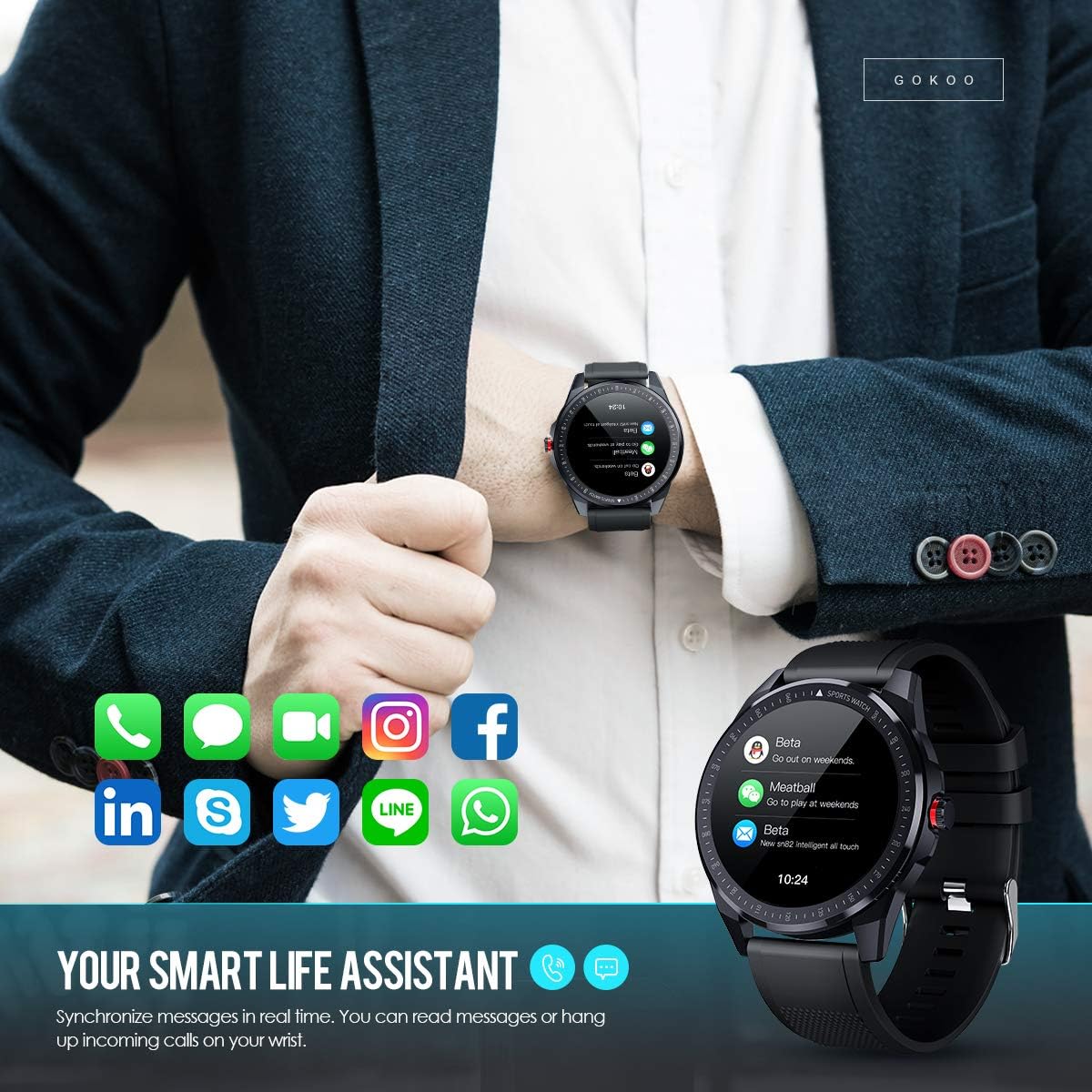
Figure 7: The watch showing synchronized notifications from a smartphone.
5. Баптау
The GOKOO Smart Watch allows for personalization of its interface. You can select from various pre-installed watch faces or download additional styles through the companion app to match your preference.
Техникалық қызмет көрсету
1. Тазалау
Regularly clean your watch and strap to prevent skin irritation and maintain device hygiene. Use a soft, lint-free cloth. If necessary, slightly dampшүберекке су құйыңыз. Қатты химиялық заттарды, абразивті тазартқыштарды немесе аэрозоль спрейлерін пайдаланбаңыз.
2. Суға төзімділік нұсқаулары
The GOKOO Smart Watch has an IP68 waterproof rating, meaning it is resistant to dust and can withstand immersion in water up to 1.5 meters for 30 minutes. It is suitable for daily use, hand washing, rain, and swimming.
Маңызды: Do not use the watch in hot water baths, saunas, or during diving. High temperatures and high pressure can compromise the waterproof seals and cause damage.
3. Батареяны күту
- Батареяны жиі толық зарядсыздандырудан аулақ болыңыз.
- Charge the watch using the provided magnetic charging cable.
- Ұзақ уақыт пайдаланбаған кезде сағатты салқын, құрғақ жерде сақтаңыз.
Ақаулықтарды жою
- Сағат қосылмайды: Сағаттың толық зарядталғанына көз жеткізіңіз. Оны зарядтағышқа кемінде 30 минут қосыңыз.
- Телефонмен жұптастыру мүмкін емес:
- Телефонда Bluetooth қосылғанына көз жеткізіңіз.
- Сағат телефоныңыздың Bluetooth ауқымында екеніне көз жеткізіңіз.
- Телефонды да, сағатты да қайта іске қосыңыз.
- Қолданбаның қажетті рұқсаттары бар-жоғын тексеріңіз.
- Дұрыс емес денсаулық деректері: Сағаттың білегіңізге мықтап тағылғанына, білек сүйегінен шамамен бір саусақ еніндей жоғары орналасқанына көз жеткізіңіз. Сағаттың артқы жағындағы сенсорды тазалаңыз.
- Хабарландырулар көрсетілмейді:
- Verify that notification permissions are granted in the app and your phone's settings.
- Сағаттың Bluetooth арқылы қосылғанына көз жеткізіңіз.
- Check if 'Do Not Disturb' mode is active on either the watch or phone.
- Батареяның қысқа қызмет ету мерзімі: Reduce screen brightness, disable continuous heart rate monitoring if not needed, and limit the number of active notifications.
Техникалық сипаттамалар
| Ерекшелік | Мәлімет |
|---|---|
| Бренд | ГОКОО |
| Үлгі | B08FMBHSWD |
| Экран өлшемі | 1.3 дюйм |
| Операциялық жүйе | Android 5.0 немесе одан жоғары, iOS 9.0 немесе одан жоғары |
| Үйлесімді құрылғылар | Смартфон |
| Батареяның қызмет ету мерзімі | 10 күнге дейін (пайдалануға байланысты) |
| Батарея Түрі | Литий полимері |
| Суға төзімділік | IP68 |
| Сымсыз қосылым | Блютез |
| Адам интерфейсін енгізу | Сенсорлық экран |
| Өнім өлшемдері | 27 x 5 x 1.08 см; 168 гр |

Figure 8: Detailed product dimensions of the GOKOO Smart Watch.
Кепілдік және қолдау
For warranty information or technical support, please refer to the contact details provided with your purchase or visit the official GOKOO website. If you require a copy of this manual or have any questions regarding your GOKOO Smart Watch B08FMBHSWD, please contact customer service.
Қатысты құжаттар - B08FMBHSWD
 |
GOKOO Smart Watch пайдаланушы нұсқаулығы User manual for the GOKOO Smart Watch, covering app download, charging, connection, features, and troubleshooting. |
 |
Ақылды сағат пайдаланушы нұсқаулығы - фитнес трекері, жүрек соғу жиілігі, ұйқыны бақылау Ақылды сағатқа арналған жан-жақты пайдаланушы нұсқаулығы, онда орнату, жұптастыру, қолданбаны пайдалану және жүрек соғу жиілігін бақылау, ұйқыны бақылау, белсенділікті бақылау, спорт режимдері және хабарландырулар сияқты мүмкіндіктер егжей-тегжейлі сипатталған. IP68 су өткізбеушілігі туралы ақпарат бар. |
 |
AEAC IDW15 Smart Watch User Manual Comprehensive user manual for the AEAC IDW15 Smart Watch, detailing its features, setup, operations, and health tracking capabilities including heart rate, SpO2, sleep, and various sports modes. Learn how to use Alexa, manage notifications, and customize your watch experience. |
 |
FW101 Fitness Tracker User Manual Comprehensive user manual for the FW101 Fitness Tracker by YoYoFit, covering setup, features, notifications, activity tracking, sleep monitoring, exercise analysis, troubleshooting, and technical specifications. |
 |
AGPTEK Smart Watch Welcome Guide A comprehensive welcome guide for the AGPTEK Smart Watch, covering product overview, installation, charging, app download and binding, basic operations, and specifications. Learn how to use your AGPTEK Smart Watch effectively. |
 |
LW29 Smartwatch нұсқаулығы Қолданбаны жүктеп алу, зарядтау, Bluetooth жұптауы, жұмысы, спортты бақылау, хабарландырулар, ауа райы, ұйқыны бақылау, жүрек соғу жиілігін бақылау, қан қысымын бақылау, қандағы оттегін бақылау, секундомер, музыканы басқару, жарықтылықты реттеу, теруді ауыстыру және жүйе туралы ақпаратты қамтитын LW29 смарт сағатына арналған нұсқаулық. Өнімнің параметрлері мен кепілдік картасын қамтиды. |
Ask a question about this manual
Ask about setup, troubleshooting, compatibility, parts, safety, or missing instructions. Manuals+ will review the question and use this page’s manual context to help answer it.