
Wellue BP2A
Wellue Bluetooth Blood Pressure Monitor BP2A User Manual
Model: BP2A | Brand: Wellue
1. Кіріспе
This manual provides essential instructions for the safe and effective use of your Wellue Bluetooth Blood Pressure Monitor BP2A. This device is designed for home use to measure systolic blood pressure (SYS), diastolic blood pressure (DIA), mean arterial pressure (MAP), pulse rate, and pulse pressure. It also features an ECG function for additional heart health monitoring. Please read this manual thoroughly before first use and retain it for future reference.
2. Қауіпсіздік туралы маңызды ақпарат
- Consult your physician before using this device for any medical condition. Self-diagnosis and treatment based on measurements can be dangerous.
- Бұл құрылғы тек ересектерге арналған үйде пайдалануға арналған. Ол нәрестелерге, балаларға немесе жүкті әйелдерге қолдануға арналмаған.
- Do not use this device in conjunction with high-frequency surgical equipment.
- Құрылғыны балалар мен үй жануарларының қолы жетпейтін жерде сақтаңыз.
- Құрылғыны бөлшектемеңіз немесе жөндеуге тырыспаңыз. Барлық қызмет көрсету жұмыстарын білікті мамандарға тапсырыңыз.
- Avoid strong electromagnetic fields during use, as they may interfere with the device's operation.
- Диеталық қоспаларға қатысты мәлімдемелер FDA тарапынан бағаланбаған және кез келген ауруды немесе денсаулық жағдайын диагностикалауға, емдеуге, емдеуге немесе алдын алуға арналмаған.
3. Пакет мазмұны
Пакетті ашқан кезде барлық заттардың бар екенін тексеріңіз:
- Wellue Bluetooth Blood Pressure Monitor BP2A (integrated with cuff)
- USB зарядтау кабелі
- Пайдаланушы нұсқаулығы
4. Құрылғы аяқталдыview
The Wellue BP2A monitor features a compact, one-piece design for ease of use and portability. It includes an integrated arm cuff, a digital display, and control buttons.

Figure 4.1: Wellue BP2A Blood Pressure Monitor and ViHealth App Interface.

Figure 4.2: Key features of the Wellue BP2A monitor, including Bluetooth connectivity, FDA clearance, rechargeable battery, and built-in memory for 50 readings.
5. Орнату
5.1 Құрылғыны зарядтау
Before initial use, fully charge the device using the provided USB cable. Connect the cable to the monitor's charging port and a standard USB power adapter (not included). A full charge can provide power for up to 300 measurements.
5.2 Installing the ViHealth App
The Wellue BP2A works with the free ViHealth app, available for iOS and Android devices. Іздеу "ViHealth" in your device's app store and install it.

Figure 5.1: The ViHealth app for Android and iOS, used to track blood pressure and heart measurements.
5.3 Bluetooth жұптастыру
Ensure Bluetooth is enabled on your smartphone. Open the ViHealth app. Turn on the Wellue BP2A monitor. The device should automatically connect to the app. Follow any on-screen prompts within the app to complete the pairing process.
6. Пайдалану нұсқаулары
6.1 Proper Cuff Placement
Accurate measurement depends on correct cuff placement. Ensure the cuff is placed directly on your bare upper arm, 1-2 cm above the elbow joint. The air tube (if applicable, though this is a one-piece design, the sensor area should be aligned) should be positioned over the brachial artery. The cuff should fit snugly but not too tightly. Refer to the diagram below for guidance.

Figure 6.1: Correct cuff placement for accurate blood pressure measurement.
6.2 Қан қысымын өлшеу
- Арқаңызды тіреп, аяқтарыңызды еденге қойып, ыңғайлы отырыңыз. Қолыңызды үстелге қойып, манжет жүрек деңгейінде болуы керек.
- Ensure the device is powered on and, if desired, connected to the ViHealth app.
- түймесін басыңыз Бастау/Тоқтату button on the device. The cuff will begin to inflate.
- Өлшеу кезінде қозғалмай, үнсіз қалыңыз.
- Once complete, your blood pressure readings (SYS, DIA, MAP, Pulse Rate, Pulse Pressure) will be displayed on the device screen and automatically uploaded to the ViHealth app if connected.

Figure 6.2: User taking a blood pressure measurement with the Wellue BP2A monitor.
6.3 Taking an ECG Measurement
The device also supports ECG measurements. To take an ECG:
- Ensure the device is powered on and connected to the ViHealth app.
- Hold the device with both hands, placing your thumbs on the designated electrodes (usually the metal strips on the sides or top of the device).
- Remain still and relaxed for the duration of the measurement (typically 30 seconds).
- The ECG waveform and heart rate will be displayed on the device and recorded in the app.
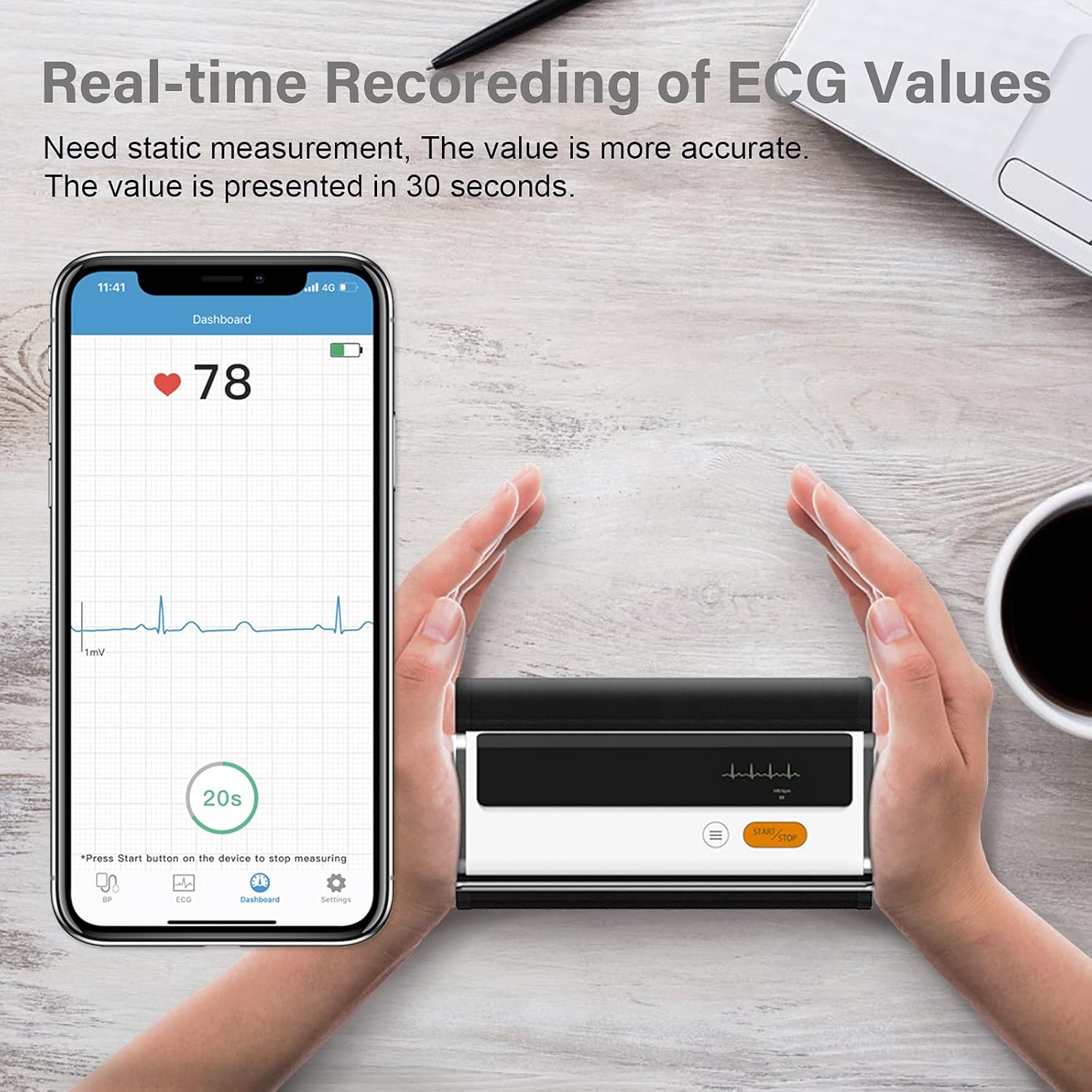
Figure 6.3: Real-time recording of ECG values using the Wellue BP2A monitor.
6.4 Using the ViHealth App for Data Management
The ViHealth app allows you to:
- View real-time readings during measurement.
- Access historical data and trends for multiple users.
- Generate and share PDF/CSV reports with healthcare providers.
- Track both blood pressure and ECG data in one place.
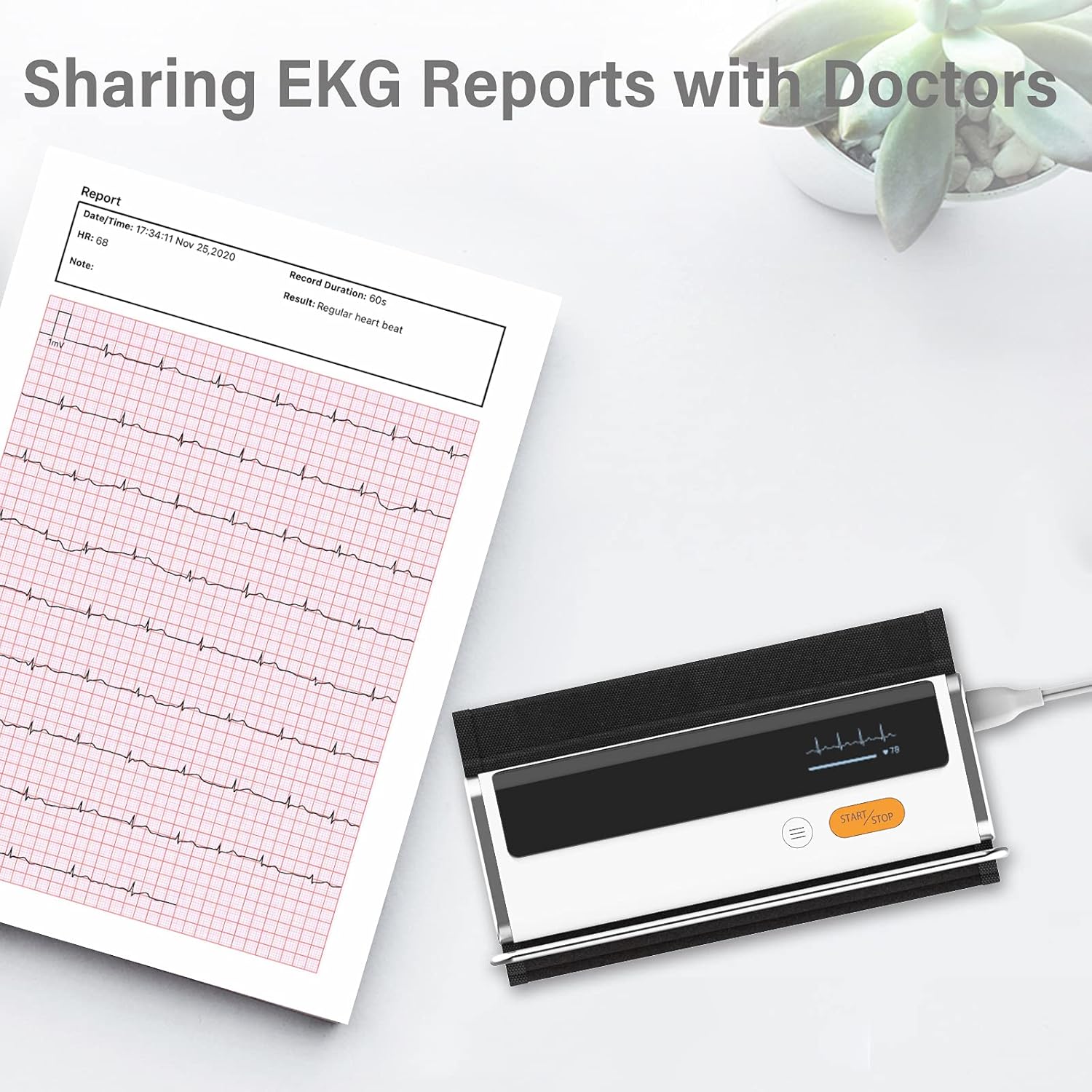
Figure 6.4: Sharing EKG reports generated by the ViHealth app.
Video 6.1: Demonstration of the Wellue blood pressure monitor's features and its integration with the ViHealth app for real-time readings and data sharing.
7. Техникалық қызмет көрсету
7.1 Тазалау
Wipe the device and cuff with a soft, dry cloth. If necessary, use a cloth lightly dampened with water or a mild disinfectant. Do not immerse the device in water or use abrasive cleaners.
7.2 Сақтау
Құрылғыны салқын, құрғақ жерде, тікелей күн сәулесінен және төтенше температурадан алыс жерде сақтаңыз. Қолданбаған кезде оны бастапқы қаптамасында немесе қорғаныш қаптамасында сақтаңыз.
7.3 Батареяға күтім жасау
To prolong battery life, charge the device regularly, even if not used frequently. Avoid fully discharging the battery for extended periods.
8. Ақаулықтарды жою
| Мәселе | Ықтимал себебі | Шешім |
|---|---|---|
| Құрылғы қосылмайды | Батарея төмен | Құрылғыны USB кабелі арқылы зарядтаңыз. |
| Қолданбаға қосылу мүмкін емес | Bluetooth off, app not open, device not in pairing mode | Ensure Bluetooth is on, open ViHealth app, restart device. |
| Дәл емес көрсеткіштер | Incorrect cuff placement, movement during measurement, speaking during measurement | Re-position cuff correctly, remain still and silent during measurement. |
| Cuff does not inflate | Cuff not properly attached, air leak | Check cuff connection, ensure no leaks. |
9. Техникалық сипаттамалар
- Модель атауы: Armfit Plus
- Элемент үлгі нөмірі: BP2A
- Бренд: Жақсы
- Манжеттің өлшемі: 8.7-16.5 дюйм (22-42 см)
- Қуат көзі: Батареямен жұмыс істейді (1 литий-ионды батарея, жинақта)
- Дисплей түрі: Сандық
- Өнім өлшемдері: 5.9"Ұ x 1.9" Е x 1.18" мың
- Салмағы: Шамамен 15.84 унция
- Қосылу мүмкіндігі: Блютез
- Жад: Built-in memory for 50 sets of readings
10. Кепілдік және қолдау
For warranty information and technical support, please refer to the official Wellue webсайтына өтіңіз немесе тұтынушыларға тікелей хабарласыңыз. Сатып алу түбіртегін кепілдік талаптары үшін сатып алудың дәлелі ретінде сақтаңыз.
Ask a question about this manual
Ask about setup, troubleshooting, compatibility, parts, safety, or missing instructions. Manuals+ will review the question and use this page’s manual context to help answer it.