
FLINQ 8720168680396
FlinQ Mobile Air Conditioner User Manual
Үлгі: 8720168680396
1. Маңызды қауіпсіздік нұсқаулары
Please read all instructions carefully before using this appliance and retain them for future reference. Failure to follow these instructions may result in electric shock, fire, or serious personal injury.
- Құрылғыны әрқашан жерге тұйықталған розеткаға қосыңыз.
- Құрылғыны зақымдалған сым немесе ашамен іске қоспаңыз.
- Құрылғыны жанғыш материалдардан және ашық оттан алыс ұстаңыз.
- Жұмыс кезінде құрылғының айналасында дұрыс желдетуді қамтамасыз етіңіз.
- Ауа кірісіне немесе шығысына заттарды салмаңыз.
- Тазалау немесе техникалық қызмет көрсету алдында құрылғыны электр желісінен ажыратыңыз.
- Бұл құрылғы физикалық, сенсорлық немесе ақыл-ой қабілеттері шектеулі немесе тәжірибесі мен білімі жоқ адамдардың (соның ішінде балалар) пайдалануына арналмаған, егер олардың қауіпсіздігіне жауапты адамның қадағалауынсыз немесе құрылғыны пайдалану туралы нұсқау болмаса.
2. Өнім аяқталдыview
The FlinQ Mobile Air Conditioner is a versatile unit designed to provide cooling, dehumidification, and fan functions for your living space. It is equipped with an energy-efficient design and comes with a window kit for easy installation.

2.1-сурет: Алдыңғы view of the FlinQ Mobile Air Conditioner, showing the main air outlet and control panel area.

Figure 2.2: The mobile air conditioner unit, displaying its energy efficiency label (Class A) and the included remote control for convenient operation.
3. Компоненттер мен бөлшектер
Familiarize yourself with the main components of your mobile air conditioner:
- Негізгі блок (басқару панелімен)
- Шығару түтігі
- Window Sealing Kit (adjustable window slider/plate)
- Қашықтан басқару құралы
- Drain Hose (for continuous drainage in dehumidification mode)
- Air Filters (located on the back/side)
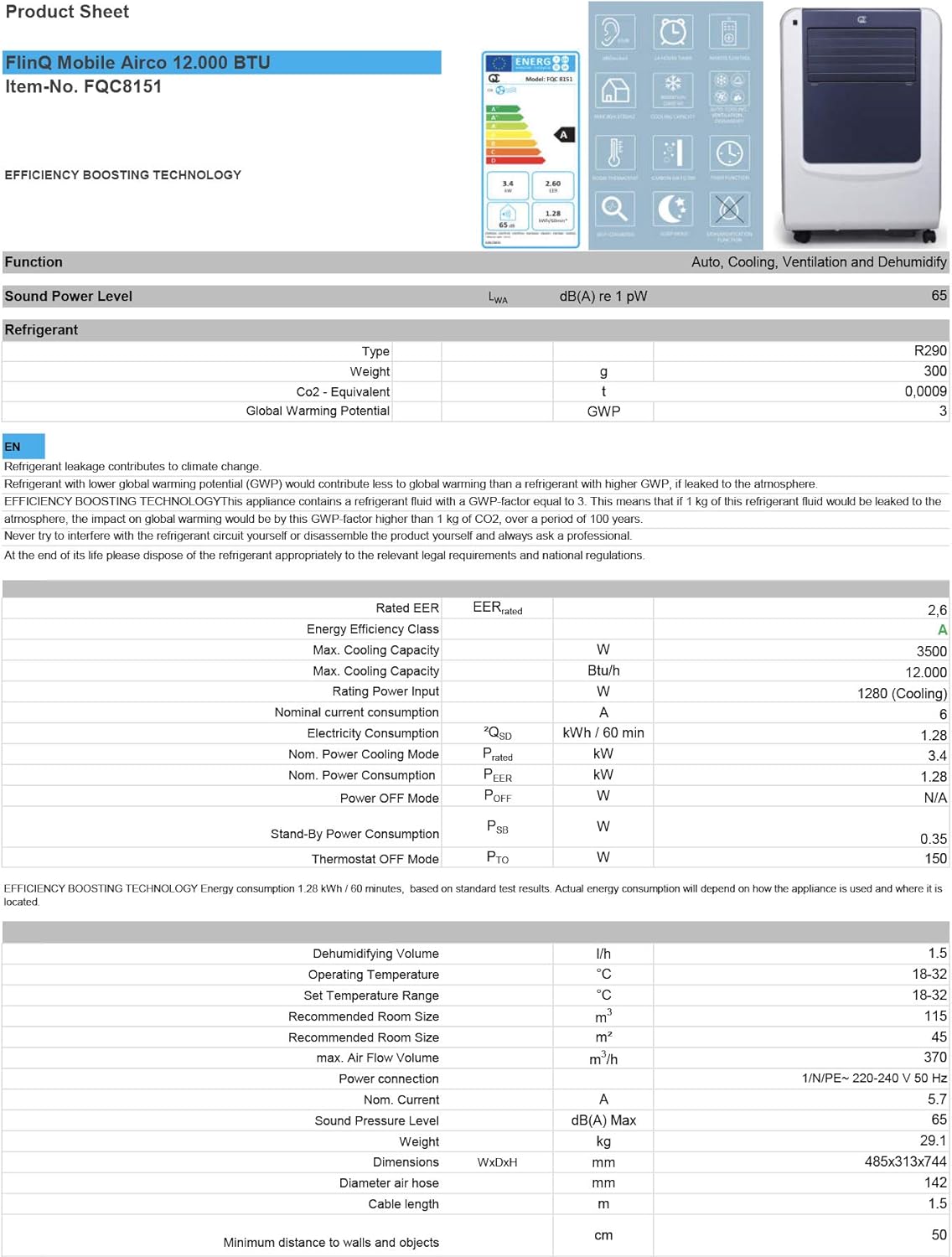
Figure 3.1: The remote control and a visual representation of the unit's key features, including noise level (65dB), 24-hour timer, cooling capacity (12000 BTU/h), room thermostat, carbon air filter, self-diagnosis, sleep mode, remote control function, timer function, auto cooling/fan/dehumidification, and dehumidification function.
4. Орнату және орнату
4.1 Қаптаманы ашу
Carefully remove the air conditioner and all accessories from the packaging. Inspect for any damage during transit. Keep the original packaging for future storage or transport.
4.2 Орналастыру
Place the unit on a flat, stable surface. Ensure there is at least 30 cm (12 inches) of clear space around the unit for proper airflow. Do not place it near heat sources or in direct sunlight.
4.3 Терезе жинағын орнату
To ensure efficient cooling, the hot air extracted by the unit must be vented outside. Use the provided window sealing kit for this purpose.
- Шығару шлангінің қосқышын құрылғының артқы жағындағы ауа розеткасына жалғаңыз.
- Extend the exhaust hose and attach the window adapter to the other end.
- Adjust the window slider/plate to fit your window opening.
- Insert the window adapter into the opening of the window slider/plate.
- Close the window as much as possible to seal the opening around the kit, minimizing air leakage.

4.1-сурет: жағы view of the mobile air conditioner, illustrating the connection point for the exhaust hose, which expels hot air from the room.
5. Пайдалану нұсқаулары
5.1 Басқару тақтасы
The control panel is located on the top of the unit and features various buttons and an LED display for setting modes, temperature, and timer functions.
5.2 Қашықтан басқару құралы
The remote control allows you to operate all functions of the air conditioner from a distance. Ensure the remote control batteries are inserted correctly.
5.3 Жұмыс режимдері
Press the 'Mode' button to cycle through the available operating modes:
- Салқындату режимі: Бөлмені салқындату үшін. Температураны реттеу түймелерін пайдаланып қалаған температураны орнатыңыз.
- Құрғату режимі: Removes excess moisture from the air. The fan speed is typically fixed in this mode. Consider connecting a drain hose for continuous drainage.
- Желдеткіш режимі: Circulates air without cooling. You can adjust the fan speed (Low, Medium, High).

5.1-сурет: Жақыннан view of the adjustable louvers on the air conditioner's front panel, which direct the airflow.
6. Техникалық қызмет көрсету
Тұрақты техникалық қызмет көрсету оңтайлы өнімділікті қамтамасыз етеді және кондиционердің қызмет ету мерзімін ұзартады.
6.1 Ауа сүзгілерін тазалау
The air filters should be cleaned every two weeks or more frequently depending on usage and air quality. Dirty filters reduce efficiency and can damage the unit.
- Кондиционерді розеткадан ажыратыңыз.
- Locate and remove the air filters (usually on the back or side of the unit).
- Wash the filters under running water (warm, not hot) or use a vacuum cleaner to remove dust.
- Allow the filters to air dry completely before reinserting them. Do not expose them to direct sunlight.

Figure 6.1: Illustration of how to remove the air filter from the mobile air conditioner for cleaning, highlighting the accessible filter panel.
6.2 Суды төгу
The unit collects condensed water during cooling and dehumidification. The internal tank will fill up, and the unit may stop operating when full. Drain the water regularly.
- Place a shallow pan or tray under the drain port (usually at the bottom rear of the unit).
- Су ағып кетуі үшін су төгетін тығынды алыңыз.
- For continuous drainage in dehumidification mode, attach the provided drain hose to the drain port.
6.3 Сақтау
Құрылғыны ұзақ уақыт сақтаған кезде:
- Құрылғыдан барлық суды төгіп тастаңыз.
- Ауа сүзгілерін тазалаңыз.
- Қуат сымын розеткадан ажыратып, оны ұқыпты ораңыз.
- Құрылғыны құрғақ, салқын жерде, жақсырақ бастапқы қаптамасында сақтаңыз.
7. Ақаулықтарды жою
Тұтынушыларды қолдау қызметіне хабарласпас бұрын жалпы мәселелер мен олардың шешімдері үшін келесі кестені қараңыз:
| Мәселе | Ықтимал себебі | Шешім |
|---|---|---|
| Құрылғы қосылмайды | Қуат жоқ; Қуат сымы қосылмаған; Толық су ыдысы | Қуат розеткасын тексеріңіз; Қуат сымын қосыңыз; Су ыдысын төгіңіз |
| Unit cools insufficiently | Dirty air filters; Exhaust hose blocked/leaking; Room too large; Doors/windows open | Clean filters; Check hose for blockages/proper sealing; Ensure room size is within capacity; Close doors/windows |
| Бірлік шулы | Unit not on a flat surface; Air filters dirty | Place on flat surface; Clean air filters |
| Құрылғыдан су ағып жатыр | Drain plug not properly sealed; Unit tilted | Су төгетін тығынның мықтап бекітілгеніне көз жеткізіңіз; Құрылғыны тегіс жерге қойыңыз |
8. Техникалық сипаттамалар
Technical details for the FlinQ Mobile Air Conditioner:
| Ерекшелік | Мән |
|---|---|
| Үлгі нөмірі | 8720168680396 |
| Өнім өлшемдері | 74 x 48 x 31 см |
| Элемент салмағы | 29 g (Note: This weight seems unusually low for an AC unit, please refer to product packaging for accurate weight) |
| Шу деңгейі | 65 дБ |
| Салқындату сыйымдылығы | 12000 XNUMX БТУ/сағ |
| Ұсынылатын бөлме өлшемі | 45 м² дейін |
| Арнайы мүмкіндіктер | Қашықтан басқару құралы |
| Энергетикалық класс | A |

Figure 8.1: Official product sheet detailing technical specifications, energy consumption, cooling capacity, and dimensions of the FlinQ Mobile Air Conditioner.
9. Кепілдік және қолдау
This FlinQ Mobile Air Conditioner comes with a limited warranty. Please refer to the warranty card included with your purchase for specific terms and conditions.
For technical support, service, or warranty claims, please contact your retailer or the manufacturer directly. Keep your proof of purchase for warranty validation.
Байланыс ақпараты:
- Бренд: FLINQ
- Webсайт: www.flinq.nl (Мысample, please refer to actual product documentation for correct webсайт)
- Электрондық пошта: support@flinq.nl (Мысample, please refer to actual product documentation for correct email)
Ask a question about this manual
Ask about setup, troubleshooting, compatibility, parts, safety, or missing instructions. Manuals+ will review the question and use this page’s manual context to help answer it.