
1. Кіріспе
This manual provides essential instructions for the safe and efficient operation of your Multilaser MINI TORRE 900W SP380 audio system. Please read this manual thoroughly before using the product and retain it for future reference. Proper use will ensure optimal performance and extend the lifespan of your device.
2. Қауіпсіздік нұсқаулары
- Қуат көзі: Қуат көзінің дыбыс деңгейіне сәйкес келетініне көз жеткізіңізtage өнім жапсырмасында көрсетілген талаптар.
- Желдету: Желдету саңылауларын жаппаңыз. Дұрыс ауа ағыны үшін құрылғының айналасында жеткілікті кеңістікті сақтаңыз.
- Су және ылғал: Keep the device away from water, rain, and excessive humidity. Do not operate with wet hands.
- Жылу көздері: Avoid placing the unit near heat sources such as radiators, stoves, or other heat-producing appliances.
- Тазалау: Disconnect the power before cleaning. Use a dry, soft cloth. Do not use liquid cleaners or aerosol sprays.
- Қызмет көрсету: Do not attempt to repair the unit yourself. Refer all servicing to qualified service personnel.
- Балалар: Құрылғыны және оның керек-жарақтарын балалардың қолы жетпейтін жерде сақтаңыз.
- Орналастыру: Құрылғы құлап кетпес үшін оны тұрақты, тегіс бетке қойыңыз.
3. Өнім аяқталдыview
The Multilaser MINI TORRE 900W SP380 is a powerful audio system designed for versatile sound reproduction. It features dual speakers, LED lighting, and multiple connectivity options.
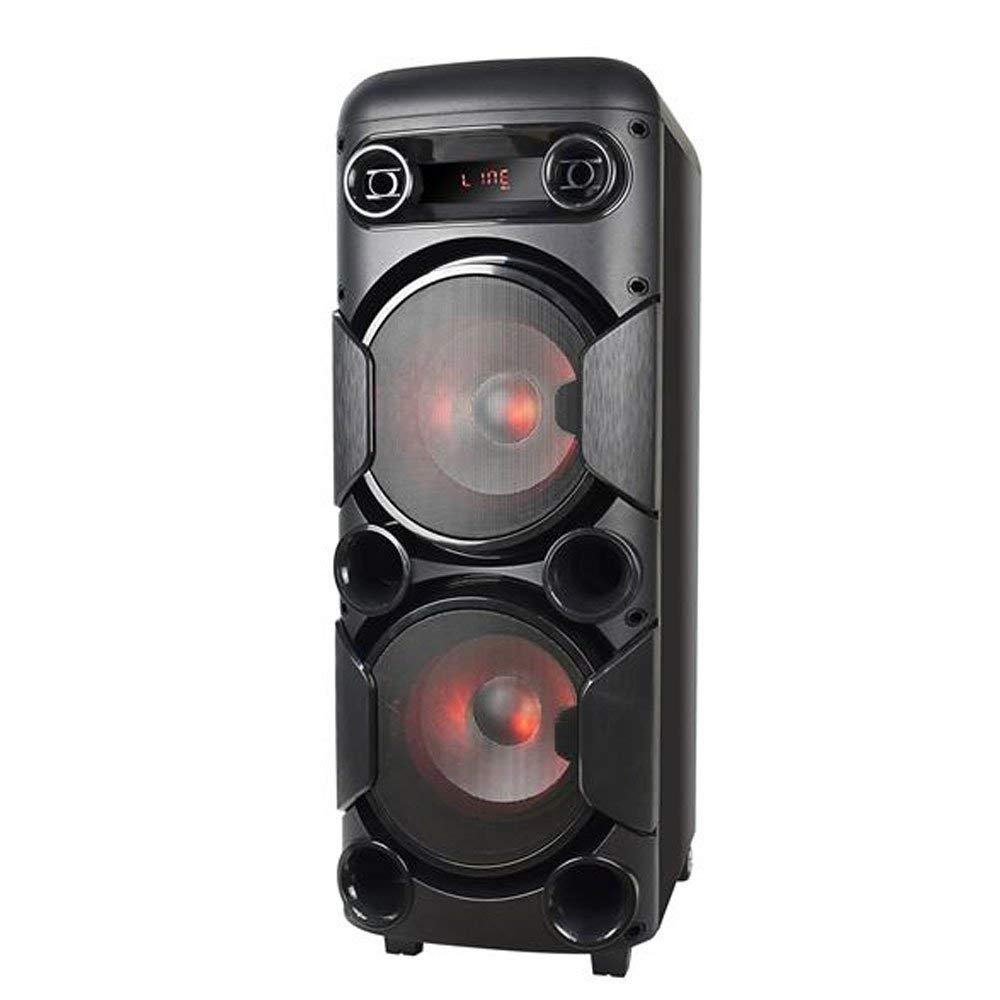
3.1-сурет: Алдыңғы view of the Multilaser MINI TORRE 900W SP380, showcasing its dual speaker design and illuminated LED woofers.
The control panel, located on the top of the unit, provides access to all functions and inputs.

3.2-сурет: Егжей-тегжейлі view of the control panel, including volume knob, equalizer sliders, input ports (USB, TF/Memory Card, Line, Mic 1, Mic 2), and control buttons for mode, light, and playback.
4. Орнату
- Қаптаманы ашу: Carefully remove the MINI TORRE from its packaging. Retain the packaging for future transport or storage.
- Орналастыру: Position the speaker on a flat, stable surface. Ensure there is adequate space around the unit for ventilation. The integrated wheels facilitate easy transport.
- Қуат қосылымы: Connect the power cable to the AC input on the unit and then to a suitable power outlet. The device supports bivolt automatic voltage.
- Бастапқы қуат қосулы: Flip the power switch (usually located on the control panel) to the "ON" position. The display will illuminate.
5. Пайдалану нұсқаулары
5.1. Қуатты қосу/өшіру
To power on the device, locate the power switch on the control panel and set it to the "ON" position. To power off, set the switch to "OFF".
5.2. Дыбыс деңгейін басқару
Adjust the main volume using the large central DOLUM knob on the control panel. Turn clockwise to increase volume and counter-clockwise to decrease.
5.3. Режимді таңдау
түймесін басыңыз РЕЖИМ button repeatedly to cycle through available input modes: Bluetooth (BT), FM Radio, USB, Memory Card (TF), and Auxiliary (LINE).
5.4. Жарықдиодты жарықтандыру
түймесін басыңыз ЖАРЫҚ button to toggle the LED lighting effects on the speakers. Multiple light modes may be available.
5.5. Микрофон енгізу
Connect a microphone to either the MIC 1 or MIC 2 input. Adjust the microphone volume using the MIC.VOL slider and add echo effect with the ЭХО жүгірткі.
5.6. Sound Equalization
пайдаланыңыз ДЕРЕК және BASS sliders to adjust the high and low frequencies of the audio output, respectively, to suit your preference.
6. Қосылу мүмкіндігі
6.1. Bluetooth жұптастыру
- Turn on the MINI TORRE and select Bluetooth (BT) көмегімен режим РЕЖИМ button. The display will show "BT" and a pairing indicator.
- Смартфонда, планшетте немесе басқа үйлесімді құрылғыда Bluetooth қосыңыз.
- Іздеу available devices and select "MULTILASER SP380" (or similar name) from the list.
- Once paired, the device will confirm the connection, and you can begin playing audio wirelessly.
6.2. USB / Memory Card Playback
USB флэш-дискісін салыңыз USB port or a TF (MicroSD) card into the TF / USB slot. The unit will automatically switch to USB or TF mode and begin playing compatible audio files. Use the playback control buttons (ОЙНАТУ/ТОҚТАТУ, АЛДЫНДАҒЫ, КЕЛЕСІ) музыкаңызды басқару үшін.
6.3. Auxiliary Input (LINE IN)
Сыртқы аудио құрылғысын (мысалы, MP3 ойнатқыш, ноутбук) қосыңыз LINE input using a 3.5mm audio cable. Select LINE режимімен РЕЖИМ түймесі. Дыбыс қосылған құрылғыдан ойнатылады.
6.4. FM радиосы
ауысу FM көмегімен режим РЕЖИМ түйме. Түймесін басып тұрыңыз ОЙНАТУ/ТОҚТАТУ button to initiate an automatic scan for FM stations. The unit will save detected stations. Use the АЛДЫНДАҒЫ және КЕЛЕСІ сақталған станциялар бойынша шарлау түймелері.
7. Техникалық қызмет көрсету
- Тазалау: Before cleaning, ensure the device is powered off and unplugged. Use a soft, dry, lint-free cloth to wipe the exterior surfaces. Do not use abrasive cleaners, waxes, or solvents.
- Сақтау орны: Егер құрылғыны ұзақ уақыт сақтасаңыз, оны розеткадан суырып, салқын, құрғақ жерде, тікелей күн сәулесінен және жоғары температурадан алыс жерде сақтаңыз.
- Кедергілерден аулақ болыңыз: Regularly check that the speaker grilles and ventilation openings are free from dust and debris.
8. Ақаулықтарды жою
| Мәселе | Ықтимал себебі | Шешім |
|---|---|---|
| Қуат жоқ | Power cable not connected; Power outlet not working; Power switch off. | Ensure power cable is securely connected. Test the outlet with another device. Turn the power switch to "ON". |
| Дыбыс жоқ | Volume too low; Incorrect input mode selected; External device not playing. | Дыбыс деңгейін арттырыңыз. түймесін басыңыз РЕЖИМ to select the correct input. Ensure the external device is playing and its volume is up. |
| Bluetooth жұптаспайды | Device too far; Bluetooth not enabled on external device; Incorrect mode. | Move devices closer. Ensure Bluetooth is enabled on your external device. Select BT mode on the speaker. |
| USB/TF картасы ойнатылмайды | Карта/диск дұрыс салынбаған; Үйлесімсіз file format; Incorrect mode. | Reinsert the USB drive or TF card. Ensure audio files are in a compatible format (e.g., MP3). Select USB or TF режимі. |
| FM радиосы статикалық | әлсіз сигнал; Қосылған антенна жоқ (бар болса). | Reposition the unit or extend the antenna (if present). Perform an auto-scan for stations again. |
9. Техникалық сипаттамалар
Below are the technical specifications for the Multilaser MINI TORRE 900W SP380:

9.1-сурет: Packaging of the Multilaser MINI TORRE 900W SP380, highlighting its main features and technical specifications.
| Ерекшелік | Мәлімет |
|---|---|
| Бренд | Мультилазер |
| Үлгі | SP380 |
| Үндеткіштің максималды шығыс қуаты | 900 ватт RMS |
| Қосылу технологиясы | Көмекші, Bluetooth 5.0 |
| Динамик түрі | Tower (2x 8" drivers) |
| Арнайы мүмкіндіктер | USB Port, LED Lighting, Microphone Input, Memory Card Slot, FM Radio, Bass Boost, Transport Wheels |
| Элемент өлшемдері (D x W x H) | 33 см x 37 см x 82 см |
| Элемент салмағы | 11.95 келі |
| Үйлесімді құрылғылар | Ноутбук, смартфон, планшет |
| Қуат көзі | Bivolt automatic (AC) |
| Жиілік реакциясы | 60Гц-20КГц |
| Сезімталдық | 89 дБ |
| Кедергі | 4 Ом |
| Құрамдас бөліктер | 1x Mini Torre 900W SP380, 1x Cable Set, 1x User Manual |
10. Кепілдік және қолдау
The Multilaser MINI TORRE 900W SP380 comes with a 1 жылдық кепілдік сатып алған күннен бастап. Бұл кепілдік қалыпты пайдалану жағдайында өндірістік ақауларды қамтиды.
For warranty claims, technical support, or service inquiries, please contact Multilaser customer support through their official channels. Please have your proof of purchase and product model number (SP380) ready when contacting support.
Ескерту: Кепілдік дұрыс пайдаланбау, жазатайым оқиғалар, рұқсат етілмеген өзгертулер немесе осы нұсқаулықтағы нұсқауларды орындамау салдарынан болған зақымдарды қамтымайды.