
Кіріспе
Welcome to the user manual for your SNDWAY SW-T60 Digital Laser Rangefinder. This device is designed for precise and efficient measurement of distances, areas, and volumes. Please read this manual carefully before using the device to ensure safe and optimal operation and to understand all features.
Қауіпсіздік туралы ақпарат
Лазерлік қауіпсіздік
The SNDWAY SW-T60 emits a Class II laser. Observe the following precautions:
- Лазер сәулесіне тікелей қарамаңыз.
- Лазер сәулесін адамдарға немесе жануарларға бағыттамаңыз.
- Көздің тікелей әсерінен аулақ болыңыз.
- Құрылғыны бөлшектемеңіз немесе өзгертпеңіз.
Жалпы қауіпсіздік
- Құрылғыны балалардың қолы жетпейтін жерде сақтаңыз.
- Do not use the device in explosive environments.
- Құрылғыны ылғалдан және тікелей күн сәулесінен қорғаңыз.
- Use only specified batteries (2 x 1.5V AAA).
Өнім аяқталдыview
Құрылғының құрамдас бөліктері
The following image illustrates the main components of the SNDWAY SW-T60.

А фронт view of the SNDWAY SW-T60 Digital Laser Rangefinder, showing the display screen, "READ" button, and other function buttons. A bubble level is visible on the right side.

Жақын жоспар view highlighting the integrated bubble level on the side of the SNDWAY SW-T60, used for ensuring horizontal alignment during measurements.
Дисплей макеті
The LCD provides various measurement readings and status indicators. Key elements include:
- Қуат көзі көрсеткіші: Батарея деңгейін көрсетеді.
- Record/Memory Indicator: Indicates data storage status.
- Laser On Indicator: Confirms laser is active.
- Ең үлкен/ең аз мәнді көрсету: Shows highest and lowest values in continuous measurement.
- Length Measurement Display: For single distance measurements.
- Area, Volume, and Pythagorean Measurement Indicators: Icons for selected measurement modes.
- Continuous Measuring Indicator: Active during tracking mode.
- Major Display: The primary measurement result.
- Auxiliary Display: Secondary measurement results or previous values.
Пернетақта функциялары
The device features several buttons for different operations:
- ОҚУ: Activates the laser, initiates a measurement, or confirms a selection.
- +: Used for adding measurements.
- -: Used for subtracting measurements.
- Area/Volume/Pythagorean: Cycles through Area, Volume, and various Pythagorean measurement modes.
- Save/Memory: Saves current measurement data or recalls stored data.
- Reference Point/Unit Switch: Toggles the measurement reference point (front/rear edge) or switches between measurement units (m/in/ft).
- ӨШІРУЛІ/ТАСҚАРУ: Turns off the device or clears the current measurement/selection.
Орнату
Батареяны орнату
The SNDWAY SW-T60 requires two 1.5V AAA batteries for operation.
- Құрылғының артқы жағындағы батарея бөлігінің қақпағын табыңыз.
- Slide or open the cover to access the battery slots.
- Insert two AAA batteries, ensuring that the positive (+) and negative (-) terminals match the indicators inside the compartment.
- Батарея бөлігінің қақпағын мықтап жабыңыз.
Пайдалану нұсқаулары
Қосу/өшіру
- Құрылғыны қосу үшін түймесін басыңыз ОҚУ түймесі.
- Өшіру үшін түймесін басып ұстап тұрыңыз ӨШІРУЛІ/ТАЗАЛАУ button. The device will automatically shut off after 150 seconds of inactivity to conserve battery.
Негізгі қашықтықты өлшеу
- түймесін басыңыз ОҚУ Лазерді іске қосу үшін түймені бір рет басыңыз.
- Aim the laser dot at the target point.
- түймесін басыңыз ОҚУ Өлшеу үшін түймені қайтадан басыңыз. Нәтиже негізгі экранда көрсетіледі.

The SNDWAY SW-T60 shown alongside a reflective plate. A reflective plate can be used to improve measurement accuracy and range, especially in bright conditions or on non-reflective surfaces.
Құрылғыны ауыстырып қосу
To switch between measurement units (meters, inches, feet), press the Reference Point/Unit Switch түймесін қысқаша басыңыз.
Reference Point Setting
The device can measure from the front or rear edge. Press and hold the Reference Point/Unit Switch button to toggle the reference point. An icon on the display will indicate the current reference point (e.g., an arrow pointing from the top or bottom of the device icon).
Үздіксіз өлшеу (қадағалау)
This mode allows for dynamic measurement, displaying minimum and maximum distances as you move the device.
- From standby, press and hold the ОҚУ түймесі.
- The device will continuously measure and display the current, minimum, and maximum distances.
- түймесін басыңыз ОҚУ үздіксіз өлшеуді тоқтату үшін қайтадан.
Ауданды өлшеу
To measure the area of a rectangular space:

A close-up of the device's display showing the icon for area measurement, which is a square.
- түймесін басыңыз Аудан/Көлем/Пифагор button once until the area icon (square) appears on the display.
- Measure the first side (length) by pressing ОҚУ.
- Measure the second side (width) by pressing ОҚУ.
- Құрылғы аумақты автоматты түрде есептеп, көрсетеді.
Көлемді өлшеу
To measure the volume of a space:

A close-up of the device's display showing the icon for volume measurement, which is a cube.
- түймесін басыңыз Аудан/Көлем/Пифагор button twice until the volume icon (cube) appears.
- Measure the length by pressing ОҚУ.
- Measure the width by pressing ОҚУ.
- Measure the height by pressing ОҚУ.
- Құрылғы дыбыс деңгейін автоматты түрде есептеп, көрсетеді.
Пифагорлық өлшем
The device supports various Pythagorean modes for indirect measurements, useful for calculating heights or distances that cannot be measured directly.
A close-up of the device's display showing the icon for Pythagorean measurement, which is a triangle.
- түймесін басыңыз Аудан/Көлем/Пифагор button repeatedly until the desired Pythagorean mode icon appears (e.g., single Pythagorean for height, double Pythagorean for partial height).
- Follow the on-screen prompts to measure the required sides (e.g., hypotenuse, base).
- Құрылғы белгісіз жағын есептеп, көрсетеді.
Қосу және азайту
Өлшемдерді қосу немесе азайту үшін:
- Take the first measurement.
- түймесін басыңыз + button for addition or the - button for subtraction.
- Екінші өлшемді алыңыз.
- The result will be displayed. You can continue adding or subtracting further measurements.
Деректерді сақтау және қайта шақыру
The device can store up to 30 sets of measurement data.
- Өлшеуден кейін түймесін басыңыз Save/Memory button to save the result.
- To recall stored data, press and hold the Save/Memory түймесі. пайдаланыңыз + және - buttons to navigate through stored records.
Техникалық қызмет көрсету
- Құрылғыны жұмсақ шүберекпен тазалаңыз, damp мата. Абразивті тазартқыштарды немесе еріткіштерді қолданбаңыз.
- Ensure the laser lens is clean for accurate measurements.
- Құрылғы ұзақ уақыт бойы пайдаланылмайтын болса, батареяларды алып тастаңыз.
- Store the device in a dry, dust-free environment.
- Құрылғыда бар IP54 rating, meaning it is protected against dust and splashing water, but it is not waterproof.
Ақаулықтарды жою
| Мәселе | Ықтимал себебі | Шешім |
|---|---|---|
| Құрылғы қосылмайды | Low or dead batteries, incorrect battery polarity | Батареяларды ауыстырыңыз, полярлықты тексеріңіз |
| Дәл емес өлшемдер | Dirty laser lens, unstable measuring surface, target too reflective/dark | Clean lens, ensure stable position, use a reflective plate for difficult targets |
| Лазер көрінбейді | Жарқын сыртқы жарық | Use in lower light conditions, use a target plate |
| Дисплейде қате туралы хабар | Measurement out of range, internal error | Re-measure within range, restart device |
Мәселелер жойылмаса, қосымша көмек алу үшін тұтынушыларды қолдау қызметіне хабарласыңыз.
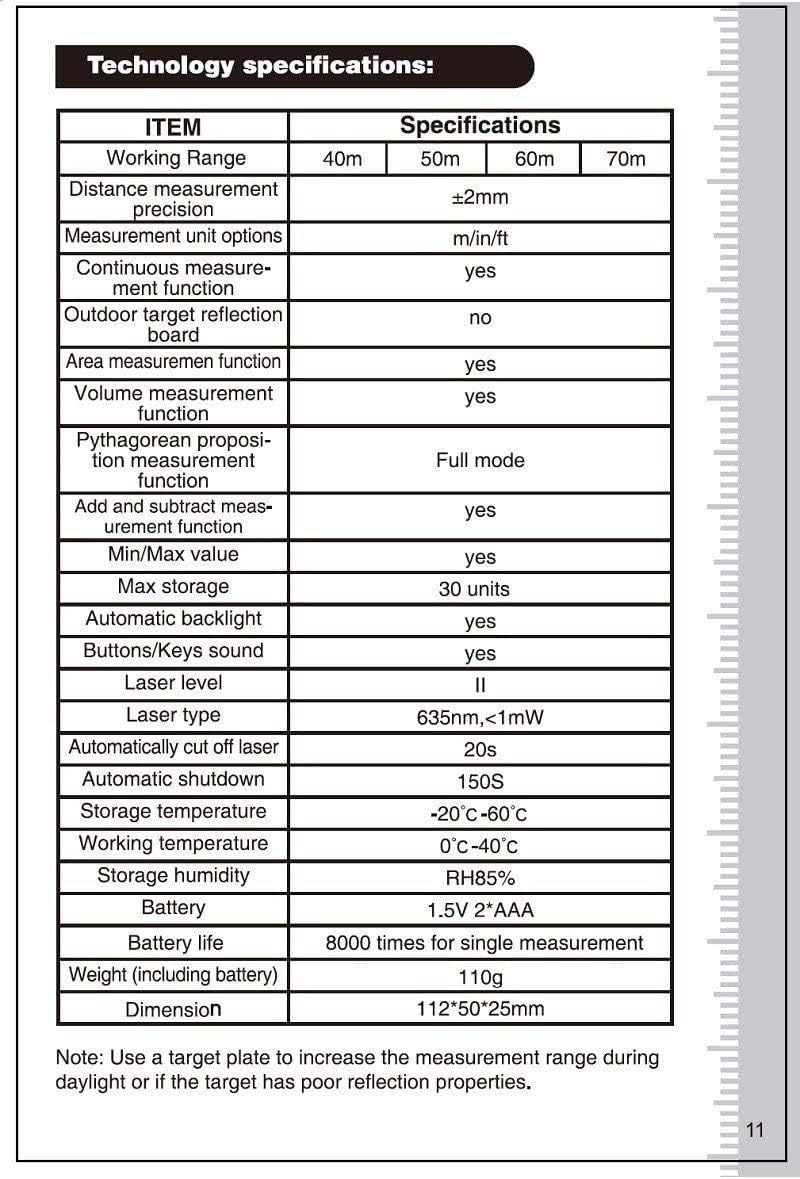
Техникалық сипаттамалар
| Элемент | Техникалық сипаттама |
|---|---|
| Жұмыс ауқымы | 0.05 - 60 м |
| Қашықтықты өлшеу дәлдігі | ±2мм |
| Measurement Unit Options | м/дюйм/фут |
| Continuous Measurement Function | Иә |
| Outdoor Target Reflection Board | No (recommended for daylight/poor targets) |
| Area Measurement Function | Иә |
| Volume Measurement Function | Иә |
| Pythagorean Measurement Function | Толық режим |
| Add and Subtract Measurement Function | Иә |
| Мин./Макс. мән | Иә |
| Ең көп жад | 30 бірлік |
| Автоматты артқы жарық | Иә |
| Buttons/Keys Sound | Иә |
| Лазерлік деңгей | II |
| Лазер түрі | 635нм, <1мВт |
| Automatically Cut Off Laser | 20 с |
| Автоматты түрде өшіру | 150 с |
| Сақтау температурасы | -20°C - 60°C |
| Жұмыс температурасы | 0°C - 40°C |
| Сақтау ылғалдылығы | RH85% |
| Батарея | 1.5V * 2 AAA |
| Батареяның қызмет ету мерзімі | Бір өлшеу үшін 8000 рет |
| Салмағы (батареяны қосқанда) | 110 г |
| Өлшем | 112 x 50 x 25 мм |
| Халықаралық қорғау рейтингі | IP54 |
Note: A target plate is recommended to increase the measurement range during daylight or if the target has poor reflection properties.
Кепілдік және қолдау
For warranty information and technical support, please refer to the documentation provided with your purchase or contact SNDWAY customer service. Keep your purchase receipt as proof of purchase for any warranty claims.