
1. Кіріспе
The Aerocool LUXPRO550 is a 550W power supply unit designed for desktop computers, offering reliable and efficient power delivery. This unit is 80 Plus 230V EU Bronze certified, ensuring over 88% efficiency. It features high-quality 105°C Japanese capacitors and a 14cm FDB fan for enhanced durability and optimized thermal performance. This manual provides essential information for the safe and correct installation, operation, and maintenance of your LUXPRO550 power supply.

Image 1.1: The Aerocool LUXPRO550 Power Supply Unit, highlighting its high efficiency and 80 Plus Bronze certification.
2. Қауіпсіздік шаралары
- Always disconnect the power cord from the wall outlet before installing or removing the power supply.
- Қуат көзін ашпаңыз casing. Жоғары томtagішінде электр тогының соғуына әкелуі мүмкін заттар бар.
- Электрлік қауіптерді болдырмау үшін жерге дұрыс қосуды қамтамасыз етіңіз.
- Қуат көзін жақсы желдетілетін жерге, жылу көздері мен ылғалдан алыс орнатыңыз.
- Тек қуат көзімен бірге берілген кабельдерді пайдаланыңыз.
- This product is designed for use in computer systems only. Do not use it for any other purpose.
3. Орнату нұсқаулығы
The LUXPRO550 power supply supports all Intel ATX12V formats and features flat, black cables for optimized internal airflow and ease of installation.
3.1. Орнатуға дайындық
- Компьютеріңізді өшіріп, қуат сымын қабырға розеткасынан ажыратыңыз.
- Компьютер қорабын ашыңыз. Нақты нұсқауларды компьютер қорабының нұсқаулығынан қараңыз.
- If replacing an existing power supply, disconnect all cables from the old PSU and remove it from the case.
3.2. Қуат көзін орнату
- Carefully place the LUXPRO550 into the power supply bay of your computer case.
- Secure the power supply to the case using the provided screws.
- Connect the 20+4 pin ATX motherboard power connector to your motherboard.
- Connect the 4+4 pin CPU power connector to your motherboard.
- Connect SATA power connectors to your storage drives (HDDs, SSDs) and optical drives.
- Connect PCIe 6+2 pin connectors to your graphics card(s) if required.
- Connect any other peripheral connectors (e.g., Molex) as needed for case fans or other components.
- Ensure all connections are secure. Use cable ties to manage cables for better airflow.
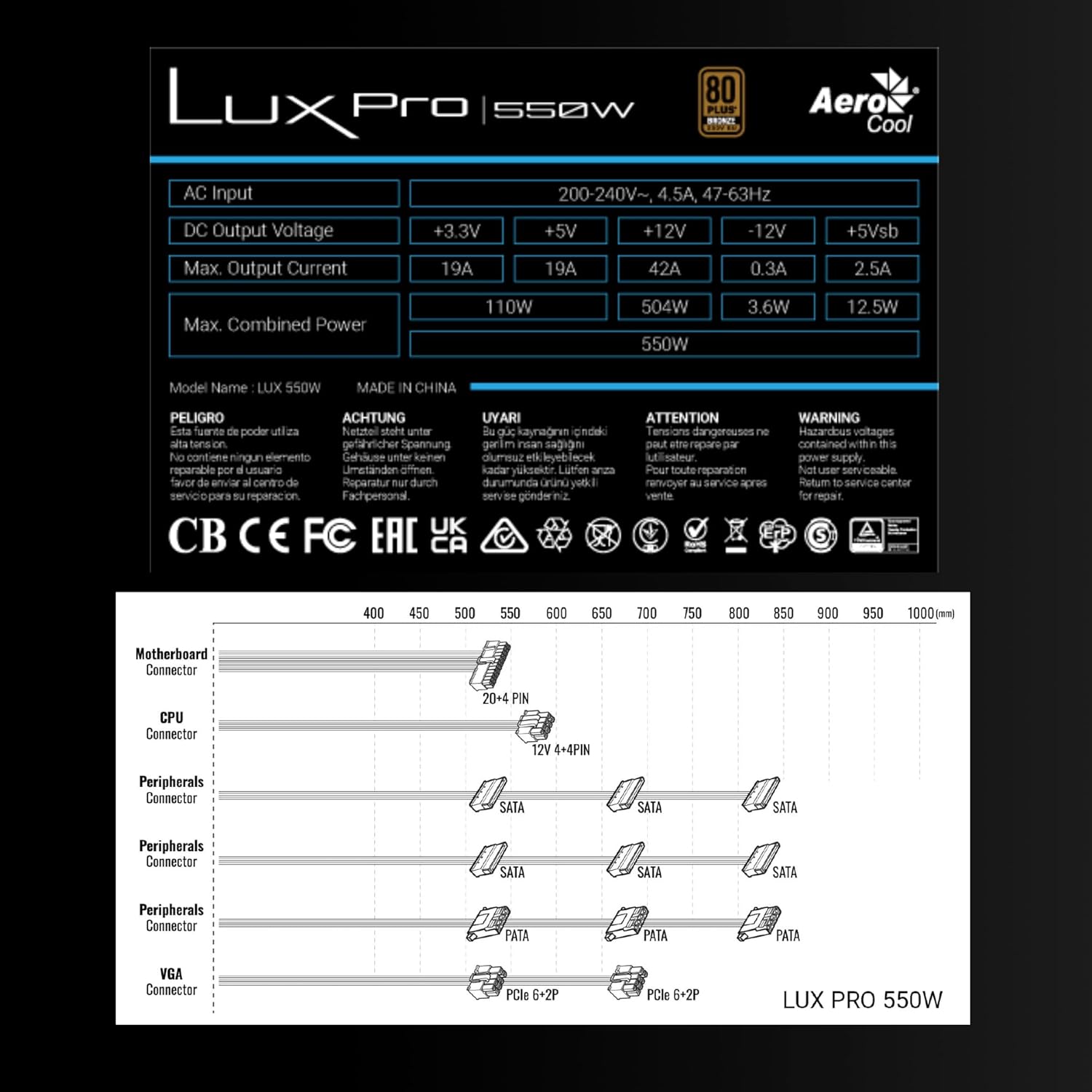
Image 3.1: Connector types and lengths for the LUXPRO550 power supply. This diagram illustrates the available connectors including Motherboard (20+4 PIN), CPU (12V 4+4 PIN), Peripherals (SATA, PATA), and VGA (PCIe 6+2 PIN).
3.3. Соңғы қадамдар
- Компьютер корпусын жабыңыз.
- Айнымалы ток қуат сымын қуат көзіне, содан кейін қабырға розеткасына қосыңыз.
- Flip the power switch on the back of the PSU to the 'ON' position.
- Компьютеріңізді қосыңыз.
4. Пайдалану нұсқаулары
The Aerocool LUXPRO550 is designed for continuous and stable operation once correctly installed. Its 80 Plus Bronze certification ensures high energy efficiency, reducing power consumption and heat generation.
4.1. Active PFC Technology
The integrated Active Power Factor Correction (APFC) technology ensures efficient and reliable power distribution, contributing to overall system stability and energy savings.
4.2. Желдеткіштің жұмысы
The 14cm FDB (Fluid Dynamic Bearing) fan features optimized thermal speed control. It operates silently, starting at less than 700 RPM, and only increases speed as the load approaches 40% at ambient temperatures of 25°C, ensuring quiet operation under typical loads.

Image 4.1: The 14cm FDB fan of the LUXPRO550, illustrating its optimized thermal speed control for efficient cooling.
5. Техникалық қызмет көрсету
The LUXPRO550 is built with high-quality components, including 105°C Japanese capacitors, designed for maximum reliability and a long operational lifespan with minimal maintenance.

Image 5.1: High-quality 105°C Japanese capacitors, contributing to the power supply's reliability and extended lifespan.
5.1. Жалпы күтім
- Keep the power supply and computer case free from dust. Dust accumulation can hinder cooling and reduce efficiency.
- Use compressed air to gently clean the fan and ventilation grilles periodically. Ensure the computer is powered off and unplugged before cleaning.
- Do not obstruct the airflow around the power supply.
No user-serviceable parts are inside. Do not attempt to open or repair the unit yourself.
6. Ақаулықтарды жою
If you encounter issues with your LUXPRO550 power supply, please follow these basic troubleshooting steps:
- Қуат жоқ:
- Ensure the AC power cord is securely connected to both the power supply and the wall outlet.
- Check that the power switch on the back of the PSU is in the 'ON' position.
- Басқа құрылғыны қосу арқылы қабырға розеткасының жұмыс істеп тұрғанын тексеріңіз.
- Жүйе жүктелмейді:
- Double-check all power connections to the motherboard, CPU, graphics card, and storage devices.
- Ensure all components are properly seated in their slots.
- If possible, test the power supply with another known working system or test another power supply with your system to isolate the issue.
- Ерекше шулар:
- A slight hum is normal. If you hear grinding or loud fan noises, ensure the fan is not obstructed by cables or dust.
- Шу жойылмаса, тұтынушыларды қолдау қызметіне хабарласыңыз.
If these steps do not resolve the issue, please contact Aerocool customer support or your retailer for further assistance. Do not attempt to repair the unit yourself.
7. Техникалық сипаттамалар
| Ерекшелік | Техникалық сипаттама |
|---|---|
| Модель атауы | LUXPRO550 |
| Бренд | AeroCool |
| Ватtage | 550 Вт |
| Тиімділік сертификаты | 80 Plus Bronze 230V EU (over 88% efficiency) |
| Форма факторы | ATX |
| Конденсаторлар | Japanese 105°C |
| Желдеткіш түрі | 14cm FDB (Fluid Dynamic Bearing) with thermal speed control |
| PFC | Белсенді PFC |
| Өлшемдері (LxWxH) | 16 x 15 x 8.5 см |
| Салмағы | 1.4 кг |
| Үйлесімді құрылғылар | PC |
7.1. Тұрақты ток шығысының көлеміtage Кесте
The following table details the DC output voltages and maximum currents for the LUXPRO550:
| DC шығыс көлеміtage | +3.3 В | +5 В | +12 В | -12 В | +5Vsb |
|---|---|---|---|---|---|
| Макс. Шығу тогы | 19A | 19A | 42A | 0.3A | 2.5A |
| Макс. Біріккен қуат | 110 Вт | 504 Вт | 3.6 Вт | 12.5 Вт | |
| Total Combined Power | 550 Вт | ||||
8. Кепілдік және қолдау
8.1. Кепілдік туралы ақпарат
The Aerocool LUXPRO550 power supply comes with an extended 5 жылдық кепілдік, reflecting its high reliability and the quality of its components, such as the 105°C Japanese capacitors.
Кепілдік шағымдары үшін сатып алуды растайтын құжатты сақтаңыз.
8.2. Тұтынушыларға қолдау көрсету
For technical assistance, warranty claims, or any questions regarding your Aerocool LUXPRO550 power supply, please contact Aerocool customer support through their official webсайтында немесе жергілікті сатушыңызда.
Do not attempt to open or repair the power supply unit, as this will void the warranty.