
Кіріспе
This manual provides essential instructions for the proper use, setup, and maintenance of your BYTECH Lightning Cable (Model: CLMFCBLASST). This cable is designed for charging and data transfer with compatible Apple iOS devices, including iPhones, iPads, and iPods, as well as connecting to laptops and personal computers.
Өнім аяқталдыview
The BYTECH Lightning Cable is a durable accessory for your Apple devices. It features a Lightning connector on one end and a USB-A connector on the other, facilitating both power delivery for charging and data exchange. The cable supports fast charging capabilities for compatible devices.
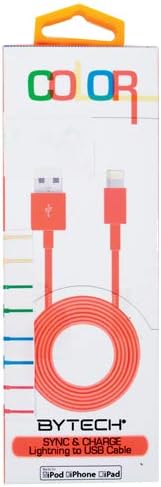
This image displays the retail packaging for the BYTECH Lightning to USB Cable. The packaging is white with 'COLOR' printed at the top in multi-colored letters. An orange Lightning to USB cable is visible through a clear window, coiled neatly. The bottom of the package indicates 'BYTECH SYNC & CHARGE Lightning to USB Cable' and compatibility with iPod, iPhone, and iPad.
Құрамдас бөліктер:
- Найзағай қосқышы: Connects to your Apple iOS device (iPhone, iPad, iPod).
- USB-A қосқышы: Connects to a USB power adapter, computer USB port, or other USB charging source.
- Кабель: The flexible cord connecting the two connectors, designed for durability and efficient power/data transfer.
Орнату
To begin using your BYTECH Lightning Cable, follow these steps:
- Қосқыштарды анықтау: Locate the Lightning connector (smaller, 8-pin) and the USB-A connector (larger, rectangular).
- Қуат көзіне немесе компьютерге қосылыңыз:
- For charging, insert the USB-A connector into a compatible USB wall adapter or car charger.
- For charging and data transfer, insert the USB-A connector into an available USB port on your laptop or personal computer.
- Connect to iOS Device: Insert the Lightning connector into the charging port of your iPhone, iPad, or iPod. Ensure it is fully seated.
- Қосылымды тексеру: Your device should indicate that it is charging or connected to a computer.
Пайдалану нұсқаулары
Құрылғыны зарядтау:
Once connected as described in the "Setup" section, your iOS device will begin charging automatically. The cable supports fast charging when paired with a compatible power adapter and device.
Деректерді тасымалдау:
When connected to a computer, the cable enables data transfer between your iOS device and the computer. This allows for syncing media, documents, and other files using iTunes or Finder (macOS Catalina and later).
- Connect your iOS device to your computer using the BYTECH Lightning Cable.
- Unlock your iOS device and respond to any "Trust This Computer?" prompts by tapping "Trust" and entering your passcode if required.
- Open iTunes (Windows/older macOS) or Finder (macOS Catalina and later) on your computer.
- Select your device within the application to manage and transfer data.
Техникалық қызмет көрсету
Proper care extends the life of your cable:
- Сақтау орны: When not in use, coil the cable loosely. Avoid tight coiling or sharp bends, especially near the connectors, as this can damage the internal wires.
- Тазалау: Кабель мен қосқыштарды ақырын сүрту үшін жұмсақ, құрғақ шүберекті пайдаланыңыз. Сұйық тазалағыштарды немесе абразивті материалдарды пайдаланбаңыз.
- Өңдеу: Always grasp the connector head when plugging or unplugging the cable. Avoid pulling directly on the cable itself.
- Қоршаған орта: Кабельді жоғары температурадан, тікелей күн сәулесінен және ылғалдан алыс ұстаңыз.
Ақаулықтарды жою
If you encounter issues with your BYTECH Lightning Cable, consider the following:
- Құрылғы зарядталмай жатыр:
- Кабельдің екі ұшы да мықтап жалғанғанына көз жеткізіңіз.
- Try a different USB power adapter or computer USB port.
- Check the charging port on your iOS device for debris or lint.
- Test the cable with a different compatible iOS device, if available.
- Деректерді тасымалдау мәселелері:
- Ensure your iOS device is unlocked and you have tapped "Trust This Computer" when prompted.
- Restart both your iOS device and your computer.
- Update iTunes or Finder to the latest version.
- Компьютерде басқа USB портын қолданып көріңіз.
- Кабельдің зақымдалуы: Inspect the cable for any visible signs of damage, such as fraying, cuts, or bent connectors. Discontinue use if damage is found.
Техникалық сипаттамалар
| Атрибут | Мәлімет |
|---|---|
| Бренд | Bytech |
| Үлгі нөмірі | CLMFCBLASST |
| UPC | 805112016938 |
| Қосқыш түрі | Найзағай (еркек) - USB-A (еркек) |
| Кабель түрі | Найзағай |
| Үйлесімді құрылғылар | iPhone, iPad, iPod, Laptop, Personal Computer |
| Арнайы мүмкіндік | Жылдам зарядтау |
| Ұсынылатын пайдаланулар | Charging, data transfer for iOS devices |
| Істікшелер саны | 8 (Lightning) |
| Элемент салмағы | 1.76 унция |
| Өнім өлшемдері | 1 x 1 x 1 дюйм (қаптама) |
Кепілдік және қолдау
For warranty information or technical support regarding your BYTECH Lightning Cable, please refer to the official Bytech webсайтына өтіңіз немесе тұтынушыларға тікелей хабарласыңыз. Кепілдік шағымдары үшін сатып алу түбіртегін сақтаңыз.
Жалпы сұрақтар бойынша мына сайтқа кіре аласыз Bytech brand page on Amazon.