
1. Кіріспе
Welcome to the Artillery Hornet 3D Printer User Manual. This guide provides comprehensive instructions for setting up, operating, maintaining, and troubleshooting your new 3D printer. The Artillery Hornet is designed for ease of use and high-quality printing, featuring a highly pre-assembled structure and advanced components for reliable performance.
2. Қауіпсіздік туралы ақпарат
- Принтерді әрқашан жақсы желдетілетін жерде пайдаланыңыз.
- Жұмыс кезінде қолды қозғалатын бөліктерден аулақ ұстаңыз.
- Do not touch the hotend or heated bed during or immediately after printing, as they can reach high temperatures.
- Қуат көзінің дұрыс қосылғанына және жерге тұйықталғанына көз жеткізіңіз.
- Unplug the printer from the power source before performing any maintenance or cleaning.
- Принтерді жанғыш материалдардан және тікелей күн сәулесінен алыс ұстаңыз.
- Принтер жұмыс істеп тұрған кезде балалар мен үй жануарларын бақылаңыз.
3. Пакет мазмұны
Қораптан шығарған кезде барлық компоненттердің бар екенін тексеріңіз:
- Artillery Hornet 3D Printer (95% pre-assembled)
- Спуль ұстағышы
- Қуат кабелі
- USB кабелі
- Tool Kit (wrenches, screwdrivers, etc.)
- SD Card with Test Files және бағдарламалық қамтамасыз ету
- Пайдаланушы нұсқаулығы (бұл құжат)
- Sample Filament
4. Өнім аяқталдыview
The Artillery Hornet features a robust metal integrated structure and a sleek design. Key components include:

4.1-сурет: Жалпы view of the Artillery Hornet 3D Printer.
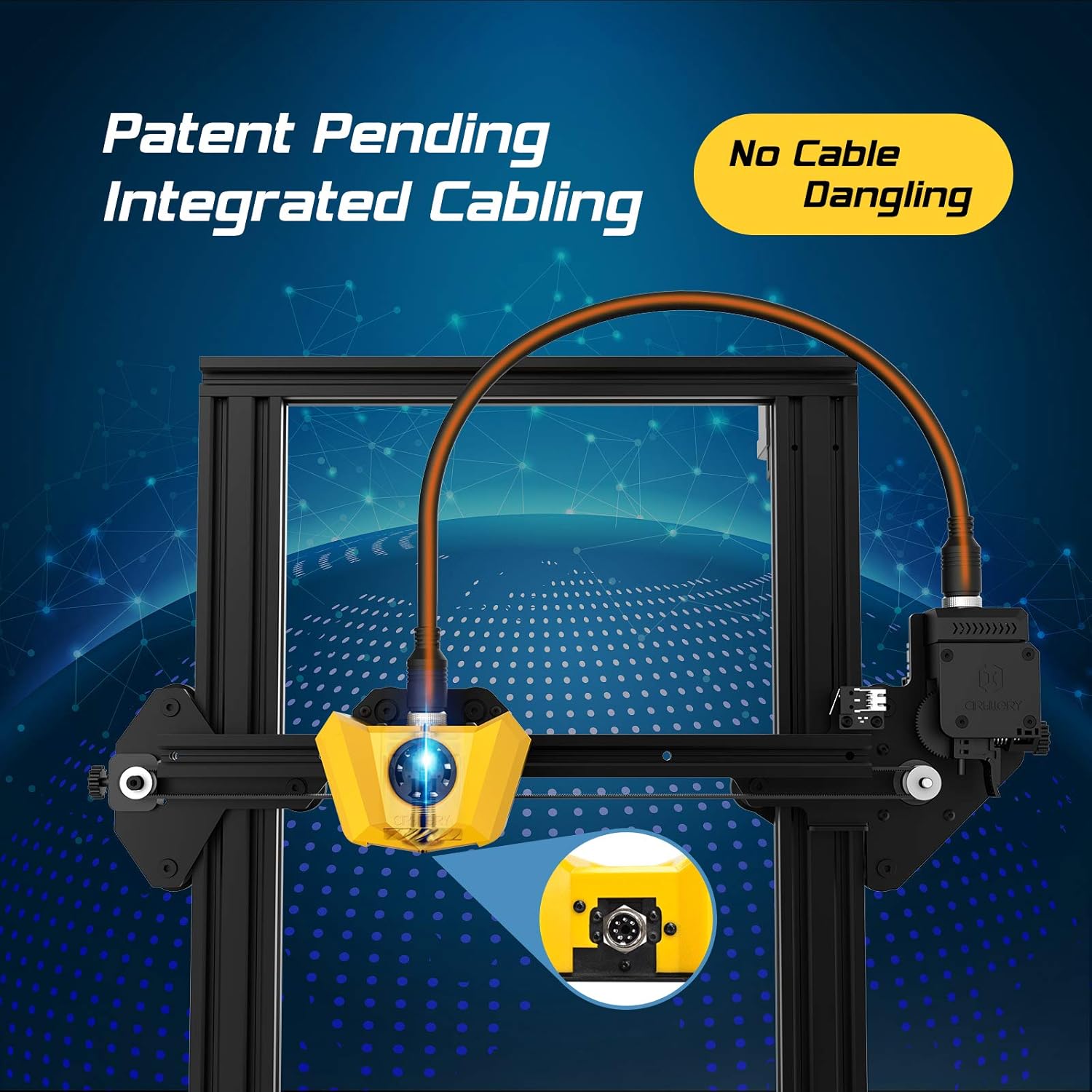
Figure 4.2: Close-up of the innovative integrated cabling system, designed to prevent cable dangling and ensure a neat setup.

Figure 4.3: Details of the New Titan Extruder and Modular Hotend, crucial for stable and precise filament feeding and melting.

Figure 4.4: The self-developed 32-bit motherboard with replaceable drivers, enabling ultra-silent printing and enhanced performance.

Figure 4.5: The user-friendly one-key knob integrated switch for easy operation and the adjustable filament holder designed to maintain a low center of gravity.
5. Орнату нұсқаулығы
The Artillery Hornet is designed for quick and easy assembly, being 95% pre-assembled. Follow these steps to complete the setup:

Figure 5.1: The printer arrives 95% pre-assembled, requiring only a few minutes for final setup.
- Қаптаманы ашу: Қаптамадан барлық компоненттерді мұқият алып тастаңыз.
- Attach Gantry: Secure the pre-assembled gantry to the base unit using the provided screws. The integrated cabling simplifies this connection.
- Install Filament Holder: Mount the adjustable filament holder to the designated slot on the side of the printer.
- Қуатты қосу: Қуат кабелін принтерге, содан кейін жерге тұйықталған электр розеткасына қосыңыз.
- Қуат қосулы: Flip the power switch located at the rear of the base unit.
- Төсек тегістеу: Perform manual bed leveling as instructed on the printer's display or in the detailed guide on the included SD card. Proper bed leveling is crucial for successful prints.
6. Пайдалану нұсқаулары
Operating the Artillery Hornet is intuitive, thanks to its one-key knob integrated switch and efficient design.
6.1. Жіпті жүктеу
- Place your filament spool onto the adjustable filament holder.
- Feed the filament through the filament sensor and into the Titan Extruder.
- Heat the hotend to the appropriate temperature for your filament type (e.g., 200°C for PLA).
- Use the one-key knob to select the 'Load Filament' option. The extruder will automatically pull the filament through the hotend until it extrudes smoothly.
6.2. Басып шығаруды бастау
- 3D моделіңізді кесу бағдарламалық жасақтамасын (мысалы, Cura, PrusaSlicer) пайдаланып дайындаңыз және оны G-код ретінде сақтаңыз file SD картасына.
- Insert the SD card into the printer's SD card slot.
- Navigate the menu using the one-key knob to 'Print from SD' and select your desired G-code file.
- The printer will automatically heat up the bed and hotend, then begin printing. The self-developed 32-bit motherboard ensures ultra-silent operation during printing.
Бейне 6.1: Шенеунік аяқталдыview of the Artillery Hornet 3D Printer, showcasing its features and printing capabilities.
7. Техникалық қызмет көрсету
Regular maintenance ensures optimal performance and longevity of your Artillery Hornet 3D Printer.
- Баспа төсегін тазалаңыз: After each print, clean the print bed with isopropyl alcohol to ensure good adhesion for future prints.
- Саңылауларды тазалау: Periodically clean the nozzle to prevent clogs. Use a brass brush or needle to clear any residue.
- Lubricate Z-axis Rod: Apply a small amount of lithium grease or similar lubricant to the Z-axis lead screw every few months to ensure smooth vertical movement.
- Check Belts: Inspect the X and Y axis belts for proper tension and wear. Adjust if too loose or replace if damaged.
- Желдеткіш тазалау: Ensure cooling fans (for hotend, part cooling, and power supply) are free from dust and debris to prevent overheating.
8. Ақаулықтарды жою
Міне, кейбір жалпы мәселелер және олардың ықтимал шешімдері:
| Мәселе | Ықтимал себебі | Шешім |
|---|---|---|
| Filament not feeding | Nozzle clog, tangled filament, incorrect loading. | Clear nozzle, untangle filament, re-load filament carefully ensuring it enters the Bowden tube correctly. |
| Poor print adhesion / Prints lifting | Unleveled bed, dirty print surface, incorrect bed temperature. | Re-level the print bed, clean the print surface with isopropyl alcohol, adjust bed temperature in slicing software. |
| Layering problems / Poor print quality | Loose belts, Z-axis wobble, incorrect print settings. | Check and tighten X/Y belts, ensure Z-coupler is secure, adjust print speed and temperature settings. |
| Printer is noisy | Loose components, worn bearings. | Check all screws and connections. The 32-bit motherboard is designed for silent operation, but external factors can cause noise. |
| Қызып кету мәселелері | Blocked cooling fans. | Ensure all cooling fans are clear of obstructions and functioning correctly. |
9. Техникалық сипаттамалар
| Ерекшелік | Техникалық сипаттама |
|---|---|
| Құрастыру көлемі | 220 x 220 x 250 мм |
| Принтердің өлшемдері | 17.1"D x 16.1"W x 18.5"H |
| Элемент салмағы | 17.6 фунт (8 килограмм) |
| Материал | Алюминий |
| Түс | Сары |
| Экструдер түрі | New Titan Extruder |
| Hotend Type | Modular Hotend |
| Аналық плата | 32-bit with replaceable drivers |
| Ассамблея | 95% Pre-Assembled |

Figure 9.1: Dimensions of the Artillery Hornet 3D Printer.
10. Кепілдік және қолдау
For warranty information and technical support, please refer to the documentation included with your product or visit the official Artillery webсайт. Сатып алу түбіртегін кез келген кепілдік талаптары үшін сатып алудың дәлелі ретінде сақтаңыз.