
1. Кіріспе
This manual provides detailed instructions for the safe and effective use of your Sndway SW-M40 Digital Laser Rangefinder. Please read this manual thoroughly before operating the device and retain it for future reference.
The Sndway SW-M40 is a compact and precise digital laser distance meter designed for various measurement tasks, including single distance, area, volume, and Pythagorean calculations. It features a measuring range of up to 40 meters.
2. Қауіпсіздік туралы ақпарат
ЕСКЕРТУ: Лазерлік сәулелену
- Лазер сәулесіне қарамаңыз.
- Лазер сәулесін адамдарға немесе жануарларға бағыттамаңыз.
- Лазер сәулесінің көзге тікелей әсер етуінен аулақ болыңыз.
- This device emits Class 2 laser radiation.
- Құрылғыны балалардың қолы жетпейтін жерде сақтаңыз.
- Құрылғыны өзгертуге немесе бөлшектеуге әрекет жасамаңыз.
Always use the device in accordance with the instructions provided to prevent injury or damage.
3. Өнім аяқталдыview
The Sndway SW-M40 Digital Laser Rangefinder is equipped with a clear display and intuitive controls for efficient operation.

3.1-сурет: Алдыңғы view of the Sndway SW-M40 Digital Laser Rangefinder displaying multiple measurement results.
3.1 Негізгі мүмкіндіктер
- Digital Laser Distance Measurement
- Area and Volume Calculation
- Pythagorean Measurement Function
- Addition and Subtraction of Measurements
- Reference Point Adjustment
- Unit Switching (meters, feet, inches)
- Деректерді сақтау функциясы
- Integrated Horizontal and Vertical Bubble Levels for alignment.

Figure 3.2: Sndway SW-M40 functions including Distance, Area, Volume, and Pythagorean measurement.
3.2 Түйме функциялары

Figure 3.3: Control panel with button functions.
- ОҚУ түймесі: Powers on the device and initiates measurement.
- Area/Volume/Pythagorean Mode Button: Әртүрлі өлшеу режимдері бойынша циклдар.
- '+' / '-' түймелері: Өлшемдерді қосу немесе азайту үшін қолданылады.
- Reference Point / Unit Switch Button: Changes the measurement reference point (front/rear of device) and switches measurement units.
- Сақтау түймесі: Stores current measurement data.
- OFF/CLEAR Button: Turns off the device or clears the current display.
4. Орнату
4.1 Батареяны орнату
The Sndway SW-M40 requires two AAA batteries for operation. Ensure correct polarity when inserting the batteries.
- Құрылғының артқы жағындағы батарея бөлігінің қақпағын табыңыз.
- Қақпақты сырғытып ашыңыз.
- Insert two AAA batteries, matching the '+' and '-' indicators inside the compartment.
- Батарея бөлігінің қақпағын мықтап жабыңыз.
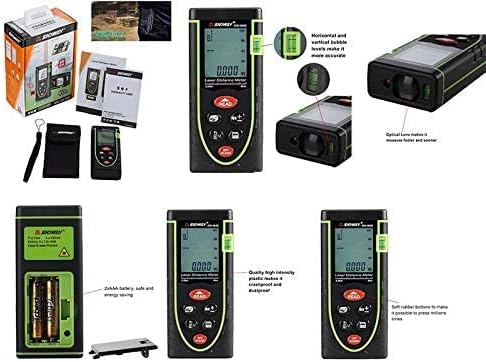
Figure 4.1: Battery compartment and other product details.
5. Пайдалану нұсқаулары
5.1 Қуатты қосу/өшіру
- Қосу үшін: түймесін басыңыз ОҚУ түймесі. Лазер іске қосылады.
- Қуатты өшіру үшін: түймесін басып тұрыңыз ӨШІРУЛІ/ТАЗАЛАУ button for a few seconds. The device will also automatically power off after a period of inactivity.
5.2 Бір арақашықтықты өлшеу
- Power on the device by pressing ОҚУ.
- Лазерді нысанаға бағыттаңыз.
- түймесін басыңыз ОҚУ again to take the measurement. The distance will be displayed on the screen.
5.3 Ауданды өлшеу
- түймесін басыңыз Режим button (the button with the box icon) until the area icon (square) appears on the display.
- Take the first length measurement by pressing ОҚУ.
- Take the second width measurement by pressing ОҚУ.
- Құрылғы аумақты автоматты түрде есептеп, көрсетеді.
5.4 Көлемді өлшеу
- түймесін басыңыз Режим button until the volume icon (cube) appears on the display.
- Take the length measurement by pressing ОҚУ.
- Take the width measurement by pressing ОҚУ.
- Take the height measurement by pressing ОҚУ.
- Құрылғы дыбыс деңгейін автоматты түрде есептеп, көрсетеді.
5.5 Пифагор өлшемі
This mode is used to calculate indirect distances (e.g., height) using the Pythagorean theorem.
- түймесін басыңыз Режим button until the Pythagorean icon (triangle) appears. There are typically two Pythagorean modes: two-point and three-point.
- Follow the on-screen prompts to measure the required sides of the triangle (e.g., hypotenuse, base).
- Құрылғы белгісіз жағын есептеп, көрсетеді.
5.6 Unit Switching and Reference Point
- Құрылғы ауыстырғышы: түймесін қысқаша басыңыз Анықтамалық нүкте / бірлік ауыстырғышы button to cycle through measurement units (meters, feet, inches).
- Анықтама нүктесі: түймесін басып тұрыңыз Анықтамалық нүкте / бірлік ауыстырғышы button to change the measurement reference point between the front edge and the rear edge of the device. An icon on the display will indicate the active reference point.

Figure 5.1: Device held in hand, showing button layout.
5.7 Қосу және азайту
Өлшемдерді қосу немесе азайту үшін:
- Take the first measurement.
- түймесін басыңыз '+' or '-' түймесі.
- Екінші өлшемді алыңыз.
- The result of the addition or subtraction will be displayed.
5.8 Деректерді сақтау
To save a measurement, press the Сақтау button after a measurement is displayed. The device can store multiple readings, which can be recalled later.
5.9 Clearing Measurements
To clear the current measurement from the display, briefly press the ӨШІРУЛІ/ТАЗАЛАУ түймесі.
6. Техникалық қызмет көрсету
- Тазалау: Жұмсақ пайдаланыңыз, damp құрылғыны тазалауға арналған шүберек. Абразивті тазартқыштарды немесе еріткіштерді қолданбаңыз.
- Линзаға күтім жасау: The optical lens is a sensitive component. Clean it gently with a soft cloth, similar to cleaning camera lenses.
- Сақтау орны: Құрылғыны құрғақ, салқын жерде, тікелей күн сәулесінен және жоғары температурадан алыс сақтаңыз. Ұзақ уақыт сақтасаңыз, ағып кетудің алдын алу үшін батареяларды алып тастаңыз.
- Батареяны ауыстыру: Replace batteries when the low battery indicator appears on the display to ensure accurate operation.
7. Ақаулықтарды жою
| Мәселе | Ықтимал себебі | Шешім |
|---|---|---|
| Құрылғы қосылмайды | Төмен немесе зарядсыз батареялар; Батареяны дұрыс орнатпау | Батареяларды ауыстырыңыз; Батареяның полярлығын тексеріңіз |
| Дәл емес өлшемдер | Unstable target surface; Obstruction in laser path; Dirty lens; Incorrect reference point | Ensure stable target; Clear laser path; Clean lens; Verify reference point setting |
| «Қате» хабары көрсетіледі | Measurement out of range; Strong light interference; Laser blocked | Ensure target is within 0.05m-40m range; Measure in shaded areas; Ensure laser is not blocked |
| Лазер көрінбейді | Bright ambient light; Laser not activated | Measure in lower light conditions; Press READ button to activate laser |
8. Техникалық сипаттамалар
| Ерекшелік | Техникалық сипаттама |
|---|---|
| Үлгі | SW-M40 |
| Өлшеу диапазоны | 0.05м - 40м |
| Өлшем бірліктері | meters (m), feet (ft), inches (in) |
| Лазерлік класс | Сынып 2 |
| Батареялар | 2 x AAA (жинаққа кіреді) |
| Материал | Пластмасса |
| Түс | Жасыл |
| Элемент салмағы | 0.17 келі |
| Пакет өлшемдері | 17 x 8.8 x 5 см |
9. Кепілдік және қолдау
9.1 Кепілдік туралы ақпарат
Сатып алу құжаттамаңызды немесе сатушының құжатын қараңыз website for specific warranty terms and conditions applicable to your Sndway SW-M40 Digital Laser Rangefinder.
9.2 Тұтынушыларды қолдау қызметі
For technical assistance, troubleshooting not covered in this manual, or service inquiries, please contact the retailer or the manufacturer directly. Contact information can typically be found on the product packaging or the seller's online store page.