
1. Кіріспе
Thank you for choosing the AUNA Pro Amp-Pro1 BT PA Ampкөтергіш. Бұл amplifier is designed to deliver professional-level sound for various events, including karaoke nights, parties, and general audio amplification. It features a robust 2 x 50W RMS output, Bluetooth connectivity, multiple microphone inputs, USB/SD media playback, and a 7-band equalizer for precise sound control. This manual provides essential information for safe operation, setup, and maintenance of your device.
2. Қауіпсіздік нұсқаулары
Please read these safety instructions carefully before operating the device and keep them for future reference. Failure to follow these instructions may result in electric shock, fire, or other hazards.
- Нәр беруші: Connect the device only to a 230 V, 50 Hz AC power outlet. Ensure the power cord is not damaged or pinched.
- Желдету: Do not block any ventilation openings. Ensure adequate airflow around the unit to prevent overheating. Do not place the amplifier on soft surfaces that may block vents.
- Су және ылғал: Do not expose the device to rain or moisture. Do not place objects filled with liquids, such as vases, on or near the ampқұтқарушы.
- Жылу көздері: сақтаңыз amplifier away from heat sources such as radiators, heat registers, stoves, or other heat-producing appliances.
- Тазалау: Unplug the device from the power outlet before cleaning. Use a dry, soft cloth. Do not use liquid cleaners or aerosol cleaners.
- Қызмет көрсету: Бұл өнімді өзіңіз жөндеуге тырыспаңыз. Барлық қызмет көрсету жұмыстарын білікті қызмет көрсету мамандарына тапсырыңыз. Құрылғыны ашу сізді қауіпті жүктемеге ұшыратуы мүмкін.tages немесе басқа қауіптер.
- Нысан және сұйық енгізу: Ешқашан кез келген заттарды бұл өнімге саңылаулар арқылы итермеңіз, себебі олар қауіпті көлемге тиюі мүмкінtagөрт немесе электр тогының соғуына әкелетін нүктелер немесе қысқа тұйықталу бөліктері.
- Орналастыру: Place the unit on a stable, level surface. Avoid placing it in direct sunlight or in areas with high humidity or dust.
3. Өнім аяқталдыview
The AUNA Pro Amp-Pro1 BT is a versatile PA amplifier designed for powerful audio output and flexible connectivity. It can be used as a standalone unit or installed in a 19-inch Hi-Fi rack.
Негізгі ерекшеліктері:
- Қуатты шығыс: 2 x 50 W RMS power at 4 ohms.
- Bluetooth функциясы: Смартфондардан, планшеттерден немесе ноутбуктерден сымсыз аудио ағыны үшін.
- Бірнеше микрофон кірістері: Three fully adjustable 6.3 mm jack microphone inputs for karaoke and vocal performances.
- Медиа ойнату: USB port and SD/MMC card slot for direct playback of digital audio files.
- 7 жолақты эквалайзер: Two-channel, 7-band equalizer for precise adjustment of treble, bass, and mid-range frequencies.
- Кең байланыс: 2 x stereo RCA inputs, 1 x antenna input, 1 x 3.5 mm AUX input, and 2 x stereo speaker outputs.
- Сөреге орнатылатын: Suitable for installation in a 19-inch Hi-Fi rack.
Алдыңғы панельдің басқару элементтері мен қосылымдары:
The front panel provides access to power, microphone inputs, media playback controls, and sound adjustments.

Артқы панель қосылымдары:
The rear panel houses the main audio inputs and speaker outputs.

4. Орнату және қосылымдар
Follow these steps to set up your AUNA Pro Amp-Pro1 BT ampқұтқарушы.
4.1 Үндеткіштерді қосу
- қамтамасыз етіңіз ampкөтергіш өшірілген және розеткадан ажыратылған.
- Connect your passive speakers to the stereo speaker outputs on the rear panel. Use appropriate speaker cables.
- For a single set of speakers, ensure their impedance is between 4 and 16 ohms.
- If connecting two sets of speakers simultaneously, ensure their combined impedance is between 8 and 16 ohms.
4.2 Дыбыс көздерін қосу
The amplifier offers various input options:
- RCA кірістері: Connect external audio devices like CD players, DVD players, or mixers to the 2 x stereo RCA inputs on the rear panel.
- AUX кірісі: For portable devices, use the 3.5 mm AUX input on the front panel.
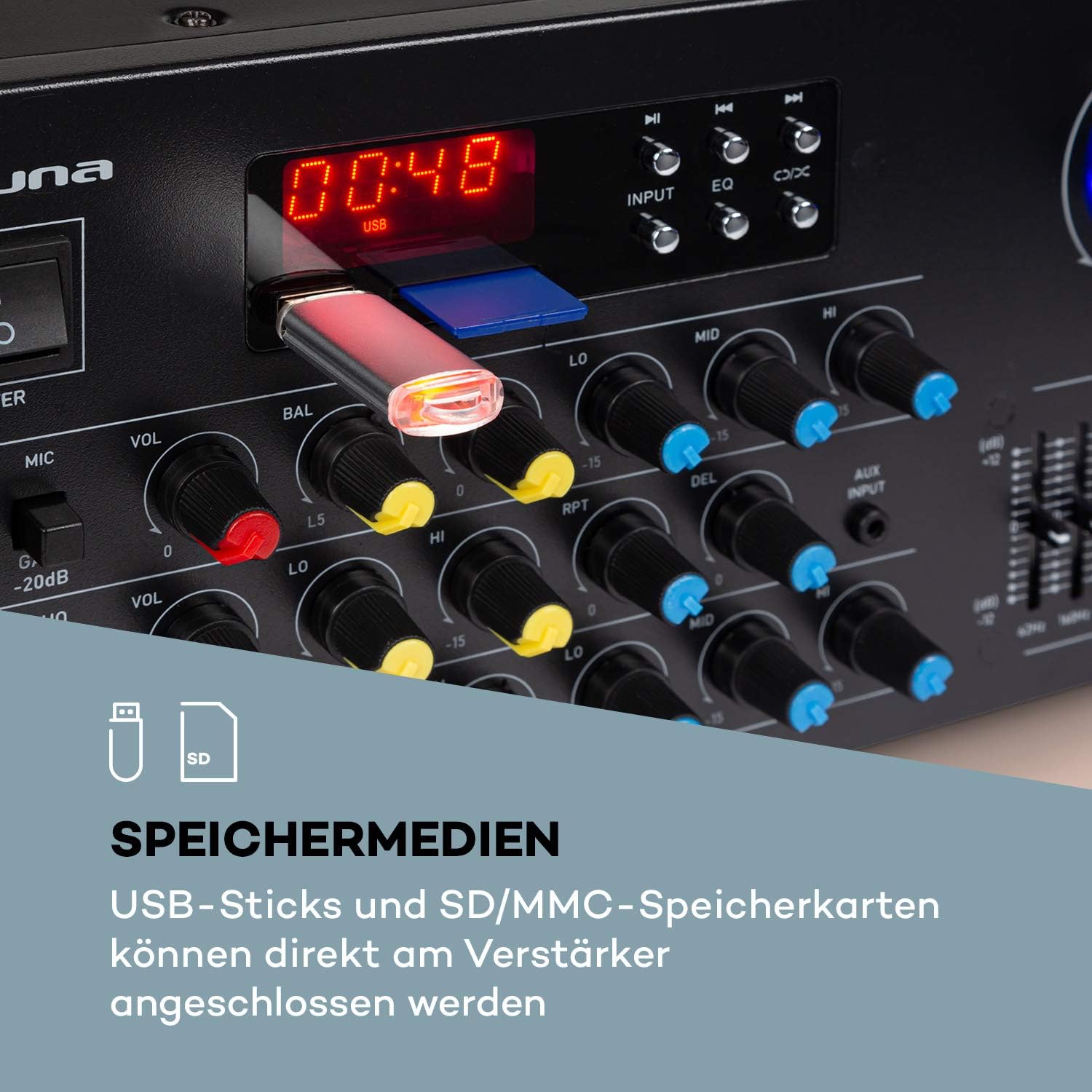
- USB/SD: Insert a USB stick or SD/MMC card into the respective slots on the front panel for direct media playback.
- Блютез: Үйлесімді құрылғылардан сымсыз дыбыс ағыны үшін.
4.3 Микрофондарды қосу
Connect up to three 6.3 mm jack microphones to the dedicated inputs on the front panel.

4.4 Қуат қосылымы
Once all audio and speaker connections are made, plug the amplifier's power cord into a suitable 230 V, 50 Hz AC power outlet.
5. Пайдалану нұсқаулары
5.1 Қуатты қосу/өшіру
түймесін басыңыз ҚУАТ бұру үшін алдыңғы панельдегі түймені басыңыз ampкөтергішті қосулы немесе өшірулі күйде қалдырыңыз. Құрылғы қосылған кезде дисплей жанады.
5.2 Дереккөзді таңдау
пайдаланыңыз INPUT selector button on the front panel to cycle through available audio sources: Bluetooth, USB, SD, AUX, and RCA inputs.
5.3 Bluetooth жұмысы
- Select the Bluetooth input source using the INPUT button. The display will show 'BLUE' or a similar indicator.
- Смартфонда, планшетте немесе ноутбукте Bluetooth қосыңыз.
- Іздеу available devices and select 'AUNA Amp-Pro1 BT' (or similar) from the list.
- Жұптастырылғаннан кейін дыбысты сымсыз ағынмен жіберуге болады ampқұтқарушы.

5.4 USB/SD ойнату
- Insert a USB stick or SD/MMC card into the corresponding slot on the front panel.
- Select the USB or SD input source using the INPUT түймесі. The amplifier will automatically detect and begin playing compatible audio files.
- Use the playback controls (Play/Pause, Next, Previous) on the front panel to manage your music.
5.5 Микрофонды басқару элементтері
Each microphone input has individual volume, 3-band equalizer (treble, mid, bass), balance, and echo effect controls. The echo effect also has 2-band equalizer, repeat, delay, and volume controls.
- реттеңіз MIC VOL knob for the overall microphone volume.
- Жеке тұлғаны пайдаланыңыз Т knobs for each microphone input.
- реттеңіз LO, ОРТА, HI knobs for microphone equalization.
- Control the echo effect using the ЭХО, RPT (Қайталау), және DEL (Delay) knobs.
5.6 Эквалайзерді реттеу
The amplifier features a 2-channel, 7-band equalizer to fine-tune your audio output. Adjust the sliders for each frequency band (62Hz, 160Hz, 400Hz, 1KHz, 3KHz, 8KHz, 16KHz) to shape your sound.

5.7 Негізгі дыбыс деңгейін басқару
Үлкенін реттеңіз МАСТЕР ТӨЛЕМІ knob to control the overall output level of the ampқұтқарушы.
6. Техникалық қызмет көрсету
6.1 Тазалау
Әрқашан желіден ажыратыңыз amplifier before cleaning. Use a soft, dry cloth to wipe the exterior surfaces. Do not use abrasive cleaners, waxes, or solvents, as they may damage the finish.
6.2 Сақтау
Егер amplifier will not be used for an extended period, unplug it from the power outlet and store it in a cool, dry place, away from direct sunlight and extreme temperatures.
6.3 Сақтандырғышты ауыстыру
The amplifier is equipped with a 2A fuse. If the unit fails to power on, the fuse may need replacement. This should only be performed by qualified service personnel to ensure safety and proper operation.
7. Ақаулықтарды жою
Егер сізде проблемалар туындаса ampliifier үшін келесі жалпы мәселелер мен шешімдерді қараңыз:
| Мәселе | Ықтимал себебі | Шешім |
|---|---|---|
| Қуат жоқ | Power cord unplugged; Power outlet faulty; Fuse blown | Check power cord connection; Try a different outlet; Contact service for fuse replacement. |
| Дыбыс шығуы жоқ | Incorrect input selected; Volume too low; Speakers not connected or faulty; Mute function active | Select correct input source; Increase Master Volume; Check speaker connections; Ensure no mute is active. |
| Bluetooth қосылмайды | Amplifier not in Bluetooth mode; Device not discoverable; Interference | Select Bluetooth input; Ensure Bluetooth is enabled on your device and in pairing mode; Move devices closer; Restart both devices. |
| Микрофон жұмыс істемейді | Microphone not connected; Microphone volume too low; Microphone faulty | Check microphone connection; Increase individual MIC VOL; Test with another microphone. |
| Бұрмаланған дыбыс | Volume too high; Input signal too strong; Speaker impedance mismatch | Reduce Master Volume or input source volume; Check speaker impedance. |
Осы шешімдерді қолданып көргеннен кейін мәселе жойылмаса, тұтынушыларды қолдау қызметіне хабарласыңыз.
8. Техникалық шарттар
Below are the technical specifications for the AUNA Pro Amp-Pro1 BT PA Ampөмір сүруші:
| Ерекшелік | Техникалық сипаттама |
|---|---|
| Шығу қуаты | 2 x 50 W RMS at 4 ohms |
| Жиілік реакциясы | 20 Гц - 20 кГц |
| Сигналдардың шуылға қатынасы | > 76 дБ |
| Speaker Impedance (1 set) | 4 16 - XNUMX Ом |
| Speaker Impedance (2 sets synchronized) | 8 16 - XNUMX Ом |
| Микрофон кірістері | 3 x 6.3 mm jack (front) |
| Аудио кірістер | 2 x stereo RCA, 1 x 3.5 mm AUX, USB, SD/MMC |
| Антенна кірісі | 1 x antenna input |
| Динамик шығыстары | 2 x stereo (screw terminals/banana connector) |
| Нәр беруші | 230 V, 50 Гц |
| Сақтандырғыш | 2 А |
| Өлшемдері (ені x Y x D) | Шамамен. 43 x 16.3 x 32.5 см |
| Салмағы | Шамамен 3.0 кг |
| Қосылу технологиясы | AUX, Bluetooth, USB |
| Үйлесімді құрылғылар | Ноутбук, смартфон |

9. Жою туралы ақпарат
Do not dispose of this product with normal household waste. This product should be handed over to an applicable collection point for the recycling of electrical and electronic equipment. By ensuring this product is disposed of correctly, you will help prevent potential negative consequences for the environment and human health, which could otherwise be caused by inappropriate waste handling of this product. For more detailed information about recycling of this product, please contact your local city office, your household waste disposal service or the shop where you purchased the product.
10. Кепілдік және қолдау
For warranty information, technical support, or service inquiries, please refer to the documentation provided with your purchase or contact your retailer. You can also visit the official AUNA webқосымша көмек алу үшін сайт.