
1. Кіріспе
This manual provides essential information for the installation, operation, maintenance, and troubleshooting of your Chieftec Polaris 650W 80Plus Certified Power Supply Unit (PSU). Please read this manual thoroughly before installing and using the product to ensure proper function and safety. The Chieftec Polaris 650W PSU is designed to provide stable and efficient power to your personal computer system.
2. Қауіпсіздік туралы ақпарат
Жарақат алуды немесе жабдықты зақымдауды болдырмау үшін әрқашан келесі қауіпсіздік шараларын орындаңыз:
- Істемеймін open the PSU casing. Жоғары томtages inside can cause electric shock. There are no user-serviceable parts inside.
- Істемеймін insert any objects into the PSU's ventilation openings.
- Істемеймін expose the PSU to water, moisture, or high humidity.
- Ensure the PSU is installed in a well-ventilated area, free from obstructions to airflow.
- PSU орнату, алу немесе тазалау алдында әрқашан айнымалы ток қуат сымын қабырға розеткасынан ажыратыңыз.
- Use only the modular cables provided with your Chieftec Polaris 650W PSU. Using incompatible cables may damage the PSU or connected components.
- Ensure all cable connections are secure before powering on the system.
3. Пакет мазмұны
Пакетте барлық элементтердің бар екенін тексеріңіз:
- Chieftec Polaris 650W Power Supply Unit
- Modular Cable Set (e.g., 24-pin ATX, 8-pin EPS/CPU, PCIe, SATA, Molex)
- Айнымалы ток қуат сымы
- Орнату бұрандалары
- Пайдаланушы нұсқаулығы (бұл құжат)
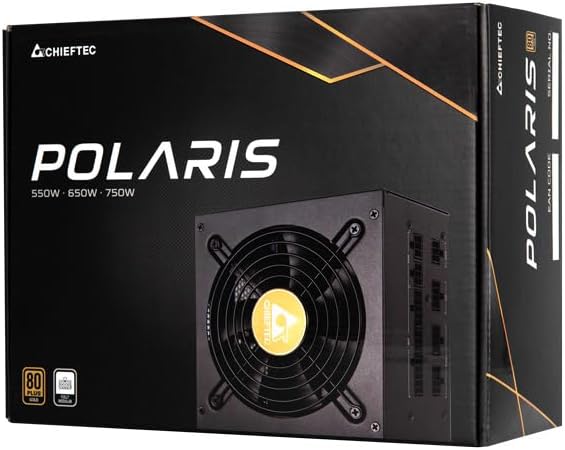
Image: The Chieftec Polaris 650W Power Supply Unit and its retail packaging.
4. Орнату және орнату
Follow these steps to install your Chieftec Polaris 650W PSU into your personal computer system:
- Жүйені дайындаңыз: Ensure your computer is completely powered off and unplugged from the wall outlet. Open your computer case to access the PSU mounting area.
- Ескі PSU алып тастаңыз (егер бар болса): If replacing an existing PSU, disconnect all cables from the components and motherboard, then unscrew and remove the old PSU.
- Жаңа PSU орнату: Carefully slide the Chieftec Polaris 650W PSU into the designated PSU bay in your computer case. Ensure the fan faces the correct direction (typically downwards for bottom-mounted PSUs, or as per case design for optimal airflow). Secure the PSU with the provided mounting screws.
- Модульдік кабельдерді қосу: Identify the necessary modular cables for your system components (motherboard, CPU, graphics card, storage drives). Connect these cables to the corresponding ports on the back of the PSU. Refer to the image below for connector identification.
- Компоненттерге қосылу: Connect the other end of the modular cables to your motherboard (24-pin ATX and 8-pin EPS/CPU), graphics card(s) (PCIe), and storage devices (SATA/Molex). Ensure all connections are firm and fully seated.
- Кабельдерді басқару: Кабельдерді корпусыңыздың ішіндегі ауа ағынын және эстетиканы жақсарту үшін ұқыпты орналастырыңыз.
- Қорытынды тексерулер: Double-check all connections. Ensure no loose cables are obstructing fans. Close your computer case.
- Айнымалы ток қуатын қосу: Plug the AC power cord into the PSU's power inlet and then into a wall outlet.

Сурет: артқы view of the Chieftec Polaris 650W PSU showing modular cable connection ports for M/B, SATA, PCIe, and CPU.

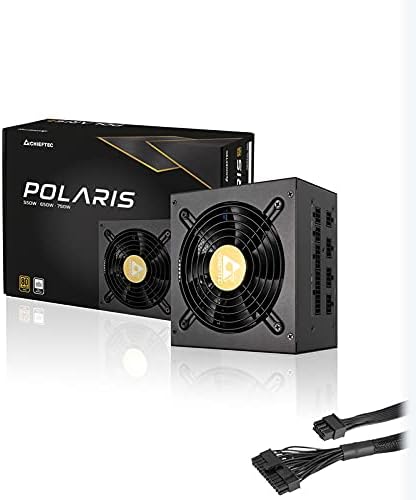
Image: The Chieftec Polaris 650W Power Supply Unit with its modular cables connected, ready for installation.
5. Пайдалану нұсқаулары
Once the Chieftec Polaris 650W PSU is correctly installed and all connections are secure:
- Қуат қосулы: Locate the power switch on the back of the PSU (next to the AC power inlet). Ensure it is in the 'I' (On) position.
- Жүйені іске қосу: Press the power button on your computer case. The system should power on, and the PSU fan will begin to spin, indicating normal operation.
- Желдеткіштің жұмысы: The PSU features an air cooling method. The fan will operate to dissipate heat generated by the power supply components. Its speed may vary depending on the load and temperature to maintain optimal cooling and noise levels.
- Қуат көзін өшіру: To shut down your system, use the operating system's shutdown procedure. For a complete power cut, switch the PSU's power switch to the 'O' (Off) position and unplug the AC power cord.
Сурет: жоғарыдан төменге view of the Chieftec Polaris 650W Power Supply, highlighting the cooling fan and protective grille.
6. Техникалық қызмет көрсету
Proper maintenance ensures the longevity and optimal performance of your PSU:
- Шаңды тазалау: Periodically (e.g., every 3-6 months), power off your computer, unplug the AC cord, and open the case. Use compressed air to gently blow dust out of the PSU's fan and ventilation grilles. Істемеймін use a vacuum cleaner directly on the PSU as it can generate static electricity.
- Қоршаған орта жағдайлары: Ensure the computer operates in a clean, dry, and well-ventilated environment. Avoid extreme temperatures and direct sunlight.
- Кабельдің тұтастығы: Occasionally check that all modular cables are securely connected and not frayed or damaged.
7. Ақаулықтарды жою
If you encounter issues with your Chieftec Polaris 650W PSU, consider the following troubleshooting steps:
- Қуат жоқ:
- Айнымалы ток қуат сымының PSU мен қабырға розеткасына мықтап жалғанғанын тексеріңіз.
- Check that the PSU's power switch on the back is in the 'I' (On) position.
- Басқа құрылғыны қосу арқылы қабырға розеткасының жұмыс істеп тұрғанын тексеріңіз.
- Confirm all internal power cables (24-pin ATX, 8-pin EPS/CPU) are firmly connected to the motherboard.
- Жүйе тұрақсыздығы/кездейсоқ өшірулер:
- Ensure the PSU is adequately ventilated and not overheating.
- Check all power connections to components (graphics card, storage) for looseness.
- If possible, test the PSU with a different set of components or in another system to rule out other hardware issues.
- Ерекше шулар:
- A rattling or grinding noise may indicate a fan issue. Power off the system and inspect the PSU fan for obstructions (e.g., loose cables).
- If the noise persists and is not due to an obstruction, contact support.
Бұл қадамдар мәселені шешпесе, Кепілдік және қолдау бөлімін қараңыз.
8. Техникалық сипаттамалар
| Ерекшелік | Техникалық сипаттама |
|---|---|
| Бренд | Басшы |
| Модель атауы | Поляр |
| Элемент үлгі нөмірі | IN-ACT-ZDLCHFOBU0087 |
| Шығу Wattage | 650 Вт |
| Форма факторы | ATX |
| Салқындату әдісі | Ауа |
| Қосқыш түрі | ATX |
| Үйлесімді құрылғылар | Дербес компьютер |
| Өнім өлшемдері (L x W x H) | 8.66 x 3.15 x 1.18 дюйм (22 x 8 x 3 см) |
| Элемент салмағы | 4.4 фунт (2 килограмм) |
| Сертификаттау | 80Plus сертификатталған |
9. Кепілдік және қолдау
Chieftec products are manufactured to high-quality standards. For specific warranty terms and conditions, please refer to the warranty card included with your product or visit the official Chieftec website. Warranty periods and coverage may vary by region and product.
For technical support, product inquiries, or warranty claims, please contact Chieftec customer service through their official website or the contact information provided in your product documentation. When contacting support, please have your product model number (IN-ACT-ZDLCHFOBU0087) and proof of purchase readily available.