
1. Кіріспе
Сатып алғаныңыз үшін рахметasing the MUSE M-10 Red Radio Alarm Clock. This manual provides essential information for the safe and efficient operation of your device. Please read these instructions carefully before use and retain them for future reference.

Figure 1: MUSE M-10 Red Radio Alarm Clock. This image shows the front view of the red alarm clock with its digital LED display showing '12:00' and various control buttons on the top panel.
2. Қауіпсіздік нұсқаулары
- Құралды қолданар алдында барлық нұсқауларды оқып шығыңыз.
- Do not expose this appliance to rain or moisture to prevent fire or shock hazards.
- Қуат адаптеріне оңай қол жеткізуге болатынына көз жеткізіңіз.
- Өндіруші көрсеткен қосымшаларды/керек-жарақтарды ғана пайдаланыңыз.
- Өнімді тікелей күн сәулесі түсетін жерге немесе жылу көздеріне жақын қоймаңыз.
- Avoid placing the product on surfaces that are unstable or subject to vibration.
- c ашпаңызasing; барлық қызмет көрсетуді білікті мамандарға тапсырыңыз.
- Қолданылған батареяларды жергілікті ережелерді сақтай отырып, жауапкершілікпен тастаңыз.
3. Өнім аяқталдыview
3.1 Алдыңғы панель және дисплей
The front panel features a clear 0.6-inch white LED display for time and alarm indicators.
3.2 Жоғарғы панельді басқару элементтері
The top panel houses all control buttons for easy access:
- ЖАД: Memory button for saving and recalling radio presets.
- ОРНАТУ: Button for setting time and alarm parameters.
- AL1: Alarm 1 setting button.
- AL2: Alarm 2 setting button.
- << HR: Hour adjustment button (backward).
- MIN >>: Minute adjustment button (forward).
- ҰЙЫҚТАУ: Activates the snooze function during an alarm.
- ҰЙҚЫ: Ұйқы таймері функциясын іске қосады.
- ДИММЕР: Дисплей жарықтығын реттейді.

2 -сурет: Аяқталдыview of the MUSE M-10 Red Radio Alarm Clock's functions, including its 0.6-inch white LED display, PLL radio, 20 FM presets, dimmer, dual alarm, snooze, and sleep features.
4. Орнату
4.1 Қуат қосылымы
Connect the provided AC adapter to the DC IN jack on the rear of the unit and then plug it into a standard wall outlet. The unit will power on and the display will light up.
4.2 Батареяның қосалқы көшірмесін орнату
For time and alarm settings backup during a power outage, install 2 x AAA batteries (not included) into the battery compartment located on the bottom of the unit. Ensure correct polarity (+/-) when inserting batteries.
5. Пайдалану нұсқаулары
5.1 Уақытты орнату
- түймесін басып тұрыңыз ОРНАТУ түймесін сағат сандары жыпылықтағанша басыңыз.
- пайдаланыңыз << HR or MIN >> түймелері сағатты реттеуге арналған.
- түймесін басыңыз ОРНАТУ again, and the minute digits will flash.
- пайдаланыңыз << HR or MIN >> минуттарды реттеу үшін түймелер.
- түймесін басыңыз ОРНАТУ растау және уақытты орнату режимінен шығу үшін тағы бір рет басыңыз.
5.2 Дабылдарды орнату (1-дабыл және 2-дабыл)
Құрылғы екі тәуелсіз дабылмен жабдықталған.
- түймесін басып тұрыңыз AL1 (немесе AL2) button until the alarm hour digits flash.
- пайдаланыңыз << HR or MIN >> қажетті оятқыш сағатын орнату үшін түймелерді басыңыз.
- түймесін басыңыз AL1 (немесе AL2) again, and the alarm minute digits will flash.
- пайдаланыңыз << HR or MIN >> Қажетті дабыл минуттарын орнату үшін түймелерді басыңыз.
- түймесін басыңыз AL1 (немесе AL2) again to select the alarm source: Дабыл or Радио.
- түймесін басыңыз AL1 (немесе AL2) once more to confirm and activate the alarm. An alarm icon will appear on the display.
5.3 FM радиосының жұмысы
The unit has a PLL FM radio with 20 preset stations.
- баптау: түймесін басыңыз << HR or MIN >> buttons to manually tune the radio frequency. Press and hold these buttons for automatic scanning to the next available station.
- Алдын ала орнатуларды сақтау: Қалаған станцияға баптаңыз. түймесін басып тұрыңыз MEM button until 'P01' (or the next available preset number) flashes. Use << HR or MIN >> алдын ала орнатылған нөмірді таңдау үшін түймесін басыңыз MEM қайтадан сақтау үшін.
- Алдын ала орнатылған параметрлерді еске түсіру: түймесін қысқаша басыңыз MEM Сақталған алдын ала орнатылған станциялар арасында айналдыру үшін түймесін басыңыз.
5.4 Кідірту функциясы
Дабыл естілгенде түймесін басыңыз ҰЙЫҚТАУ button to temporarily silence the alarm for approximately 9 minutes. The alarm will sound again after this period.
5.5 Ұйқы таймерінің функциясы
түймесін басыңыз ҰЙҚЫ button repeatedly to set a sleep timer (e.g., 90, 60, 30, 15 minutes, or OFF). The radio will play for the selected duration and then automatically turn off.
5.6 Дисплейдің күңгірттенуі
түймесін басыңыз DIMMER button repeatedly to cycle through display brightness levels: High, Low, or Off.

Figure 3: Key features of the MUSE M-10 Red Radio Alarm Clock, including snooze, radio or buzzer alarm, dimmable display, and FM PLL radio with 20 presets.
6. Техникалық қызмет көрсету
- Тазалау: Құрылғыны жұмсақ, құрғақ шүберекпен сүртіңіз. Абразивті тазартқыштарды немесе еріткіштерді қолданбаңыз.
- Батареяны ауыстыру: Replace backup batteries annually or when the display shows signs of dimming during power outages.
- Сақтау орны: If storing the unit for an extended period, remove the backup batteries to prevent leakage.
7. Ақаулықтарды жою
| Мәселе | Ықтимал себебі | Шешім |
|---|---|---|
| Қуат жоқ/дисплей өшірулі | Қуат адаптері қосылмаған немесе ақаулы. | Қуат адаптерінің қосылымын тексеріңіз. Басқа розетканы қолданып көріңіз. |
| Дабыл естілмейді | Дабыл қосылмаған немесе дұрыс орнатылмаған. | Ensure alarm icon is visible on display. Re-check alarm time and source settings. |
| Нашар радио қабылдау | FM антеннасы ұзартылмаған немесе сигнал аймағы нашар. | Fully extend the FM wire antenna. Adjust its position for better reception. |
| Қуаттан кейін жоғалған уақыт/параметрлерtage | Қосалқы батареялар орнатылмаған немесе таусылған. | Install new AAA batteries for backup. |
8. Техникалық сипаттамалар
- Үлгі: M-10 ҚЫЗЫЛ
- Бренд: MUSE
- Көрсеткіш: 0.6-inch White LED, Digital
- Радио: FM PLL Radio with 20 Presets
- Дабыл: Қос дабыл (сигнал немесе радио)
- Арнайы мүмкіндіктер: Snooze, Sleep Timer, Display Dimmer (High/Low/Off)
- Қуат көзі: AC Adapter (included), 2 x AAA batteries for backup (not included)
- Өлшемдері (L x W x H): 12 x 7 x 10.9 см (шамамен 4.7 x 2.8 x 4.3 дюйм)
- Салмағы: 200 грамм (шамамен 0.44 фунт)
- Материал: Пластмасса
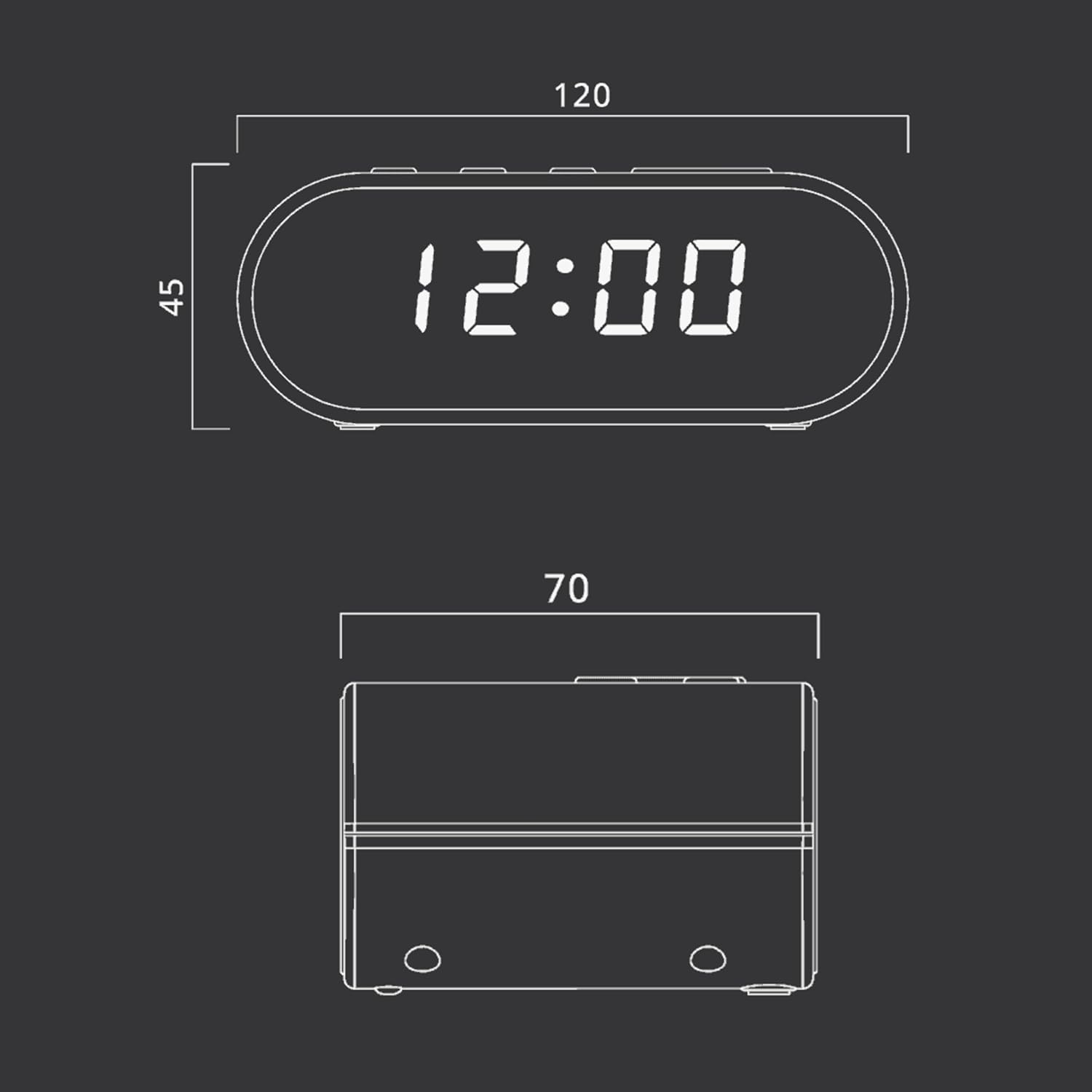
Figure 4: Dimensional drawing of the MUSE M-10 Red Radio Alarm Clock, showing its length (120mm), width (70mm), and height (45mm).
9. Кепілдік және қолдау
For warranty information or technical support, please refer to the warranty card included with your product or contact your local MUSE distributor. Keep your purchase receipt as proof of purchase.