
1. Кіріспе
Сатып алғаныңыз үшін рахметasing the Singsation Professional Karaoke Machine. This portable Bluetooth karaoke system is designed to provide hours of entertainment with its advanced voice effects, dynamic sound effects, and captivating light show. This manual will guide you through the setup, operation, and maintenance of your new karaoke machine, ensuring you get the most out of its features.
2. Қауіпсіздік туралы ақпарат
- Өнімді қолданар алдында барлық нұсқауларды оқып шығыңыз.
- Құрылғыны суға немесе шамадан тыс ылғалға ұшыратпаңыз.
- Тиісті желдетуді қамтамасыз етіңіз; ешқандай желдету саңылауларын жаппаңыз.
- Құрылғымен бірге берілген қуат адаптерін ғана пайдаланыңыз.
- Құрылғыны радиаторлар, жылытқыштар, пештер немесе басқа құрылғылар (соның ішінде) сияқты жылу көздерінен алыс ұстаңыз. ampжылу шығаратын көтергіштер).
- Бұл өнімге өзіңіз қызмет көрсетуге тырыспаңыз. Барлық қызмет көрсетуді білікті қызмет көрсетуші қызметкерлерге тапсырыңыз.
- Құрылғының үстіне ауыр заттарды қоймаңыз.
3. Пакет мазмұны
Қаптамаңыздағы барлық заттардың бар-жоғын тексеріңіз:
- Singsation Professional Karaoke Machine Unit
- 2 x микрофондар
- Қашықтан басқару құралы
- Қуат адаптері
- Пайдаланушы нұсқаулығы (бұл құжат)
4. Өнімнің ерекшеліктері
The Singsation Professional Karaoke Machine is packed with features to enhance your singing experience:
- 60 Professional-Quality Voice Effects: Transform your voice with various effects like echo, baritone, alien, and more.
- 10 Amazing Sound Effects: Add fun sounds like applause, cheers, and air horn to your performance.
- 25 Room-Filling LED Light Effects: Create a dynamic party atmosphere with multi-color light modes including party, pulse, breathe, and chase.
- Портативті дизайн: Easy to transport for parties anywhere.
- Bluetooth қосылымы: Wirelessly stream music from your smartphone or tablet.
- Қос микрофон кірістері: Includes two microphones for duet singing.

4.1-сурет: Біттіview of the Singsation Karaoke Machine's control panel highlighting the extensive light, sound, and voice effects available.

4.2-сурет: The Singsation Karaoke Machine supports two microphones, enabling duet performances for enhanced entertainment.
5. Орнату
Follow these steps to set up your Singsation Professional Karaoke Machine:
- Құрылғыны орауыштан шығару: Қаптамадан барлық компоненттерді мұқият алып тастаңыз. Қаптаманы болашақта сақтау немесе тасымалдау үшін сақтаңыз.
- Қуат қосылымы: Connect the supplied power adapter to the DC IN port on the back of the karaoke machine and plug it into a standard electrical outlet. The unit can also operate on its internal battery.
- Микрофон қосылымы: Plug the included microphones into the MIC 1 and MIC 2 XLR ports on the side of the unit.
- Орналастыру: Place the karaoke machine on a stable, flat surface. Ensure there is adequate space around the unit for ventilation.
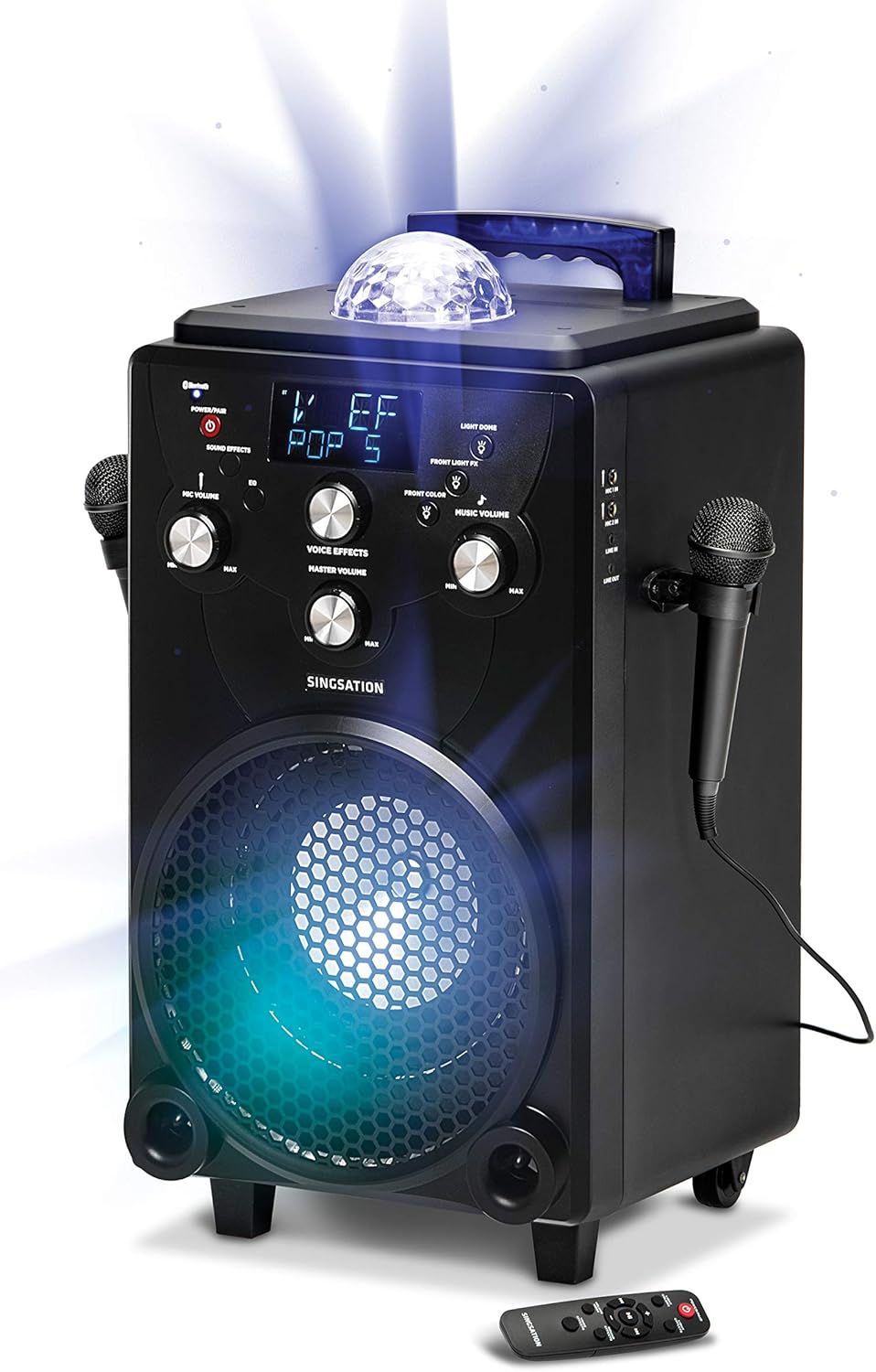
5.1-сурет: The main unit of the Singsation Professional Karaoke Machine, showing its overall design and primary components.
6. Пайдалану нұсқаулары
This section details how to operate your karaoke machine's various functions.
6.1. Қуатты қосу/өшіру
- түймесін басып тұрыңыз ҚУАТ/ЖҰП құрылғыны қосу немесе өшіру үшін басқару панеліндегі немесе қашықтан басқару пультіндегі түймесін басыңыз.
6.2. Музыканы ойнату
The Singsation Karaoke Machine supports Bluetooth audio streaming and auxiliary input.
6.2.1. Bluetooth жұптастыру
- Turn on the karaoke machine. The Bluetooth indicator will flash, indicating it's in pairing mode.
- Смартфонда немесе планшетте Bluetooth қосыңыз және қолжетімді құрылғыларды іздеңіз.
- Select "Singsation" from the list of devices. Once paired, the Bluetooth indicator will glow solid.
- Start playing music from your device. Adjust the Music Volume knob on the karaoke machine.
6.2.2. Көмекші кіріс
- Connect an external audio device (e.g., MP3 player) to the AUX IN port using a 3.5mm audio cable (not included).
- The unit will automatically switch to AUX mode. Adjust the Music Volume knob.
6.3. Микрофонды пайдалану
- Микрофонның дыбыс деңгейі: Use the MIC VOLUME knob to adjust the volume of the connected microphones.
- Дауыс әсерлері: Press the VOICE EFFECTS button repeatedly to cycle through the 60 available voice effects. Use the VOICE EFFECTS knob to fine-tune the effect level.
6.4. Дыбыс әсерлері
- Press the SOUND EFFECTS button to activate one of the 10 built-in sound effects. Press again to cycle through them.
6.5. Жарық шоуы
- Ашық түстер: Press the LIGHT COLORS button to switch between different color modes for the main speaker light.
- Жарық әсерлері: Press the LIGHT EFFECTS button to cycle through the 25 dynamic light effects for the main speaker light and the top disco ball light.
- Front Light FX: Use the FRONT LIGHT FX button to control the front-facing light effects.
6.6. Қашықтан басқару функциялары
Қашықтан басқару пульті негізгі функцияларға ыңғайлы қол жеткізуді қамтамасыз етеді:
- Power/Pair: Turns the unit on/off and initiates Bluetooth pairing.
- Ашық түстер: Changes the color of the main speaker light.
- Жарық әсерлері: Cycles through light show patterns.
- Дыбыс режимі: Switches between adjusting music volume and microphone volume.
- Дыбыс әсерлері: Activates and cycles through sound effects.
- Дауыс әсерлері: Cycles through voice transformation effects.
- Ойнатуды басқару элементтері: Ойнату/Үзіліс, Алға өткізу, Артқа өткізу.

6.1-сурет: The Singsation remote control, detailing the functions of each button for convenient operation.
7. Техникалық қызмет көрсету
Proper care will ensure the longevity of your karaoke machine:
- Тазалау: Құрылғыны жұмсақ, құрғақ шүберекпен сүртіңіз. Абразивті тазартқыштарды немесе еріткіштерді қолданбаңыз.
- Сақтау орны: Қолданбаған кезде құрылғыны салқын, құрғақ жерде, тікелей күн сәулесінен және төтенше температурадан алыс жерде сақтаңыз.
- Батареяға күтім жасау: If the unit is not used for an extended period, charge the battery periodically to maintain its health.
8. Ақаулықтарды жою
If you encounter issues with your Singsation Professional Karaoke Machine, refer to the following common problems and solutions:
| Мәселе | Ықтимал себебі | Шешім |
|---|---|---|
| Құрылғы қосылмайды. | Батарея заряды таусылған немесе қуат адаптері дұрыс жалғанбаған. | Connect the power adapter and ensure it's plugged into a working outlet. Allow the unit to charge for a few minutes before attempting to power on again. |
| Динамиктен дыбыс жоқ. | Music volume is too low, external device volume is low, or incorrect input mode. | Increase the Music Volume knob. Check the volume on your connected Bluetooth device or auxiliary source. Ensure the correct input mode is selected (Bluetooth/AUX). |
| Микрофон жұмыс істемейді. | Microphone not plugged in, Mic Volume too low, or microphone is faulty. | Ensure microphones are securely plugged into the MIC ports. Increase the MIC VOLUME knob. Test with another microphone if available. |
| Bluetooth жұптастыру сәтсіз аяқталды. | Unit is not in pairing mode, or device is too far away. | Press and hold the POWER/PAIR button to enter pairing mode (indicator will flash). Ensure your device is within 30 feet of the karaoke machine. Try unpairing and re-pairing. |
9. Техникалық сипаттамалар
| Ерекшелік | Мәлімет |
|---|---|
| Бренд | Ән айту |
| Үлгі нөмірі | SPKA75 |
| Элемент салмағы | 20.7 фунт |
| Өнім өлшемдері | 12 x 13 x 25 дюйм |
| Түс | Қара |
| Үйлесімді құрылғылар | Смартфон, планшет |
| Қосқыш түрі | XLR (микрофондар үшін) |
| Спикер саны | 1 |
| Қуат көзі | Батареядан қуат алады |
| Тtage | 12 вольт |
| Арнайы мүмкіндік | Портативті |
| Қосылған құрамдас бөліктер | Microphone (x2), Remote Control, Power Adapter |
10. Кепілдік және қолдау
For warranty information or technical support, please refer to the contact details provided on the product packaging or visit the official Singsation webсайт. Сатып алу түбіртегін кез келген кепілдік талаптары үшін сатып алудың дәлелі ретінде сақтаңыз.