
1. Кіріспе және одан әріview
Thank you for choosing the Lorex Analog 4K Weatherproof Indoor/Outdoor HD Wired Add-On Security Camera. This manual provides essential information for the proper installation, operation, and maintenance of your new security camera. This camera is designed as an add-on unit and requires a compatible Lorex recorder (DVR/NVR) for full functionality.
This camera features 4K resolution for superior image clarity, robust weatherproof construction for reliable indoor and outdoor use, and advanced deterrence features such as motion-activated lights and remote-triggered sirens. Its long-range night vision ensures comprehensive surveillance even in low-light conditions.
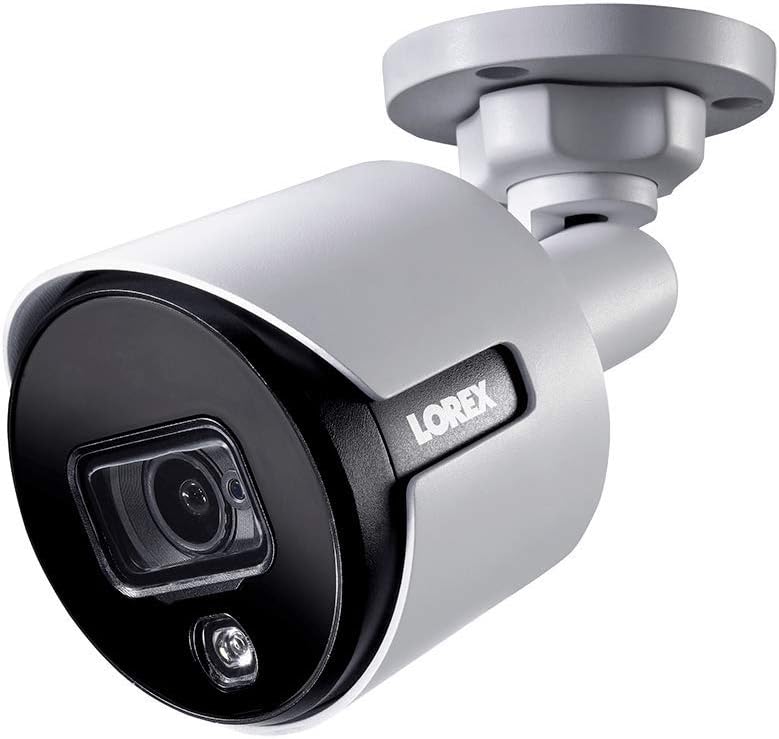
1.1-сурет: Алдыңғы бұрыш view of the Lorex 4K Weatherproof Security Camera. This image shows the camera's bullet form factor, lens, and integrated light.
2. Пакет мазмұны
The Lorex Analog 4K Weatherproof Indoor/Outdoor HD Wired Add-On Security Camera package includes:
- 1 x Lorex Analog 4K Weatherproof Indoor/Outdoor HD Wired Add-On Security Camera (Model: LBV8543XW)
- Монтаждау жинағы (бұрандалар мен қабырға тығындары)
- Allen Key (for adjustment)
Note: This is an add-on camera. Video cables, power adapters, and a compatible Lorex recorder are sold separately and are required for operation.
3. Негізгі мүмкіндіктер
- 4K Ultra HD ажыратымдылығы: Provides exceptional detail and clarity with an 8MP effective still resolution.
- Ауа райына төзімді дизайн (IP67): Durable metal housing ensures reliable performance in various weather conditions, suitable for both indoor and outdoor installation.
- Long Range Night Vision: See clearly up to 150 feet (45m) in ambient night conditions and up to 98 feet (30m) in total darkness. Features Color Night Vision for enhanced detail in low light.
- Motion-Activated Warning Light: Integrated LED light can be triggered by motion to deter intruders.
- Remote-Triggered Siren: Activate a loud siren directly from your Lorex recorder or connected app to scare away unwanted visitors.
- Wired Connectivity (BNC): Ensures a stable and secure connection to your Lorex DVR/NVR system.
- Кең жұмыс температурасы: Functions reliably in temperatures up to 60 degrees Celsius.
4. Орнату және орнату
Before installation, ensure you have a compatible Lorex recorder (DVR/NVR) and necessary video/power cables.
4.1 Орналасқан жерді таңдау
Select a location that provides the desired viewing angle and is within reach of your Lorex recorder and a power source. Consider areas prone to intrusion, such as entry points or vulnerable perimeters. The camera is suitable for ceiling mount and wall mount applications.

4.1-сурет: жағы view of the Lorex 4K Weatherproof Security Camera, showing its adjustable mounting base.
4.2 Камераны орнату
- Бұрғылау тесіктерін белгілеңіз: Use the mounting template (if provided) or the camera base to mark the positions for drilling.
- Бұрғылау саңылаулары: Drill pilot holes for the mounting screws. If mounting on drywall or masonry, insert the provided wall plugs.
- Қауіпсіз камера: Камераның негізін бұрғыланған тесіктермен туралап, берілген бұрандалармен бекітіңіз.
- Бұрышты реттеу: Loosen the adjustment screws on the camera body using the Allen key to position the camera for the optimal viewing angle. Tighten the screws once adjusted.
4.3 Камераны қосу
- Бейне кабельді қосу: Connect one end of the BNC video cable (not included) to the camera's BNC port and the other end to an available video input channel on your Lorex recorder.
- Қуатты қосу: Connect the camera's power input to a compatible power adapter (not included). Ensure the power adapter is connected to a power outlet.
- Power On Recorder: Ensure your Lorex recorder is powered on and properly configured.
5. Пайдалану нұсқаулары
Once the camera is physically installed and connected to your Lorex recorder, you can begin operation.
5.1 ViewLive Feed қосу
Access your Lorex recorder's interface (via monitor, Lorex Home app, or client software) to view the live video feed from the camera. Ensure the correct channel is selected.

5.1-сурет: Жақыннан view of the Lorex 4K Weatherproof Security Camera's lens and integrated light.
5.2 Motion Detection and Smart Deterrence
Your Lorex recorder manages motion detection settings. Refer to your recorder's manual for detailed instructions on configuring motion zones and sensitivity.
- Motion-Activated Light: The camera's integrated light can be set to activate automatically upon motion detection. This setting is typically configured within your Lorex recorder's deterrence or alarm settings.
- Remote-Triggered Siren: You can manually activate the camera's siren through your Lorex recorder's interface or the Lorex Home app. This feature is useful for immediate deterrence.

Figure 5.2: The Lorex 4K Weatherproof Security Camera mounted on a brick wall at night, demonstrating its motion-activated light feature.
5.3 Түнгі көру
The camera automatically switches to night vision mode in low-light conditions. The infrared (IR) LEDs provide illumination for clear black and white video. Color Night Vision (CNV) may be available if there is sufficient ambient light, providing full-color video in low-light scenarios.
6. Техникалық қызмет көрсету
Regular maintenance ensures optimal performance and longevity of your security camera.
- Тазалау: Камера объективін және корпусын жұмсақ, damp cloth. Avoid abrasive cleaners or solvents that could damage the finish or lens.
- Қосылымдарды тексеру: Ensure all cable connections (BNC and power) are secure and free from corrosion, especially for outdoor installations.
- Микробағдарламаны жаңарту: Regularly check the Lorex website or your recorder's settings for available firmware updates for your camera and recorder to ensure the latest features and security enhancements.
- Қоршаған орта жағдайлары: While weatherproof, extreme conditions outside the specified operating temperature range (up to 60°C) may affect performance.
7. Ақаулықтарды жою
If you encounter issues with your Lorex camera, refer to the following common troubleshooting steps:
| Мәселе | Ықтимал себебі | Шешім |
|---|---|---|
| Камерадан бейне берілмейді | Бос кабель қосылымы Камераға қуат жоқ Incorrect channel selected on recorder | Check BNC and power connections. Ensure power adapter is working and connected. Verify the correct input channel on your Lorex recorder. |
| Poor image quality / blurry video | Лас линза Improper focus (if adjustable) Cable interference/damage | Камера объективін жұмсақ шүберекпен тазалаңыз. Камераның дұрыс фокусталғанына көз жеткізіңіз (қажет болса). Check video cable for damage or interference. Use high-quality cables. |
| Түнгі көру жұмыс істемейді | IR LEDs obstructed Қуат жеткіліксіз Камера параметрлері | Ensure nothing is blocking the IR LEDs. Verify stable power supply. Check night vision settings on your Lorex recorder. |
| Қозғалысты анықтау іске қосылмайды | Incorrect motion zone setup Сезімталдық тым төмен Кедергі view | Review and adjust motion detection zones on your recorder. Increase motion sensitivity. Clear any obstructions from the camera's field of view. |
For more advanced troubleshooting, consult your Lorex recorder's user manual or visit the Lorex support webсайт.
8. Техникалық сипаттамалар
| Ерекшелік | Техникалық сипаттама |
|---|---|
| Үлгі нөмірі | LBV8543XW |
| Бейне түсіру рұқсаты | 4K (8 МП тиімді ажыратымдылық) |
| Қосылу технологиясы | BNC (Wired) |
| Ішкі/сыртқы пайдалану | Ішкі, Сыртқы |
| Халықаралық қорғау рейтингі | IP67 (ауа райына төзімді) |
| Түнгі көру диапазоны | 150 фут (45 м) |
| Арнайы мүмкіндіктер | Motion Sensor, Night Vision, Motion Activated Lights, Remote-Triggered Siren |
| Форма факторы | Оқ |
| Материал | Металл |
| Operating Temperature (Upper) | 60 градус Цельсий |
| Өнім өлшемдері (L x W x H) | 16 x 6 x 6 дюйм |
| Элемент салмағы | 0.01 унция |
| UPC | 695529017136 |
| Бақылау әдісі | App, Remote (via compatible Lorex recorder) |
9. Кепілдік және қолдау
Lorex products are designed for reliability and performance. For information regarding your product's warranty, please refer to the warranty policy available on the official Lorex website or the documentation included with your Lorex recorder.
For technical support, product registration, or to download the latest software and firmware updates, please visit the official Lorex support page or the Lorex Store:
- Lorex Store: Visit the Lorex Store on Amazon
- Пайдаланушы нұсқаулығы (PDF): A comprehensive user guide in PDF format is also available for download: Пайдаланушы нұсқаулығын жүктеп алыңыз
When contacting support, please have your product model number (LBV8543XW) and serial number ready.