
Кіріспе
This manual provides instructions for the safe and efficient operation of your RIDGID R84086B 18-Volt Cordless Mini Bluetooth Radio. This compact and versatile device offers portable audio entertainment and device charging, featuring AM/FM radio, Bluetooth connectivity, and an auxiliary input. It is powered by RIDGID 18-Volt batteries and can also function as a power bank for charging other devices.
Қауіпсіздік туралы ақпарат
Осы өнімді пайдаланбас бұрын әрқашан барлық қауіпсіздік ескертулері мен нұсқауларын оқып, түсініңіз. Осы нұсқауларды орындамау электр тогының соғуына, өртке және/немесе ауыр жарақатқа әкелуі мүмкін.
- Do not expose the radio to rain or wet conditions. Water entering the radio will increase the risk of electric shock.
- Use only with specified battery packs. Using any other battery packs may create a risk of injury and fire.
- Do not operate the radio in explosive atmospheres, such as in the presence of flammable liquids, gases, or dust.
- Keep the radio away from heat sources, direct sunlight, and extreme temperatures.
- Always ensure the battery is properly seated before use.
Өнім аяқталдыview
Familiarize yourself with the components of your RIDGID R84086B radio.
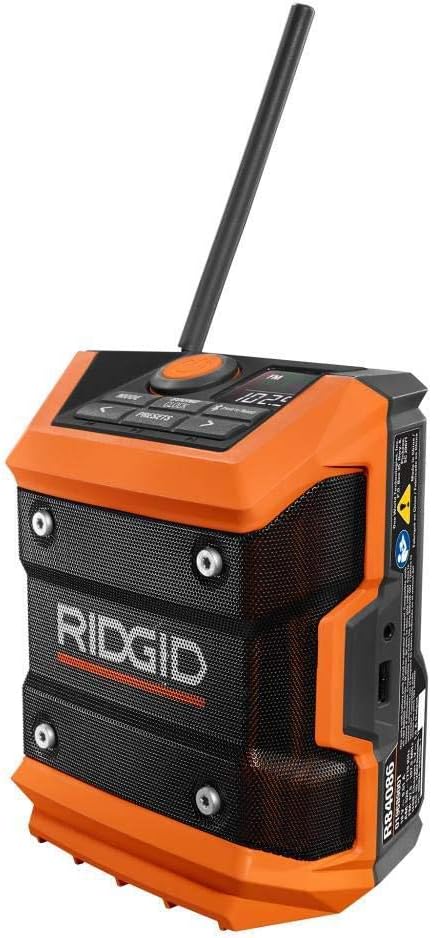
1-сурет: Алдыңғы view of the RIDGID R84086B radio, showing the control panel, speaker, and extended antenna.

Figure 2: The RIDGID R84086B radio in a workshop setting, demonstrating its portability and use with a smartphone.
Орнату
Батареяны орнату
- Радионың өшірілгеніне көз жеткізіңіз.
- Align a charged RIDGID 18-Volt battery pack with the battery port on the radio.
- Батарея жинағын орнына сенімді түрде сырт еткенше сырғытыңыз.
Антеннаны реттеу
For optimal radio reception, extend and adjust the antenna as needed. The antenna can be rotated and tilted to improve signal strength.
Пайдалану нұсқаулары
Қуатты қосу/өшіру
Press the orange power button located on the control panel to turn the radio on or off.
Режимді таңдау
түймесін басыңыз РЕЖИМ button to cycle through available audio sources: FM Radio, AM Radio, Bluetooth, and Auxiliary (AUX) input.
Radio Tuning (AM/FM)
- Select FM or AM mode using the РЕЖИМ түймесі.
- Сол жақты пайдаланыңыз (<) және оң (>) arrow buttons to manually tune to a desired frequency.
- To save a station as a preset, press and hold the ПРЕЗИДЕНТТЕР button, then use the arrow buttons to select a preset number and press ПРЕЗИДЕНТТЕР растау үшін қайтадан басыңыз.
Bluetooth жұптастыру
- пайдаланып Bluetooth режимін таңдаңыз РЕЖИМ button. The Bluetooth icon on the display will flash, indicating it is in pairing mode.
- Мобильді құрылғыда Bluetooth қосыңыз және қолжетімді құрылғыларды іздеңіз.
- Select "RIDGID Radio" from the list of devices to pair. Once paired, the Bluetooth icon will stop flashing and remain solid.
Көмекші кіріс
To use the auxiliary input, connect an audio device (e.g., smartphone, MP3 player) to the 3.5mm AUX port on the side of the radio using a standard audio cable. Select AUX mode using the РЕЖИМ түймесі.
Дыбысты реттеу
түймесін басыңыз SOUND/CLOCK button to access sound settings. Use the arrow buttons to adjust bass and treble levels for your preferred audio experience.
Power Bank функциясы
The radio features a USB port that allows you to charge compatible devices. Connect your device to the USB port using an appropriate charging cable. The radio's battery will provide power to charge your device.
Video: Demonstration of the RIDGID R84086B radio's features, including battery installation, mode selection, radio tuning, auxiliary input, and power bank functionality.
Техникалық қызмет көрсету
Тазалау
Радионы үнемі жұмсақ, d шүберекпен тазалап тұрыңызamp cloth. Do not use harsh chemicals or abrasive cleaners. Ensure all ports are free of dust and debris.
Батареяға күтім жасау
Store battery packs in a cool, dry place away from direct sunlight. Do not store battery packs in a discharged condition. Always charge batteries fully before extended storage.
Ақаулықтарды жою
Қуат жоқ
- Батарея жинағының толық зарядталғанын және дұрыс салынғанын тексеріңіз.
- Check for any obstructions in the battery port.
Нашар радио қабылдау
- Extend and adjust the antenna for better signal.
- Move the radio to a different location to avoid interference.
Bluetooth қосылым мәселелері
- Ensure the radio is in Bluetooth pairing mode.
- Make sure your mobile device's Bluetooth is enabled and within range.
- Құрылғыны жұптан ажыратып, қайта жұптап көріңіз.
Техникалық сипаттамалар
| Бренд | RIDGID |
| Үлгі нөмірі | R84086B |
| Қосылу технологиясы | Блютез |
| Қуат көзі | Battery Powered (RIDGID 18-Volt) |
| Элемент салмағы | 1.75 фунт |
| Үйлесімді құрылғылар | Смартфон |
| Аппараттық интерфейс | USB |
| UPC | 723548648427 |
Кепілдік және қолдау
Кепілдік туралы ақпарат
This product comes with a 90-day limited warranty. Please refer to the warranty card included with your purchase for full terms and conditions.
Тұтынушыларды қолдау
For technical assistance, troubleshooting, or warranty claims, please contact RIDGID customer support. Contact information can typically be found on the official RIDGID webсайтында немесе өнім қаптамасында.