
Кіріспе
The MUSKY DY28 is a versatile device combining a Bluetooth speaker, smart touch lamp, alarm clock, and MP3 player into a single unit. This manual provides instructions for its setup, operation, and maintenance to ensure optimal performance.
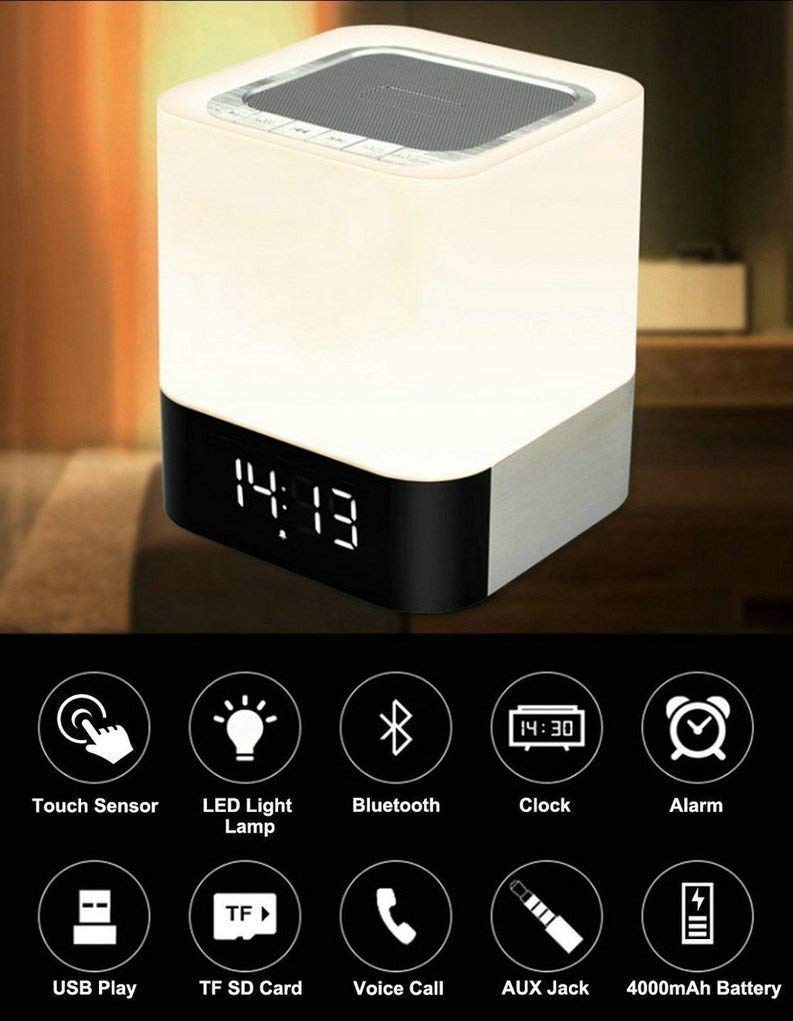
Image: The MUSKY DY28 device, showcasing its integrated clock display and touch-sensitive light panel.
Қораптың мазмұны
- MUSKY DY28 Bluetooth Speaker
- Пайдаланушы нұсқаулығы
- Зарядтау кабелі
Өнім ерекшеліктері
- Көп функционалды: Bluetooth speaker, smart touch lamp, alarm clock, and MP3 player.
- Bluetooth 4.0: Easy and stable connection with Bluetooth-enabled devices.
- Реттелетін жарықдиодты шам: Warm LED light with adjustable brightness (Max 20 Lumen) via touch sensor.
- Digital Clock & Alarm: Big digit 12/24H alarm clock with calendar, alarm, and sleep mode functions.
- Бірнеше ойнату режимдері: Supports MP3 playback via USB, micro TF/SD Card, and 3.5mm AUX input.
- Аудио сапасы: 5W single acoustic driver with enhanced passive low-frequency radiator for clear sound and solid bass.
- Батареяның ұзақ қызмет ету мерзімі: Built-in 4000mAh battery provides up to 15 hours of lighting or 9 hours of music playback (depending on usage).
- Handsfree қоңырау шалу: Integrated microphone for answering calls.
Орнату
1. Құрылғыны зарядтау
Before first use, fully charge the speaker. Connect the provided USB charging cable to the charging port on the device and to a standard USB power adapter (not included) or a computer's USB port. The charging indicator will show the charging status.
2. Қуатты қосу/өшіру
Locate the Power On/Off switch on the device. Slide the switch to the 'ON' position to power on the speaker. Slide it to 'OFF' to power off.
3. Bluetooth жұптастыру
- Ensure the speaker is powered on and in Bluetooth mode (indicated by a flashing blue light or voice prompt).
- Мобильді құрылғыда Bluetooth қосыңыз және қолжетімді құрылғыларды іздеңіз.
- Select 'MUSKY DY28' from the list of devices.
- Once paired, the speaker will indicate a successful connection (e.g., solid blue light or voice prompt).
4. Уақыт пен дабылды орнату
Refer to the detailed control diagram for button locations. Use the 'Mode' button to cycle through functions until the clock setting is displayed. Use the 'Previous' and 'Next' buttons to adjust hours and minutes, and the 'Play/Pause' button to confirm. For alarm settings, follow a similar procedure, activating the alarm function and setting the desired time.

Сурет: егжей-тегжейлі view of the MUSKY DY28's control panel, highlighting buttons for power, charging, audio inputs, playback, volume, and the touch sensor.
Пайдалану нұсқаулары
1. Музыканы ойнату
The DY28 supports multiple music sources:
- Bluetooth режимі: After successful pairing, play music from your connected device. Use the speaker's 'Play/Pause', 'Previous', and 'Next' buttons to control playback.
- USB кірісі: MP3 бар USB флэш-дискісін салыңыз fileUSB портына қосыңыз. Динамик автоматты түрде USB режиміне ауысып, ойнатуды бастайды.
- Micro TF/SD Card: Insert a micro TF/SD card with MP3 files into the Micro SD Slot. The speaker will automatically switch to TF/SD card mode and play music.
- AUX кірісі: Connect an external audio device using a 3.5mm AUX cable to the AUX port. The speaker will switch to AUX mode. Control playback from your external device.

Image: Visual guide demonstrating the three primary ways to play music on the DY28: via Bluetooth, Micro SD card, and USB drive.
2. Жарықпен жұмыс істеу
The top panel of the speaker features a touch sensor for controlling the LED light. Tap the touch sensor to turn the light on/off and cycle through different brightness levels. The light offers a warm glow suitable for various environments.

Image: The MUSKY DY28 speaker illuminated, serving as a night light with its digital clock display visible in a low-light environment.
3. Оятқыш функциялары
Once the alarm is set, it will sound at the designated time. To snooze, tap the touch sensor. To turn off the alarm, press the 'Mode' button or power off the device. The sleep mode feature allows the lamp and speaker to automatically turn off after a set period.
4. Қолсыз қоңырау шалу
When a call comes in while connected via Bluetooth, the speaker will ring. Press the 'Play/Pause' button to answer the call. Press it again to end the call. The integrated microphone allows for hands-free conversation.
Техникалық сипаттамалар
| Ерекшелік | Мәлімет |
|---|---|
| Бренд | МУШКИ |
| Үлгі нөмірі | DY28 |
| Қосылу технологиясы | Көмекші, Bluetooth, USB |
| Сымсыз технология түрі | Блютез |
| Монтаждау түрі | Үстелге орнату |
| Динамик түрі | Кітап сөресі |
| Өнім ерекшеліктері | Light for emergency use |
| Контроллер түрі | Сенсорлық тақта |
| Бақылау әдісі | түртіңіз |
| Түс | Ақ |
| Батарея сыйымдылығы | 4000 мАч (кіріктірілген) |
| Battery Life (Lighting) | 15 сағатқа дейін |
| Батареяның қызмет ету мерзімі (музыка ойнату) | 9 сағатқа дейін |
| Зарядтау уақыты | 2-4 сағат |
| Bluetooth диапазоны | 33 фут / 10 метр |
| Қуат көзі | Батареядан қуат алады |
| Аудио арналар саны | 5 ватт |
| Су өткізбейтін | ШЫН |
| Элемент салмағы | 700 грамм |
| Үйлесімді құрылғылар | MP3 ойнатқыш, смартфон, планшет |
Ақаулықтарды жою
- Қуат жоқ: Ensure the device is fully charged. Check the power switch is in the 'ON' position.
- Bluetooth жұптау мүмкін емес: Make sure the speaker is in Bluetooth pairing mode. Ensure your device's Bluetooth is enabled and within range (10 meters). Try restarting both devices.
- Дыбыс жоқ: Check the volume level on both the speaker and your connected device. Ensure the correct input mode (Bluetooth, USB, TF/SD, AUX) is selected.
- Жарық жұмыс істемейді: Tap the touch sensor on the top of the speaker. Ensure the device has sufficient battery charge.
- Дабыл естілмейді: Verify the alarm time is set correctly and the alarm function is activated.
Техникалық қызмет көрсету
- Құрылғыны жұмсақ, құрғақ шүберекпен тазалаңыз. Абразивті тазартқыштарды немесе еріткіштерді қолданбаңыз.
- Динамикті шектен тыс температураға, тікелей күн сәулесіне немесе жоғары ылғалдылыққа ұшыратпаңыз.
- Құрылғыны ұзақ уақыт пайдаланбаған кезде салқын, құрғақ жерде сақтаңыз.
- Құрылғыны өзіңіз бөлшектеуге немесе жөндеуге әрекеттенбеңіз, себебі бұл кепілдікті жояды.
Өнімнің ресми бейнесі
Video: Official product video demonstrating the key features and functions of the MUSKY DY28 Bluetooth Speaker, Smart Touch Lamp, and Alarm Clock.
Кепілдік және қолдау
Кепілдік туралы ақпаратты және тұтынушыларды қолдауды сатып алумен бірге берілген құжаттаманы қараңыз немесе өндірушіге тікелей хабарласыңыз. Кез келген кепілдік талаптары үшін сатып алуды растайтын құжатты сақтаңыз.