
1. Кіріспе
This manual provides detailed instructions for the installation, operation, and maintenance of your Everycom EC801B 80mm Thermal Printer. Please read this manual thoroughly before using the printer to ensure proper function and longevity of the device. The EC801B is a high-speed thermal receipt printer equipped with an auto-cutter and versatile connectivity options including USB and LAN.
2. Қауіпсіздік туралы ақпарат
- DO NOT DISASSEMBLE THE PRINTER PERSONALLY. For any service-related queries, please contact Everycom support.
- The printer should be installed on a flat and solid surface to avoid vibration or impact damage.
- Ensure the power supply matches the printer's requirements to prevent electrical damage.
- Keep the printer away from water, dust, and direct sunlight.
3. Пакет мазмұны
Төменде тізімделген заттардың барлығы сіздің пакетіңізге қосылғанын тексеріңіз:
- 1 x Everycom EC801B Thermal Receipt Printer
- 1 x қуат адаптері
- 1 x USB деректер кабелі
- 1 x Paper Roll (Sampле)
- 1 x Пайдаланушы нұсқаулығы
- 1 х драйвер CD

Image: Contents of the Everycom EC801B printer package, including the printer unit, power adapter, USB cable, sample paper roll, user manual, and driver CD.
4. Өнім аяқталдыview
Familiarize yourself with the various parts of your Everycom EC801B thermal printer.
4.1 Алдыңғы және жоғарғы жағы View

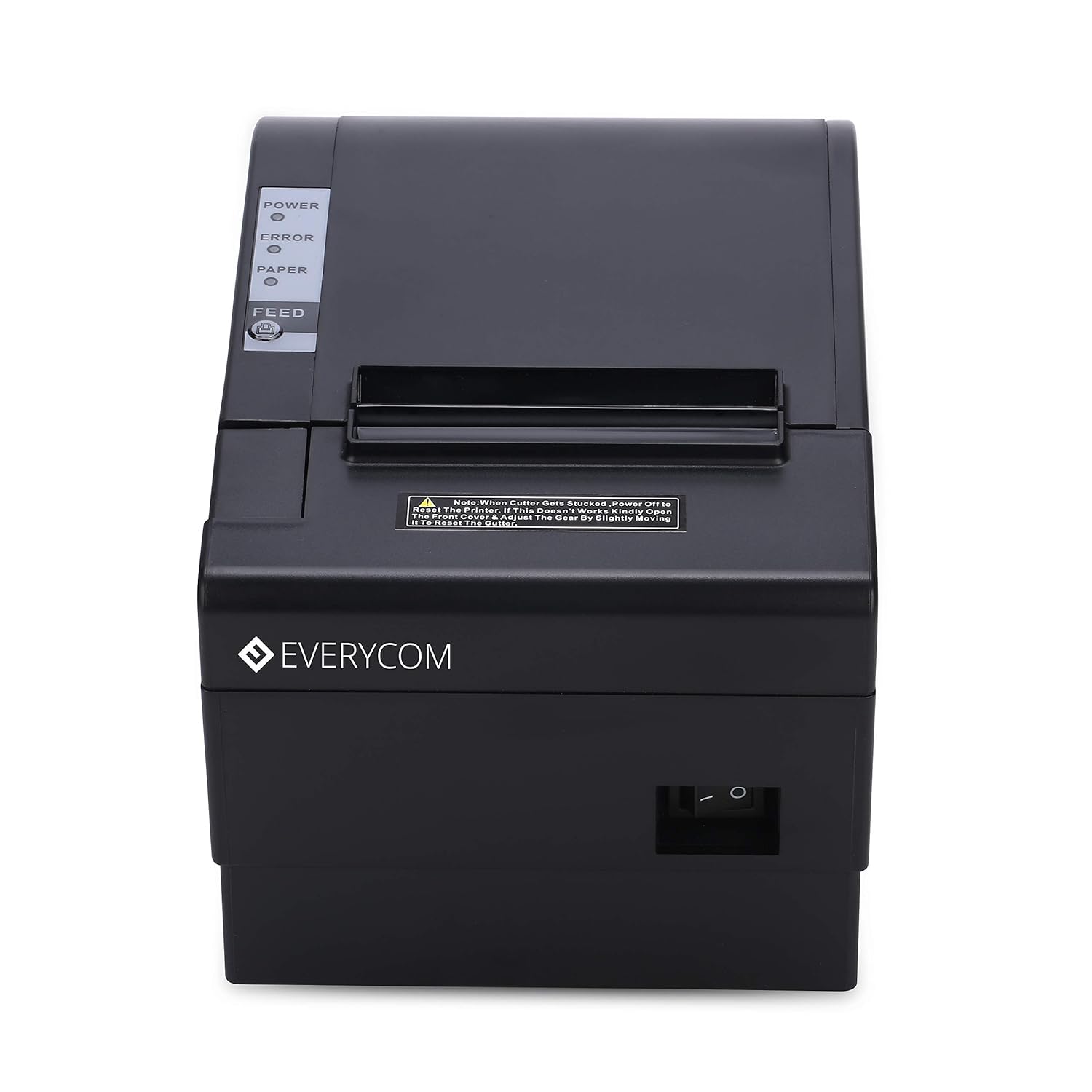
Сурет: алдыңғы view of the Everycom EC801B thermal printer, showing the paper output slot and control panel.

Сурет: жоғарғы view of the Everycom EC801B thermal printer, highlighting the control panel with POWER, ERROR, PAPER indicators, and the FEED button.
4.2 Басқару тақтасы
- POWER индикаторы: Принтер қосылғанда жанады.
- ҚАТЕ индикаторы: Flashes or illuminates to indicate an error (e.g., paper out, cover open).
- PAPER Indicator: Illuminates when paper is present, flashes when paper is low.
- FEED түймесі: Press to advance paper. Hold to print a self-test page.
4.3 Rear Panel (Connectivity Ports)

Сурет: артқы view of the Everycom EC801B thermal printer, showing the power port, cash drawer port, Ethernet (LAN) port, and USB port.
- POWER порты: Қуат адаптеріне қосылады.
- CASH Drawer Port: Connects to a compatible cash drawer.
- LAN (Ethernet) порты: Connects to a network for network printing.
- USB порты: Connects to a computer via USB cable.
5. Орнату
5.1 Физикалық орналастыру
Place the printer on a stable, flat surface. Ensure there is adequate space around the printer for ventilation and easy access to ports and paper loading.
5.2 Қосылатын кабельдер
- Қуат қосылымы: Connect the power adapter to the printer's POWER port and then plug the adapter into a power outlet.
- Data Connection (Choose one):
- USB: Принтердің USB портындағы USB деректер кабелін компьютердегі қол жетімді USB портына жалғаңыз.
- LAN: Ethernet кабелін принтердің LAN портынан желілік маршрутизаторға немесе қосқышқа жалғаңыз.
- Cash Drawer (Optional): If using a cash drawer, connect its cable to the printer's CASH Drawer port.
5.3 Қағаз жүктеу
- Open the printer cover by pushing the cover open lever (if present) or lifting the top cover.
- Insert the 80mm thermal paper roll into the compartment, ensuring the paper feeds from the bottom and the leading edge extends out of the printer.
- Close the printer cover firmly until it clicks into place. Ensure there is no slack in the paper.

Сурет: жоғарғы view of the Everycom EC801B printer with the cover open, revealing the paper roll compartment.
5.4 Драйверді орнату
For the printer to communicate with your computer, drivers must be installed.
- Insert the provided Driver CD into your computer's CD-ROM drive.
- Follow the on-screen instructions to install the printer drivers. If your computer does not have a CD drive, drivers can typically be downloaded from the Everycom official webсайт.
- After installation, configure the printer settings through your operating system's printer management tools.
6. Пайдалану нұсқаулары
6.1 Қуатты қосу/өшіру
To power on the printer, ensure the power adapter is connected and press the power switch located on the side or rear of the printer. The POWER indicator light will illuminate. To power off, press the power switch again.
Сурет: алдыңғы view of the Everycom EC801B printer, showing the location of the power switch on the side.
6.2 Printing a Self-Test Page
A self-test page can confirm basic printer functionality and print quality without requiring a computer connection.
- Ensure the printer is powered off and paper is loaded.
- түймесін басып тұрыңыз БЕРУ түймесі.
- ұстап тұрғанда БЕРУ button, turn on the printer.
- шығарыңыз БЕРУ button once the printer starts printing. A self-test page will print, showing printer information and a sampбасып шығару.

Image: Everycom EC801B printer actively printing a self-test receipt with a QR code and text.
6.3 Basic Printing Operation
Once drivers are installed and the printer is connected, you can print from any application that supports printing. Select the Everycom EC801B from your list of available printers and initiate the print command.
6.4 Auto Cutter Function
The EC801B features an automatic cutter that will cut the receipt paper after each print job, or as configured in your printer settings/software.
7. Техникалық қызмет көрсету
7.1 Принтерді тазалау
Тұрақты тазалау басып шығару сапасын сақтауға көмектеседі және принтердің қызмет ету мерзімін ұзартады.
- Басып шығару механизмі: Мақта тампонын жеңіл қолданыңыз dampened with isopropyl alcohol to gently wipe the thermal print head. Allow it to dry completely before use.
- Қағаз жолы: Use a soft, dry cloth to remove any paper dust or debris from the paper path.
- Сыртқы: Сыртқы бетін жұмсақ шүберекпен сүртіңіз, damp шүберек. Қатты химиялық заттарды немесе абразивті тазартқыштарды қолданбаңыз.
7.2 Қағаз орамын ауыстыру
When the PAPER indicator flashes or printing becomes faint, it's time to replace the paper roll. Follow the steps in Section 5.3 to load a new 80mm thermal paper roll.
8. Ақаулықтарды жою
Принтерге қатысты мәселелерге тап болсаңыз, келесі жалпы мәселелер мен шешімдерді қараңыз:
| Мәселе | Ықтимал себебі | Шешім |
|---|---|---|
| Принтер қосылмайды | No power, faulty adapter | Check power cable connection, ensure outlet is working, try another adapter if available. |
| No printing / Blank output | Paper loaded incorrectly, no paper, print head issue, driver issue | Reload paper correctly (thermal side facing print head), replace paper roll, clean print head, reinstall drivers. |
| ERROR indicator on/flashing | Paper out, cover open, print head overheat | Check paper, close cover firmly, allow printer to cool down. |
| Нашар басып шығару сапасы | Dirty print head, low quality paper, old paper roll | Clean print head, use high-quality thermal paper, replace old paper. |
| Принтерді компьютер танымайды | Driver not installed, incorrect cable, port issue | Install/reinstall drivers, check USB/LAN cable connection, try a different port. |
If the problem persists after attempting these solutions, please contact Everycom customer support.
9. Техникалық сипаттамалар
Key technical specifications for the Everycom EC801B Thermal Printer:
| Ерекшелік | Мәлімет |
|---|---|
| Үлгі | EC801B |
| Баспа технологиясы | Термиялық жолмен басып шығару |
| Басып шығару жылдамдығы | 220 мм/секунд |
| Қағаз ені | 80мм |
| Қосылу мүмкіндігі | USB, LAN (Ethernet) |
| Автоматты кескіш | Иә |
| Принтердің шығысы | Монохромды |
| Өлшемдері (LxWxH) | 18.6 x 14.5 x 13.3 см |
| Элемент салмағы | 1.2 кг |
| Өндіруші | Everycom Electronics (Made in India) |
10. Кепілдік және қолдау
The Everycom EC801B Thermal Printer comes with a 1 жылдық кепілдік сатып алған күннен бастап. Бұл кепілдік қалыпты пайдалану жағдайында өндірістік ақаулар мен ақауларды қамтиды.
For technical assistance, troubleshooting, or warranty claims, please contact Everycom Customer Support:
- Тегін нөмір: 1800 121 4480
- Customer Support Working Hours: Monday - Saturday, 10:00 AM - 6:30 PM (Except on Public Holidays)

Image: Everycom customer service contact details, including the toll-free number and working hours.