
Кіріспе
This user manual provides comprehensive instructions for the setup, operation, maintenance, and troubleshooting of your Alienware M15 Gaming Laptop. Please read this manual thoroughly to ensure optimal performance and longevity of your device. For additional support, refer to the official Alienware support resources.
Өнім аяқталдыview
Негізгі мүмкіндіктер
- 8th Generation Intel Core i7-8750H (6-Core, 9MB Cache, up to 4.1GHz w/ Turbo Boost)
- 15.6" FHD (1920 x 1080) 60Hz Anti-glare IPS, 300-nits 72% Color gamut, narrow-border Display
- 16GB, 2x8GB, DDR4, 2666MHz RAM
- 128GB PCIe M.2 SSD + 1TB (+8GB SSHD) Hybrid Drive
- Nvidia GeForce GTX 1060 with 6GB GDDR5 Graphics Card
- Windows 10 Home Operating System
Физикалық құрамдас бөліктер

1-сурет: Алдыңғы view of the Alienware M15 laptop, showcasing the display with the Alienware logo.

2-сурет: Жоғарыдан төмен view of the open Alienware M15 laptop, highlighting the keyboard layout and touchpad.

3-сурет: Сол жағы view of the Alienware M15 laptop, showing various ports such as USB 3.0.
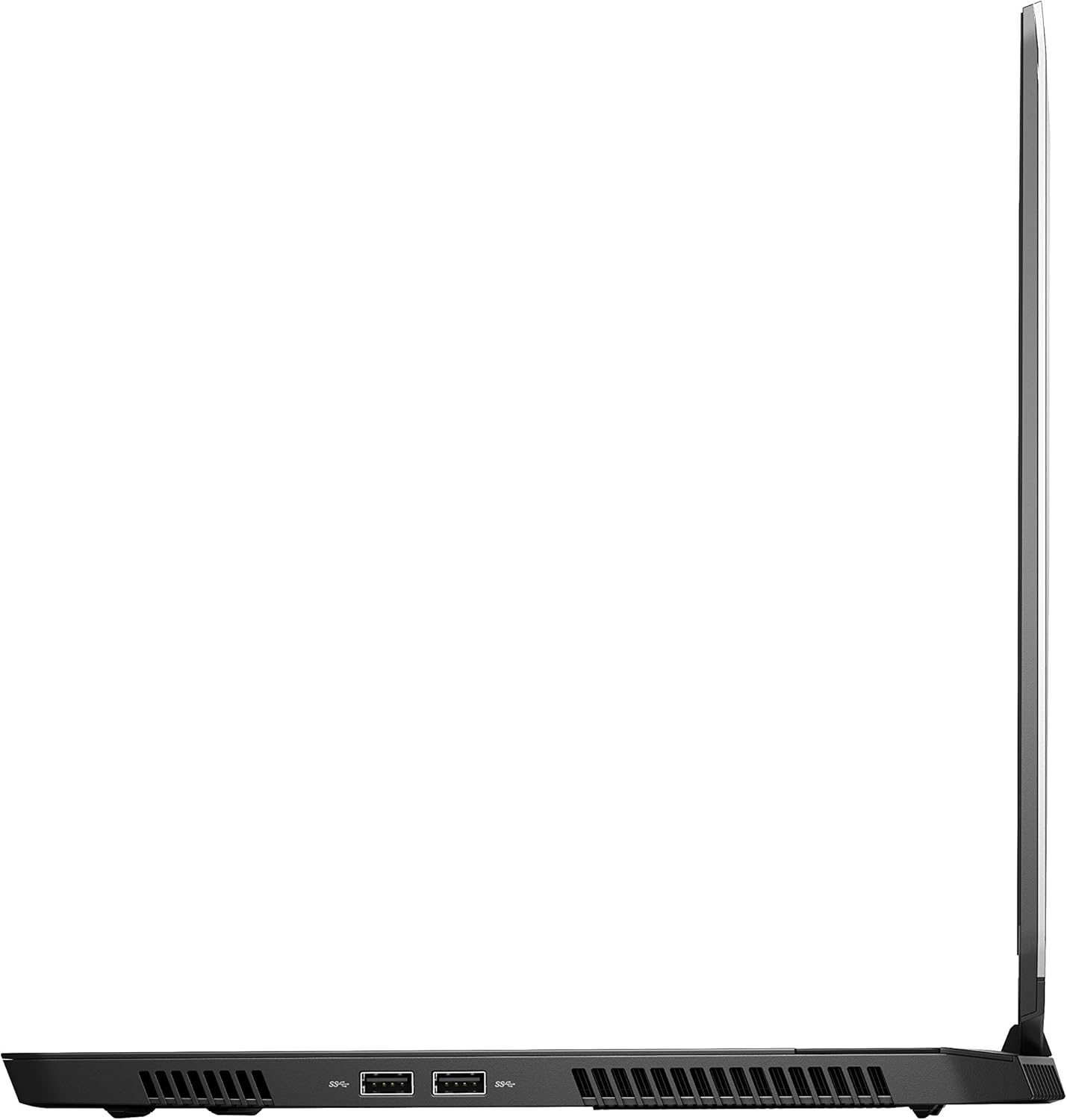
4-сурет: Оң жақ view of the Alienware M15 laptop, displaying additional ports and ventilation.

5-сурет: Жарылған view illustrating the internal cooling system of the Alienware M15 laptop, including fans and heat sinks.
Орнату
Қаптаманы ашу
Қаптамадан барлық компоненттерді мұқият алып тастаңыз. Мына элементтердің бар екеніне көз жеткізіңіз:
- Alienware M15 Gaming Laptop
- Қуат сымы
- 180 Вт қуат адаптері
Бастапқы қосу
- Қуат адаптерін ноутбуктің қуат кіріс портына қосыңыз.
- Қуат сымын қабырғадағы розеткаға қосыңыз.
- Open the laptop lid and press the power button, typically located on the top right of the keyboard deck or a dedicated button on the chassis.
- Windows 10 Home жүйесін орнату процесін аяқтау үшін экрандағы нұсқауларды орындаңыз, соның ішінде тіл таңдау, желі қосылымы және пайдаланушы тіркелгісін жасау.
Пайдалану нұсқаулары
Негізгі операция
Your Alienware M15 laptop runs on Windows 10 Home. Familiarize yourself with the operating system's interface. The keyboard features customizable backlighting via Alienware's software. The touchpad supports multi-touch gestures for navigation.
Ойын өнімділігі
The Alienware M15 is designed for high-performance gaming. For optimal gaming experience, ensure the laptop is connected to the power adapter. This allows the system to utilize its full power capabilities for the CPU and GPU. While gaming, the laptop may generate significant heat; this is normal for high-performance hardware. Consider using a cooling pad for extended gaming sessions to enhance thermal management.
Техникалық қызмет көрсету
Тазалау
- Экран: Аздап жұмсақ, түксіз матаны пайдаланыңыз dampсумен немесе экран тазалағышпен аяқталады. Қатты химиялық заттардан аулақ болыңыз.
- Пернетақта мен шасси: Use a soft brush or compressed air to remove dust from keys and vents. Wipe surfaces with a microfiber cloth.
- Порттар: Use compressed air to clear dust from USB, HDMI, and other ports.
Бағдарламалық құрал жаңартулары
Regularly update your Windows operating system, graphics drivers (NVIDIA GeForce), and Alienware software. Updates often include performance improvements, security patches, and bug fixes. Access Windows updates through Settings > Update & Security. Graphics drivers can be updated via the NVIDIA GeForce Experience application.
Батареяға күтім жасау
To maximize battery lifespan, avoid consistently discharging the battery completely. For prolonged use while plugged in, consider using battery management features (if available in Alienware Command Center) to limit charging to 80-90% capacity.
Ақаулықтарды жою
This section addresses common issues you might encounter with your Alienware M15 laptop.
| Мәселе | Ықтимал себеп/шешім |
|---|---|
| Laptop gets excessively hot during use. | High-performance components generate heat. Ensure ventilation vents are clear. Use a cooling pad. Update graphics drivers. |
| "No media present" error or SSD/HDD not detected. | This can sometimes be a temporary software glitch. Try restarting the laptop. If persistent, ensure the power cable is securely connected and try a hard reboot (unplug power, hold power button for 15 seconds, then reconnect and power on). If the issue persists, contact support. |
| Wi-Fi connection drops frequently. | Ensure Wi-Fi drivers are up to date. Check for interference from other devices. Restart your router and the laptop. If the issue persists, consider reinstalling Wi-Fi drivers or contacting support. |
| System performance is slow or lagging. | Ensure the laptop is plugged into power for full performance. Close unnecessary background applications. Check for malware. Ensure sufficient free space on the SSD/HDD. |
Техникалық сипаттамалар
Detailed technical specifications for the Alienware M15 Gaming Laptop (Model: AWM15-7830SLV-PUS).
| Ерекшелік | Мәлімет |
|---|---|
| Тұрақты экранның өлшемі | 15.6 дюйм |
| Экран ажыратымдылығы | 1920 x 1080 пиксель |
| Максималды экран ажыратымдылығы | 1920x1080 пиксель |
| Процессор | 4.1 GHz core_i7_8750h |
| Жедел Жадтау Құрылғысы | 16 ГБ DDR4 |
| Жад жылдамдығы | 2666 МГц |
| Қатты диск | 1000 GB 128GB PCIe M.2 SSD + 1TB (+8GB SSHD) Hybrid Drive |
| Графикалық сопроцессор | NVIDIA GeForce GTX 1060 |
| Чипсет бренді | NVIDIA |
| Карта сипаттамасы | Арналған |
| Графикалық картаның жедел жады өлшемі | 6 ГБ |
| Сымсыз түрі | 802.11a/b/g/n |
| USB 3.0 порттарының саны | 3 |
| Бренд | Alienware |
| Сериялар | AWm15-7830SLV-PUS |
| Элемент үлгі нөмірі | AWM15-7830SLV-PUS |
| Операциялық жүйе | Windows 10 Home |
| Элемент салмағы | 4.8 фунт |
| Өнім өлшемдері | 10.8 x 14.3 x 0.8 дюйм |
| Түс | Қара |
| Процессор бренді | Intel |
| Процессорлар саны | 6 |
| Компьютердің жады түрі | DDR4 SDRAM |
| Флэш жады өлшемі | 16 |
| Қатты диск интерфейсі | Қатты күй |
| Қатты дискінің айналу жылдамдығы | 5400 айналым/мин |
| Оптикалық дискінің түрі | Оптикалық диск жетегі жоқ |
| Тtage | 240 вольт |
| Батареялар | 1 литий металл батареясы қажет. (қоса берілген) |
| Бірінші қол жетімді күн | 5 жылдың 2019 қаңтары |
| Модель атауы | AWm15-7830SLV-PUS |
| Экран өлшемі | 15.6 дюйм |
| Қатты диск өлшемі | 1000 ГБ |
| CPU моделі | Core i7 8750H |
| Орнатылған жедел жад өлшемі | 16 ГБ |
| Арнайы мүмкіндік | Жарқылға қарсы жабын |
Кепілдік және қолдау
For detailed warranty information, please refer to the documentation included with your purchase or visit the official Alienware support website. For technical assistance, driver downloads, and further resources, please visit the Alienware support portal.
Ресми пайдаланушы нұсқаулығы (PDF) да жүктеп алуға болады: Пайдаланушы нұсқаулығын PDF жүктеп алыңыз