
1. Кіріспе
Thank you for choosing the DreamSky DS312 Small Digital Alarm Clock. This manual provides detailed instructions for setting up and operating your new alarm clock. Designed for clarity and ease of use, it features a large display, adjustable brightness, and convenient USB charging capabilities. Please read this manual thoroughly before use and retain it for future reference.
2. Пакет мазмұны
- DreamSky DS312 сандық оятқыш
- USB-C қуат адаптері
- Пайдаланушы нұсқаулығы
3. Өнім аяқталдыview
The DreamSky DS312 features a sleek design with a large LED display for easy readability. Key controls are located on the back panel for intuitive operation.

1-сурет: Алдыңғы view of the DreamSky DS312 Digital Alarm Clock showing the large green time display.
2-сурет: Артқы view of the alarm clock, highlighting the control buttons for time, alarm, volume, and dimmer settings, along with the USB power input and an additional USB charging port.
Басқару түймелері мен порттары:
- SOZE түймесі: Located on top, for temporary alarm pause.
- TIME SET Button: Уақытты орнату режиміне өту үшін басып тұрыңыз.
- ALARM SET түймесі: Дабыл орнату режиміне өту үшін басып тұрыңыз.
- ҚОСУ/ӨШІРУ түймесі: Toggles alarm function.
- +/- түймелері: Adjust time, alarm, volume, and brightness settings.
- 12/24HR Button: Switches between 12-hour and 24-hour time display.
- LOW VOLUME/HIGH VOLUME Slider: Adjusts alarm sound level.
- LOW DIMMER/HIGH DIMMER Slider: Дисплей жарықтығын реттейді.
- USB IN порты: Қуат адаптерін қосу үшін.
- USB OUT порты: Сыртқы құрылғыларды зарядтауға арналған.
- Батарея бөлімі: For 2 x AAA backup batteries (not included).
4. Орнату
4.1 Сағатты қосу
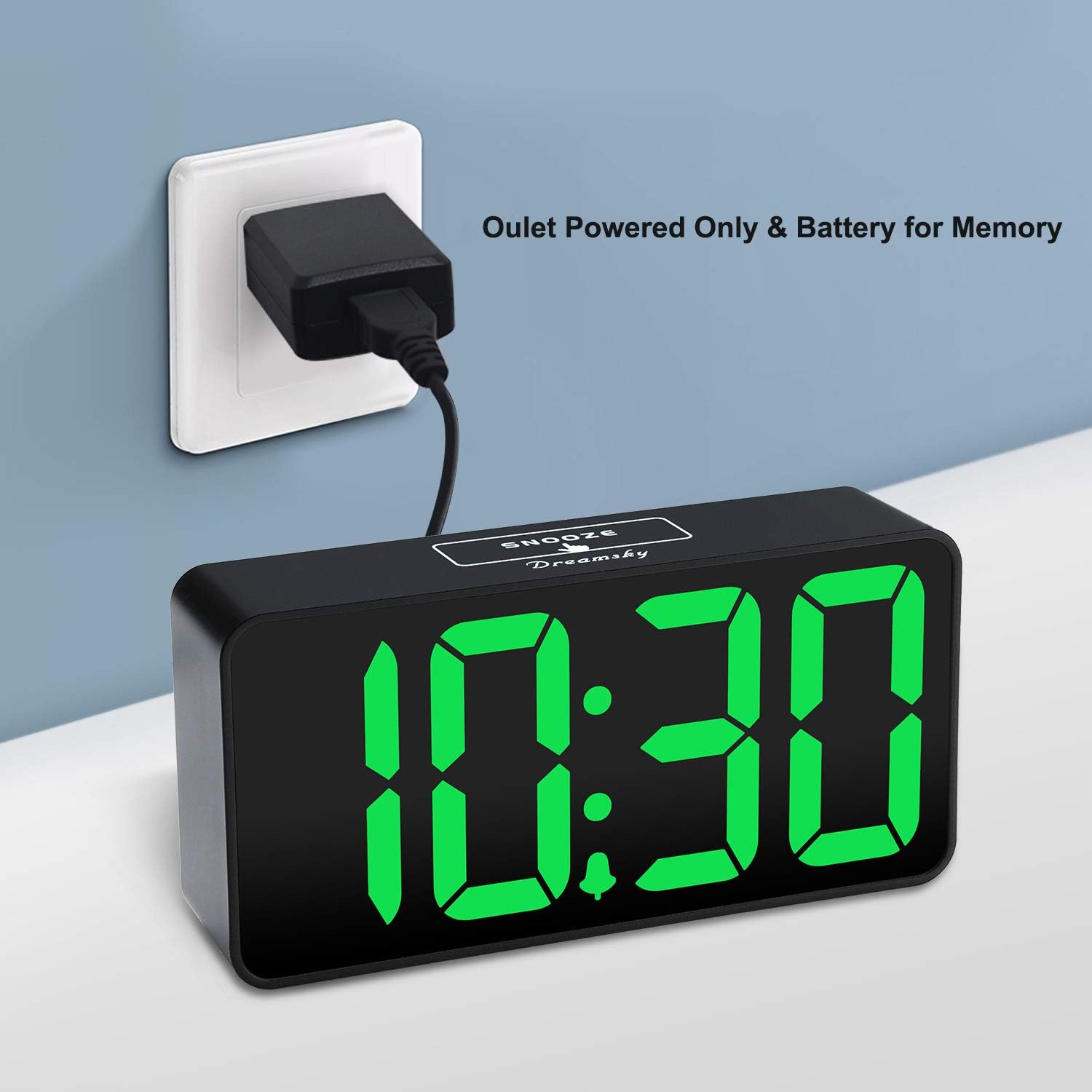
The DreamSky DS312 is primarily powered by the included USB-C adapter. Connect the USB-C cable to the USB IN port on the back of the clock and plug the adapter into a standard electrical outlet.

3-сурет: The alarm clock receiving power via its USB-C adapter plugged into a wall socket.
4.2 Батареяның сақтық көшірмесі (қосымша)
For memorizing time and alarm settings during a power outage, insert 2 x AAA batteries (not included) into the battery compartment on the back of the clock. Note that with battery power only, the screen will go blank and the alarm will not sound; batteries only retain settings until power is restored.
5. Пайдалану нұсқаулары
5.1 Уақытты орнату
- түймесін басып тұрыңыз УАҚЫТ ОРНАТЫЛДЫ button for 2 seconds until the hour digits flash.
- пайдаланыңыз + or - түймелері сағатты реттеуге арналған.
- түймесін басыңыз УАҚЫТ ОРНАТЫЛДЫ again to confirm the hour and move to minute setting.
- пайдаланыңыз + or - минуттарды реттеу үшін түймелер.
- түймесін басыңыз УАҚЫТ ОРНАТЫЛДЫ one more time to save the settings and exit.
5.2 Дабылды орнату
- түймесін басып тұрыңыз ДАБЫЛДЫ ОРНАТУ button for 2 seconds until the alarm hour digits flash.
- пайдаланыңыз + or - түймелері дабыл сағатын реттеуге арналған.
- түймесін басыңыз ДАБЫЛДЫ ОРНАТУ again to confirm the alarm hour and move to alarm minute setting.
- пайдаланыңыз + or - түймелері дабыл минуттарын реттеуге арналған.
- түймесін басыңыз ДАБЫЛДЫ ОРНАТУ one more time to save the alarm settings and exit.
5.3 Turning Alarm On/Off
түймесін басыңыз ҚОСУ/ӨШІРУ button to activate or deactivate the alarm. An alarm icon will appear on the display when the alarm is active.
5.4 Дисплей жарықтығын реттеу
пайдаланыңыз LOW DIMMER/HIGH DIMMER slider on the back of the clock to adjust the brightness of the LED display to your preference. This allows for optimal visibility during the day and minimal disturbance at night.

4-сурет: Illustration of the alarm clock's adjustable brightness dimmer, showing various display intensities from bright to completely off.
5.5 Adjusting Alarm Volume
пайдаланыңыз LOW VOLUME/HIGH VOLUME slider on the back of the clock to set the desired alarm sound level (30-90 dB). This ensures the alarm is neither too soft to wake you nor too loud to startle you.

5-сурет: The alarm clock displaying time with a graphic indicating adjustable alarm volume levels.
5.6 Using Snooze
Дабыл естілгенде, үлкен түймесін басыңыз ҰЙЫҚТАУ button on the top of the clock to temporarily pause the alarm for 9 minutes. The alarm will sound again after the snooze period.
5.7 12/24 сағат пішімі
түймесін басыңыз 12/24 сағ button to switch between 12-hour (with AM/PM indicator) and 24-hour time display formats.
5.8 USB зарядтау порты
The clock includes a convenient USB OUT port on the back, allowing you to charge your smartphone or other small electronic devices directly from the clock, reducing the need for additional wall adapters.

6-сурет: A smartphone connected to the alarm clock's USB charging port, illustrating its charging capability.
6. Ерекшеліктер
- Үлкен дисплей: 2-inch jumbo illuminated LED digits for easy visibility.
- Жарықтықты реттегіш: Adjustable display brightness to suit day or night viewпреференцияларды енгізу.
- Реттелетін дабыл дыбысы: Alarm volume can be set from 30-90 dB.
- Кейінге қалдыру функциясы: 9-minute snooze duration.
- USB зарядтау порты: Смартфоныңызды немесе басқа құрылғыларыңызды ыңғайлы түрде зарядтаңыз.
- Оңай жұмыс: Intuitive buttons for straightforward time and alarm setting.
- Батареяның сақтық көшірмесі: Retains time and alarm settings during power outages (requires 2 x AAA batteries, not included).
7. Ақаулықтарды жою
Q: Can this digital clock run on batteries alone?
A: No. Battery function only works to store the clock time and settings in the case of a main power outage. The adapter is required as the main power source for this alarm clock.
Q: How do you turn off the alarm once it wakes you up?
A: When the alarm goes off, you can press any button at the back of the clock to turn off the alarm.
Q: How long does the alarm stay on?
A: The alarm will last for 2 minutes then shut off automatically if not manually turned off or snoozed.
8. Техникалық сипаттамалар
| Атрибут | Мәлімет |
|---|---|
| Бренд | DreamSky |
| Үлгі нөмірі | DS312 |
| Дисплей түрі | Сандық жарықдиодты |
| Өнім өлшемдері | 5.3"Е x 2.6"H |
| Қуат көзі | Corded Electric (USB-C Adapter) |
| Батареяның сақтық көшірмесі | 2 x AAA батареялары (жинаққа кірмейді) |
| Материал | Пластмасса |
| Арнайы мүмкіндіктер | Large display, brightness dimmer, adjustable alarm volume, USB charging port |
9. Кепілдік және қолдау
9.1 Кепілдік туралы ақпарат
This DreamSky DS312 Digital Alarm Clock comes with a Limited Warranty. Please refer to the product packaging or contact customer support for specific warranty terms and conditions.
9.2 Тұтынушыларды қолдау қызметі
For any questions, technical assistance, or warranty inquiries, please contact DreamSky Customer Support at: info@dreamsky4u.com