
1. Кіріспе
Welcome to the user manual for your AAXA LED Pico Micro Video Projector. This compact and versatile projector is designed for personal media sharing, business presentations, and home cinema experiences. This manual provides detailed instructions on setting up, operating, maintaining, and troubleshooting your device to ensure optimal performance.
Пакет мазмұны
Пакетте барлық элементтердің бар екенін тексеріңіз:
- AAXA LED Pico микро бейне проекторы
- USB кабелі
- АВ кабелі
- Mini Tripod (optional, may vary by package)
- Power Adapter (not explicitly listed but implied for charging)
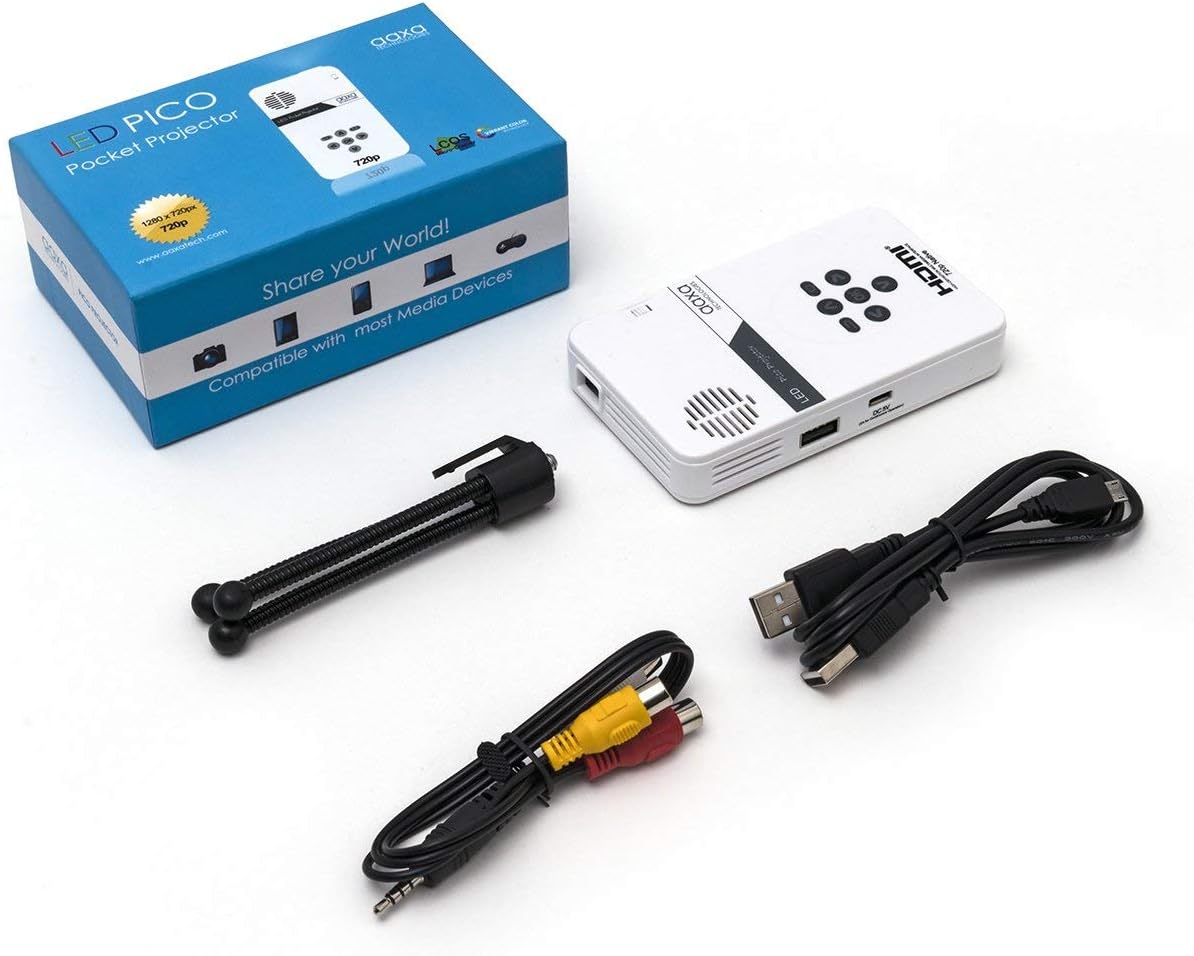
Figure 1: Package contents including the projector, cables, and tripod.
2. Өнім аяқталдыview
The AAXA LED Pico Micro Video Projector is a compact device featuring a user-friendly interface and multiple connectivity options. It is designed for portability and ease of use.
Негізгі ерекшеліктері:
- Ultra Bright 25 Lumens LED light source with 15,000-hour lifespan.
- High Definition 720p (1280x720) native resolution, supporting up to 1080p input.
- Vibrant Color Technology for rich and accurate colors.
- Built-in 80-minute rechargeable Lithium-ion battery.
- Integrated media player and speakers.
- Compact and lightweight design (4.25 x 2.36 x 0.7 inches, 6.3 ounces).
Басқару элементтері мен порттар:
Familiarize yourself with the various controls and connection ports on your projector:

2-сурет: Жоғарғы view of the projector with navigation buttons (Up, Down, Left, Right, OK, Menu, Back) and speaker grille.
- Навигация түймелері: Мәзірлерді шарлау және опцияларды таңдау үшін пайдаланылады.
- Динамик торы: For audio output from the built-in speakers.
- Фокус дөңгелегі: Located on the side, used to adjust image clarity.

3-сурет: Алдыңғы view of the projector showing the HDMI, AV, and 3.5mm audio out ports.
- HDMI кірісі: Ноутбуктарға, ойын консольдеріне немесе басқа HDMI қосылған құрылғыларға қосыңыз.
- AV кірісі: For connecting older devices using the included AV cable.
- 3.5 мм аудио шығысы: Сыртқы құлақаспаптарды немесе динамиктерді қосыңыз.

4-сурет: жағы view of the projector showing the USB port and DC 5V charging port.
- USB порты: Медиа ойнату үшін USB дискілерін қосуға арналған.
- Тұрақты ток 5 В кірісі: Power input for charging the internal battery.

5-сурет: жағы view of the projector showing the TF Card slot.
- Micro SD (TF Card) Slot: Insert a Micro SD card (up to 16GB) for media playback.
3. Орнату
3.1 Қуатты қосу/өшіру және зарядтау
- Зарядтау: Connect the supplied micro USB cable to the DC 5V input on the projector and a compatible USB power source. The LED indicator will show charging status.
- Қуат қосулы: Press and hold the power button (usually located near the focus wheel or on the top panel) until the projector powers on.
- Қуат көзін өшіру: Press and hold the power button again until the projector shuts down.
3.2 Проекторды орналастыру
Place the projector on a stable, flat surface. For optimal image quality, project onto a smooth, light-colored wall or a dedicated projector screen. The distance from the surface will determine the image size.

Figure 6: The projector can be mounted on a tripod for stable positioning and angle adjustment.
3.3 Фокусты реттеу
To achieve a clear image, rotate the focus wheel located on the side of the projector until the projected image appears sharp and in focus.
4. Пайдалану нұсқаулары
4.1 Құрылғыларды қосу
- HDMI: Connect an HDMI cable from your source device (laptop, game console, etc.) to the HDMI input port on the projector. Select HDMI as the input source in the projector's menu.
- OF: Use the provided AV cable to connect to devices with composite video and audio outputs. Select AV as the input source.
- USB/микро SD: Insert a USB flash drive into the USB port or a Micro SD card into the TF Card slot. The projector's media player interface will typically appear, allowing you to browse and play files.
4.2 Медиа ойнату
The built-in media player supports various video, music, and picture formats. Use the navigation buttons on the projector to browse files and select content for playback.
4.3 Аудио шығысы
The projector has built-in speakers. For private listening or enhanced audio, connect headphones or external speakers to the 3.5mm Audio Out port.
5. Техникалық қызмет көрсету
- Тазалау: Use a soft, dry cloth to clean the exterior of the projector. For the lens, use a lens cleaning cloth and specialized lens cleaning solution. Do not use abrasive cleaners.
- Сақтау орны: Пайдаланылмаған кезде проекторды салқын, құрғақ жерде, тікелей күн сәулесінен және қатты температурадан алыс сақтаңыз.
- Батареяға күтім жасау: Батареяның қызмет ету мерзімін ұзарту үшін батареяны жиі толығымен зарядсыздандырмаңыз. Проекторды белсенді түрде пайдаланбасаңыз да, оны үнемі зарядтап отырыңыз.
6. Ақаулықтарды жою
| Мәселе | Ықтимал себебі | Шешім |
|---|---|---|
| Кескін проекцияланбады | Projector not powered on; incorrect input source; loose cable connection. | Ensure projector is on and charged. Select correct input source (HDMI, AV, USB/SD). Check all cable connections. |
| Сурет бұлыңғыр | Focus not adjusted; projector too close/far from surface. | Adjust the focus wheel until the image is clear. Adjust the distance of the projector from the projection surface. |
| Дыбыс жоқ | Volume too low; external audio device connected; audio format not supported. | Increase volume. Disconnect external audio devices if using internal speakers. Ensure audio format is supported. |
| Проектор күтпеген жерден өшеді | Батарея аз; қызып кету. | Charge the battery. Ensure proper ventilation and clear any obstructions from vents. |
7. Техникалық сипаттамалар
| Ерекшелік | Мәлімет |
|---|---|
| Бренд | AAXA Technologies |
| Үлгі нөмірі | KP-101-01-cr |
| Дисплей ажыратымдылығы | 1280 x 720 (Native), Max 1080p Input |
| Жарықтық | 25 люмен |
| Жарық көзі Өмір | 100 000 сағат (жарық диодты) |
| Қосылу технологиясы | HDMI, USB, Micro SD, 3.5mm Aux Out, Composite AV |
| Батареяның қызмет ету мерзімі | Up to 80 minutes (Lithium-Ion) |
| Өнім өлшемдері | 4.25 x 2.36 x 0.7 дюйм |
| Элемент салмағы | 6.3 унция |
| Ұсынылатын пайдаланулар | Бизнес, Білім, Үй кинотеатры |
8. Кепілдік және қолдау
This product is offered as an Amazon Renewed item, which means it has been professionally inspected and tested to work and look like new. Amazon Renewed products are eligible for replacement or refund under the Amazon Renewed Guarantee if you are not satisfied with your purchase.
For further assistance or technical support, please refer to the official AAXA Technologies webсайтына өтіңіз немесе тұтынушыларға тікелей хабарласыңыз.