
1. Кіріспе
Сатып алғаныңыз үшін рахметasing the Yenkee YKB 3200 Gaming Keyboard. This manual provides essential information for the proper setup, operation, and maintenance of your new keyboard. Please read this manual thoroughly before using the product to ensure optimal performance and longevity.
2. Қауіпсіздік туралы ақпарат
- Пернетақтаны сұйықтықтардан және шамадан тыс ылғалдан алыс ұстаңыз.
- Пернетақтаны шектен тыс температураға ұшыратпаңыз.
- Пернетақтаны құлатып алудан немесе қатты соққыларға ұшыраудан аулақ болыңыз.
- Do not attempt to disassemble or repair the keyboard yourself. Refer all servicing to qualified personnel.
- Тазалау үшін тек құрғақ, жұмсақ шүберекті пайдаланыңыз.
3. Пакет мазмұны
Қаптаманы ашқан кезде қаптаманың ішіндегісін тексеріңіз. Егер қандай да бір заттар жоқ немесе зақымдалған болса, сатушыңызға хабарласыңыз.
- Yenkee YKB 3200 Gaming Keyboard with integrated smartphone holder
- USB кабелі (қосылған)
4. Өнім аяқталдыview
The Yenkee YKB 3200 is a robust gaming keyboard designed for an enhanced gaming experience. It features a durable metal construction, responsive rubber dome keys, and dynamic rainbow backlighting.
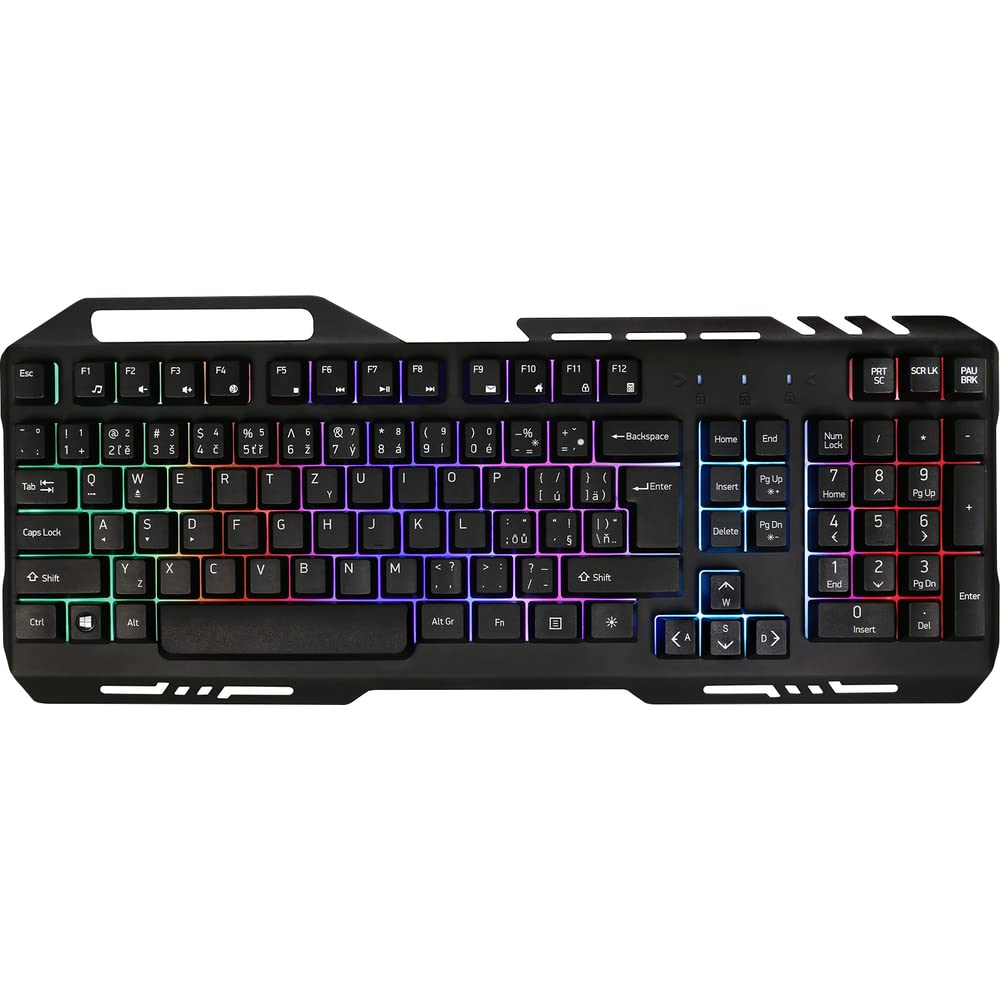
Image 1: Yenkee YKB 3200 Gaming Keyboard. This image displays the full keyboard with its metal frame and illuminated keys, highlighting the integrated smartphone holder at the top.
Негізгі ерекшеліктері:
- Metal Keyboard Design: Provides enhanced durability and a premium feel.
- Integrated Smartphone Holder: Conveniently located at the top of the keyboard for easy access to your mobile device.
- Durable Rubber Dome Keys: Offers a comfortable and responsive typing experience.
- Nine Rainbow Backlight Modes: Customizable lighting effects to suit your preference and gaming atmosphere.
- USB қосылымы: Simple plug-and-play connection to your computer.
- 1.5 м кабель ұзындығы: қамтамасыз етеді ampтүрлі орнатуларға қол жеткізе аласыз.
5. Орнату
- Пернетақтаны қаптамадан шығару: Пернетақтаны орамынан абайлап алыңыз.
- Компьютерге қосылу: Locate an available USB port on your computer (PC or laptop). Insert the USB connector of the keyboard into the USB port.
- Драйверді орнату: The keyboard is plug-and-play and typically does not require additional driver installation. Your operating system should automatically detect and install the necessary drivers.
- Орналастыру: Place the keyboard on a stable, flat surface. You can use the integrated smartphone holder to position your mobile device.
- Сынақ функционалдығы: Open a text editor or browser to test if the keys are responding correctly.
6. Пайдалану нұсқаулары
Артқы жарықты басқару:
The Yenkee YKB 3200 features nine distinct rainbow backlight modes. These modes can typically be cycled through using a dedicated function key combination.
- Режимдерді өзгерту: Look for a key labeled 'FN' (Function) and a key with a light bulb icon or 'Scroll Lock' / 'Pause Break'. Pressing FN + Light Bulb / Scroll Lock / Pause Break (depending on keyboard layout) will cycle through the available backlight modes.
- Жарықтықты реттеу: Some keyboards allow brightness adjustment using FN + Up/Down Arrow keys. Refer to your specific keyboard layout for exact key combinations.
- Артқы жарықты қосу/өшіру: A long press of the backlight control key or a specific FN combination might turn the backlight on or off.
Multimedia and Function Keys:
The keyboard may include additional function keys (F1-F12) that, when combined with the 'FN' key, provide multimedia control or quick access to applications. Common functions include:
- FN + F1-F12: Volume control, media playback, email, web browser, etc. (Specific functions vary by model).
7. Техникалық қызмет көрсету
Тазалау:
- Жалпы тазалау: Пернетақта бетін сүрту үшін жұмсақ, құрғақ, түксіз матаны пайдаланыңыз.
- Шаңды кетіру: Пернелер арасындағы шаң мен қоқысты кетіру үшін сығылған ауаны пайдаланыңыз.
- Қатты дақтар: Қатты дақтар үшін, аздап dampen the cloth with water or a mild, non-abrasive cleaning solution. Ensure no liquid enters the keyboard.
Сақтау орны:
Ұзақ уақыт бойы пайдаланбаған кезде, пернетақтаны салқын, құрғақ жерде, тікелей күн сәулесінен және төтенше температурадан алыс жерде сақтаңыз.
8. Ақаулықтарды жою
| Мәселе | Ықтимал себебі | Шешім |
|---|---|---|
| Пернетақта жауап бермейді | Бос USB қосылымы, ақаулы USB порты, драйвер мәселесі. | USB кабелінің сенімді жалғанғанына көз жеткізіңіз. Басқа USB портын қолданып көріңіз. Компьютеріңізді қайта іске қосыңыз. |
| Артқы жарық жұмыс істемейді | Backlight turned off, low brightness setting. | Press the backlight control key combination (e.g., FN + Scroll Lock) to cycle modes or adjust brightness. |
| Пернелер жабысқақ немесе жауап бермейді | Dirt or debris under keys. | Clean the keyboard using compressed air and a soft cloth. |
9. Техникалық сипаттамалар
| Ерекшелік | Техникалық сипаттама |
|---|---|
| Бренд | Yenkee |
| Үлгі нөмірі | YKB 3200 |
| Қосылу технологиясы | USB |
| Кабель ұзындығы | 1.5 метр |
| Пернетақта сипаттамасы | Ойын |
| Backlight Theme | Rainbow (9 modes) |
| Үйлесімді құрылғылар | Ноутбук, компьютер |
| Өнім өлшемдері | 45.2 x 20 x 3.5 см |
| Өнімнің салмағы | 841 г |
| Қосылған құрамдас бөліктер | USB cable (attached) |
10. Кепілдік және қолдау
Yenkee products are designed and manufactured to the highest quality standards. For information regarding warranty terms and conditions, please refer to the warranty card included with your purchase or visit the official Yenkee website. For technical support or service inquiries, please contact your local retailer or the Yenkee customer support team.