
SAM4s ER-925
SAM4s ER-925 Cash Register User Manual
Үлгі: ER-925
Кіріспе
This manual provides comprehensive instructions for the setup, operation, and maintenance of your SAM4s ER-925 Cash Register, including its integrated Metrologic Fusion Barcode Scanner. Please read this manual carefully to ensure proper use and to maximize the lifespan of your equipment.
Өнім аяқталдыview
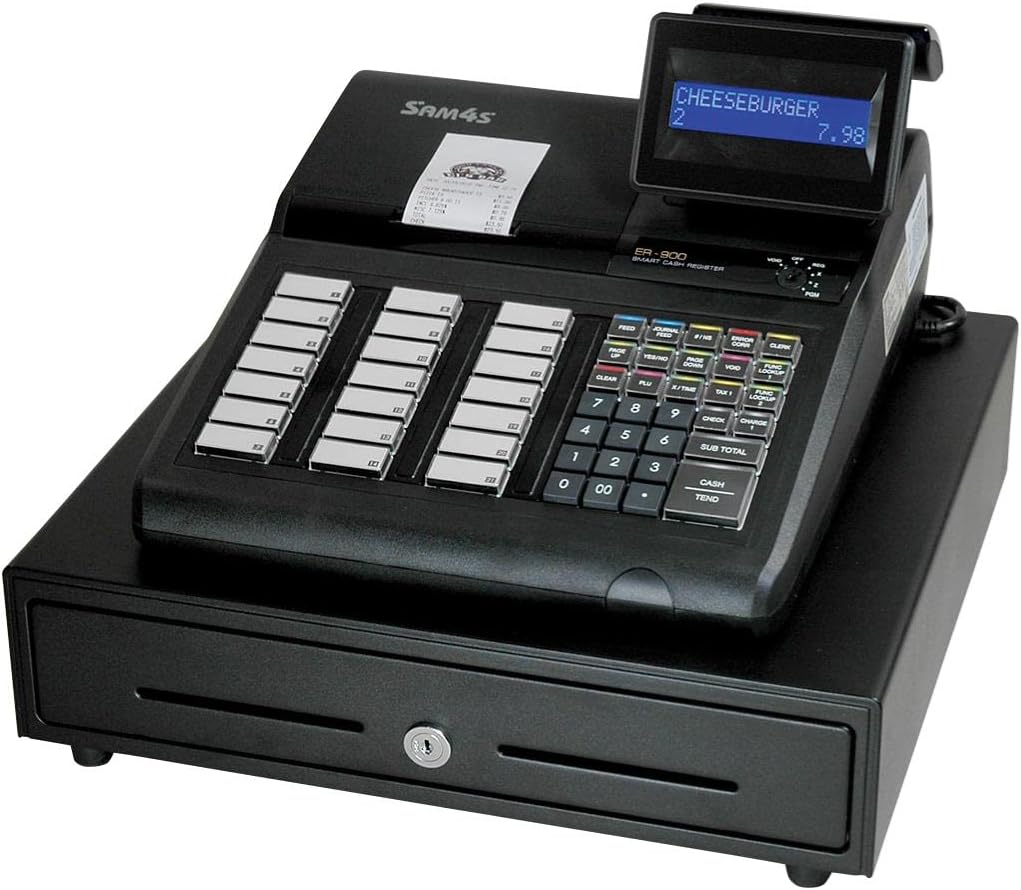
Figure 1: SAM4s ER-925 Cash Register with Metrologic Fusion Barcode Scanner. The image shows the main unit with a display showing "CHEESEBURGER 2 7.98", a receipt printer, a numeric keypad, function keys, and a cash drawer below.
The SAM4s ER-925 is a robust cash register designed for efficient transaction processing. It comes pre-configured with a Metrologic Fusion Barcode Scanner, enabling fast and accurate item entry. The system is designed for ease of use and reliability in various retail environments.
Орнату
Қаптаманы ашу және тексеру
Carefully remove all components from the packaging. Verify that all items are present and undamaged. The package should contain the ER-925 cash register unit, the Metrologic Fusion Barcode Scanner, power cord, and any included documentation.
Орналастыру
Place the cash register on a stable, flat surface. Ensure adequate ventilation around the unit. Avoid placing it in direct sunlight or near heat sources.
Қуат қосылымы
Connect the power cord to the cash register's power input, then plug it into a standard electrical outlet. It is recommended to use a surge protector.
Сканер қосылымы
The Metrologic Fusion Barcode Scanner is pre-configured for plug-and-play operation with the ER-925. Connect the scanner's USB cable to the designated USB port on the cash register. The scanner should be recognized automatically upon power-up.
Бастапқы конфигурация
The system comes with basic configuration. For specific item programming and keyboard layout adjustments, refer to the "Programming" section or contact customer support for assistance. SAM4s offers free telephone support for programming items and keyboard layouts, and configuration setup at no charge.
Пайдалану нұсқаулары
Қуатты қосу/өшіру
To power on, ensure the power cord is connected and press the power button. To power off, follow the proper shutdown procedure outlined in the register's internal menu to prevent data loss, then disconnect power.
Basic Transaction
- Элемент енгізу: Use the Metrologic Fusion Barcode Scanner to scan product barcodes. The item name and price will appear on the display. Adding items with this scanner is very fast and simple.
- Қолмен енгізу: For items without barcodes, use the numeric keypad to enter the item code or price, then press the appropriate department or PLU key.
- Quantity Entry: To enter multiple quantities of an item, input the quantity using the numeric keypad, then press the 'X' key (if available) followed by scanning the item or entering its code.
- Аралық жиынтық: түймесін басыңыз SUB TOTAL кілті view the current transaction total.
- Төлем: Enter the amount received from the customer using the numeric keypad, then press the ҚОЛДАМА or ТЕНД key. The change due will be displayed.
Қатені түзету
If an incorrect item is entered, use the VOID or ҚАТЕ ДҰРЫС key as per the register's specific programming. Consult the on-screen prompts or the programming guide for detailed steps.
End of Day Procedures
At the end of each business day, perform a Z-report to clear daily sales data and print a summary. Consult your programming guide for specific steps to generate reports.
Техникалық қызмет көрсету
Тазалау
Regularly clean the exterior of the cash register and scanner with a soft, damp cloth. Do not use abrasive cleaners or solvents. For the scanner's reading window, use a lint-free cloth and a mild glass cleaner if necessary.
Қағаз орамын ауыстыру
When the receipt paper runs low, replace it with a new thermal paper roll of the correct size. Refer to the diagram inside the printer cover for proper loading direction.
Деректердің сақтық көшірмесін жасау
Periodically back up your sales data and programming settings to an external device if your model supports it. This protects against data loss in case of power outages немесе жүйенің ақаулары.
Ақаулықтарды жою
| Мәселе | Ықтимал себебі | Шешім |
|---|---|---|
| Тіркеу құрылғысы қосылмайды. | Қуат сымы қосылмаған; розетка мәселесі. | Қуат сымының сенімді жалғанғанына көз жеткізіңіз. Розетканы басқа құрылғымен тексеріңіз. |
| Сканер штрих-кодтарды оқымайды. | Scanner cable loose; barcode damaged; scanner lens dirty. | Check scanner cable connection. Try scanning a different barcode. Clean the scanner lens. |
| Принтер басып шығармайды. | No paper; paper jammed; printer cover not closed. | Replace paper roll. Clear any paper jams. Ensure printer cover is securely closed. |
| Incorrect item prices. | Дұрыс емес бағдарламалау. | Verify item programming. Contact customer support for programming assistance. |
Техникалық сипаттамалар
- Үлгі: ER-925
- Бренд: SAM4s
- Элемент салмағы: 45 фунт
- Қуат көзі: Сымды электр
- Қосылу технологиясы: USB Cable (for scanner)
- Үйлесімді құрылғылар: Laptop, Desktop (for programming/data transfer, if applicable)
- UPC: 074927755572
- ASIN: B07GVRT467
Кепілдік және қолдау
The SAM4s ER-925 Cash Register comes with an unconditional guarantee to function properly. For any technical assistance, programming support, or warranty inquiries, please contact SAM4s customer service. Free telephone support is available for programming items and keyboard layouts, and configuration setup is provided at no charge.
For further assistance, please refer to the contact information provided with your purchase documentation or visit the official SAM4s webсайт.
Ask a question about this manual
Ask about setup, troubleshooting, compatibility, parts, safety, or missing instructions. Manuals+ will review the question and use this page’s manual context to help answer it.