
Кіріспе
Thank you for choosing the Butterfly Eco Smart Plus 25-Litre Air Cooler. This manual provides essential information for the safe and efficient operation, maintenance, and troubleshooting of your new appliance. Please read these instructions carefully before use and retain them for future reference.
Маңызды қауіпсіздік нұсқаулары
To reduce the risk of fire, electric shock, or injury, always follow basic safety precautions when using electrical appliances. This includes:
- Қуат көзі көлемін қамтамасыз етіңізtage matches the cooler's requirements (220-240 volts).
- Салқындатқышты, сымды немесе ашаны суға немесе басқа сұйықтықтарға батырмаңыз.
- Unplug the cooler from the outlet when not in use, before filling with water, or before cleaning.
- Сым немесе аша зақымданған немесе құрылғы дұрыс жұмыс істемей қалғаннан кейін немесе қандай да бір жолмен зақымдалған құрылғыны пайдаланбаңыз.
- Keep the cooler on a stable, level surface to prevent tipping.
- Do not block air inlets or outlets. Maintain adequate clearance around the cooler for proper airflow.
- Keep children and pets away from the cooler during operation.
- Do not use the cooler in areas where flammable liquids or gases are stored.
Өнім аяқталдыview
Familiarize yourself with the components of your Butterfly Eco Smart Plus Air Cooler.

1-сурет: Алдыңғы view of the Butterfly Eco Smart Plus 25-Litre Air Cooler. This image shows the main body, front louvers, digital display control panel at the top, and castor wheels at the base.
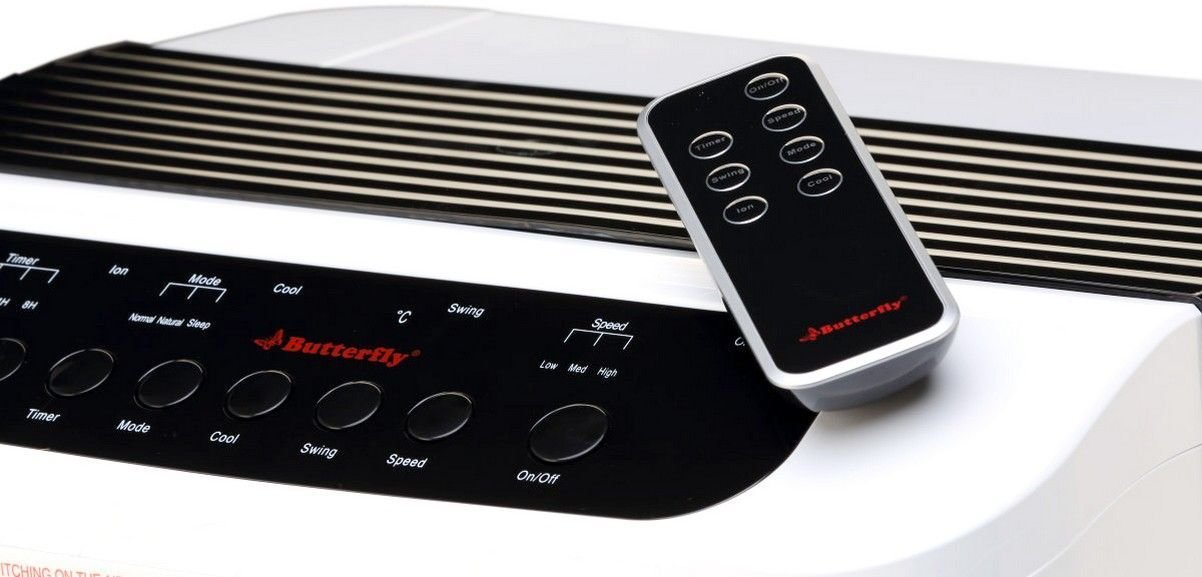
2-сурет: Бұрыштық view of the air cooler, highlighting the top control panel and the included remote control placed on top. The side profile with vertical vents is also visible.

3-сурет: Close-up of the remote control for the air cooler, showing buttons for On/Off, Speed, Mode, Timer, Swing, Ion, and Cool functions.

4-сурет: Артқы view of the air cooler with the back panel removed, revealing the honeycomb cooling media. This section is where air is drawn in and cooled by evaporating water.
Негізгі компоненттер:
- Digital Display Control Panel: Located on the top, for manual operation.
- Front Louvers: Adjustable for directing airflow. Features both horizontal and vertical louvers for wide air distribution.
- Су ыдысы: 25-litre capacity, located at the bottom for water storage.
- Бал ұясын салқындату құралы: Located at the rear, responsible for evaporative cooling.
- Кастор дөңгелектері: Құрылғының оңай қозғалуы үшін.
- Қашықтан басқару пульті: Қашықтан ыңғайлы жұмыс істеу үшін.
Орнату
- Қаптаманы ашу: Carefully remove the air cooler from its packaging. Retain all packaging materials for future storage or transport.
- Орналастыру: Place the air cooler on a firm, level surface. For optimal cooling, position the cooler near an open window or door to allow fresh air intake and proper ventilation. Ensure there is at least 20 cm of space around the unit for unobstructed airflow.
- Суды толтыру: Open the water inlet cap, typically located at the top or side. Fill the water tank with clean, fresh water up to the 'MAX' level indicator. Do not overfill. The cooler has a 25-litre capacity.
- Қуат қосылымы: Ensure the cooler is switched off before plugging it into a standard 220-240V AC power outlet.
Пайдалану нұсқаулары
Your air cooler can be operated using the control panel on the unit or the remote control.
Басқару тақтасы/қашықтан басқару функциялары:
- Қосу/өшіру түймесі: Press to turn the cooler on or off.
- Жылдамдық түймесі: Желдеткіштің 3 жылдамдығы бойынша айналады: Төмен, Орташа, Жоғары.
- Салқындату түймесі: Activates the water pump to circulate water over the honeycomb pads for evaporative cooling.
- Айналмалы түйме: Activates or deactivates the automatic oscillation of the vertical louvers to distribute air across a wider area. Horizontal louvers can be adjusted manually.
- Режим түймесі: Selects different operating modes (e.g., Normal, Natural, Sleep, if available).
- Таймер түймесі: Sets an operating duration after which the cooler will automatically turn off.
- Ион түймесі: Activates the ionizer function (if available) for air purification.
Бастапқы операция:
- Қуат сымын сәйкес электр розеткасына қосыңыз.
- түймесін басыңыз Қосу/Өшіру button on the control panel or remote. The unit will start in a default fan speed.
- түймесін басыңыз Жылдамдық button to select your desired fan speed (Low, Medium, High).
- For cooling, press the Керемет button. You will hear the water pump activate.
- түймесін басыңыз Әткеншек button to activate the automatic swing function for wider air distribution.
Техникалық қызмет көрсету
Тұрақты техникалық қызмет көрсету ауа салқындатқышыңыздың оңтайлы өнімділігі мен ұзақ қызмет ету мерзімін қамтамасыз етеді.
Daily/Weekly Maintenance:
- Су ыдысы: Regularly check the water level. For best performance and hygiene, drain and refill the water tank with fresh water every few days, especially if the cooler is used frequently.
- Сыртқы тазалау: Сыртқы беттерді жұмсақ шүберекпен сүртіңіз, damp мата. Абразивті тазартқыштарды немесе еріткіштерді қолданбаңыз.
Monthly/Seasonal Maintenance:
- Honeycomb Cooling Pads: The honeycomb pads can accumulate dust and mineral deposits. To clean, first unplug the cooler. Remove the back panel (refer to Figure 4 for location). Carefully slide out the honeycomb pads. Rinse them under running water to remove dust and deposits. For stubborn deposits, soak them in a mild descaling solution (e.g., vinegar and water) for 30 minutes, then rinse thoroughly. Ensure pads are completely dry before reinserting.
- Су сорғысы: Inspect the water pump and its tubing for any blockages or damage. Clean any debris that may have accumulated.
- Ағызу: Completely drain the water tank before long periods of non-use or storage.
Сақтау орны:
Before storing the cooler for an extended period, ensure the water tank is empty and clean, and the honeycomb pads are dry. Store the unit in a dry, cool place, preferably in its original packaging.
Ақаулықтарды жою
Ауа салқындатқышқа қатысты мәселелерге тап болсаңыз, келесі жалпы мәселелер мен шешімдерді қараңыз:
| Мәселе | Ықтимал себебі | Шешім |
|---|---|---|
| Салқындатқыш қосылмайды. | Қуат көзі жоқ; Қуат сымы қосылмаған; Қуат түймесі басылмады. | Check power outlet; Ensure cord is securely plugged in; Press the On/Off button. |
| No cool air / Only hot air. | Water tank empty; Cool function not activated; Honeycomb pads clogged; Water pump malfunction. | Fill water tank; Press the Cool button; Clean honeycomb pads; Check water pump for blockages or contact customer service if damaged. |
| Water is not pumping. | Water tank empty; Water pump or tubing blocked/damaged; Cool function not activated. | Ensure water tank is filled; Inspect pump and tubing for blockages; Press the Cool button. If pump is damaged, contact customer service. |
| Cool button blinking. | Low water level indicator. | Refill the water tank to the 'MAX' level. The blinking should stop once sufficient water is detected. |
| Жұмыс кезінде әдеттен тыс шу. | Low water level; Obstruction in fan or pump; Unit not on a level surface. | Check water level and refill if low; Inspect for foreign objects in fan or pump area (unplug first); Ensure cooler is on a stable, flat surface. |
| Қашықтан басқару пульті жұмыс істемейді. | Batteries depleted; Obstruction between remote and cooler; Remote not pointed correctly. | Replace batteries; Remove any obstructions; Point remote directly at the cooler's receiver. |
Осы шешімдерді қолданып көргеннен кейін мәселе жойылмаса, тұтынушыларды қолдау қызметіне хабарласыңыз.
Техникалық сипаттамалар
- Бренд: Көбелек
- Модель атауы: Eco Smart Plus
- Сыйымдылығы: 25 литр
- Қуат тұтынуы: 200 Вт
- Операциялық томtage: 220 - 240 вольт
- Жылдамдық саны: 3 (Төмен, Орта, Жоғары)
- Монтаждау түрі: Ерекше
- Арнайы мүмкіндіктер: Compact design, Remote Control, Horizontal and Vertical Louvers, Honeycomb Cooling Media, Digital Display Control Panel
- Түсі: Ақ
Кепілдік
This Butterfly Eco Smart Plus Air Cooler comes with a 1 жылдық кепілдік on the product from the date of purchase. Please retain your purchase receipt as proof of purchase for warranty claims. The warranty covers manufacturing defects under normal use. It does not cover damage caused by misuse, accidents, unauthorized repairs, or normal wear and tear.
Тұтынушыларды қолдау
For any queries, service requests, or technical assistance regarding your Butterfly Eco Smart Plus Air Cooler, please contact Butterfly customer support. Refer to the warranty card or the official Butterfly webең соңғы байланыс ақпаратына арналған сайт.
Ескерту: Always provide your product model number (Eco Smart Plus) and purchase details when contacting support.