
1. Кіріспе
This manual provides detailed instructions for the installation, operation, and maintenance of your Thomson SB260IBT 2.1 Channel Soundbar. Please read this manual thoroughly before using the product and retain it for future reference.
1.1 Қауіпсіздік туралы ақпарат
- Қуат көзі көлемін қамтамасыз етіңізtage өнім жапсырмасында көрсетілген талаптарға сәйкес келеді.
- Do not expose the soundbar or subwoofer to rain, moisture, or extreme temperatures.
- Құрылғыны жылу көздеріне жақын немесе тікелей күн сәулесі түсетін жерге қоймаңыз.
- Қызып кетудің алдын алу үшін құрылғының айналасында дұрыс желдетуді қамтамасыз етіңіз.
- c ашпаңызasing; барлық қызмет көрсетуді білікті мамандарға тапсырыңыз.
- Құрылғыны тек жұмсақ, құрғақ шүберекпен тазалаңыз.
2. Пакет мазмұны
Барлық элементтер пакетте бар екенін тексеріңіз:
- Thomson SB260IBT Soundbar
- Сабвуфер
- Қашықтан басқару құралы
- Қуат кабелі
- Audio Cables (e.g., Optical, AUX - may vary by region)
- Пайдаланушы нұсқаулығы
3. Өнім аяқталдыview
3.1 Soundbar және сабвуфер

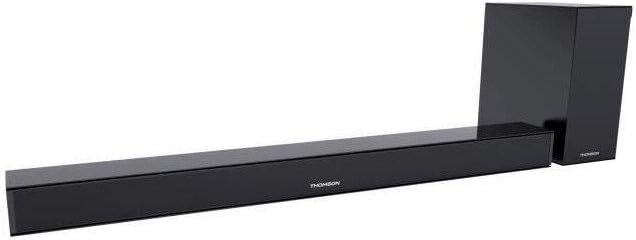
This image displays the Thomson SB260IBT soundbar unit alongside its accompanying subwoofer. The soundbar is a long, slender black unit, and the subwoofer is a compact black cube, both designed to complement modern home entertainment systems.
3.2 Басқару тақтасы және порттар
This image shows a close-up of the soundbar's side panel, revealing various control buttons and input/output ports. These include buttons for power, mode selection, volume control, and ports such as USB, SD card slot, and auxiliary input.
3.2.1 Алдыңғы панель
- Жарық диодты индикатор: Ағымдағы режимді немесе күйді көрсетеді.
- IR қабылдағыш: Қашықтан басқару пультінің сигналдары үшін.
3.2.2 Артқы панель
- Қуат кірісі: Connects to the AC power cable.
- ОПТИКАЛЫҚ кіріс: For digital audio connection from a TV or other device.
- AUX кірісі: For analog audio connection using a 3.5mm cable.
3.2.3 бүйірлік панель
- USB порты: Аудионы ойнату үшін fileUSB дискісінен.
- SD картасы ұясы: Аудионы ойнату үшін files SD картасынан.
- Басқару түймелері: Power, Mode, Volume Up/Down.
3.2.4 Қашықтан басқару құралы
The remote control provides full functionality for power, input selection, volume adjustment, and playback controls.
4. Орнату
4.1 Орналастыру
Place the soundbar on a stable, flat surface directly in front of your television. Position the subwoofer on the floor near the soundbar for optimal bass response. Ensure adequate ventilation around both units.
4.2 Қуат көзіне қосу
- Қуат кабелін саундбардың қуат кірісіне қосыңыз.
- Қуат кабелінің екінші ұшын қабырғадағы розеткаға қосыңыз.
- Connect the subwoofer to its power source (if separate).
4.3 Аудио қосылымдар
4.3.1 Оптикалық қосылым
For high-quality digital audio, connect an optical cable from your TV's optical output to the soundbar's OPTICAL input. Select 'Optical' mode on the soundbar.
4.3.2 AUX қосылымы
Use a 3.5mm audio cable to connect your device's audio output (e.g., smartphone, MP3 player) to the soundbar's AUX input. Select 'AUX' mode on the soundbar.
4.3.3 Bluetooth қосылымы
For wireless audio, select 'Bluetooth' mode on the soundbar. Refer to section 5.4 for detailed pairing instructions.
5. Пайдалану нұсқаулары
5.1 Қуатты қосу/өшіру
түймесін басыңыз Қуат құрылғыны қосу немесе өшіру үшін дыбыс тақтасындағы немесе қашықтан басқару пультіндегі түймені басыңыз.
5.2 Енгізуді таңдау
түймесін басыңыз Режим button on the soundbar or remote control to cycle through available input sources: Bluetooth, Optical, AUX, USB, SD Card. The LED indicator will show the selected mode.
5.3 Дыбыс деңгейін басқару
пайдаланыңыз Көлем + және Көлемі - buttons on the soundbar or remote control to adjust the master volume level.
5.4 Bluetooth жұптастыру
- Саундбарды қосып, түймесін басыңыз Режим button to select Bluetooth mode. The LED indicator will flash, indicating it is in pairing mode.
- Bluetooth қосылған құрылғыда (мысалы, смартфон, планшет) Bluetooth мүмкіндігін қосыңыз және қолжетімді құрылғыларды іздеңіз.
- Select "SB260IBT" from the list of found devices to pair.
- Once successfully paired, the soundbar's LED indicator will stop flashing and remain solid. You can now play audio from your device through the soundbar.
5.5 USB/SD картасын ойнату
Insert a USB drive or SD card (containing compatible audio files) into the corresponding port on the soundbar's side panel. The soundbar will automatically switch to USB/SD mode and begin playback. Use the remote control for playback functions such as Play/Pause, Next Track, and Previous Track.
6. Техникалық қызмет көрсету
6.1 Тазалау
Disconnect the soundbar from the power supply before cleaning. Use a soft, dry cloth to gently wipe the surfaces. Do not use liquid cleaners, abrasive materials, or chemical solvents, as these may damage the finish.
6.2 Сақтау
If storing the unit for an extended period, disconnect it from power and store it in a cool, dry place, away from direct sunlight and extreme temperatures. It is recommended to keep the original packaging for storage.
7. Ақаулықтарды жою
| Мәселе | Шешім |
|---|---|
| Қуат жоқ | Check if the power cable is securely connected to the soundbar and the wall outlet. Ensure the wall outlet is functional. |
| Дыбыс жоқ | Ensure the correct input source (e.g., Optical, AUX, Bluetooth) is selected. Check all audio cable connections. Increase the volume on both the soundbar and the connected device. |
| Bluetooth Disconnection or Failure to Pair | Ensure the device is within the Bluetooth operating range (approximately 10 meters). Turn off and on Bluetooth on your device, then try re-pairing. Ensure no other devices are actively connected to the soundbar. |
| Қашықтан басқару құралы жұмыс істемейді | Check the battery in the remote control and replace if necessary. Ensure there are no obstacles between the remote control and the soundbar's IR receiver. |
8. Техникалық сипаттамалар
- Модель атауы: SB260IBT
- Бренд: Томсон
- Арна конфигурациясы: 2.1 арна
- Максималды шығыс қуаты: 200 Вт
- Қосылу технологиясы: Bluetooth, Wired/Wireless
- Кіріс түрі: Multiple (Optical, AUX, USB, SD Card)
- Қуат көзі: Сымды электр
- Бақылау әдісі: Via App, Remote Control, On-unit Buttons
- Арнайы мүмкіндіктер: Блютез
- Ұсынылатын пайдаланулар: For Computers, Gaming Consoles, Music Players, Smartphones or Tablets, Televisions
- Өнім өлшемдері: 100 x 15 x 7 см (Soundbar)
- Өнім салмағы: Approximately 3 kg (Soundbar and Subwoofer combined)
- Бірліктер саны: 2 (Саундбар және сабвуфер)
- Суға төзімді: Жоқ
- Монтаждау түрі: Үстел үсті
9. Кепілдік және қолдау
9.1 Кепілдік туралы ақпарат
This product comes with a limited warranty. Please refer to the warranty card included in your package for specific terms and conditions, including the warranty period and coverage details. Retain your proof of purchase for warranty claims.
9.2 Тұтынушыларды қолдау қызметі
For technical assistance, troubleshooting, or service inquiries, please contact Thomson customer support. Contact details can typically be found on the manufacturer's official website or in your product documentation. Please have your model number (SB260IBT) and purchase information ready when contacting support.