
1. Кіріспе
Сатып алғаныңыз үшін рахметasing the Capello Play it All Bluetooth Wireless Home Stereo Speaker CI302. This device offers versatile audio playback options including Bluetooth wireless streaming, CD player functionality, and FM digital radio. This manual provides detailed instructions for setup, operation, maintenance, and troubleshooting to ensure optimal performance and longevity of your speaker system.
2. Қауіпсіздік туралы маңызды ақпарат
- Құрылғыны іске қоспас бұрын барлық нұсқауларды оқып шығыңыз.
- Бұл нұсқаулықты болашақта анықтама үшін сақтаңыз.
- Өрт немесе ток соғу қаупін болдырмау үшін құрылғыны жаңбырға немесе ылғалға ұшыратпаңыз.
- Тиісті желдетуді қамтамасыз етіңіз; ешқандай желдету саңылауларын жаппаңыз.
- Құрылғыны тұрақты, тегіс бетке қойыңыз.
- Өндіруші көрсеткен қосымшаларды/керек-жарақтарды ғана пайдаланыңыз.
- Найзағай кезінде немесе ұзақ уақыт пайдаланбаған кезде құрылғыны электр желісінен ажыратыңыз.
- Барлық қызмет көрсетуді білікті қызмет көрсету қызметкерлеріне тапсырыңыз.
3. Пакет мазмұны
Барлық элементтердің бар екенін тексеріңіз:
- Capello Play it All Bluetooth Wireless Home Stereo Speaker CI302
- Қашықтан басқару құралы
- Айнымалы ток адаптері
- Пайдаланушы нұсқаулығы (бұл құжат)
4. Өнім аяқталдыview
Familiarize yourself with the main components and controls of your Capello Play it All speaker.
Алдыңғы View

4.1-сурет: Алдыңғы view of the Capello Play it All speaker, showing the speaker grille, digital clock display, and subtle branding.
Жоғарғы панельдік басқару элементтері

4.2-сурет: Top panel of the Capello Play it All speaker, illustrating the CD compartment, 'capello' logo, and various control buttons including PRESET, MODE, PAIRING, PROGRAM/CLOCK SET, SKIP, PLAY/PAUSE, STOP, REPEAT, and VOLUME.
- PRESET +/-: Navigate through saved FM radio stations.
- БАҒЫТТАРЫ: Switch between Bluetooth, CD, FM Radio, and Line-In modes.
- ЖҰПТАУ: Bluetooth жұптастыру режимін іске қосыңыз.
- PROGRAM/CLOCK SET: Program CD tracks or set the clock.
- SKIP ◀◀ / ▶▶: Skip tracks on CD or adjust FM frequency.
- PLAY/PAUSE ▶▶: Play or pause CD playback.
- STOP ■: Stop CD playback.
- ҚАЙТАЛАУ: Repeat current track or all tracks on CD.
- VOL +/-: Дыбыс деңгейін реттеу.
- АШУ/ЖАБУ: Open or close the CD compartment.
- ҚАЛ: Құрылғыны қосыңыз/өшіріңіз.
Rear Panel (Typical)
The rear panel typically includes the AC power input, FM antenna connection, and Line-In jack.
5. Орнату
5.1 Қуат қосылымы
- Connect the AC power adapter to the DC IN jack on the rear of the speaker.
- Адаптердің екінші ұшын қабырғадағы стандартты розеткаға қосыңыз.
- The unit will enter standby mode, and the digital clock display will illuminate.
5.2 FM Antenna Setup
For optimal FM radio reception, extend the FM wire antenna fully and position it for the best signal. Avoid placing it near other electronic devices that may cause interference.
5.3 Сағатты орнату
- Күту режимінде түймесін басып тұрыңыз PROGRAM/CLOCK SET түймесі.
- The hour digits will begin to flash. Use the SKIP ◀◀ / ▶▶ түймелері сағатты реттеуге арналған.
- түймесін басыңыз PROGRAM/CLOCK SET again to confirm the hour.
- Минут сандары жыпылықтайды. SKIP ◀◀ / ▶▶ минуттарды реттеу үшін түймелер.
- түймесін басыңыз PROGRAM/CLOCK SET one last time to save the setting.
6. Пайдалану нұсқаулары
6.1 Қуатты қосу/өшіру және режимді таңдау
- түймесін басыңыз ҚАЛ button on the unit or the remote control to turn the speaker on or off.
- түймесін басыңыз РЕЖИМ button repeatedly to cycle through available modes: Bluetooth, CD, FM Radio, and Line-In.
6.2 Bluetooth сымсыз ағыны
- Динамикті қосып, Bluetooth режимін таңдаңыз РЕЖИМ button. The display will show 'BT' and flash, indicating it's in pairing mode.
- Bluetooth қосылған құрылғыңызда (смартфон, планшет, компьютер) Bluetooth функциясын қосып, қолжетімді құрылғыларды іздеңіз.
- Select 'Capello CI302' (or similar) from the list of devices.
- Once paired, the speaker will emit a confirmation tone, and 'BT' on the display will stop flashing.
- You can now play audio from your device through the speaker. Use your device or the speaker's controls for volume and track navigation.
6.3 CD ойнату
- түймесін басыңыз АШУ/ЖАБУ ықшам дискі бөлімін ашу үшін түймесін басыңыз.
- Carefully place an audio CD (CD, CD-R/-RW) with the label side facing up into the compartment.
- CD бөлімін жабыңыз. Құрылғы дискіні оқиды.
- If not already in CD mode, press the РЕЖИМ CD режимін таңдау үшін түймесін басыңыз.
- түймесін басыңыз ОЙНАТУ/ТОҚТАТУ ойнатуды бастау үшін
- Қолдану SKIP ◀◀ / ▶▶ to skip tracks, ТОҚТАУ ■ to stop, and ҚАЙТАЛАУ to cycle through repeat options.
6.4 FM Digital Radio
- түймесін басыңыз РЕЖИМ button to select FM radio mode. The current frequency will be displayed.
- Автоматты сканерлеу: түймесін басып тұрыңыз ОЙНАТУ/ТОҚТАТУ Қолжетімді FM станцияларын алдын ала орнатылған параметрлер ретінде автоматты түрде сканерлеу және сақтау үшін түймесін басыңыз.
- Қолмен баптау: түймесін басыңыз SKIP ◀◀ / ▶▶ briefly to fine-tune the frequency. Press and hold to scan for the next strong station.
- Алдын ала орнатуларға қол жеткізу: пайдаланыңыз АЛДЫНДАҒЫ +/- Сақталған станциялар арасында айналдыру үшін түймелер.
6.5 Line-In Operation
- Connect an audio cable (not included) from the headphone jack or line-out of an external audio device to the ЖЕЛІ КІРУ jack on the speaker.
- түймесін басыңыз РЕЖИМ button to select Line-In mode.
- Қосылған құрылғыңыздан аудио ойнатыңыз. Дыбыс деңгейін динамик немесе сыртқы құрылғы арқылы басқаруға болады.
6.6 USB арқылы зарядтау
The speaker features a USB port for charging compatible devices (e.g., smartphones, tablets). Connect your device's USB charging cable (not included) to the USB port on the speaker. The speaker does not need to be in a specific mode for USB charging to function.
6.7 Қашықтан басқару құралын пайдалану
The included remote control provides convenient access to all functions. Ensure the remote has working batteries and is pointed towards the front of the speaker.
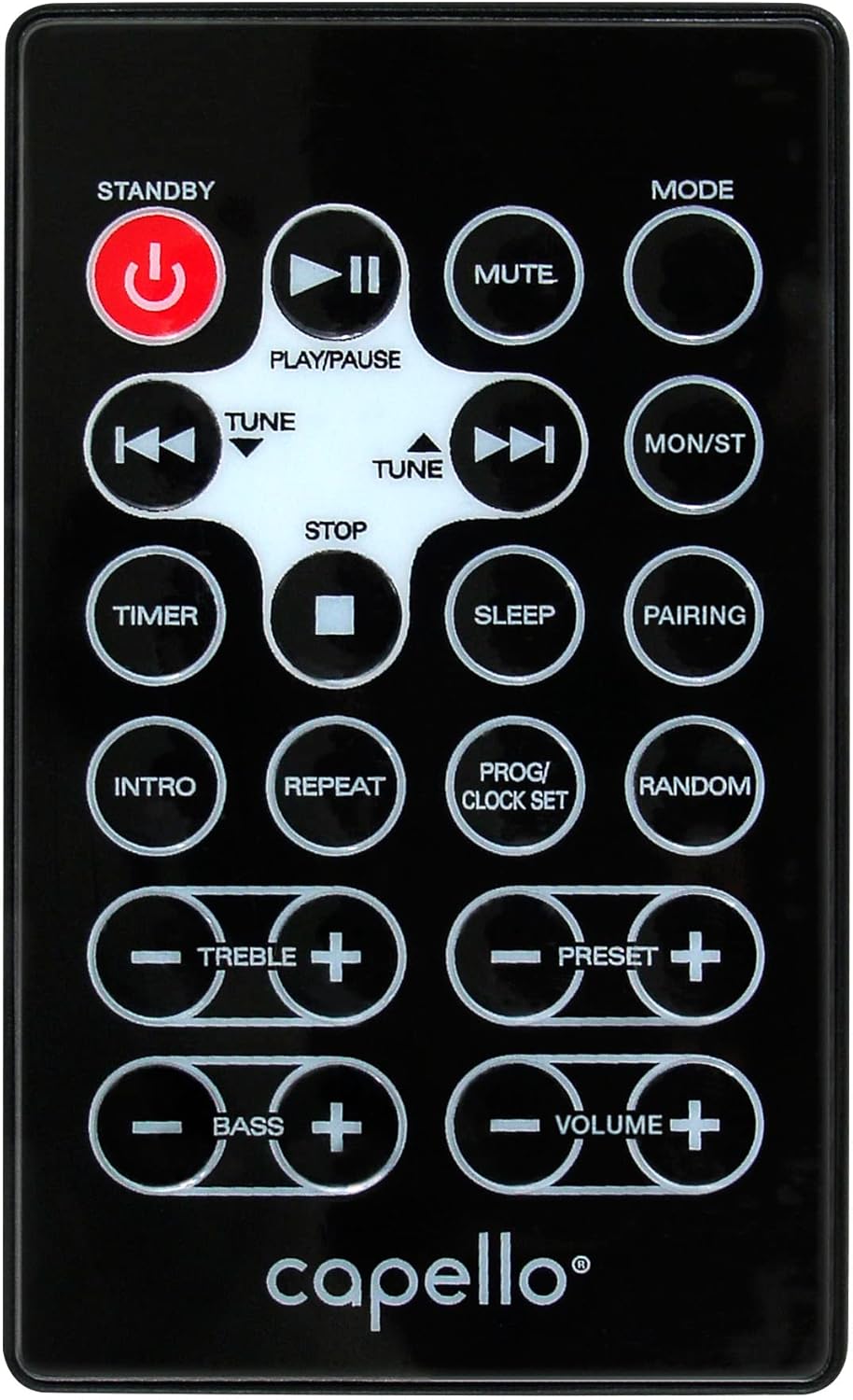
6.1-сурет: Layout of the remote control for the Capello Play it All speaker, showing buttons for Standby, Play/Pause, Mute, Mode, Skip/Tune, Stop, Timer, Sleep, Pairing, Intro, Repeat, Program/Clock Set, Random, Treble, Bass, and Volume controls.
- ҚАЛ: Қуатты қосу/өшіру.
- ОЙНАТУ/ТОҚТАТУ: Аудионы ойнату немесе кідірту.
- ӨШІРУ: Дыбысты өшіру немесе қосу.
- БАҒЫТТАРЫ: Cycle through input modes.
- SKIP/TUNE ◀◀ / ▶▶: Skip tracks or tune radio frequency.
- ТОҚТАТУ: Ойнатуды тоқтатыңыз.
- ТАЙМЕР: Ұйқы таймерін орнатыңыз.
- ҰЙҚЫ: Activate sleep function.
- ЖҰПТАУ: Bluetooth жұптауын бастаңыз.
- КІРІСПЕ: Play the first few seconds of each CD track.
- ҚАЙТАЛАУ: Repeat current track or all tracks.
- PROG/CLOCK SET: Program CD tracks or set clock.
- КЕЗДЕСУ: Play CD tracks in random order.
- ҮШТІ +/-: Adjust treble levels.
- BASS +/-: Adjust bass levels.
- VOLUME +/-: Жалпы дыбыс деңгейін реттеңіз.
7. Техникалық қызмет көрсету
7.1 Тазалау
- Тазалау алдында құрылғыны розеткадан ажыратыңыз.
- Сыртқы беттерді сүрту үшін жұмсақ, құрғақ шүберекті пайдаланыңыз.
- Абразивті тазартқыштарды, балауызды немесе еріткіштерді пайдаланбаңыз, себебі олар әрлеуді зақымдауы мүмкін.
- CD объективі үшін арнайы CD объективін тазалауға арналған дискіні пайдаланыңыз.
7.2 Сақтау
If storing the unit for an extended period, unplug it from the power source and store it in a cool, dry place away from direct sunlight and extreme temperatures.
8. Ақаулықтарды жою
| Мәселе | Ықтимал себебі | Шешім |
|---|---|---|
| Қуат жоқ | Қуат сымы қосылмаған; розетка белсенді емес. | Ensure power cord is securely plugged in; try a different outlet. |
| Дыбыс жоқ | Volume too low; incorrect mode selected; external device muted. | Increase volume; select correct input mode; check external device volume/mute. |
| CD өткізіп жібереді немесе ойнатылмайды | Dirty or scratched CD; CD inserted incorrectly; dirty CD lens. | Clean or replace CD; insert CD label-side up; use a CD lens cleaner. |
| Bluetooth жұптау сәтсіз аяқталды | Device too far; Bluetooth not enabled on device; speaker not in pairing mode. | Move device closer; enable Bluetooth; ensure speaker is in BT pairing mode. |
| FM қабылдаудың нашарлығы | Антенна ұзартылмаған; кедергі бар. | Fully extend and reposition FM antenna; move away from other electronics. |
| Қашықтан басқару пульті жұмыс істемейді | Batteries depleted; obstruction; not pointed at sensor. | Replace batteries; remove obstructions; point remote directly at the unit. |
9. Техникалық сипаттамалар
| Ерекшелік | Техникалық сипаттама |
|---|---|
| Бренд | Капелло |
| Үлгі нөмірі | CI302 |
| Қосылу технологиясы | Блютез |
| Динамик түрі | Стерео |
| Дыбысты шығару режимі | Стерео |
| Қолдау көрсетілетін аудио пішімдері | CD, MP3 |
| Үндеткіштердің номиналды шығыс қуаты | 10 Вт |
| Үндеткіштердің максималды шығыс қуаты | 10 Вт |
| Динамик көлемді дыбыс арнасының конфигурациясы | 2.0 |
| Қуат көзі түрі | Сымды электр |
| Үйлесімді құрылғылар | Ноутбук, смартфон, планшет |
| Арнайы мүмкіндіктер | Digital Display, Portable, USB Port |
| Материал түрі | Пластмасса |
| Монтаждау түрі | Үстел үсті |
| Элемент салмағы | 2.57 келі |
| Пакет өлшемдері | 38.3 x 24.2 x 18.5 см |
| Батареялар кіреді | Жоқ |
| Батареялар қажет | Жоқ |
10. Кепілдік және қолдау
This product is covered by a limited warranty. Please refer to the warranty card included in your package for specific terms and conditions. For technical support or customer service inquiries, please contact Capello customer support through their official webсайт немесе сатып алу құжаттамасымен бірге берілген байланыс ақпараты.